
- Top Pick: Capture Card, 4K HDMI Video Capture Card, Game Capture Card, 1080P 60FPS Video Capture Device, HDMI to USB 3.0 Capture Card for Streaming, Work with Camera/Xbox/PS4/PS5/PC/OBS
- Best Value: Elgato 4K S Capture Card for PS5, Xbox Series X/S, Switch 2
- Premium Choice: XIIXMASK Video Capture Card, Audio Video Capture Card, USB 3.0 Capture Card 4K HDMI Loop-Out, 1080P 60FPS/2K 30FPS Video Game Capture for Streaming Works for PS5/Switch/Camera/PC/OBS(Black)
Best capture card for Xbox Series X decisions hinge on passthrough rather than capture resolution, because this console outputs up to 4K120 with variable refresh rate and you do not want to give that up while recording. These six models cover 1080p streaming through 4K60 capture, with the compromises stated openly.
As an Amazon Associate we earn from qualifying purchases at no extra cost to you.





As an Amazon Associate we earn from qualifying purchases at no extra cost to you.
By Ryan Cole, PC hardware writer at NVIDIA Review.
How to Choose the Best Capture Card for Xbox Series X
The console’s output capability shapes this decision, since a mismatched card forces it into a lower mode. Four specifications determine whether a device is the best capture card for Xbox Series X in your particular setup.
Passthrough Is the Specification That Matters Most
Capture resolution is what gets recorded; passthrough is what reaches your television untouched. A card capturing at 1080p60 while passing 4K120 through means you record at streaming resolution while still playing at the console’s full output.
Buyers routinely over-spend here. Since most platforms deliver 1080p or 1440p to viewers, a modest capture resolution paired with strong passthrough is usually the better configuration than the reverse arrangement.
Check VRR and HDMI 2.1 Support
Xbox Series X supports variable refresh rate, and a card without VRR passthrough forces the console into a fixed refresh mode. That removes one of the console’s better features for the sake of recording, which is a poor trade.
HDR passthrough works similarly. Many cards pass HDR to the display while recording in SDR, which is usually fine since streaming platforms deliver SDR anyway, but it is worth knowing before you assume your recordings will match what you see.
Cable quality matters at these speeds. A certified high-bandwidth HDMI lead is required for 4K120 with VRR, and an older cable is a common reason a correctly specified card still refuses to pass the console’s best mode.
Internal PCIe or External USB
Internal cards sit in a PCIe x4 slot on the recording PC and generally give lower, steadier latency without USB bandwidth negotiation. The cost is flexibility, since they occupy a slot and cannot move between machines.
External units are portable and simpler to install, but 4K capture requires a genuine USB 3.2 Gen 2 port at 10 Gbps. Connecting one to a 5 Gbps port silently removes the higher modes, which causes a great deal of confusion.
Remember the Console Already Records
Xbox Series X captures clips and screenshots natively, so if you only want short highlights, no additional hardware is required at all. Capture cards exist for live streaming and for longer recordings at higher bitrates than the console produces.
That distinction is worth settling first. If your goal is uploading occasional clips rather than streaming, the money is better spent on storage expansion or a decent headset than on capture hardware you will rarely use.
Bitrate is the other difference. Console-native captures are compressed for convenience, whereas a capture card records at whatever bitrate your software allows, which matters if the footage will be edited and re-encoded later.
Top Picks: Best Capture Card for Xbox Series X in 2026
The best capture card for Xbox Series X depends on your output resolution and whether the recording PC has a free slot, so these six cover both approaches. Specifications come from manufacturer documentation; verify against your exact model revision.
| Model | Type | Max Capture | Max Passthrough | VRR Passthrough |
|---|---|---|---|---|
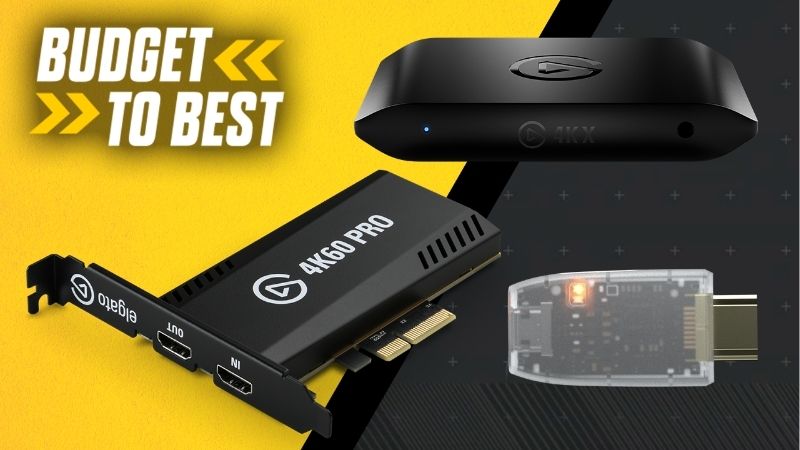
| Elgato Game Capture 4K X | External | 4K60 HDR10 | 4K144 / 1080p240 | Yes |
| AVerMedia Live Gamer Ultra 2.1 | External | 4K60 HDR | 4K144 | Yes |
| Elgato 4K Pro | Internal PCIe x4 | 4K60 HDR10 | 4K144 | Yes |
| AVerMedia Live Gamer 4K 2.1 | Internal PCIe x4 | 4K60 HDR | 4K144 | Yes |
| Elgato HD60 X | External | 4K30 / 1080p60 | 4K60 HDR10 / 1080p240 | Yes |
| Razer Ripsaw HD | External | 1080p60 | 4K60 | No |
Elgato Game Capture 4K X
This is the most complete external option for the console. It records up to 4K60 with HDR10 and passes through 4K144, 1440p240 or 1080p240, so a high-refresh display or a 120Hz television keeps working exactly as intended.
Software support is mature and setup takes minutes. The requirement is the host port: without a genuine 10 Gbps USB 3.2 Gen 2 connection the higher capture modes are unavailable, which catches out anyone using an older laptop.
AVerMedia Live Gamer Ultra 2.1
AVerMedia’s external flagship covers similar ground with 4K60 HDR capture and 4K144 passthrough over USB-C, plus VRR support so the console retains its variable refresh output while you record.
Build quality is good and it often prices below the Elgato equivalent. The reservation is driver consistency, which has historically been less predictable across generations, so check current firmware notes before building a live workflow around it.
Elgato 4K Pro
For a dedicated streaming PC that stays put, the internal card is the better answer. It captures 4K60 with HDR10 over PCIe x4 and passes through up to 4K144, with none of the USB bandwidth issues external units can present.
Latency is low enough for comfortable in-software monitoring, which matters when playing from the recording machine’s display. The drawbacks are physical: it needs a free x4 slot and often ends up beneath a large graphics card.
AVerMedia Live Gamer 4K 2.1
This is the internal alternative and matches the Elgato closely on specification, with 4K60 HDR capture, 4K144 passthrough and VRR support on a PCIe x4 card. Lighting is included, for whatever that adds to a device inside a case.
When pricing favours it, the feature set is competitive. The same driver consistency caveat applies as with AVerMedia’s external units, so check recent firmware release notes if reliability during live streams is critical.
Elgato HD60 X
The HD60 X is the value pick that still respects the console’s output. It captures 1080p60 or 4K30 while passing through 4K60 with HDR10, 1440p120 or 1080p240, which covers the majority of television and monitor setups.
For a 1080p channel it is arguably the sweet spot of the range. The limitation is capture resolution, since 4K recording caps at 30 frames per second, making it unsuitable for high-resolution local footage you plan to edit.
Razer Ripsaw HD
The Ripsaw HD remains a dependable 1080p60 option with 4K60 passthrough over USB 3.0. Its distinguishing feature is a pair of 3.5 mm jacks for mixing microphone and headset audio on the device before capture.
That audio routing genuinely simplifies console streaming. The drawbacks are age-related: no HDR capture and no VRR passthrough, so the console loses variable refresh while this card sits in the chain.
Why Console Capture Is in Demand This Quarter
One release schedule development is driving interest in capture hardware right now, and it directly affects Xbox owners.
GTA 6 Arrives on Console Only
GTA 6 launches on 19 November for PS5 and Xbox with no PC version at release. Precedent suggests a long wait for PC, since GTA V took roughly 19 months and Red Dead Redemption 2 around 13 months to appear.
For anyone streaming from a PC setup, that means the year’s biggest release has to come through a capture device. Buying before the November rush is simply less stressful than trying to source one during it.
The Fourth Quarter Calendar Is Crowded
Call of Duty MW4 released on 23 October and Black Friday falls on 27 November, so console-sourced content is likely to dominate streams through the quarter. Planning your setup ahead of that avoids last-minute compromises.
There is no need to over-specify, though. A 1080p channel is well served by the HD60 X or Ripsaw HD, and the saving is better spent on lighting or a microphone, both of which viewers notice more than capture resolution.
No New Capture Hardware Before CES 2027
Major hardware launches across the industry have shifted to CES in January 2027, and no wave of new capture devices is scheduled before then. Current models will not be superseded within the next few months.
That makes buying now reasonable if you need the capability. It equally means no scheduled discount event is coming, so let your streaming plans drive the timing rather than waiting for a price movement that may not arrive.
Frequently Asked Questions
These questions come up most often from people setting up console capture for the first time.
Does HDCP block recording on Xbox Series X?
Not for gameplay. The console allows game footage to pass to capture hardware, unlike some streaming applications where copy protection applies. If a video app produces a blank capture, that is the protection working as intended.
Will a capture card add input lag to my gameplay?
Not if you play from the passthrough output, which sends the signal to your display unmodified. Lag appears only when playing from the preview window on the recording PC, which is why passthrough exists.
Can I use the best capture card for Xbox Series X with a laptop?
Yes, with an external unit and a suitable port. The 4K models require a genuine USB 3.2 Gen 2 connection at 10 Gbps, so check the laptop’s port specification rather than assuming any USB-C socket will suffice.
Do I need 4K capture for a console stream?
Rarely. Streaming platforms deliver 1080p or 1440p to viewers, so 4K capture mainly benefits local recordings intended for editing. Passthrough resolution matters far more for how the game feels while you play it.
See More:
- Best MSI motherboard
- Best motherboard processor combo for gaming
- Best B550 motherboard
- Best CPU for streaming
- What is the best AM4 CPU for gaming
Final Thoughts
The best capture card for Xbox Series X is the one that preserves 4K120 and VRR on your display while capturing at whatever resolution your channel actually outputs. The HD60 X covers 1080p streaming affordably, the 4K X and internal 4K Pro suit higher-resolution recording, and only the oldest models now cost you VRR.











Write Your Review
No reviews yet. Be the first to share your experience!