
- Top Pick: GIGABYTE B550 Eagle WIFI6 AMD AM4 ATX Motherboard, Supports Ryzen 5000/4000/3000 Processors, DDR4, 10+3 Power Phase, 2X M.2, PCIe 4.0, USB-C, WIFI6, GbE LAN, PCIe EZ-Latch, EZ-Latch, RGB Fusion
- Best Value: GIGABYTE B850 AORUS Elite WIFI7 AMD AM5 ATX Motherboard, Support AMD Ryzen 9000/8000/7000 Series, DDR5, 14+2+2 Power Phase, 3X M.2, PCIe 5.0, USB-C, WIFI7, 2.5GbE LAN, EZ-Latch, 5-Year Warranty
- Premium Choice: Asus ROG Strix B550-F Gaming WiFi II AMD AM4 (3rd Gen Ryzen) ATX Gaming Motherboard (PCIe 4.0,WiFi 6E, 2.5Gb LAN, BIOS Flashback, HDMI 2.1, Addressable Gen 2 RGB Header and Aura Sync)
Best Motherboard Brands change depending on how much you are spending. The company that dominates the budget shelf is rarely the one leading at the top, so this guide splits the market into tiers and names the specific board worth buying in each one.
As an Amazon Associate we earn from qualifying purchases at no extra cost to you.


As an Amazon Associate we earn from qualifying purchases at no extra cost to you.
By Ryan Cole, hardware writer at NVIDIAReview.
How the Best Motherboard Brands Split Across Price Tiers
Every major manufacturer sells boards from under a hundred pounds to well over four hundred, and their strengths are not evenly distributed. Four things separate the tiers, and knowing them tells you where to stop spending.
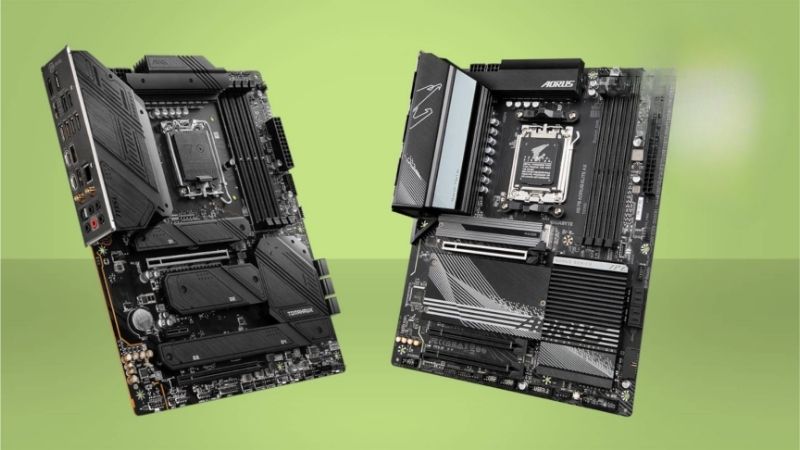
The Budget Tier and What You Actually Give Up
Entry boards usually keep the same chipset as pricier models, so core functionality is intact. What disappears is rear connectivity, heatsink mass, extra M.2 slots and, often, wireless networking.
Power delivery is the specification to check here rather than the feature list. A budget board paired with a mid-range six or eight-core processor is fine; the same board under a sixteen-core chip is where problems appear.
Firmware polish also thins out. Memory compatibility tends to be less refined, so high-speed kits may need manual tuning rather than simply enabling a profile and walking away.
Fan headers are the other quiet omission. Budget boards commonly provide three or four, which runs out quickly in a case with a full set of intakes, a rear exhaust and a liquid cooler to power.
Mid-Range Is Where Value Peaks
This is the tier where power delivery is already sufficient for any mainstream processor, two or three M.2 slots are standard, and networking is current. Above it, spending buys headroom you are unlikely to use.
Brands compete hardest here, which is why the recommendations change every generation. The specific model matters more than the badge, since each manufacturer has a strong and a weak entry at this level.
Look for the model that adds a second or third M.2 slot without cutting lanes elsewhere. That is usually the clearest sign a board belongs in the middle tier rather than being a budget design with a better cooler on the power stages.
The High-End Tier and Who It Is Really For
Premium boards buy overbuilt power delivery, more Gen5 storage, USB4 or Thunderbolt, ten gigabit networking and better rear ports. For an all-core workstation load or heavy overclocking, that is worth something.
For gaming it usually is not. A mid-range board with the same chipset will hold identical clocks in almost every scenario, and the money is better spent on a graphics card or storage.
The exception is connectivity you genuinely need today. Ten gigabit networking, Thunderbolt for an audio interface or four simultaneous Gen5 drives are real reasons to buy up, and none of them are about performance.
Choose the Chipset Before the Brand
The chipset sets lane counts, overclocking support and how many devices can run at full speed simultaneously. Pick that first based on what you intend to attach, then compare brands within that chipset.
Socket longevity is part of that decision too, since AMD has committed to new processors on AM5 through 2029 while Intel’s next generation requires a new socket.
Within a chipset, the best motherboard brands are separated by firmware and layout rather than by capability. Two boards on the same chipset from different makers will perform the same; what differs is how easy the machine is to live with.
Top Picks From the Best Motherboard Brands at Each Tier
These six span budget to high-end across both platforms. Specifications are manufacturer-listed and vary by revision, and retail pricing at the time of writing in August 2026 changes weekly.
| Board | Brand | Platform | Tier | Notes |
|---|---|---|---|---|
| B650M Pro RS | ASRock | AM5 | Budget | Micro-ATX, two M.2 slots |
| B760M Pro RS | ASRock | LGA 1700 | Budget Intel | DDR4 versions available |
| MAG B650 Tomahawk WiFi | MSI | AM5 | Mid-range | Strong power delivery |
| TUF Gaming B860-Plus WiFi | ASUS | LGA 1851 | Mid-range Intel | Tool-free M.2 latches |
| B850 AORUS Elite WiFi7 | Gigabyte | AM5 | Upper mid-range | Gen5 storage, Wi-Fi 7 |
| ROG Strix X870E-E Gaming WiFi | ASUS | AM5 | High-end | USB4, extensive rear I/O |
ASRock B650M Pro RS
Among the best motherboard brands ASRock owns the budget tier, giving entry boards specifications that rivals reserve for higher prices. This micro-ATX AM5 board carries two M.2 slots and DDR5 support at a price where competitors offer one slot and less heatsink.
Rear connectivity is thin, wireless is absent on the base model, and the VRM heatsinks are modest. Pair it with a six or eight-core processor rather than a Ryzen 9 and it does everything asked.
ASRock B760M Pro RS
The Intel equivalent follows the same formula, and the DDR4 variants remain useful for anyone carrying memory across from an older build. That alone can save a meaningful amount on a budget system.
The socket is the limitation. LGA 1700 is a mature platform with no future processors coming, so treat this as a value build today rather than a foundation for an upgrade in two years.
MSI MAG B650 Tomahawk WiFi
The Tomahawk has been the default mid-range AM5 recommendation for several generations. Power delivery comfortably handles a Ryzen 9, and the board carries current networking, multiple M.2 slots and a clean firmware layout.
It is not the cheapest board with those specifications, and MSI’s naming makes it easy to buy a lesser model by mistake. Check the exact suffix on the listing before ordering.
ASUS TUF Gaming B860-Plus WiFi
On the Intel side, the TUF line is the sensible middle. Tool-free M.2 latches, solid power delivery for a mainstream chip and reliable firmware make it straightforward to build with and to live with.
Pricing sits above equivalent boards from ASRock and Gigabyte, and the socket has a shorter road ahead than AM5 does. Buy it for a machine you expect to keep as-is rather than upgrade.
Gigabyte B850 AORUS Elite WiFi7
This is the upper mid-range sweet spot: Gen5 storage support, current wireless, generous heatsink coverage and power delivery that will not flinch at a high-core-count processor, all without high-end pricing.
The firmware interface takes longer to learn than its rivals, and the board is physically heavy with covers that make some connectors awkward to reach. Neither affects how it runs.
ASUS ROG Strix X870E-E Gaming WiFi
If you genuinely need the high-end tier, this delivers extensive rear connectivity, USB4 support, multiple Gen5 slots and the kind of power delivery that suits sustained all-core workloads.
The price is several times a competent mid-range board, and for gaming the performance difference is negligible. Buy it for connectivity and expansion, not for frames per second.
What 2026 Conditions Mean for Each Tier
Market conditions have hit the tiers unevenly this year, which changes where the best motherboard brands offer real value. Three points are worth knowing before you commit to a budget.
The Cheapest Tier Is Thinning Out
Motherboard sales have dropped more than twenty five percent, and manufacturers responded by concentrating on mid and upper tiers. Promotional pricing programmes ended in early 2026, and Intel has reduced emphasis on mainstream desktop parts.
Fewer genuinely cheap boards with modern features reach shelves as a result. The gap between budget and mid-range has narrowed enough that stretching one tier is often the better purchase.
AM5 Longevity Changes the Maths
AMD has committed to new processors on AM5 through the end of 2029, while Intel’s next platform requires a different socket. A mid-range AM5 board can therefore serve two processors rather than one.
Amortised that way, the premium over a budget board is small. It is the clearest argument for buying in the middle of the range rather than at the bottom.
Nothing New Arrives Before CES 2027
The next generation of processors and chipsets has shifted to CES in January 2027, so current boards will not be superseded within a few months. Firmware on existing chipsets is also at its most mature.
If you are building now, that is a good position to buy in. If you were holding out for a new platform, plan for a wait well into next year.
Mature firmware is an underrated advantage of buying late in a platform cycle. Memory compatibility problems that plagued early boards have largely been resolved, so a kit that appears on the support list generally just works.
Frequently Asked Questions
These come up most often when someone is weighing two of the best motherboard brands against each other within the same budget.
Is a budget board risky with a high-end processor?
It is more likely to throttle under sustained all-core load than to fail outright. For a six or eight-core chip it is fine; for a sixteen-core part, step up a tier for the power delivery and heatsinks.
Do I need Wi-Fi built in?
Only if you will use it. Wired-only versions of the same board are usually cheaper, and a wireless card can be added later through a spare M.2 or PCIe slot if your needs change.
Does a pricier board improve memory speed?
Higher tiers often have better memory trace layouts and more refined firmware, which can help very fast kits run stably. For mainstream speeds, mid-range boards handle profiles without difficulty.
Should I match my board brand to my other components?
Only for lighting synchronisation, and even then a standard header often works across brands. Choose the board on features and firmware, not to complete a set.
See More:
- What Is the Best Thermal Paste
- Best PC Case Fans 120mm
- Thermal Paste Best Brand
- Best Thermal Paste Brands
- Best CPU Cooler Reddit
Final Thoughts
The best motherboard brands each own a different tier: ASRock at the bottom, MSI and Gigabyte through the middle, ASUS at the top and strong in the middle on Intel. Decide your chipset first, buy in the mid-range unless you have a specific connectivity requirement, and spend what you save on storage or the graphics card.











Write Your Review
No reviews yet. Be the first to share your experience!