
- Top Pick: Skytech Gaming PC Shadow 5, Ryzen 7, RTX 5060 Ti 8GB, 16GB RAM, 1TB SSD
- Best Value: Skytech Gaming Chronos Mini Gaming PC, Ultra 7 U7 270K Plus, RTX 5060
- Premium Choice: Skytech Gaming O11 Vision Gaming PC, AMD Ryzen 7 7700X 4.5GHz, NVIDIA RTX 5070 12GB, X670 Board, 1TB Gen4 NVMe SSD, 32GB DDR5 RAM 5600, 850W Gold ATX 3 PSU, 360 ARGB AIO, Wi-Fi, Win 11, Desktop
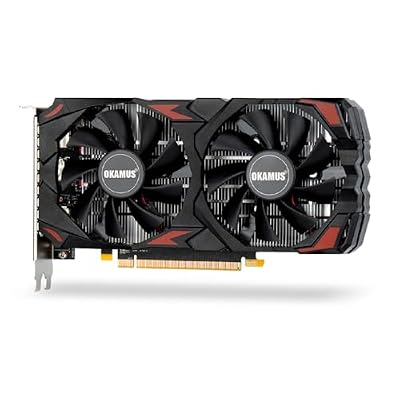


Choosing a budget 1080p gaming gpu should be simple and the internet makes it exhausting – every video recommends one card, every card has a fan club, and none of them ask what you can actually spend. So this is organised differently. Scan the table, find your budget row, read the two paragraphs under it, and you are done. There is no single best budget card. There are four price tiers with a clear winner in each, and the only thing you genuinely need to get right is the memory. That part is below in bold, because it is the mistake that costs people the most.
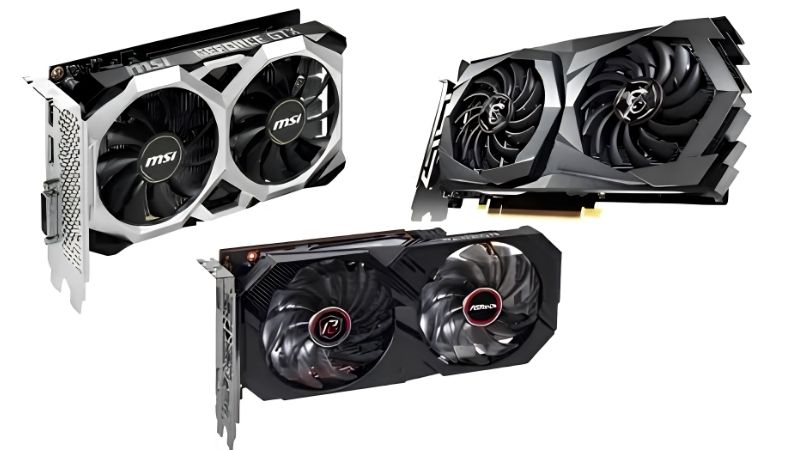
The Ranked Picks by Budget Tier
The honest framing first: at 1080p, almost any current card handles esports titles at high frame rates. What separates these tiers is modern AAA performance and how long the card stays usable. So find your number, take the pick, and skip the rest of the internet.
As an Amazon Associate we earn from qualifying purchases at no extra cost to you.


The Quick Comparison Table
Everything, ranked by what you can spend.
| Budget | The pick | VRAM | AAA 1080p high | PSU | New or used |
|---|---|---|---|---|---|
| ~$110-140 | RX 6600 | 8GB | ~75-95 fps | 450W | Used |
| ~$160-210 | RTX 3060 12GB | 12GB | ~65-85 fps | 550W | Used |
| ~$249 | Intel Arc B580 | 12GB | ~75-95 fps | 600W | New |
| ~$429 | RTX 5060 Ti 16GB | 16GB | ~95-115 fps | 550W | New |
| Avoid | Any 8GB card over $300 | 8GB | Stutters | – | – |
Notice the VRAM column, because it is the only column that predicts whether a card is still fine in 2028. Notice also that the $160 pick has more memory than the $249 one has performance – that is not a mistake in the table, it is the whole strange shape of the current budget market.
Under $150: The RX 6600
If your budget genuinely stops here, the RX 6600 is the answer and it is not close. It delivers roughly 75-95 fps in modern AAA titles at 1080p high, clears 200 fps in esports, and draws 132W on a 450W supply with a single 8-pin – which means it drops into old prebuilts without a power supply upgrade.
The compromises are real and worth naming. It has 8GB, which is the floor rather than comfort – keep textures at high rather than ultra and treat ray tracing as off, which you would anyway at this tier. It has no CUDA, so Blender and DaVinci Resolve are out. And its encoder is weaker than Nvidia’s, which matters if you stream.
The alternative people ask about is the RTX 3050. Skip it. The RX 6600 is roughly 25-30% faster for the same power and usually the same or less money, and the only reasons to choose the 3050 are streaming with NVENC, CUDA, or a low-profile 75W variant for an office prebuilt with no power connector at all. Those are real reasons. Brand preference is not.
Around $180: The RTX 3060 12GB
This is the value pick of the entire budget market and the reasoning is unusual: you are buying a slower card on purpose.
The 3060 is roughly 10-15% behind the RX 6600 in raw frames. It costs more. And it is the better buy anyway, because it carries 12GB against the 6600’s 8GB – more VRAM than an RTX 5070 selling new today for four times the price.
Why that matters comes down to how cards fail. A card short on shader power runs slower: predictable, tunable, you drop a setting. A card short on VRAM hitches, streams textures in late, and its 1% lows collapse while the average frame rate looks fine. You cannot tune around that except by dropping textures – the setting people notice most. The 3060 also gets DLSS, which is worth real frames on hardware this modest.
Two warnings. Confirm it is the 12GB 192-bit version – an RTX 3060 8GB with a 128-bit bus exists and is slower despite the name. And budget $15-25 for thermal paste, because a six-year-old card is well past the pump-out point for factory paste regardless of what the seller says.
The Two Mistakes That Cost Budget Buyers Most
Almost every regretted budget GPU purchase comes down to one of two errors, and both are avoidable in about five minutes of checking. Neither has anything to do with picking the wrong brand.
Buying 8GB Above $300
This is the expensive one and it is worth stating plainly: do not buy an 8GB card for more than $300 in 2026.
At $130 for an RX 6600, 8GB is a reasonable compromise you are making knowingly for a card that costs less than a game. At $399 for an RTX 4060 Ti 8GB or a 5060 Ti 8GB, it is not a compromise – it is paying mid-range money for a card with an entry-level ceiling, and that ceiling gets lower every year on its own because games do not get lighter.
The specific trap is the naming. The 4060 Ti and 5060 Ti both ship in 8GB and 16GB versions with the same die and clocks. In light workloads they are within 1-2%. In heavy ones the 8GB version does not lose 10% – its 1% lows drop 30-50% and it starts hitching. That $50 you saved is the most expensive $50 in the current stack.
The rule that follows: at the $400 tier, only the 16GB versions are worth considering. If the 16GB version is out of budget, drop to the $180 tier and buy an RTX 3060 12GB instead. Do not buy the 8GB middle – it is worse value than either option surrounding it.
Not Checking the PSU and the Case
This is the free mistake and it catches an enormous number of first-time buyers.
Check your power supply wattage and confirm it has a genuine 8-pin PCIe cable rather than an adapter chained off Molex. Then check the numbers: 450W handles an RX 6600, 550W handles a 3060 or 5060 Ti, and the Arc B580 wants 600W despite being a budget card – which is worth knowing before you decide it is the cheap option, because a $50 saving that forces a $70 PSU upgrade is not a saving.
Then measure your case, front to back, in millimetres. Many budget cards are compact dual-fan designs at 200-250mm and fit almost anywhere. Some are not. If you are upgrading an OEM prebuilt from Dell or HP, measure twice – those chassis are frequently tighter than the spec sheet suggests, and a card that does not fit is a return, a restocking fee, and a wasted week.
Finally, look at your airflow. A card in a case with one exhaust fan and a sealed front panel will throttle – which means you paid for performance you are not receiving. Two intake fans cost less than a game and are the highest-return accessory in this entire category, because they improve every component at once.
Pros and Cons of Building on a Budget in 2026
| What works in your favour | What works against you |
|---|---|
| 1080p is the sweet spot – almost any current card saturates a 144Hz panel in esports titles | 8GB is now the floor rather than a comfortable buffer, and it is not getting better |
| Budget cards draw little power and run on the PSU you already own | Used prices are propped up by a flat new market – six-year-old cards still cost real money |
| The used market has genuinely good value if you test the card properly | Used cards need a repaste and carry no warranty; a dead card is your problem |
| DLSS and FSR extend the life of weak hardware by years, for free | Upscaling reduces render load, not memory load – it cannot fix a VRAM wall |
| Compact models fit prebuilts, opening upgrades to people without full towers | The 8GB / 16GB naming trap costs uninformed buyers $50 they will regret |
The honest summary: 1080p budget gaming is in good shape on performance and poor shape on memory. Get the VRAM decision right and almost any pick here works. Get it wrong and no amount of frames saves you.
Why Budget Cards Are Not Getting Cheaper
Everything above assumes today’s prices, and the most common question at this tier is whether waiting helps. It deserves a data-driven answer, because budget buyers get hurt worst when that answer is wrong.
Prices Flattened – Waiting No Longer Pays
The memory-driven surge through late 2025 lifted component and laptop pricing broadly, and used GPUs followed with a lag – the used market prices against the cheapest new alternative rather than against age. That is why a six-year-old RTX 3060 still commands $180.
The genuinely positive news is narrow but real: the steep climb seen at the end of 2025 has stopped, and manufacturers including Framework have reported a period of relative stability, while still warning openly that volatility has not ended.
Flat is not falling, and that inverts the classic budget strategy. Buying the weaker card now and upgrading in eighteen months assumes upgrades get cheaper. They are not. Which means the extra performance and memory in the tier above is worth more than the price gap suggests – you are buying time as much as frames.
New Memory Capacity Arrives in 2027 or 2028
Real relief is under construction. OEMs can now source DDR5 from Chinese suppliers such as CXMT, and Micron is building two fabrication plants in Idaho – funded, structural additions to global supply, not speculation.
The obstacle is the calendar. Those Idaho plants do not come online until 2027-2028. Fabrication capacity takes years to stand up, and any budget build happening this year concludes well before that supply reaches a shelf.
So the strategy for a budget buyer is not to wait. It is to buy the most memory per dollar available today and keep the card healthy long enough to reach the point where supply actually loosens. Clean the fans, fix the airflow, run a fan curve – that is what turns a $180 card into a four-year card.
What to Buy Alongside the Card
Two things routinely undermine an otherwise correct budget purchase, and both cost a fraction of the GPU.
Thermal paste if you buy used. A six-year-old card has factory paste well past its pump-out point, and a repaste plus a fan curve in MSI Afterburner routinely drops sustained temperatures 8-12C and recovers 60-90 MHz of boost clock. That is roughly $20 and an afternoon, and on a budget card it is a meaningful percentage of what you paid.
Intake fans regardless. Every 1C you take out of case air temperature returns roughly 1C at the GPU core, and two 120mm or 140mm static-pressure fans cost less than a game.
See More:
- A fan curve msi afterburner
- amd radeon rx 9070 vs rtx 5070
- 5060 ti vs 5070 benchmark
- rx 6600 vs rtx 3050
- 2060 vs 3060
Final Verdict
The right budget 1080p gaming gpu is whichever one your money reaches – the tiers are clear enough that there is no agonising required, and the only decision that genuinely matters is memory.
Under $150, buy the RX 6600 and enjoy it. Around $180, buy the RTX 3060 12GB even though it is slower – the 12GB is why that card is still relevant while faster cards from its era have aged out. At $249, the Arc B580 gives you 12GB and strong performance if your platform supports Resizable BAR and your PSU reaches 600W. At $429, the RTX 5060 Ti 16GB ends the conversation for years.
And whatever you do, do not spend $300-400 on an 8GB card. That is the one genuine mistake available at this tier, and it is the one the naming makes easy to walk into.
Check your PSU, measure your case, fix your airflow, and buy on today’s prices – because with component costs flat and new memory capacity not arriving until 2027-2028, the card in front of you is roughly the card that will be in front of you in spring.
Frequently Asked Questions
How much do I need to spend for solid 1080p gaming?
Around two hundred and fifty to three hundred dollars buys a genuinely capable new card in 2026, covering options like the Intel Arc B580, RTX 5060 and RX 9060 class hardware. Below two hundred dollars you are looking at older or entry-level silicon suited to esports and medium settings. Above three hundred and fifty you have moved past what 1080p actually requires.
Is 8GB of VRAM still enough at 1080p?
At 1080p with high settings it is generally adequate today, but it is the tight end of the market and several 2025 and 2026 titles will force texture reductions on 8GB cards. Twelve gigabytes, as found on the Arc B580 and RTX 3060, gives noticeably more comfort and protects you if you later move to a 1440p monitor.
Should I buy used to stretch my budget?
Used can be excellent value, particularly for RTX 3060 12GB, RX 6700 XT and similar cards. The risks are worn fans, dried thermal pads, no warranty, and the possibility of heavy prior mining use. Buy from platforms with buyer protection, test immediately under sustained load looking for artifacts and thermal throttling, and factor a replacement thermal pad kit into your budget.
What power supply does a budget card need?
Most cards in this class draw between 115W and 190W and use a single 8-pin PCIe connector, so a good quality 500W to 600W unit is ample for the whole system. The important word is quality: a reputable 550W unit is far safer than a no-name 750W. If your existing supply is over eight years old, replace it alongside the GPU.
How much does upscaling change the budget calculation?
Substantially. DLSS 4, FSR 4 and XeSS all let a modest card render internally below 1080p and reconstruct a clean image, which typically gains thirty to fifty percent frame rate at quality settings and also reduces VRAM pressure. That effectively raises the settings ceiling of a cheap card, and it is a strong argument for choosing hardware with the best upscaling support.











Write Your Review
No reviews yet. Be the first to share your experience!