
- Top Pick: Capture Card 4K HDMI Video Streaming to USB 3.0 1080P 60FPS Capture Device
- Best Value: Capture Card, 4K HDMI Video Capture Card, Game Capture Card, 1080P 60FPS Video Capture Device, HDMI to USB 3.0 Capture Card for Streaming, Work with Camera/Xbox/PS4/PS5/PC/OBS
- Premium Choice: dobestyou 4K Capture Card Black for Streaming, Recording & Gaming – HDMI Video Capture Device with USB 3.0, 1080p 60fps, Plug & Play,Zero Latency for PS5, Xbox, Switch, OBS, PC, Mac
Best graphics card for streaming is a different question from the best card for gaming, because what matters is the dedicated encoder block rather than raw shader performance. A card can lead in benchmarks and produce a worse-looking stream. Here are six ranked on what they send to viewers.
As an Amazon Associate we earn from qualifying purchases at no extra cost to you.






As an Amazon Associate we earn from qualifying purchases at no extra cost to you.
By Ryan Cole
How to Choose the Best Graphics Card for Streaming
The encoder sits on a separate part of the die and runs independently of the shaders, which is why a mid-range card can stream as cleanly as a flagship. Four specifications determine which is the best graphics card for streaming rather than for benchmarks.
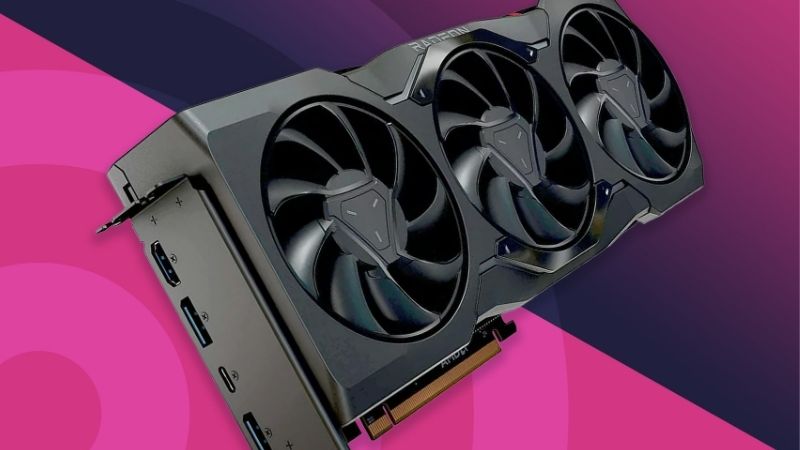
AV1 Is the Reason to Buy a Current Card
AV1 encoding delivers noticeably better image quality than H.264 at the same bitrate, which matters enormously on platforms that cap upload rates. Fast motion, smoke and particle effects are where the difference is most obvious to viewers.
All three vendors now support AV1 encoding on their current cards. Check platform support at your end too, since AV1 ingest availability varies between services and a card that encodes it is only useful if the platform actually accepts it.
Encoder Generation Matters More Than Card Tier
Within a single generation, the encoder block is frequently identical across tiers, so an entry card and a flagship produce the same stream quality. What the flagship adds is headroom to play at higher settings while the encode runs alongside.
That means a mid-range current card usually beats a previous-generation flagship for streaming specifically. Buying an older high-end card for a streaming build is a common and expensive mistake.
Dual Encoders Help Recording, Not Streaming
Higher-tier cards carry two encoder blocks, which allows simultaneous streaming and local recording at different settings without a performance penalty. For a single live output, one encoder is sufficient.
If you record a high-quality local copy for editing while streaming a compressed version, the second encoder block is genuinely useful. If you only ever go live, it is capability you are paying for and will never actually use.
VRAM Capacity Protects You at 1440p
Streaming adds overhead on top of the game’s own memory use, and several recent titles already push past 8GB at 1440p. A 16GB card removes that pressure and is the safer purchase for a machine doing two jobs.
This is where the tier choice genuinely matters rather than the brand. An 8GB card that runs out of memory will stutter regardless of how good its encoder is, and no streaming setting or bitrate change recovers that.
What the 2026 Market Means for Streaming Builds
Graphics card pricing has moved more than any other component this year, and three developments should shape both when you buy the best graphics card for streaming and which tier you settle on.
GPU Supply Is Genuinely Constrained
NVIDIA cut partner supply by roughly 20 percent and global pricing rose around 19 percent from late 2025. The RTX 5070 Ti climbed roughly 25 percent to around $1,000 and the RTX 5080 sits near $1,400.
MSI raised card prices between 15 and 30 percent, and the RTX 50 Super refresh remains held up by GDDR7 module costs. Radeon RX 9000 cards use GDDR6 and have been noticeably less affected.
Nothing Better Arrives Before CES 2027
The RTX 50 Super refresh has moved to January 2027, alongside Zen 6 and Intel Nova Lake. Waiting means at least six months to announcement and considerably longer before retail supply settles at sane prices.
For anyone building a streaming machine now, that argues firmly for buying rather than waiting it out. Encoder capability on current cards is already mature, and the refresh is unlikely to change encode quality significantly at any tier.
The Fourth Quarter Schedule Raises Demand
Call of Duty MW4 launches on 23 October and GTA 6 on 19 November, followed by Black Friday. That release run drives content creation demand, which tightens stock on the mid-range cards streamers actually buy.
Buying ahead of that window is the sensible plan. Prices on popular streaming-tier cards tend to firm up rather than soften around major releases, and seasonal discounts in this category have been thin all year.
Top Picks: Best Graphics Card for Streaming Ranked
These are ordered by streaming suitability rather than raw gaming performance, because the best graphics card for streaming is rarely the one topping benchmark charts. Verify current pricing and availability before ordering, since this category moves week to week.
| Card | VRAM | Memory Type | AV1 Encode | Best For |
|---|---|---|---|---|
| NVIDIA RTX 5070 Ti | 16GB | GDDR7 | Yes, dual encoder | Stream and record |
| NVIDIA RTX 5070 | 12GB | GDDR7 | Yes | Balanced choice |
| NVIDIA RTX 5060 Ti 16GB | 16GB | GDDR7 | Yes | Value with headroom |
| AMD Radeon RX 9070 XT | 16GB | GDDR6 | Yes | Less price pressure |
| NVIDIA RTX 5080 | 16GB | GDDR7 | Yes, dual encoder | 4K gameplay capture |
| Intel Arc B580 | 12GB | GDDR6 | Yes | Budget entry |
NVIDIA RTX 5070 Ti
The 5070 Ti is the strongest all-round streaming card in the range, pairing 16GB of VRAM with dual encoder blocks so you can push a compressed feed to the platform and record a high-quality local copy at the same time.
Pricing is the problem. It has risen roughly 25 percent to around $1,000, which is difficult to justify against cheaper cards that produce an identical stream. Buy it for the gameplay headroom rather than the encoder.
NVIDIA RTX 5070
The 5070 carries exactly the same current-generation encoder as the higher tiers, so stream quality is indistinguishable from cards costing considerably more. NVENC also remains the most mature encoder implementation in OBS by a clear margin.
12GB of VRAM is the weak point for a machine doing two jobs at 1440p, where recent titles are already close to that ceiling. It also lacks the second encoder block, which matters only if you record locally.
NVIDIA RTX 5060 Ti 16GB
This is the value pick for a streaming build, combining the same encoder block as the flagship cards with a full 16GB of VRAM. For 1080p streaming of 1440p gameplay it does everything the expensive cards do for a fraction of the outlay.
Raw gaming performance sits well below the higher tiers, so demanding titles at 1440p with settings raised will need upscaling. Avoid the 8GB variant entirely, since the VRAM capacity is the whole argument here.
AMD Radeon RX 9070 XT
The 9070 XT offers 16GB of VRAM and competent AV1 encoding, and because it uses GDDR6 rather than GDDR7 it has been less affected by the memory-driven price increases hitting NVIDIA cards.
AMD’s encoder has improved substantially but community consensus still places NVENC slightly ahead for OBS reliability and image quality at low bitrates. Ray tracing performance also trails at the same tier.
NVIDIA RTX 5080
For anyone capturing 4K gameplay locally while streaming, the 5080 provides both the shader performance to run games at that resolution and dual encoders to handle two outputs at once.
At around $1,400 it is a difficult purchase to justify for streaming alone, since the encoder output is identical to a card a third of the price. This is a gaming card that happens to stream well.
Intel Arc B580
Intel’s encoder has been well regarded since the first Arc generation, and the B580 delivers AV1 encoding alongside 12GB of VRAM at the lowest price on this list. For a budget streaming build it is genuinely competitive rather than a compromise.
Driver maturity remains behind both rivals, particularly in older titles, and OBS integration has needed more troubleshooting in community reports. Gaming performance is entry-level, so pair it with modest settings.
Frequently Asked Questions
These questions come up whenever builders realise the best graphics card for streaming is chosen on encoder capability rather than benchmark position.
Does a more expensive card improve stream quality?
Not within a generation. The encoder block is frequently identical across tiers, so a mid-range current card produces the same stream as a flagship. What extra money buys is headroom to play at higher settings while encoding.
Is AV1 worth prioritising?
Yes, where the platform accepts it. AV1 delivers visibly better quality than H.264 at the same bitrate, which matters most in fast motion. All three vendors support it on current cards, so it is a reason to avoid older hardware.
Do I need 16GB of VRAM to stream?
At 1440p, increasingly yes. Streaming adds overhead on top of the game’s memory use, and several recent titles already approach 8GB. A card that exhausts its VRAM stutters regardless of how good the encoder is.
Is AMD or NVIDIA better for streaming?
NVENC still leads on OBS maturity and low-bitrate quality, though AMD has closed much of the gap. AMD cards use GDDR6 and have seen smaller price increases, which makes them worth pricing before defaulting to NVIDIA.
Should I use the GPU encoder or the CPU?
The GPU encoder, in almost every case. Software encoding on the processor produces marginally better quality at the same bitrate but consumes cores the game needs, which costs frame rate. A dedicated hardware encoder runs alongside without competing for resources.
See More:
- Who makes the best motherboard
- Best budget AM5 CPU for gaming
- What is the best thermal paste pattern
- Best mini ITX computer case
- Best desktop RAM for gaming
Final Thoughts
The best graphics card for streaming is a current-generation mid-range card with 16GB of VRAM, because the encoder is shared across tiers and the memory capacity is what actually protects you. The RTX 5060 Ti 16GB does everything the expensive cards do for live output, the 9070 XT is worth pricing given smaller increases on GDDR6 parts, and dual encoders only earn their place if you record locally while streaming. Figures reflect August 2026 and should be verified before purchase.











Write Your Review
No reviews yet. Be the first to share your experience!