
- Top Pick: GIGABYTE B550M K AMD AM4 Micro-ATX Motherboard, Supports Ryzen 5000/4000/3000 Series Processors, DDR4, 3+3 Power Phase, 2X M.2, PCIe 4.0, USB 3.2 Gen 1, GbE LAN, Q-Flash
- Best Value: ASUS ROG Strix X870E-E Gaming WiFi AMD AM5 X870 ATX Motherboard 18+2+2 Power Stages, Dynamic OC Switcher, Core Flex, DDR5 AEMP, WiFi 7, 5X M.2, PCIe® 5.0, Q-Release Slim, USB4®, AI OCing & Networking | GAMING WIFI
- Premium Choice: ASUS ROG Strix B550-F Gaming WiFi II AMD AM4 (3rd Gen Ryzen) ATX Gaming Motherboard (PCIe 4.0,WiFi 6E, 2.5Gb LAN, BIOS Flashback, HDMI 2.1, Addressable Gen 2 RGB Header and Aura Sync)
Best AMD motherboard advice has to answer a platform question first. AM4 is finished but still cheap and widely owned, while AM5 is confirmed to receive new processors through 2029. Which of the two suits your situation decides everything else that follows, including how much board is genuinely worth buying at all.
As an Amazon Associate we earn from qualifying purchases at no extra cost to you.
By Ryan Cole, PC hardware writer at NvidiaReview
How to Choose the Best AMD Motherboard
Finding the best AMD motherboard is a three-step process rather than a single comparison. Settle the platform question, work out which chipset tier you actually need, then decide which form factor and features earn their place in the machine you are planning to build or upgrade.
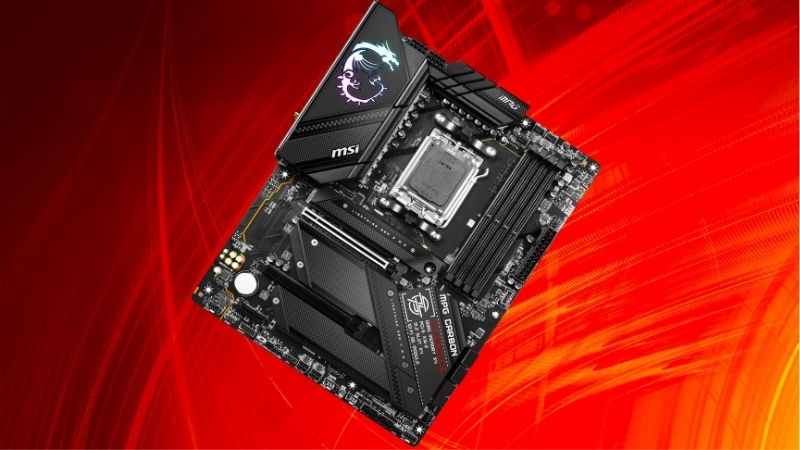
AM4 or AM5: Which Platform Fits Your Situation
AM4 uses DDR4 memory and tops out with the Ryzen 5000 series, including the excellent 5700X3D and 5800X3D. It only makes sense if you already own a working board and memory kit, or if a complete budget build using existing parts is the goal rather than long-term upgrade potential.
AM5 uses DDR5, supports every current processor, and has confirmed support for new chips until the end of 2029. For any new build, it is the platform to choose. The higher entry cost buys you a socket that will still accept processors released several years from now without a rebuild.
Understanding the Chipset Ladder
On AM5, A620 is the entry tier with limited overclocking and no PCIe 5.0 graphics support. B650 and B850 cover the mainstream and keep PCIe 5.0 for the primary storage slot. X870 adds mandatory USB4 at 40Gbps, and X870E doubles the chipset for additional lanes and connectivity.
Most gaming builds land correctly on B650 or B850. Step up to X870 only when you genuinely use high-speed external storage or need the extra rear connectivity, since gaming performance across these tiers with the same processor is effectively identical in every test that matters.
Form Factor and the Features You Will Actually Use
ATX gives you the most slots and ports, Micro-ATX trims expansion for a lower price, and Mini-ITX trades both for size. Be honest about expansion cards: most builders now use one graphics card and nothing else, which makes Micro-ATX a quietly sensible choice for a lot of machines.
Count your storage plans too. Three or four M.2 slots sound useful until you read the lane-sharing notes and discover that populating the third one disables SATA ports. Two well-placed slots with proper heatsinks are more valuable than four that fight each other for bandwidth.
Top Picks: Best AMD Motherboard Across Platforms
These five candidates for the best AMD motherboard cover both sockets and three form factors, from a budget Micro-ATX board to a fully specified X870 flagship. All figures are vendor-published specifications. Availability and pricing tiers were checked in August 2026.
| Board | Socket / chipset | Memory | Form factor | Best for |
|---|---|---|---|---|
| Gigabyte X870 Aorus Elite WIFI7 | AM5 / X870 | DDR5, 4 slots | ATX | Feature-rich builds |
| ASUS TUF Gaming B850-Plus WiFi | AM5 / B850 | DDR5, 4 slots | ATX | Mainstream gaming |
| MSI MAG B650 Tomahawk WiFi | AM5 / B650 | DDR5, 4 slots | ATX | Value AM5 builds |
| ASRock B650M Pro RS | AM5 / B650 | DDR5, 4 slots | Micro-ATX | Budget AM5 entry |
| MSI MAG B550 Tomahawk MAX WiFi | AM4 / B550 | DDR4, 4 slots | ATX | AM4 upgrades |
ASUS TUF Gaming B850-Plus WiFi – Best for Most Builds
The TUF pairs a DrMOS power array with Wi-Fi 7, 2.5GbE and a PCIe 5.0 M.2 slot on a full ATX board, which covers everything a single graphics card gaming machine needs. It handles every current processor including the 16-core parts without any concern about power delivery limits.
There is no USB4 and the graphics slot runs at PCIe 4.0, neither of which costs frames today. Audio sits a tier below the premium ranges. For the majority of builders this is where the price curve stops being worth climbing, which makes it the default recommendation on AM5.
Gigabyte X870 Aorus Elite WIFI7 – Best Feature Set
Gigabyte specifies a 16+2+2 phase design alongside four M.2 slots, three of them PCIe 5.0, plus dual USB4 Type-C ports with DisplayPort passthrough, Wi-Fi 7 and 2.5GbE. The screwless EZ-Latch mechanisms for storage and graphics make both assembly and later upgrades noticeably faster.
Networking is 2.5GbE rather than the 5G found on some rivals, and the ALC1220 audio codec sits below flagship implementations. It also costs meaningfully more than the B850 option. If you run multiple NVMe drives or high-speed external storage, the extra spend returns real capability.
MSI MAG B650 Tomahawk WiFi – Best AM5 Value
The B650 Tomahawk brings a 14+2+1 duet rail design with dual 8-pin connectors, 2.5GbE and Wi-Fi 6E, and because it belongs to the earlier chipset generation it regularly sells below newer boards with comparable capability. Power delivery is ample for any AM5 processor you might fit.
You lose Wi-Fi 7 and USB4, and the main storage slot runs at PCIe 4.0. It may also need a BIOS update for the newest processors, so verify the shipped firmware or confirm BIOS Flashback support. Handled correctly, it is one of the strongest value propositions on the platform.
ASRock B650M Pro RS – Best Budget Entry
ASRock lists an 8+2+1 power phase design on a Micro-ATX board with a PCIe 5.0 M.2 slot and 2.5GbE, at a price that undercuts nearly everything else supporting AM5 properly. For a mid-range six or eight-core processor in a value build, it delivers what matters and skips the rest.
This variant has no onboard Wi-Fi, the VRM heatsinks are modest, and it is not the board for a 16-core chip under sustained all-core load. Rear connectivity is basic. As the cheapest legitimate route onto a socket supported through 2029, it is a genuinely smart purchase.
MSI MAG B550 Tomahawk MAX WiFi – Best AM4 Option
For anyone staying on AM4, the B550 Tomahawk remains the sensible choice: PCIe 4.0 for both graphics and primary storage, dual M.2 slots, 2.5GbE networking, Wi-Fi 6E and power delivery that comfortably handles a Ryzen 7 5800X3D or a 5900X without throttling during long gaming sessions.
It is a dead-end platform limited to DDR4 and the Ryzen 5000 series, so buying one for a fresh build rarely makes sense. Where it earns its place is replacing a failed B450 board in a machine full of working DDR4 and a good graphics card, which is a very common situation.
What the 2026 Market Means for AMD Builders
Choosing between AMD platforms in 2026 is partly a market decision rather than a purely technical one, and it affects how much the best AMD motherboard for you should really cost. Three developments should shape where the money goes and how much board is worth buying.
AM5 Is Guaranteed New Processors Until 2029
AMD confirmed at Computex 2026 that socket AM5 will keep receiving new chips through the end of 2029, while Intel’s next generation moves to a fresh socket. That gives an AM5 board purchased today a credible path through several future processor releases without touching anything else.
The practical consequence is that spending slightly more on the board is easier to justify than it used to be. Better VRM cooling, an extra storage slot and a vendor with a strong firmware record all matter more when the same board may still be running a processor from 2028.
The Budget Segment Is Being Squeezed
Motherboard sales have fallen more than 25 percent industry-wide, and manufacturers have responded by focusing on mid-range and premium models. Promotional pricing policies were withdrawn in February 2026, so the aggressive discounts that used to make entry boards compelling are rarer now.
That has narrowed the gap between a bare-bones board and a well-equipped mainstream one. Since the difference is often modest in absolute terms, stepping up one tier is easier to justify than it was, unless you are assembling a genuinely tight-budget machine with a locked processor.
No New Platforms Until CES 2027
Both AMD’s Zen 6 processors and Intel’s Nova Lake have slipped to CES in January 2027, which removes the usual argument for waiting. If you have been holding off on a build to see what launches next, the honest answer is that nothing significant arrives until next year at the earliest.
For AM5 buyers that stability is helpful, since the firmware ecosystem has matured well past the platform’s rough first year. Board discounts remain genuine around the late-year sales, unlike memory and storage, so grouping a board purchase into that window is a reasonable plan.
Frequently Asked Questions
The questions builders ask most when choosing between AMD platforms and chipset tiers: whether AM4 still makes sense in 2026, what B850 genuinely adds over B650, whether a high-end processor needs X870, and how much the best AMD motherboard really needs to cost.
Is AM4 still worth building on in 2026?
Only when you already own a compatible board and DDR4 memory, where a processor swap delivers most of the benefit for a fraction of the cost. For a build from scratch, AM5 is the correct answer because it has a supported upgrade path while AM4 has reached the end of its life.
What does B850 add over B650?
Mainly refinements: guaranteed PCIe 5.0 for the primary storage slot, more common Wi-Fi 7 implementations and updated USB provisioning. Gaming performance is identical with the same processor, which is why discounted B650 boards remain one of the better value plays on the platform.
Do I need X870 for a high-end processor?
No. A good B650 or B850 board handles every AM5 processor including the 16-core models, provided the VRM heatsinks are adequate and case airflow is reasonable. X870 is about connectivity, specifically USB4 at 40Gbps and richer rear I/O, rather than any processor requirement.
How much should I spend on the board?
Roughly the same as a mid-range graphics card is far too much for most builds. A well-cooled mainstream board covers gaming completely, and the money saved is better spent on memory or the graphics card, both of which affect frame rates in a way the motherboard simply does not.
See More:
- Best thermal compound paste
- Thermal paste at Best Buy
- Graphics card at Best Buy
- Best AM4 CPU for gaming
- Best motherboard for 9800x3d
Final Thoughts
The best AMD motherboard for most people is a well-cooled B850 board on AM5, with a discounted B650 close behind on value. Move up to X870 only if you will use USB4, drop to Micro-ATX when expansion does not matter, and stay on AM4 only when you already own the memory and board it would replace.
As an Amazon Associate we earn from qualifying purchases at no extra cost to you.













Write Your Review
No reviews yet. Be the first to share your experience!