
- Top Pick: Acer Nitro 27in 4K 3840×2160 IPS 160Hz DFR 320Hz Gaming Monitor VG270K V4
- Best Value: ASUS TUF Gaming 27” 4K HDR Monitor (VG27UQ1A) – 160Hz, 1ms, Extreme Low Motion Blur Sync, NVIDIA G-SYNC Compatible, AMD FreeSync Premium, 95% DCI-P3, DisplayWidget, 3 yr Warranty
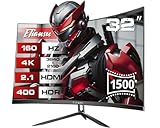
- Premium Choice: Amzfast 32" 4K 120Hz Curved Gaming Monitor, 3840×2160 UHD, PIP/PBP, Adaptive Sync, 131% sRGB, 3000:1 Contrast,HDR, 300nits, 1500R, HDMI2.1(VRR)& DP1.4, Built-in Speaker, Eyes Care, VESA Mount
Best 4K Gaming Monitor for PS5 shopping has one hard requirement that rules out most displays immediately: the console outputs over HDMI only, so the panel needs a full-bandwidth HDMI 2.1 port before any other specification matters.
As an Amazon Associate we earn from qualifying purchases at no extra cost to you. Product prices and availability are accurate as of the date shown and are subject to change.




As an Amazon Associate we earn from qualifying purchases at no extra cost to you. Product prices and availability are accurate as of the date shown and are subject to change.
By Ryan Cole, hardware writer at NVIDIAReview.
How to Choose the Best 4K Gaming Monitor for PS5
A console is stricter than a PC about what it will accept. The best 4k gaming monitor for ps5 is the one that matches the console’s output modes rather than the one with the highest number on the box. Four checks cover it.
HDMI 2.1 Bandwidth Is Not Optional
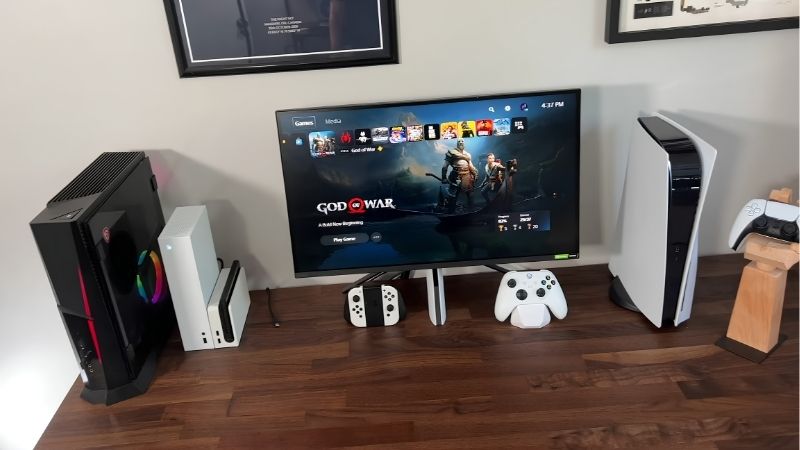
The console has no DisplayPort output, so 4K at 120 Hz requires a full-bandwidth HDMI 2.1 connection. Displays advertising HDMI 2.1 with reduced bandwidth may cap out at 4K 60 Hz, which defeats the purpose of buying a high refresh panel at all.
Check how many such ports the monitor has. Many displays include one full-bandwidth port and several older ones, which becomes a problem if you also connect a PC or a second console and expect both to run at full specification.
Cable quality is the other easy mistake. A certified high-bandwidth HDMI cable is inexpensive, and an older one will silently drop the connection back to a lower mode without telling you why.
Variable refresh rate support over HDMI is the other thing to confirm. The console supports VRR within a defined range, and monitors vary in how well they hold a stable image at the bottom of it.
Refresh Rate Beyond 120 Hz Does Nothing Here
The console tops out at 120 Hz at 4K, so a 240 Hz panel adds nothing when connected to it. Those displays are worth buying only if a gaming PC will share the same monitor.
What does matter is response time and overshoot behaviour at 120 Hz. A panel that looks clean at its maximum refresh can smear noticeably when driven slower, which is exactly how a console will drive it.
Many console titles also target 60 frames per second rather than 120, so the display spends much of its time at half its capability. Overdrive settings tuned for the top refresh rate can look worse there.
HDR Brightness and Panel Technology
Console titles lean heavily on HDR, and most monitors implement it poorly. Look for local dimming with a meaningful number of zones, or an OLED panel, rather than a basic certification badge.
OLED gives perfect blacks and excellent motion clarity but costs more and carries some risk from static interface elements over years of use. Mini-LED delivers higher sustained brightness in a lit room.
Check how the display handles the console’s HDR calibration routine as well. A panel that reports its capabilities accurately will produce sensible results from the built-in setup, while one that overstates them needs manual adjustment.
Size, Distance and Console-Specific Features
Twenty-seven inches at 4K is extremely sharp at desk distance, while thirty-two inches suits a couch or a larger desk better. Console interfaces and subtitles are designed with larger displays in mind, so small text is a real consideration at the smaller size.
A few monitors add console-specific behaviour such as automatic HDR tone mapping and picture mode switching when a console is detected. It is a convenience rather than a requirement, but it removes setup friction.
Stand adjustment and input placement matter more with a console than a PC, since the box usually sits on the desk rather than under it. Rear-facing ports on a low stand can be awkward to reach.
Top Picks for the Best 4K Gaming Monitor for PS5
Every candidate for the best 4k gaming monitor for ps5 here provides full-bandwidth HDMI 2.1. Specifications are manufacturer-listed and vary by revision, and retail pricing at the time of writing in August 2026 changes weekly.
| Monitor | Size | Panel | Max refresh | Notes |
|---|---|---|---|---|
| Sony INZONE M9 | 27 inch | IPS with local dimming | 144 Hz | Console-aware features |
| LG UltraGear 27GR93U | 27 inch | IPS | 144 Hz | Straightforward all-rounder |
| Samsung Odyssey Neo G7 | 32 inch | Mini-LED VA | 165 Hz | High HDR brightness |
| Gigabyte M32U | 32 inch | IPS | 144 Hz | Built-in KVM switch |
| LG UltraGear 32GS95UE | 32 inch | OLED | 240 Hz | Dual-mode refresh switching |
| ASUS ROG Swift OLED PG27UCDM | 27 inch | QD-OLED | 240 Hz | Best motion clarity |
Sony INZONE M9
Sony built this display around its own console, so it detects the system and switches HDR tone mapping and picture modes automatically. Local dimming gives HDR content real contrast rather than a brightened image.
The dimming zone count is modest compared with mini-LED rivals, so highlights can bloom in dark scenes. At 27 inches it is also small for couch use, which suits a desk setup better.
LG UltraGear 27GR93U
This is the uncomplicated choice: a 4K IPS panel at 144 Hz with full HDMI 2.1 bandwidth, accurate colour and low input lag. Connected to the console it does everything asked without configuration.
HDR performance is limited by the lack of meaningful local dimming, so bright scenes look good and dark ones look flat. It is a display for consistent image quality rather than spectacle.
Samsung Odyssey Neo G7
Mini-LED backlighting with many dimming zones produces the brightest HDR in this group, which matters if the room has windows. The 32 inch VA panel also gives deep blacks for the price.
VA panels show more smearing in dark transitions than IPS or OLED, and the curve divides opinion for console use. Some firmware revisions have needed updates to behave correctly with VRR.
Gigabyte M32U
The M32U pairs a 32 inch 4K IPS panel with a built-in KVM switch, which is genuinely useful if the same display serves a console and a PC with one keyboard and mouse.
HDR is basic, the stand is functional rather than flexible, and the on-screen menu is clumsy. As a value 4K display with console-capable ports it remains hard to beat.
LG UltraGear 32GS95UE
An OLED panel gives perfect blacks and the cleanest motion here, and the dual-mode feature lets a PC run a lower resolution at a much higher refresh while the console uses 4K at 120 Hz.
It is expensive, and the extra refresh headroom is wasted on console use alone. Static interface elements over years of use remain a consideration with any OLED panel.
ASUS ROG Swift OLED PG27UCDM
At 27 inches this QD-OLED delivers exceptional pixel density, contrast and motion clarity, making console games look about as good as a desk display can manage.
The price is the highest here, and much of what you pay for is refresh headroom the console cannot use. Bright rooms also suit mini-LED better than any OLED.
What 2026 Conditions Mean for Console Display Buyers
The console release calendar rather than component pricing shapes when to buy the best 4k gaming monitor for ps5 this year. Three points are relevant.
The Q4 Release Schedule Favours Console Owners
A major open-world release arrives on 19 November for console only, with no PC version announced. Previous entries in that series took well over a year to reach PC, so console remains the only route for now.
That is pushing a lot of PC gamers toward a console alongside their existing setup, which makes a shared display with a KVM or multiple HDMI 2.1 inputs more useful than it used to be.
Displays Are Not Caught in the Memory Squeeze
Memory, drives and prebuilt systems face genuine pricing pressure this year because stock was built against high contract pricing. Monitors sit outside that supply chain and have been comparatively stable.
That makes a display a reasonable place to spend if a build budget is being squeezed elsewhere, since the panel will outlast two or three graphics cards.
Nothing Major Changes Before CES 2027
The next wave of panel announcements lands at CES in January 2027. Current models are mature, with firmware issues largely resolved, so buying now avoids the early revisions that new displays often ship with.
If your current display works and you only want higher refresh, waiting for that cycle is reasonable. If you are gaming at 60 Hz on a television, the upgrade is worth having now.
Frequently Asked Questions
These come up most often once someone has shortlisted the best 4k gaming monitor for ps5 and starts checking compatibility.
Does the console support 4K at 120 Hz on any monitor?
Only over a full-bandwidth HDMI 2.1 connection, and only in games that offer a 120 Hz mode. Displays with reduced-bandwidth HDMI 2.1 ports will fall back to 60 Hz at 4K.
Is a 240 Hz monitor wasted on a console?
For console use alone, yes, since the system tops out at 120 Hz. It only makes sense if a gaming PC shares the same display.
Should I buy OLED or mini-LED?
OLED for contrast and motion clarity in a controlled room, mini-LED for sustained brightness where there is daylight. Both are considerable upgrades over a basic HDR panel.
Will a monitor sound good enough without speakers?
Rarely. Built-in speakers are an emergency option at best, so plan for headphones through the controller or a separate audio setup connected to the display. A monitor with a headphone output makes that simpler than routing audio around it.
See More:
- What Is the Best Thermal Paste
- Best PC Case Fans 120mm
- Thermal Paste Best Brand
- Best Thermal Paste Brands
- Best CPU Cooler Reddit
Final Thoughts
The best 4k gaming monitor for ps5 is a display with a genuine full-bandwidth HDMI 2.1 input, 120 Hz support at 4K, working VRR and HDR that does something beyond a certification badge. Beyond that, choose the size that suits your viewing distance and only pay for refresh rates above 120 Hz if a PC will use them too.



Write Your Review
No reviews yet. Be the first to share your experience!