
- Top Pick: 12VHPWR Cable Extension, 7 Inch 16 Pin(12+4) Female to Dual 8 Pin(6+2) Male PCIe Conversion GPU Cable, GPU Power Conversion Cables for Power Supply with 12VHPWR Port
- Best Value: NZXT 12VHPWR Adapter Cable – 12+4-Pin (16-Pin) 12HVPWR to Dual 8-Pin PCIe – Compatible with NVIDIA 40 Series Graphics Cards and Existing NZXT ATX 2.X PSUs (PA-xG1BB) – Rated for 600 Watts – Black
- Premium Choice: COMeap 12VHPWR Cable Extension, 16 Pin Female to Dual 8 Pin(6+2) Male PCIe Conversion GPU Power Cable for Power Supply with 12+4pin 12VHPWR Port 7 in(18cm)
16 pin gpu power connector cables and adapters are what stand between your power supply and a modern graphics card that pulls hundreds of watts, so choosing a good one is not a place to cut corners. Whether you need a clean native cable, a safer 90-degree adapter for a tight case, or a sleeved extension to tidy your build, the right pick keeps your card powered safely and your case looking sharp. This guide gives you quick picks for busy buyers, a clear comparison, detailed breakdowns of each type, and the buying criteria that actually matter.
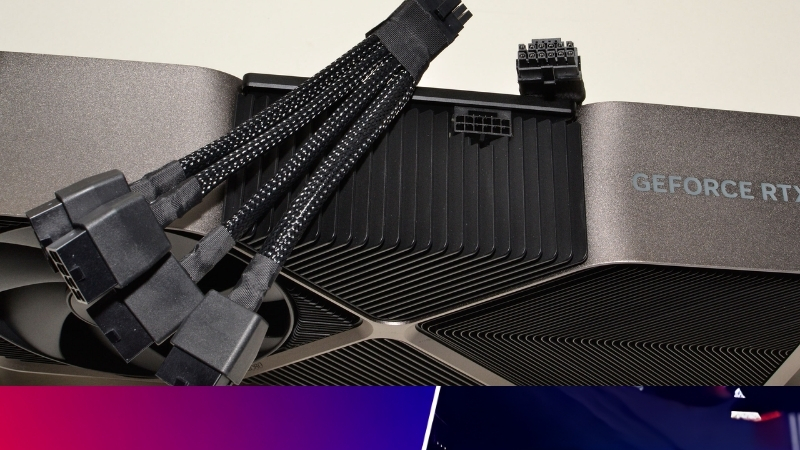
The Best 16 Pin GPU Power Connector Cables at a Glance
If you are short on time, the quick picks below cover the three situations most buyers fall into. Each option is judged on safety, build quality, and how cleanly it fits a real build, with the full reasoning further down. Use these as a shortcut, then read the detailed sections to confirm the right match for your case and card.
As an Amazon Associate we earn from qualifying purchases at no extra cost to you.


Quick Picks for Busy Buyers
For most people, one of these three will be the answer:
- Best Overall: a native 12V-2×6 cable from your power supply’s own maker, for the safest seating and a guaranteed fit.
- Best Budget: a quality sleeved 16-pin extension, ideal for tidying an existing cable without replacing the whole unit.
- Best Premium: a custom individually-sleeved 16-pin cable, for builders who want flawless looks alongside safe performance.
If your case is shallow and forces a tight bend, also look at the 90-degree adapter covered below, which solves clearance problems the straight cables cannot.
Whichever you lean toward, remember that the safest power path is always the most direct one. A single native cable from your power supply to the card beats any chain of adapters, so treat the alternatives as solutions to specific problems rather than upgrades for their own sake.
16 Pin Connector Comparison Table
This table compares the main types at a glance so you can match one to your needs quickly.
| Type | Best for | Safety | Tidiness |
|---|---|---|---|
| Native 12V-2×6 cable | New builds, safest seating | Highest | High |
| Sleeved extension | Tidying an existing cable | High | High |
| Custom sleeved cable | Show builds, exact length | High | Highest |
| 90-degree adapter | Shallow cases, tight bends | High (if quality) | Medium |
Notice that every recommended type rates high on safety; the differences come down to fit, looks, and whether you are building fresh or improving what you already have.
It is also why there is no single winner for everyone. The right pick depends on your case depth, whether your current cable is fine, and how much the look of the build matters to you. Use the table to narrow it down, then read the relevant detailed section.
How We Judge a Good 16-Pin Cable
The first criterion is the connector standard. A native 12V-2×6 cable seats more safely than an older 12VHPWR design, so newer is genuinely better here, not just marketing.
Build quality comes next: thick conductors, well-made terminals, and a secure latch matter far more than colour or sleeving. Finally, length and flexibility decide whether the cable routes cleanly in your specific case, which is why measuring before buying saves frustration.
One more criterion is the connector revision. Prefer cables and units built around the newer 12V-2×6 seating where possible, since it designs out the main melting risk for no extra cost. When two options are otherwise equal, the newer connector is the tiebreaker.
Price matters too, but only after safety and fit. A modest, well-made cable from a trusted source beats an expensive one with flashy looks but unknown build quality, especially on a line carrying this much power.
In short, buy for safety and fit first, looks second, and price last, and you will not go wrong.
Detailed Reviews of the Best 16 Pin GPU Power Connectors
Below, each pick is broken down with the same lens: what it does best, who it suits, and the trade-offs to know. Because the safest power always comes from your own PSU’s native cable, the recommendations focus on quality and fit rather than chasing exotic options.
Best Overall: Native 12V-2×6 Cable
The cable that ships with, or is sold for, your specific ATX 3.1 power supply is the safest and most reliable choice. It is matched to your unit’s voltage layout and uses the improved 12V-2×6 seating, which designs out the main melting risk.
Because it plugs directly from the PSU to the card with no adapter in the middle, it removes an entire failure point. For the overwhelming majority of builders, this is the right answer, and the recommended native cables linked here are the ones to start with.
If your power supply did not include a long enough native cable, the maker often sells one separately, and that remains a better choice than an adapter chain. Buying the matched cable for your specific unit keeps the voltage layout correct and the connection clean.
Best Budget: Sleeved 16-Pin Extension
If your existing cable works but looks messy or sits a touch short, a quality sleeved extension tidies the run for a fraction of the cost of a full replacement. It clips onto your current 16-pin cable to add length and a cleaner appearance.
The key is quality: a well-made extension with solid terminals adds no meaningful risk, while a cheap one introduces extra resistance you do not want on a high-power line. Treat it as a finishing touch on an already-good cable rather than a fix for a failing one.
Best Premium: Custom Individually-Sleeved Cable
For show builds, a custom cable made to your exact length with individually sleeved wires delivers a flawless look while carrying full power safely. These are popular in windowed cases where the cable is on display.
The trade-off is cost and lead time, and the importance of buying from a reputable maker who builds to the correct pinout. Done right, it is the tidiest possible solution; done cheaply, it is a risk, so this is one area where spending more genuinely buys safety.
For most builders, though, the premium custom route is optional polish rather than a necessity. If your case is not on display, the native cable does the same job safely for far less, so reserve the custom option for builds where looks are part of the goal.
Buying Guide and FAQs for 16 Pin Power Connectors
Before you buy, a few practical points separate a clean, safe purchase from a frustrating one. This section covers the trade-offs of each type, how to use them safely, and the questions buyers ask most, so you can choose with confidence and keep your card protected.
What to Look For: Pros and Cons by Type
Each option suits a different buyer, and the trade-offs are clear:
- Native cable – Pros: safest, guaranteed fit, no adapter. Cons: length fixed by the maker.
- Sleeved extension – Pros: cheap, tidy, reuses your cable. Cons: adds a junction, so quality is critical.
- Custom cable – Pros: best looks, exact length. Cons: costs more, must be reputable.
- 90-degree adapter – Pros: solves tight clearance. Cons: only worth it from a trusted brand.
Match the type to your real situation rather than the flashiest option, and safety stays high across all of them.
How to Use a 16-Pin Connector Safely
Whatever you buy, install it the same careful way. Push the plug straight in until it clicks firmly, confirm the latch holds, and make sure it sits flush against the card before closing the case.
Keep the cable straight for at least an inch before any bend, and never force a sharp kink at the plug. These two habits, a full seat and a gentle run, prevent nearly every problem people associate with 16-pin connectors.
Frequently Asked Questions
Is a 16-pin connector the same as 12VHPWR? Effectively yes; the 16-pin power input on modern cards uses the 12VHPWR or its safer revision, the 12V-2×6. They are cross-compatible.
Can I use an 8-pin adapter instead? You can, and many cards include one, but a single native 16-pin cable is cleaner and removes a failure point. Do I need a new PSU? Only if you want the native cable and ATX 3.1 seating; an existing quality unit with the included adapter will still run the card.
Are these cables safe at full power? Yes, when they are quality made and fully seated. The failures people read about almost always trace back to poor seating or low-grade adapters, not to good cables used correctly.
How long should my 16-pin cable be? Long enough to reach from the PSU to the top of the card with a gentle curve, not a tight one. Measure that path before buying, since a cable that is slightly too short forces exactly the sharp bend you want to avoid.
The right 16-pin cable or adapter keeps your expensive card powered safely and your build looking clean. Whether you need a native cable, a tidy extension, or a clearance-saving adapter, take a look at the recommended options linked throughout this guide and pick the one that fits your case and power supply.
See More:
- How to clean a GPU heatsink
- GPU vertical mount thermals
- GPU thermal throttle temp
- What PSU for RTX 4090
- What PSU for RTX 5080
Conclusion
Choosing the best 16 pin gpu power connector comes down to matching the type to your build: a native 12V-2×6 cable for the safest new setup, a sleeved extension to tidy what you have, a custom cable for show builds, or a quality 90-degree adapter for tight cases. Every good option rates high on safety, so the decision is really about fit, looks, and budget. Install it with a full, clicked seat and a straight cable run, and your card stays protected. Check the recommended 16-pin cables and adapters above to power your graphics card cleanly and safely.
Top-Rated Picks


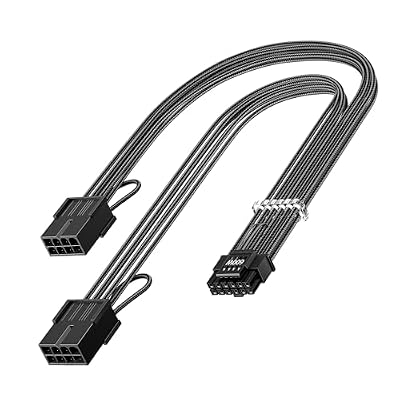

| Product | Brand | Rating | Reviews | Price |
|---|---|---|---|---|
| Cable Matters 8 Pin GPU Power Cable – 2ft, 8Pin PSU(E… | CableMatters | ★ 4.5 | 592 | $9.99 |
| Fasgear 16pin GPU Cable to 4X 8 Pin Pcie Extension – … | Fasgear | ★ 4.5 | 240 | $29.99 |
| PCIE 5.0 16Pin GPU Power 12VHPWR Extension Cable, 16P… | Bangfun | ★ 4.5 | 86 | $19.99 |
| YEZriler 8 Pin PCIe Cable for EVGA Power Supply, PCIe… | MoreOptionsForYou! | ★ 4.2 | 99 | $9.99 |
| (2-Pack) COMeap 12 Pin GPU Cable, Dual PCIe 8 Pin Fem… | COMeap | ★ 4.6 | 39 | $13.99 |











Write Your Review
No reviews yet. Be the first to share your experience!