
Best Noctua CPU cooler is almost always decided by your case and your memory height rather than by raw thermal capacity, because Noctua’s range is deliberately built around fitting different spaces. This guide ranks six models by the physical constraints that actually rule them in or out.
As an Amazon Associate we earn from qualifying purchases at no extra cost to you.








As an Amazon Associate we earn from qualifying purchases at no extra cost to you.
By Ryan Cole
How to Choose the Best Noctua CPU Cooler for Your Case
Noctua sells relatively few models and each targets a specific physical envelope. Four measurements decide which one is the best Noctua CPU cooler for your particular build, and they matter far more than any benchmark chart does.
Measure Your Case Clearance First
Case specifications list a maximum CPU cooler height, and that figure is the first filter to apply. A dual-tower flagship needs roughly 168mm of clearance, a compact dual tower around 145mm, and a low-profile unit under 40mm.
Measure rather than trusting the spec sheet if your case is older or has a side-panel fan mount. A cooler that presses against tempered glass is not merely tight, it will transmit vibration into the panel and hum audibly at certain fan speeds.
Check Memory Clearance Before Buying
Tall RGB memory heat spreaders are the most common installation problem with large air coolers. Noctua publishes RAM clearance figures for each model, and several ship with the front fan mounted higher to accommodate taller kits.
Raising the fan costs a small amount of thermal performance and can push total height past your case limit. Low-profile DDR5 kits sidestep the issue entirely and cost no more than the tall ones, which makes them the easier fix in a new build.
Match Thermal Capacity to the Processor
A Ryzen 7 9800X3D at 120W or a Ryzen 5 at 65W does not need the largest cooler in the range. A single-tower 120mm unit handles either comfortably and leaves room in the case for cable routing and airflow.
Sixteen-core processors at 170W and top-end Core Ultra parts under sustained all-core load are where a dual-tower cooler earns its size. For gaming alone, that capacity sits mostly unused.
Confirm Socket Support and Mounting Kits
Noctua supports current sockets in the box and provides free mounting kits for newer platforms on request for older coolers. That policy is a genuine part of the value, since a cooler bought in 2020 can move to an AM5 or LGA 1851 board.
Check which kit your specific model needs before ordering. Offset mounting matters on some platforms, and the correct bracket improves contact with the hottest area of the heat spreader, which is worth a couple of degrees on its own.
What the 2026 Market Means for Cooler Buyers
Three market conditions affect how much of a build budget belongs on cooling this year, and two of them favour spending here, which changes what the best Noctua CPU cooler is worth paying for.
Cooling Upgrades Deliver the Best Returns Right Now
With graphics card prices elevated, improving what you already own is the practical route to better performance. A better CPU cooler, fresh thermal compound, extra case fans and a decent power supply all produce measurable gains for modest money.
On a machine running a stock cooler, moving to a proper tower frequently restores boost clocks that had been throttling under sustained load. That shows up as steadier frame rates rather than a higher peak number.
Cooling Parts Still See Genuine Seasonal Discounts
Memory and pre-built systems will not fall meaningfully this November, because that stock uses components bought at this year’s elevated contract prices. Coolers, fans, cases and power supplies are a different category entirely.
If a cooling refresh is on the list, a seasonal sale is a reasonable moment to buy the cooler, compound and any replacement fans together. Do not delay a build waiting for it, since the savings are modest.
The Budget Tier Has Thinned Across Components
Component vendors shifted their ranges upward through 2026 and promotional pricing policies ended in February. Cooler pricing has risen modestly alongside boards and power supplies, which changes what a full refresh costs.
Noctua has never competed at the bottom of the market, so this affects the comparison rather than the products themselves. What it does mean is that the value gap against budget rivals has narrowed slightly, and the mounting kit policy counts for more than it used to.
Top Picks: Best Noctua CPU Cooler Options by Physical Fit
These run from the largest to the most space-constrained, so the best Noctua CPU cooler for you is wherever your clearance figure lands. Confirm case height and memory clearance before ordering, because fit rules out more of these than performance does.
| Cooler | Type | Height | Fan Size | Best For |
|---|---|---|---|---|
| NH-D15 G2 | Dual tower | 168mm | 140mm | Ryzen 9 and Core Ultra 9 |
| NH-U12A chromax.black | Single tower | 158mm | 120mm | Compact high performance |
| NH-D12L | Compact dual tower | 145mm | 120mm | Height-limited cases |
| NH-U9S | Single tower | 125mm | 92mm | Small form factor towers |
| NH-L9i-17xx | Low profile | 37mm | 92mm | Slim ITX builds |
| NH-P1 | Passive | 158mm | None | Silent builds |
NH-D15 G2
The G2 is the performance leader of the air cooling category and the right choice for a Ryzen 9 or a Core Ultra 9 under sustained all-core load. Seven heat pipes and dual 140mm fans give it capacity that nothing else in the Noctua range comes close to matching.
At 168mm it rules itself out of a lot of mid-tower cases, and the price sits well above the value competition. For a gaming-only build with an eight-core processor, most of that capacity will never be used.
NH-U12A chromax.black
The U12A packs dual 120mm fans onto a single tower, which delivers close to dual-tower performance in a much narrower footprint. The chromax black finish suits builds where the traditional beige and brown scheme would clash badly with the rest of the components.
It costs nearly as much as larger coolers while giving up a few degrees under heavy all-core load. Its argument is fit rather than value, so it makes sense specifically when a wide dual tower will not clear your memory.
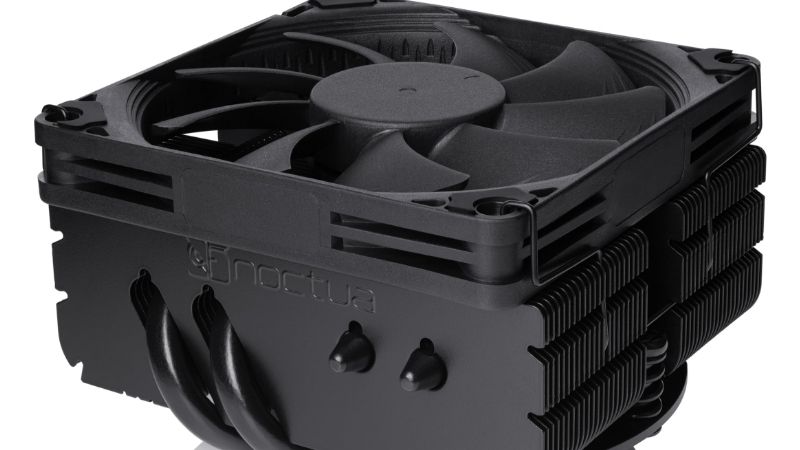
NH-D12L
At 145mm the D12L brings dual-tower construction into cases that cannot take a full-size unit. It clears memory slots completely, which removes the most common installation headache in the range and makes tall RGB kits a non-issue.
Thermal capacity sits clearly below the D15 G2, so it is not the answer for a 170W processor pushed hard. For an eight-core chip in a height-limited mid tower it is close to ideal.
NH-U9S
The U9S uses a 92mm fan on a 125mm tower, which fits the small form factor cases that reject anything larger. It handles a Ryzen 5 or Ryzen 7 without difficulty and stays reasonably quiet doing it.
The smaller fan has to spin faster to move the same air, so it is audibly less refined than the 120mm and 140mm models under load. Do not pair it with a high core-count processor.
NH-L9i-17xx
At 37mm tall this is a genuine low-profile cooler for slim ITX enclosures and HTPC builds. It fits within the socket keep-out area, so memory and PCIe clearance are never an issue.
Capacity is limited to modest processors at moderate power, and it will not restrain a high-TDP chip under sustained load. Treat it as an enabler for a build that could not otherwise exist rather than as a performance choice.
NH-P1
The P1 is designed to work with no fan at all, using widely spaced fins and a heat pipe layout tuned specifically for natural convection rather than forced air. In a case built for passive airflow it produces a genuinely silent system.
It requires a case designed for passive operation and a processor with modest sustained power. Fitting it in a poorly ventilated enclosure or under a Ryzen 9 will produce throttling rather than silence.
Frequently Asked Questions
These questions come up whenever builders start hunting for the best Noctua CPU cooler within the range itself rather than comparing one brand against another.
Is the NH-D15 G2 overkill for gaming?
For most gaming builds, yes. An eight-core processor at 120W is handled comfortably by a single-tower cooler, and the extra capacity only matters under sustained all-core load. Buy it for a Ryzen 9 or a heavy production workload rather than for frame rates.
Will a Noctua cooler fit my memory?
Check the published RAM clearance for the specific model. Several coolers accommodate taller kits by raising the front fan, which costs a little performance and adds height. Low-profile DDR5 modules avoid the problem entirely and cost no more.
Can I move an older Noctua cooler to a new socket?
Usually yes. Noctua provides mounting kits for newer sockets, including AM5 and current Intel platforms, which means a cooler bought several years ago can follow you to a new board. Confirm which kit your model needs before ordering.
Is a passive cooler practical?
Only in the right case with a modest processor. The NH-P1 needs an enclosure designed for natural convection and a chip with low sustained power draw. In a standard sealed case or under a high-TDP part it will throttle rather than run silently, which defeats the entire purpose.
See More:
- Who makes the best motherboard
- Best budget AM5 CPU for gaming
- What is the best thermal paste pattern
- Best mini ITX computer case
- Best desktop RAM for gaming
Final Thoughts
The best Noctua CPU cooler for your build is whichever one fits with room to spare. The NH-D15 G2 leads on performance and rules itself out of many mid towers, the U12A and D12L solve clearance problems at a small thermal cost, and the U9S and L9i exist to make constrained builds possible at all. Measure your case clearance and memory height carefully before comparing any temperature figures at all. Figures reflect August 2026 and should be verified before purchase.











Write Your Review
No reviews yet. Be the first to share your experience!