
- Top Pick: Thermalright TL-C14C X3 CPU Case Fan 140mm, PWM Fan Silent Computer CPU Fan with 1500RPM Speed, CPU Cooling Black Fan,3 Quantities
- Best Value: CORSAIR RS140 140mm PWM Fans – Daisy-Chain Connection – Low-Noise – Magnetic Dome Bearing – Dual Pack – Black
- Premium Choice: be quiet! Pure Wings 3 140mm Quiet PWM High-Speed Case Fan | Speed-regulating Closed Loop Motor| Extraordinary Air Pressure | BL109
Best case fans 140mm shopping starts with a simple physical advantage: a larger blade moves the same volume of air at a lower speed, and fan noise rises sharply with speed. Where your case actually accepts them, 140mm fans are the easiest single route to a quieter machine without giving up any airflow at all.
As an Amazon Associate we earn from qualifying purchases at no extra cost to you.




As an Amazon Associate we earn from qualifying purchases at no extra cost to you.
By Ryan Cole, PC hardware writer at NvidiaReview
How to Choose the Best Case Fans 140mm
Choosing the best case fans 140mm means checking three things before ordering: whether your case actually has 140mm mounting points at all, what airflow characteristic each position needs, and how the fans will be controlled once installed and the side panel is back on.
Check the Mounting Points First
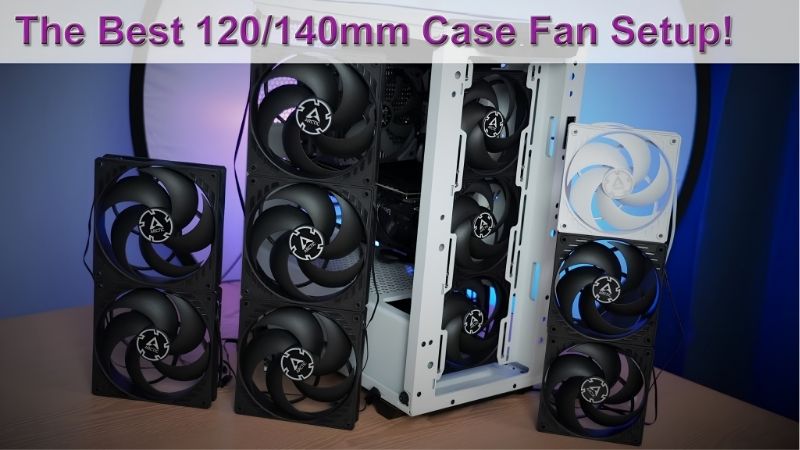
Not every case takes 140mm fans, and many that do only accept them in specific positions such as the front intake or the top exhaust. Rear exhaust mounts are frequently 120mm only, so a set of three 140mm fans may leave you one position short of a complete airflow path.
Radiator compatibility follows the same logic. A 280mm radiator uses two 140mm fans while a 360mm uses three 120mm ones, and cases rarely support both. Confirm what your chassis accepts before ordering, since fan brackets and adapters rarely produce a tidy result.
Airflow Versus Static Pressure by Position
Fans in open positions with nothing restricting them benefit from a high airflow design, measured in CFM. Fans pulling through a dense mesh panel, a dust filter or a radiator need static pressure instead, measured in millimetres of water, or they simply make noise without moving much air.
Most current fans balance both adequately, but the difference shows on restrictive front panels. If your case has a solid or heavily filtered front, prioritise a fan that publishes a static pressure figure rather than one advertising only a high airflow number in isolation.
Control, Bearings and Vibration
Four-pin PWM fans can be tuned properly in the BIOS, while three-pin fans run at fixed voltage unless the board supports voltage control on that header. Count your headers before buying four fans, and consider a hub or a splitter if the board is short of connections.
Bearing type determines how the fan sounds after two years rather than on day one. Fluid dynamic and rifle bearings age far better than cheap sleeve designs. Rubber corner pads also help, since vibration transmitted into a steel panel is often louder than the fan itself.
Top Picks: Best Case Fans 140mm Right Now
These five candidates for the best case fans 140mm cover premium quiet options, value multi-packs and lighting-focused models. All figures are vendor-published specifications and revisions vary, so confirm the model code before ordering. Availability was checked in August 2026.
| Fan | Bearing | Control | Strength | Best for |
|---|---|---|---|---|
| Noctua NF-A14 PWM | SSO2 | 4-pin PWM | Balanced airflow and noise | Best overall |
| Arctic P14 PWM PST | Fluid dynamic | 4-pin PWM, daisy chain | Static pressure | Best value |
| be quiet! Silent Wings 4 140mm | Fluid dynamic | 4-pin PWM | Lowest noise | Silent builds |
| Corsair AF140 Elite | Magnetic levitation | 4-pin PWM | High airflow | Warm cases |
| Thermalright TL-K14 | Fluid dynamic | 4-pin PWM | Cost per fan | Budget builds |
Noctua NF-A14 PWM – Best Overall
The NF-A14 remains the reference 140mm fan, balancing airflow and static pressure well enough to work in every position from front intake to radiator duty. The mounting hardware, rubber pads and included low-noise adapter are the most complete package in the category.
It is expensive per fan, and the beige and brown colour scheme suits some builds and ruins others, although black versions exist at a premium. Peak airflow trails the most aggressive alternatives. For a fan you fit once and never think about again, it justifies its price.
Arctic P14 PWM PST – Best Value
Arctic’s P14 is a genuine static pressure fan sold in multi-packs at a fraction of premium pricing, which makes fitting four of them realistic rather than aspirational. The PST daisy chain also reduces cabling considerably, running several fans from one motherboard header.
Bearing noise at high duty is more noticeable than the premium options, and the plain styling has no lighting. Build quality is good rather than exceptional. If you need to fill several positions in a case with restrictive panels, nothing else comes close on cost per fan.
be quiet! Silent Wings 4 140mm – Best for Silent Builds
be quiet! designs this range entirely around acoustics, with a fluid dynamic bearing, a carefully profiled blade and decoupling pads built into the frame. In a machine that sits on a desk, it disappears into the background at the speeds a case fan normally runs.
Peak airflow is lower than the high-flow alternatives, so a warm case with a hot graphics card may want something stronger in the intake positions. It is also expensive. Where noise is the primary complaint about an existing build, this is the most effective single change.
Corsair AF140 Elite – Best for Warm Cases
The AF140 Elite prioritises raw airflow with a magnetic levitation bearing and a blade design aimed at open positions rather than radiators. In a case with a hot graphics card and a mesh front panel, that extra volume of air moving through matters more than anything else.
It is less suited to radiator duty, where static pressure designs perform better, and it costs more than the value options. The lighting versions require Corsair’s ecosystem to control properly. For front intake positions in a warm build, the extra airflow is worth having.
Thermalright TL-K14 – Best Budget Option
Thermalright sells these in multi-packs at prices that undercut nearly everything else with a fluid dynamic bearing, and performance is entirely respectable for case airflow duty. For a first build where the fan budget competes with the graphics card, they cover the job cheaply.
Noise at high duty is more noticeable than the premium fans, and the mounting hardware is basic without vibration pads. Long-term bearing consistency is less proven. As a way to fill four positions without buying unbranded hardware, they remain very hard to argue with.
What the 2026 Market Means for Case Cooling
Fans remain one of the few component categories where prices have behaved sensibly this year, which changes where a small upgrade budget belongs and how urgent buying the best case fans 140mm really is. Three factors are worth weighing before ordering a set.
Fans Are Still the Cheapest Real Improvement
With graphics cards up sharply and memory following, most builders cannot justify a platform upgrade this year. Adding two or three good intake fans to a case that shipped with one is among the few remaining changes that measurably lowers temperatures for very little money.
The gain is largest in cases with restrictive front panels or a single stock fan. Combine new fans with a clean dust filter and fresh compound on the processor, and a machine that throttles during long sessions frequently returns to holding its clocks properly again.
The Bottom of the Market Has Thinned
Cooling components have risen roughly 6 to 8 percent as manufacturers concentrate on mid-range and premium lines, and the promotional pricing that used to offset that was withdrawn in February 2026. Unbranded fans have expanded to fill the space left behind.
Those are worth avoiding. Bearing quality decides how a fan sounds after two years, and it is the specification cheap manufacturers never publish honestly. A named multi-pack costs slightly more and removes the risk of a rattling machine within a year of building it.
Late-Year Discounts Still Apply Here
The usual advice to wait for November sales does not hold for memory, storage or prebuilt systems this year, because that stock was built from expensive contract components. Fans, cases, coolers and power supplies fall outside that problem and continue to discount properly.
If your machine is running hot now, buy and fix it rather than waiting for a small saving. If the fans are part of a wider build alongside a case and cooler, grouping the order into late November is sensible. Pricing described here reflects August 2026 conditions.
Frequently Asked Questions
The questions builders ask most when upgrading case cooling: whether larger fans are always better than 120mm units, how many to fit in total, how intake and exhaust should be balanced, and whether the best case fans 140mm justify their premium over cheaper alternatives.
Are 140mm fans always better than 120mm?
Where they fit, usually. The larger blade moves the same air at a lower speed, which is quieter. The exception is radiators, since 360mm units use three 120mm fans and often outperform a 280mm arrangement simply by having more total surface area available.
How many case fans do I need?
Two intake and one exhaust is a sensible baseline, with a third intake helping in cases with a hot graphics card. Beyond that the returns diminish quickly, and more fans mean more noise sources. Positioning and unobstructed airflow paths matter more than raw count.
Should intake exceed exhaust?
Slightly positive pressure, meaning marginally more intake than exhaust, keeps dust entering through filtered positions rather than every gap in the chassis. The difference in temperatures between positive and negative pressure is small, but the difference in cleaning frequency is not.
Do I need PWM fans?
They are worth having. Four-pin PWM fans can be tuned properly in the BIOS so they stay quiet at idle and ramp only under load, while three-pin fans depend on the board supporting voltage control. Count your available headers before buying more fans than you can control.
See More:
- Best thermal compound paste
- Thermal paste at Best Buy
- Graphics card at Best Buy
- Best AM4 CPU for gaming
- Best motherboard for 9800x3d
Final Thoughts
The best case fans 140mm are whichever ones fit your chassis and match each position’s needs. The NF-A14 works everywhere and lasts, the Arctic P14 makes filling four positions affordable, and Silent Wings 4 is the answer when noise is the actual complaint. Check your mounting points before ordering anything.











Write Your Review
No reviews yet. Be the first to share your experience!