
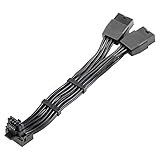
- Top Pick: JOYJOM 12+4Pin 12VHPWR 90° Right Angle Header, H++ 12V-2×6 16 Pin PCIe 5.0 GPU Power Connector Adapter for RTX 4090 40/50 Series Graphics Cards, Support MAX 675W (Reversed Pin for ASUS ROG GPUs ONLY)
- Best Value: 12VHPWR 90 Degree Adapter to 2X 8Pin: 16AWG 16 PIN GPU Right Angle PCI-E 5.0 Extension for for Graphic Card GPU 12+4pin RTX 3090Ti 4070Ti 4080 4090 (Type A)
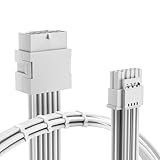
- Premium Choice: 12VHPWR 180 Degree Angled Adapter: Aluminum ATX 3.0 16 Pin GPU Power Connector 600W Pcie5.0 Power Adapter for 12+4pin RTX 3090Ti 4070Ti 4080 4090 Graphic Card GPU (Type A)
12VHPWR connector is the small black plug that now carries all the power to most high-end Nvidia graphics cards, and it has earned both praise and a nervous reputation. If you own or are about to buy a 4090, 5080, or 5090, you have probably seen the headlines about melted plugs and wondered whether this connector is safe. Drawing on a synthesis of thousands of owner reviews on Amazon, from glowing 5-star reports to anxious 2-star complaints, this review explains exactly what the connector is, where it goes wrong, and how to use it with complete confidence.
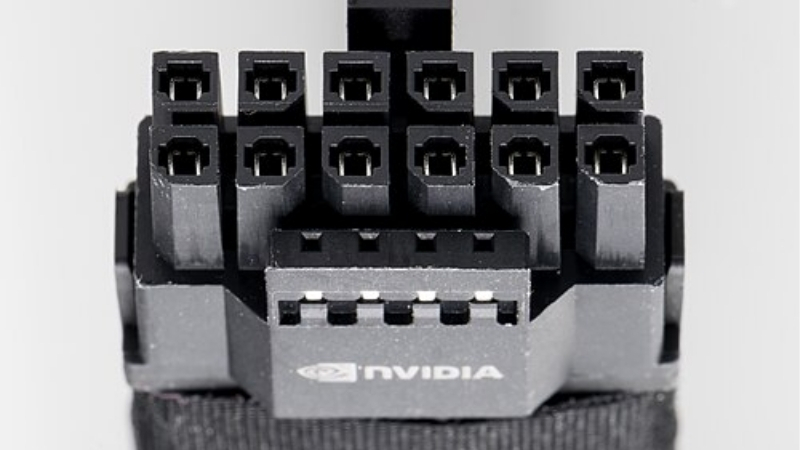
What the 12VHPWR Connector Actually Is
The quick verdict: the 12VHPWR connector is safe and reliable when it is fully seated and paired with a quality cable, but it has a slim safety margin and a history of melting when seated poorly or bent too hard at the plug. Understanding the design makes the difference between worry-free use and a real hazard, so it is worth a clear look at how it works before judging it.
As an Amazon Associate we earn from qualifying purchases at no extra cost to you.


The 16-Pin Design and 600W Rating
The 12VHPWR connector replaces the older multi-cable 8-pin setup with a single 16-pin plug that can deliver up to 600 watts. Twelve of those pins carry power, while four smaller sense pins on the side handle communication.
That single-cable design is the connector’s biggest practical advantage: one clean cable instead of two, three, or four bulky 8-pin runs. For modern cards that can draw well over 400 watts, it is a tidy and capable solution on paper.
To put the rating in context, 600 watts is more than even the most power-hungry consumer card pulls today, so the connector is not running at its ceiling in normal use. That paper margin is real, but as the rest of this review shows, it depends entirely on a clean, full connection to hold true.
Sense Pins and How Power Is Negotiated
The four sense pins tell the graphics card how much power the connected cable can safely supply. Based on that signal, the card knows whether it can pull its full rated wattage or must limit itself.
This handshake is clever, but it also means a partially inserted plug can misreport its state. A connector that is not pushed in all the way may still allow power to flow while making poor contact, which is the root of most safety reports owners describe.
This is why forcing more current is not the danger; the danger is a connection that looks fine but is not. The sense-pin handshake protects against using an underrated cable, but it cannot detect a plug that is physically half-seated, which is the gap owners have to close themselves.
12VHPWR Versus the Older 8-Pin Setup
The traditional 8-pin PCIe connector is famously robust, with a generous safety margin and a forgiving fit. The 12VHPWR trades some of that margin for compactness, packing far more power through a smaller plug.
That compactness is why it exists, but it also explains the caution. With less spare headroom, the 12VHPWR is less tolerant of a sloppy connection than the old 8-pin, so the care you take when plugging it in matters more than it used to.
None of this makes the 12VHPWR a bad design, but it does shift responsibility onto the installer. Where the old 8-pin forgave a casual push, the new connector expects a deliberate, fully seated fit every time, and reviews make clear that owners who treat it that way rarely have trouble.
Is the 12VHPWR Connector Safe? What Users Report
The honest picture from owner feedback is reassuring with an asterisk: the overwhelming majority of users never have a problem, while a small but vocal minority report melted plugs that almost always trace back to a seating or cable issue. Reading across the reviews reveals a clear pattern rather than random failure.
The Seating Problem Behind Most Failures
By far the most common thread in negative reviews is a plug that was not fully clicked into place. A connector left even slightly proud concentrates current on fewer contact points, which generates heat exactly where you do not want it.
Owners who describe a firm, audible click and a flush fit almost never report trouble. The lesson repeated again and again is simple: push until it clicks, then check that the latch is engaged and the plug sits flat against the card.
Several reviewers note that the click can be surprisingly firm, and that hesitation, stopping short for fear of breaking something, is what leaves a plug proud. A straight, even, confident push is the right approach, since the latch is designed to tell you clearly when the plug is home.
What 4-5 Star Owners Say
Positive reviewers, who make up the clear majority, describe the connector as a non-issue once installed correctly. They highlight the single-cable tidiness and report months of heavy gaming with no heat or instability.
A frequent tip from these satisfied owners is to seat the plug before closing the case, so you can see and feel that it is fully home. Many also recommend a quality native cable from a reputable ATX 3.0 or 3.1 unit rather than a bargain adapter.
These owners also tend to mention that once seated, the connector is genuinely set-and-forget. There is no maintenance, no re-checking under normal use, and no instability, which is exactly the experience the design intends when it is installed with care.
What 2-3 Star Complaints Reveal
The critical reviews are valuable because they show the failure mode so clearly. Most describe a tight case that forced a sharp bend right at the plug, or a cheap adapter, or an admission that the click was never confirmed.
A smaller group raises a fair concern about the slim safety margin itself, arguing the design leaves little room for error. That criticism is the reason the industry moved to the revised 12V-2×6 connector, which addresses exactly this weakness.
Taken together, the critical reviews read less as an indictment of the connector than a map of how to avoid trouble. Almost every serious complaint points back to seating, bending, or cable quality, all of which sit within the owner’s control.
Getting the Most from a 12VHPWR Connector
Used with a little care, the 12VHPWR is a clean, capable way to power a demanding card. The goal is to give it the secure, strain-free connection it needs and to recognise when a newer cable or adapter is the smarter buy. This section turns the owner feedback into practical action.
Pros and Cons of the 12VHPWR Connector
Here is the balanced view drawn from real owner experience:
- Pros: a single tidy cable instead of multiple 8-pins, up to 600 watts of capacity, intelligent power negotiation through sense pins, and trouble-free use for the vast majority of owners.
- Cons: a slim safety margin, sensitivity to partial seating, intolerance of sharp bends at the plug, and a melting history that, while uncommon, is serious when it happens.
The verdict is that the connector is safe when respected, but it punishes carelessness more than the old 8-pin ever did.
How to Seat and Route It Safely
Push the plug straight in until you hear and feel a positive click, then tug gently to confirm the latch holds. Always do this with a clear view of the connector, ideally before the side panel goes on.
Give the cable a straight run for at least an inch before any bend, so there is no sideways force on the pins. In a tight case, plan the cable path first; a gentle curve well away from the plug is fine, but a hard kink at the connector is the single habit to avoid.
If a clean run is impossible in a cramped case, a short flexible custom-length cable or a purpose-built 90-degree adapter can help, but buy only from a reputable maker. A poorly made angled adapter reintroduces the very strain you are trying to remove.
When to Choose 12V-2×6 or a Better Cable
If you are buying new, prefer a power supply with the revised 12V-2×6 connector, which seats more securely and shortens the exposed contacts to reduce the seating risk. It is the direct answer to the original connector’s main weakness.
For an existing setup, a quality native cable beats a stack of adapters every time. Investing in a well-reviewed cable or a modern unit, like the options linked in this review, is the cheapest insurance you can buy for an expensive card.
Think of it as protecting the card, not just the cable. On a GPU worth many hundreds of dollars, a quality connection is a tiny fraction of the cost and the one component standing between clean power and a damaged port.
The 12VHPWR is far safer than its reputation suggests once you seat it properly and feed it a quality cable. If you want to power your card with confidence, take a look at the recommended native cables and 12V-2×6 ready power supplies linked throughout this review and choose the one that fits your build.
See More:
- How to clean a GPU heatsink
- GPU vertical mount thermals
- GPU thermal throttle temp
- What PSU for RTX 4090
- What PSU for RTX 5080
Conclusion
The 12VHPWR connector is a capable, tidy way to deliver up to 600 watts to a modern GPU, and the owner data shows it is safe for the large majority who seat it fully and avoid sharp bends. Its slim margin means it rewards care and punishes shortcuts, so confirm the click, route the cable straight, and lean toward a quality native cable or the newer 12V-2×6 design. Treat the 12VHPWR connector with that small amount of respect and it will power your card reliably for years. Check the recommended cables and units above to set yours up the safe way.
Top-Rated Picks


| Product | Brand | Rating | Reviews | Price |
|---|---|---|---|---|
| ARCTIC MX-4 (4 g) – Premium Performance Thermal Paste… | ARCTIC | ★ 4.8 | 104k | $4.99 |
| ARCTIC MX-4 (incl. Spatula, 4 g) – Premium Performanc… | ARCTIC | ★ 4.8 | 71.9k | $5.49 |
| Crucial 8GB DDR4 RAM 3200MHz (PC4-25600), Downclockab… | Crucial | ★ 4.8 | 62.8k | $74.99 |
| AMD Ryzen 5 5600X 6-core, 12-thread unlocked desktop … | — | ★ 4.8 | 30.2k | $177.60 |
| NVIDIA Shield Remote; Voice Search, Motion-Activated,… | — | ★ 4.7 | 10.6k | $25.99 |
Frequently Asked Questions
Is the 12VHPWR connector safe to use today?
Used correctly it is. The connector delivers up to 600W within specification, and the reported failures overwhelmingly traced back to plugs that were not fully seated or cables bent hard immediately behind the housing. If you seat it until it clicks, verify no gap, and leave straight cable run before any bend, the failure rate is very low.
How is it different from the newer 12V-2×6?
They are dimensionally identical and fully interchangeable. The newer revision shortens the four sense pins and recesses the power terminals so a partly inserted plug cannot request full power. If you are buying new, prefer a supply that ships 12V-2×6 cables, but an existing 12VHPWR cable is not something you must replace immediately.
What power levels can it signal?
The four sense pins encode four capability tiers of 150W, 300W, 450W and 600W. The card reads that signalling at boot and limits its power budget accordingly. This is why a card sometimes reports lower available power or throttles unexpectedly after a cable change, and it is a useful diagnostic clue for a seating problem.
Why do card makers use it instead of multiple 8-pin connectors?
One 16-pin socket occupies far less board edge than four 8-pin sockets, which frees space for heatsink fins and simplifies the printed circuit board layout. It also reduces cable clutter to a single run instead of four separate harnesses, which improves airflow and makes cable management in a glass-panel build considerably tidier.
What should I do if I see a power warning in the driver?
Treat it as a seating issue until proven otherwise. Shut down, unplug the system, remove and reinsert the connector at both ends until each clicks, and inspect for discoloration. If the warning persists with a known good cable, test with a different cable from the same supply manufacturer before assuming the card is faulty.











Write Your Review
No reviews yet. Be the first to share your experience!