
- Top Pick: Cyberpunk RED Data Screen by R Talsorian Games – 4 Panel Cardstock DM Dungeon Master, GM Gamemaster, Player Screen – Board Game and Tabletop Gaming Accessories – Compatible with Cyberpunk RED
- Best Value: Cyberpunk 2077: Chrome
- Premium Choice: Cyberpunk 2077: Trauma Team (The World of Cyberpunk 2077)
What GPU can run Cyberpunk 4K is a question with no single answer, because Cyberpunk 2077 at 4K behaves completely differently depending on whether you run raster, ray tracing, or full path tracing. A card that cruises through 4K raster may collapse under path tracing, and the right choice depends entirely on which visual experience you are after. This review breaks the question down by setting, names the cards that clear each bar, and covers the practical details, VRAM, power, and DLSS, that decide how Night City runs on your 4K display.
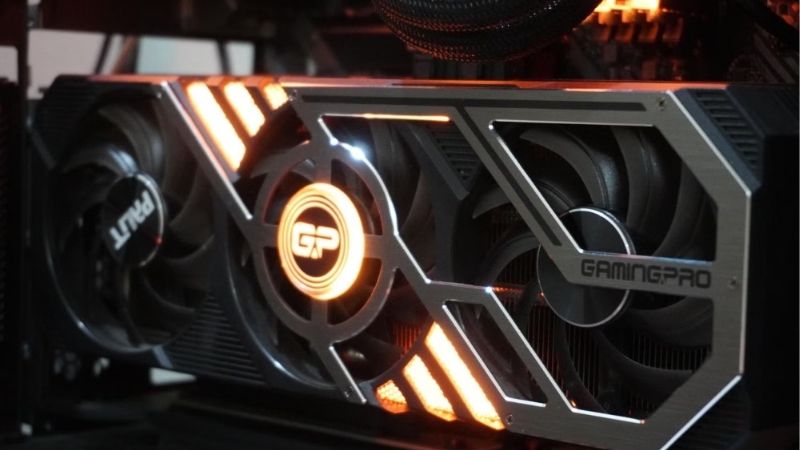
By the end you will know exactly which card matches the experience you want, and whether the current GPU market makes buying now the right move.
As an Amazon Associate we earn from qualifying purchases at no extra cost to you.




What It Takes to Run Cyberpunk at 4K
Cyberpunk is the standard benchmark for a reason: it scales from manageable to nearly impossible depending on the lighting mode. At 4K the gap between raster, ray tracing, and path tracing is enormous, so the first step is deciding which of those you actually want before choosing a card. Here is how each mode behaves at 4K.
4K Raster: The Baseline Requirement
With ray tracing off, Cyberpunk at 4K Ultra is demanding but reachable. A card like the RTX 4070 Ti Super clears 60 fps, the RTX 4080 Super sits comfortably in the 70s, and the RTX 4090 pushes past 90, all without upscaling.
This is the most accessible 4K experience, and it still looks excellent thanks to the game’s strong art direction. If you are happy without ray tracing, the requirement drops to a high-midrange card rather than a flagship.
For many players, 4K raster with DLSS Quality as a cushion is the sweet spot: smooth, sharp, and far less demanding than the ray-traced modes.
It is also the most forgiving mode on memory and power. Without the extra load of ray tracing, even a high-midrange card stays within its 16 GB buffer comfortably and runs cooler and quieter, which makes 4K raster the easiest experience to sustain over long sessions in a typical case.
4K Ray Tracing: Stepping Up
Switching on ray tracing at 4K raises the bar sharply. Native, even strong cards fall below comfortable frame rates, so DLSS becomes essential. With DLSS Quality, the RTX 4080 Super holds a playable 60 to 70 fps at 4K RT Ultra, and the RTX 4090 climbs higher.
This tier is where the experience starts to feel premium, with reflections and lighting that transform Night City. It also demands a 16 GB or larger frame buffer to avoid stutter at 4K.
For ray tracing at 4K, plan on an RTX 4080 Super at minimum, with DLSS treated as a required companion rather than an optional toggle.
Frame Generation is the other half of the equation here. On the 40 series it roughly doubles the on-screen rate, and on the 50 series Multi Frame Generation goes further, which is why the same card can feel sluggish or smooth depending purely on whether the feature is enabled. For single-player Cyberpunk, leaving it on is usually the right call.
4K Path Tracing (Overdrive): The Extreme
Overdrive mode applies full path tracing, the heaviest setting in the game. At 4K it is brutal: native frame rates collapse, and only the strongest cards with DLSS Performance and Frame Generation make it playable.
The RTX 4090 with DLSS and Frame Generation reaches a smooth 4K path-traced experience, and the RTX 5090 with DLSS 4 Multi Frame Generation pushes those numbers even higher. This is the showcase setting, and it requires showcase hardware.
If 4K path tracing is the goal, only the very top tier truly satisfies, and even then the AI feature stack is doing much of the work.
This is worth internalizing before you spend. Path tracing at 4K is less a hardware target you brute-force and more a feature you unlock through the strongest GPU and the most advanced DLSS modes together. Buying a top card without enabling those features would leave most of its path-tracing capability untouched.
GPUs That Can Run Cyberpunk 4K, Compared
The right card depends entirely on the setting you target. The table below maps cards to 4K experiences, and the breakdowns that follow reflect what owners report running Cyberpunk at 4K.
| GPU | 4K raster | 4K ray tracing | 4K path tracing |
|---|---|---|---|
| RTX 4070 Ti Super | 60+ fps | with DLSS | not ideal |
| RTX 4080 Super | 70-80 fps | comfortable + DLSS | DLSS + FG |
| RTX 4090 / 5090 | 90+ fps | strong | playable + DLSS + FG |
RTX 4070 Ti Super – Entry to 4K
The RTX 4070 Ti Super, with 16 GB of VRAM, is the sensible entry to Cyberpunk at 4K. It clears 60 fps in 4K raster and handles 4K ray tracing with DLSS, making it the value choice for the resolution.
Owners describe it as the card that makes 4K Cyberpunk accessible: strong enough for raster and ray tracing with upscaling, though path tracing at 4K is a stretch too far. The 16 GB buffer is well matched to the resolution.
If you want into 4K Cyberpunk without flagship spending, this is the starting point. Check the current price before stock tightens.
A practical tip from owners is to start with 4K raster plus DLSS Quality and only enable ray tracing selectively. This keeps frame rates high while still improving key effects like reflections, and it lets the 16 GB card stretch further than turning every ray-traced option on at once would allow.
RTX 4080 Super and RTX 4090/5090 – Full 4K
The RTX 4080 Super delivers comfortable 4K raster and ray tracing, and makes path tracing viable with DLSS and Frame Generation. The RTX 4090 and RTX 5090 sit at the top, handling every Cyberpunk mode at 4K, with the 5090’s DLSS 4 Multi Frame Generation pushing path tracing to high frame rates.
These cards are the answer for players who want Night City at its absolute best. The combination of raw power, large frame buffers, and the full DLSS stack removes the compromises that lower tiers impose.
For a no-compromise 4K Cyberpunk experience across every setting, this tier is the target. See the current deal when comparing them.
The decision between these flagships hinges on path tracing. If you only want raster and standard ray tracing at 4K, the 4080 Super is more than enough; if Overdrive mode is the goal, the 4090 or 5090’s extra power and advanced frame generation are what turn it from a slideshow into a smooth experience.
Pros and Cons by Tier
Stripping away the marketing, here is the honest balance sheet for running Cyberpunk at 4K across the tiers. The picture is strong, with caveats that depend heavily on which lighting mode you chase.
Pros
- 4K raster is reachable on a high-midrange card like the 4070 Ti Super.
- DLSS makes 4K ray tracing playable across the upper tiers.
- The 4090 and 5090 handle even 4K path tracing smoothly.
- 16 GB and up suits the resolution and avoids stutter.
Cons
- 4K path tracing demands the most expensive cards available.
- Every ray-traced mode at 4K relies on DLSS to be playable.
- The top tiers draw heavy power and need a strong PSU.
GPU Prices and Buying Advice
Choosing the card is only half the decision; timing is the other half. The current hardware market sends mixed signals, and a 4K buyer, often shopping at higher tiers, should weigh them carefully. Here is what is moving prices and what it means for you.
Why High-End Prices Stay Elevated
Laptop and PC-component prices have continued to trend upward, and that pressure lands hardest on the premium cards 4K Cyberpunk requires. Street prices frequently sit above launch figures, so comparison shopping matters more at this end of the market.
Memory cost is the quiet driver, and the large frame buffers these cards carry amplify it. With DRAM and GDDR still tight, that cost feeds straight into the price of the exact cards you need for 4K.
AI Demand and the H200 Move
One development worth understanding is that the US is now allowing Nvidia to sell the H200, one of its most powerful AI chips, to China. That is a data center story, but it confirms where Nvidia’s highest-margin demand and memory allocation are heading.
For a 4K buyer, the practical read is that high-end pricing is unlikely to ease while AI demand stays this hot. It also explains the heavy DLSS investment: the same AI focus that drives data center revenue powers the upscaling that makes 4K Cyberpunk, especially path tracing, possible.
Buy Now or Wait?
There is genuine but distant good news. Prices have stopped climbing as steeply as in late 2025 and the market has entered a calmer stretch, though volatility remains. New supply is coming, with Micron building two fabs in Idaho, but those plants do not come online until 2027 to 2028.
In plain terms, prices have plateaued rather than fallen, and real relief is years away. If you have a 4K monitor and want Cyberpunk now, waiting years for a modest drop rarely pays. Watch for a fair price tied to a stock-clearing window, then check today’s deal and buy.
A measured approach works best at this end of the market. Decide the experience you want and the most you will pay, then wait for a listing that meets both rather than grabbing the first card in stock. Premium GPUs swing in price, and patience often saves a meaningful amount on the exact model you need.
See More:
- GPU for Valorant 240fps
- GPU for Fortnite 240fps
- GPU for CS2 high fps
- GPU for Apex Legends
- RTX 4070 Cyberpunk FPS
Final Verdict and Recommendation
So, what gpu can run Cyberpunk 4K depends entirely on your target: an RTX 4070 Ti Super covers 4K raster and DLSS-assisted ray tracing, an RTX 4080 Super adds comfortable ray tracing and viable path tracing, and an RTX 4090 or 5090 runs every mode including 4K path tracing. Decide which lighting experience you want first, then buy the tier that matches it, insisting on at least 16 GB of VRAM, confirming your power supply can feed it, and treating DLSS as essential rather than optional at 4K. With elevated prices likely to persist while AI demand stays high, buying a sensible Nvidia card now beats waiting for relief that is still years out. Whichever tier you land on, enable DLSS, confirm your PSU and case can handle the card, and pick your lighting mode deliberately rather than maxing everything by reflex. Check the current price on the card that fits your goal and run Cyberpunk at full 4K.
Top-Rated Picks


| Product | Brand | Rating | Reviews | Price |
|---|---|---|---|---|
| ARCTIC MX-4 (4 g) – Premium Performance Thermal Paste… | ARCTIC | ★ 4.8 | 104k | $4.99 |
| ARCTIC MX-4 (incl. Spatula, 4 g) – Premium Performanc… | ARCTIC | ★ 4.8 | 71.9k | $5.49 |
| Crucial 8GB DDR4 RAM 3200MHz (PC4-25600), Downclockab… | Crucial | ★ 4.8 | 62.8k | $74.99 |
| AMD Ryzen 5 5600X 6-core, 12-thread unlocked desktop … | — | ★ 4.8 | 30.2k | $177.60 |
| NVIDIA Shield Remote; Voice Search, Motion-Activated,… | — | ★ 4.7 | 10.6k | $25.99 |
Frequently Asked Questions
What card do I need for Cyberpunk 2077 at 4K without ray tracing?
At 4K Ultra with ray tracing off, an RTX 4070 Ti Super or RX 7900 XT comfortably exceeds 60 fps native, and an RTX 5070 Ti does so with headroom. Adding DLSS Quality upscaling brings a plain RTX 4070 or 5070 into the same range at very similar image quality.
What is required for 4K with ray tracing enabled?
Ray Tracing Ultra at 4K needs at least an RTX 4080 Super or RTX 5080 with DLSS Performance to hold 60 fps consistently. Radeon cards are usable but noticeably slower in this title’s ray tracing paths, so an RX 7900 XTX typically needs FSR Performance plus reduced ray settings.
Can any card run path tracing in Overdrive mode at 4K?
Only the top tier. An RTX 4090 or RTX 5090 with DLSS Performance and frame generation reaches playable frame rates, and an RTX 5080 manages it with Ray Reconstruction plus multi frame generation at reduced quality. Native 4K path tracing above 60 fps remains out of reach for every current card.
How much VRAM does 4K Cyberpunk actually use?
Roughly 10 to 12 GB at 4K Ultra with ray tracing, and more with the HD texture settings and path tracing. Twelve gigabytes is the practical minimum and 16 GB is the comfortable target, which is why 16 GB cards such as the RTX 5070 Ti and 5080 age better here.
Does DLSS 4 change the recommendation?
Meaningfully. The transformer model in DLSS 4 makes Performance mode at 4K look close to what Quality mode delivered before, which effectively moves one tier of hardware down. Combined with multi frame generation on RTX 50 series cards, mid-range hardware now delivers a genuinely smooth 4K experience.











Write Your Review
No reviews yet. Be the first to share your experience!