
- Top Pick: HP OMEN 45L Gaming Desktop, 13th Generation Intel Core i7-13700KF, 16 GB RAM, 1 TB Solid StateDrive, NVIDIA GeForce RTX 4070 Ti Graphics, Windows 11 Home, GT22-1072(2023)
- Best Value: Omen by HP Obelisk Gaming Desktop Computer, 9th Generation Intel Core i9-9900K Processor, NVIDIA GeForce RTX 2080 SUPER 8 GB, HyperX 32 GB RAM, 1 TB SSD, VR Ready, Windows 10 Home (875-1023, Black)
- Premium Choice: HP OMEN 17 inch Laptop, FHD 144Hz Display, 7ms Response Time, 13th Generation Intel Core i7-13700HX, 16 GB RAM, 512 GB SSD, NVIDIA GeForce RTX 4060 GPU (8 GB), Windows 11 Home, 17-cm2010nr (2023)
nvidia frame generation has become one of the most influential and most debated features in modern gaming, because it can dramatically raise displayed frame rates by having AI create frames the GPU never traditionally rendered. First introduced with DLSS 3 and expanded into Multi Frame Generation with DLSS 4, it lets a GeForce card produce smoothness far beyond its raw output. But the technology raises real questions about latency and what a frame rate truly means. This review explains how frame generation works, which RTX cards support it, what owners experience, and whether it is a reason to buy Nvidia in 2026.
What Nvidia Frame Generation Is
Nvidia Frame Generation is the part of the DLSS suite that increases frame rate by inserting AI-generated frames between the ones your GPU renders, rather than by making rendering itself faster. It began with a single generated frame in DLSS 3 and grew into the multi-frame approach of DLSS 4. Understanding how it creates those frames, how it has evolved across generations, and which cards support it is the key to judging where it fits in your gaming setup.
As an Amazon Associate we earn from qualifying purchases at no extra cost to you.


How Frame Generation Works
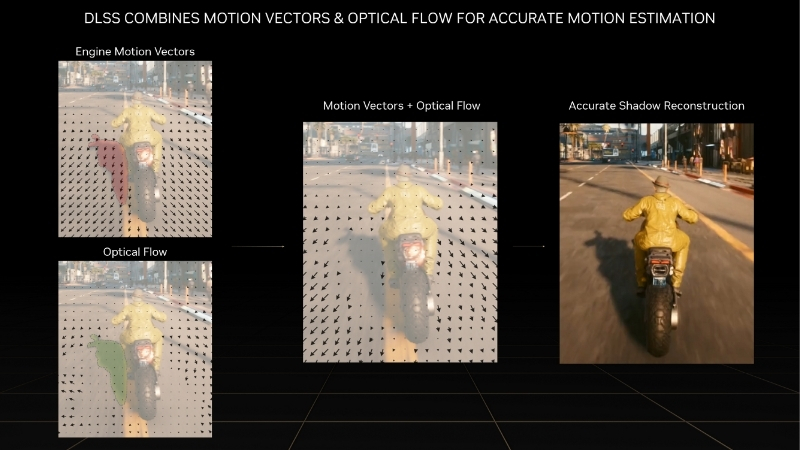
Frame generation analyzes two sequentially rendered frames along with motion data and produces one or more interpolated frames to place between them, raising the number of frames the display receives. The rendered frames still set the pace of the underlying simulation, while the generated frames add visual smoothness in between.
Because these extra frames are interpolated rather than rendered from fresh input, the technology increases how fluid a game looks without increasing how fast it actually simulates or responds. That distinction is the heart of both its appeal and its controversy.
Nvidia runs this process on dedicated hardware within its RTX GPUs and pairs it with Reflex to manage latency, which is what makes the generated frames arrive smoothly and keeps the overall experience responsive enough for most games.
This hardware-plus-software design is what separates Nvidia’s approach from purely driver-level interpolation. By using motion data from the game engine alongside dedicated silicon, frame generation can build more accurate intermediate frames than a method working blindly after the fact. The result is generally cleaner motion, though it comes at the cost of requiring specific, recent hardware rather than working on any GPU a player happens to own.
From DLSS 3 to DLSS 4 Multi Frame Gen
The first version, part of DLSS 3, generated a single AI frame per rendered frame, roughly doubling displayed frame rates in the best case and debuting on the RTX 40-series. It proved the concept and quickly spread across supported titles.
DLSS 4 expanded this into Multi Frame Generation on the RTX 50-series, generating multiple frames per rendered frame for an even larger multiplication of displayed performance. Each step raised the ceiling on achievable frame rates.
This evolution shows Nvidia treating frame generation as a long-term pillar, refining it generation over generation, which suggests the feature will keep improving and remain central to the GeForce value proposition going forward.
Supported RTX GPUs
Frame generation is tied to specific hardware. Single frame generation is available on the RTX 40-series and, in its DLSS 4 form, the RTX 50-series, while the more advanced Multi Frame Generation is exclusive to the RTX 50-series and its Blackwell architecture.
Older RTX 20 and 30-series cards support DLSS upscaling but not frame generation, so this specific feature is reserved for the newer generations. That hardware gating is important to know before shopping.
For a buyer, the practical requirement is an RTX 40 card at minimum for frame generation, or an RTX 50 card for the multi-frame version, tying the feature directly to a relatively recent GeForce purchase.
This tiered availability is worth mapping to your goals before you shop. If you simply want frame generation at all, a wide range of RTX 40 cards unlocks it affordably; if you specifically want the highest displayed frame rates from Multi Frame Generation, only the RTX 50-series will do. Matching the exact feature you care about to the right card avoids both overspending and disappointment.
Real-World Performance and User Impressions
The measured gains are dramatic, but frame generation is as much about feel as figures, so a fair review blends the numbers with owner experience. Combining the enthusiastic 4-5 star feedback with the more critical 2-3 star reviews reveals where the technology genuinely elevates gaming and where the concerns are valid. Here is the consistent pattern from both the data and the community.
FPS Gains and the Smoothness Payoff
The core benefit is a large increase in displayed frame rate, which on a high-refresh monitor translates into visibly smoother motion. In graphically demanding single-player games, this lets players enable heavy ray tracing and still enjoy fluid gameplay.
The size of the gain depends on the generation and the game, ranging from roughly doubling frames with single generation to multiplying them further with the multi-frame version on the latest cards.
As with all such features, the payoff is greatest from a healthy base frame rate. Owners consistently find frame generation most convincing when it amplifies an already-playable experience rather than trying to rescue a struggling one.
The type of game matters too. Frame generation suits visually rich, single-player experiences — open-world adventures, story-driven titles, and simulation games — where the extra smoothness enhances immersion and the modest latency cost goes unnoticed. It is far less suited to fast multiplayer shooters, where responsiveness outweighs visual fluidity, so the same feature can feel transformative in one game and pointless in another depending on how you play.
What 4-5 Star Users Praise
Positive reviewers love the smoothness that frame generation brings to cinematic, single-player games, praising the ability to combine maxed-out visuals with high frame rates that raw rendering could not sustain.
They also appreciate the pairing with Reflex, which keeps the experience feeling responsive in the slower and mid-paced games where frame generation is most at home, making the added latency a non-issue in practice.
Many describe it as a feature that meaningfully extends what their GeForce card can do, unlocking a level of visual quality and fluidity together that feels like genuine added value from their hardware.
Longtime owners often note that once they have played with frame generation enabled in a suitable game, going back to it turned off makes the same title feel noticeably choppier, which is a strong sign the smoothness benefit is real rather than merely a bigger number on screen.
Common Complaints from 2-3 Star Reviews
The most common criticism is that frame generation does not reduce input latency, so a high displayed frame rate can feel less responsive than the number suggests. Competitive players in particular tend to avoid it for this reason.
Related is the philosophical “fake frames” debate, where some argue that interpolated frames should not be counted the same as rendered ones, especially when marketing headlines lean on the multiplied figures.
Others point to the hardware gating, feeling that reserving the feature and its best version for newer cards makes upgrades feel obligatory, and a minority note artifacts when the base frame rate is low or settings are pushed too far.
Latency, Alternatives, and Buying Advice
Whether frame generation is right for you depends on understanding its latency behavior, knowing the alternatives, and deciding whether the hardware is a smart buy, so this section addresses each. Because the feature is tied to RTX cards, the buying question also depends on timing your purchase within 2026’s shifting pricing.
Latency and When to Use It
The essential rule is that frame generation improves smoothness, not responsiveness, so it shines in single-player and slower-paced games and is best avoided in fast competitive titles where input lag is paramount. Pairing it with Reflex is important to keep latency controlled.
It also depends on a solid base frame rate to feel right, since generating frames on top of a low base exaggerates the disconnect between smooth visuals and controls. Used from a good base, in a suitable game, it feels excellent.
As for alternatives, AMD’s FSR frame generation and driver-level AFMF, plus Intel’s XeSS 2, offer comparable capabilities on other hardware, so frame generation is no longer unique to Nvidia, even if Nvidia’s implementation remains highly polished.
That competitive context is worth weighing for buyers. Because rival frame-generation options now exist across brands, choosing Nvidia purely for frame generation is a weaker argument than it once was, especially in the budget tier where AMD and Intel compete hard. Nvidia’s edge is now more about the overall polish, the maturity of Reflex, and the wider game support rather than the mere existence of the feature.
Pros and Cons of Nvidia Frame Generation
Here is the balanced summary based on the evidence and owner feedback.
Pros: large increases in displayed frame rate, excellent smoothness for high-fidelity single-player games, mature implementation paired with Reflex, and a feature that keeps improving across generations.
Cons: does not reduce input latency, requires an RTX 40 card or newer with the best version limited to RTX 50, needs a healthy base frame rate, and remains contentious among competitive players.
Is an RTX GPU Worth Buying for Frame Generation in 2026?
Because frame generation requires a recent RTX card, accessing it can mean buying GeForce, and 2026’s market is part of the decision. After the steep rise at the end of 2025, graphics-card pricing has settled into a calmer phase, but calm means flat rather than falling, and some volatility remains.
Fresh memory supply is on the way, with OEMs able to source DDR5 from makers such as CXMT and Micron building two plants in Idaho, yet that capacity will not run until 2027–2028, so genuine relief stays distant.
For a buyer who values frame generation, waiting through 2026 for a big drop is therefore a weak strategy. If an RTX card fits your budget, check its current price through the link on this page and buy while the market holds steady.
See More:
Conclusion
The verdict on nvidia frame generation is that it is a powerful, well-executed feature best understood for what it is: a smoothness multiplier rather than a latency reducer. From a healthy base frame rate, in cinematic single-player games, and paired with Reflex, it delivers a fluid, high-fidelity experience that showcases what a modern GeForce card can do. Its limits are the unchanged input lag and the hardware gating that reserves the best version for the newest cards. For gamers who understand those trade-offs, it adds real value — and with prices only holding steady rather than dropping, there is little reason to wait. Use the link above to compare live pricing on an RTX GPU and secure yours today.
Top-Rated Picks


| Product | Brand | Rating | Reviews | Price |
|---|---|---|---|---|
| ARCTIC MX-4 (4 g) – Premium Performance Thermal Paste… | ARCTIC | ★ 4.8 | 104k | $4.99 |
| ARCTIC MX-4 (incl. Spatula, 4 g) – Premium Performanc… | ARCTIC | ★ 4.8 | 71.9k | $5.49 |
| Crucial 8GB DDR4 RAM 3200MHz (PC4-25600), Downclockab… | Crucial | ★ 4.8 | 62.8k | $74.99 |
| AMD Ryzen 5 5600X 6-core, 12-thread unlocked desktop … | — | ★ 4.8 | 30.2k | $177.60 |
| NVIDIA Shield Remote; Voice Search, Motion-Activated,… | — | ★ 4.7 | 10.6k | $25.99 |
Frequently Asked Questions
Which GPUs support Nvidia frame generation?
DLSS frame generation requires RTX 40-series or newer, because it relies on the optical flow accelerator hardware introduced with Ada Lovelace. RTX 50-series adds multi frame generation on top. RTX 20 and 30-series cards can use DLSS super resolution and Reflex but not Nvidia frame generation; they can use AMD or Intel alternatives instead.
Does frame generation actually make games feel smoother?
Visually yes, provided your base frame rate is already reasonable. Going from 60 to 110 frames per second looks noticeably smoother on a high refresh monitor. Starting from 30, the generated frames amplify the underlying judder and artifacts become obvious. Treat around 60fps native as the practical floor before turning it on.
Does it increase input lag?
Yes. The renderer must hold a completed frame in order to interpolate, which adds latency even with Nvidia Reflex active. Reflex claws back much of it, so the net result is often close to native latency, but never lower. For competitive shooters, run Reflex alone and leave frame generation switched off.
Does frame generation use extra VRAM?
It does. The optical flow field and the extra frame buffers typically add several hundred megabytes to over a gigabyte depending on resolution. On an 8GB card at 1440p with high textures, that overhead can be the difference between smooth frame times and stutter, so watch memory usage before enabling it.
What causes the artifacts I see around the HUD?
Interpolation struggles with elements that move independently of the 3D scene, such as overlays, subtitles, crosshairs and particle effects. Newer DLSS versions handle HUDs far better than early implementations, and swapping in the latest DLL through the Nvidia app often reduces shimmering noticeably in older titles that shipped with an early build.











Write Your Review
No reviews yet. Be the first to share your experience!