
- Top Pick: ASUS Dual GeForce RTX 4060 Ti EVO OC Edition 8GB GDDR6 (PCIe 4.0, 8GB GDDR6, DLSS 3, HDMI 2.1a, DisplayPort 1.4a, Axial-tech Fan Design, Auto-Extreme Technology), 3 Year Warranty
- Best Value: ASUS TUF Gaming NVIDIA GeForce RTX 4080 Super OC Edition Gaming Graphics Card (PCIe 4.0, 16GB GDDR6X, HDMI 2.1a, DisplayPort 1.4a), 3 Year Warranty
- Premium Choice: ASUS Dual GeForce RTX 4070 Super EVO OC Edition 12GB GDDR6X (PCIe 4.0, 12GB GDDR6X, DLSS 3, HDMI 2.1a, DisplayPort 1.4a, 2.5-Slot Design, Axial-tech Fan Design, 0dB Technology), 3 Year Warranty
The fsr 3 vs dlss 3 question matters to almost every gamer weighing a graphics card in 2026, because these two frame-generation technologies can dramatically raise your on-screen frame rate — yet they do not play by the same rules. FSR 3 is open and runs on a huge range of GPUs, while DLSS 3’s frame generation is locked to Nvidia’s RTX 40-series hardware. This comparison breaks down image quality, hardware requirements, real FPS gains, and the true cost of each path, so you know exactly which upscaler — and which card — is the smarter buy for your setup.
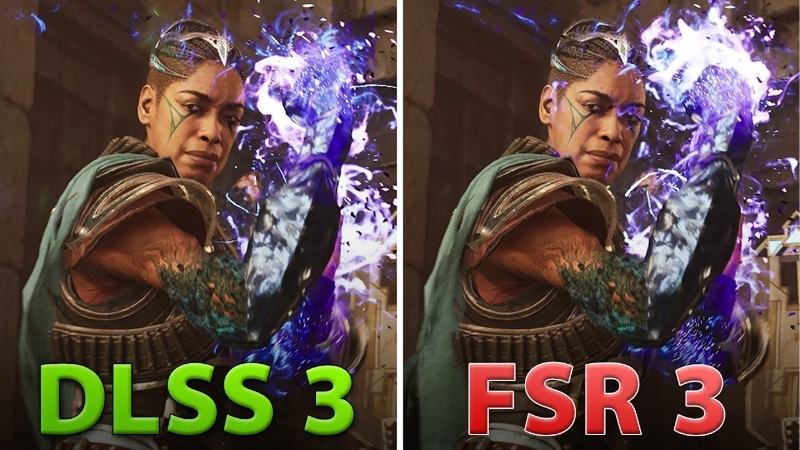
The Quick Verdict: FSR 3 vs DLSS 3
Here is the fast answer for the impatient reader. DLSS 3 currently produces the cleaner, more stable image in motion and pairs with Nvidia Reflex for lower latency, making it the quality leader — but only if you own or buy an RTX 40-series card. FSR 3 is the accessibility leader: it works across AMD, Nvidia, and even older GPUs, and it is free to enable on hardware you already own. If you already have an RTX 40 card, DLSS 3 is the obvious pick; if you do not, FSR 3 delivers most of the benefit without forcing a new purchase, which reframes the whole decision around your existing hardware.
As an Amazon Associate we earn from qualifying purchases at no extra cost to you.


What FSR 3 Does Best
FSR 3, AMD’s FidelityFX Super Resolution 3, combines upscaling with Fluid Motion Frames to generate additional frames. Its defining strength is openness: it is vendor-agnostic and supported on a very wide range of GPUs, including many older cards that Nvidia’s frame generation excludes.
That reach makes FSR 3 the pragmatic choice for anyone on a budget or an aging system. You can switch it on today, boost your frame rate, and spend nothing extra, which is a powerful advantage the spec sheet alone doesn’t capture.
It also means a single game’s FSR 3 implementation benefits the widest possible audience, so developers have a strong incentive to support it — a virtuous cycle that keeps expanding the list of compatible titles.
What DLSS 3 Does Best
DLSS 3 is Nvidia’s package of DLSS Super Resolution plus Frame Generation, and the frame-generation half leans on the dedicated Optical Flow Accelerator built into RTX 40-series GPUs. That hardware lets it reconstruct interpolated frames with fewer visible artifacts than software-only approaches.
Paired with Nvidia Reflex to counter the latency that frame generation can introduce, DLSS 3 delivers the most polished experience in supported single-player titles. This is the experimental, hardware-accelerated edge that keeps Nvidia’s stack ahead in raw quality.
For players chasing the smoothest possible presentation in graphically demanding games, that combination of dedicated silicon and tight latency control is exactly what justifies staying inside Nvidia’s ecosystem.
Head-to-Head Comparison Table
The table below distills the core differences so you can weigh openness against image quality at a glance before the deeper analysis that follows.
| Factor | FSR 3 | DLSS 3 |
|---|---|---|
| Vendor | AMD (open) | Nvidia |
| Frame generation | Fluid Motion Frames | Optical Flow (RTX 40) |
| GPU support | Very wide, cross-vendor | RTX 40-series only |
| Latency tool | AMD Anti-Lag | Nvidia Reflex |
| Motion clarity | Good, improving | Excellent |
| Cost to enable | Free on existing GPU | Requires RTX 40 card |
Deep Dive Face-Off: Quality, Compatibility, and Frames
A verdict is only useful if you understand the reasoning behind it, so this section compares the two technologies across the three criteria that actually change your experience: how clean the image looks in motion, which hardware each one demands, and how much real frame-rate uplift you get. These are the trade-offs that decide whether FSR 3 or DLSS 3 is right for you, and they rarely point in the same direction, which is what makes the choice interesting.
Image Quality and Motion Clarity
In side-by-side motion, DLSS 3 generally holds a lead. Its hardware-assisted interpolation produces fewer ghosting artifacts around fast-moving objects and cleaner edges on fine detail, which is most noticeable in busy scenes with lots of movement.
FSR 3 has closed the gap considerably and looks very good in many titles, but it can still show more shimmering or interpolation artifacts in demanding scenes. For most players at a normal viewing distance the difference is modest; for pixel-peepers chasing the cleanest possible image, DLSS 3 wins.
Worth noting: implementation quality varies by game for both technologies, so a well-integrated FSR 3 title can look better than a rushed DLSS 3 one. Judge the specific games you play rather than the brand alone.
Resolution also changes the calculus. At 4K, both upscalers have more source pixels to work with, so their reconstructed images look cleaner and the quality gap narrows. At 1080p, the internal render resolution drops low enough that artifacts become easier to spot, and DLSS 3’s hardware assist tends to show its advantage more clearly.
If you game on a 1440p or 4K display, then, either technology will satisfy most players; if you are on 1080p and highly sensitive to image quality, DLSS 3 is the safer bet for a consistently clean result.
Supported GPUs and Hardware Requirements
This is where the comparison flips decisively toward FSR 3. It runs on a broad spectrum of graphics cards regardless of brand, so gamers on older GPUs or AMD hardware still get frame generation without buying anything new.
DLSS 3 Frame Generation, by contrast, requires an RTX 40-series GPU because it depends on that generation’s Optical Flow Accelerator. Note the nuance: DLSS Super Resolution, the upscaling part, works on RTX 20-series and newer, but the headline frame-generation feature does not.
Practically, that means “getting DLSS 3” usually equals “buying a new Nvidia card.” That hardware requirement is the single biggest factor in the whole comparison, because it turns a software choice into a spending decision.
Real FPS Gains and Latency
Both technologies can produce large frame-rate increases, frequently lifting a title from borderline to smooth in supported games. The exact uplift depends on the game and your base frame rate, but the effect is substantial on both sides and easily the headline benefit of either.
The catch with any frame generation is input latency, since interpolated frames don’t respond to your input. Both camps address this — Nvidia with Reflex, AMD with Anti-Lag — and enabling those tools is essential for the technology to feel responsive rather than floaty.
One practical rule holds for both: frame generation works best when your base frame rate is already reasonable, ideally above 50–60 FPS, because generating frames on top of a very low base can make latency feel worse.
This is an important expectation to set. Neither FSR 3 nor DLSS 3 is a magic fix for a GPU that is badly overmatched by a game; they multiply frames you can already produce rather than rescuing an unplayable situation. On appropriately matched hardware, though, the uplift is transformative and can be the difference between a stuttering mess and a locked, fluid experience.
For competitive shooters where every millisecond counts, many players leave frame generation off entirely and use only the upscaling half; for cinematic single-player games, the extra smoothness is usually well worth the small latency trade-off.
Which to Choose, the Alternative, and 2026 Buying Context
The right pick depends on the hardware you own or intend to buy, and on how much you value image polish versus cost and flexibility. This section lays out the pros and cons cleanly, offers a neutral third option if neither ecosystem suits you, and factors in where GPU pricing sits in 2026 — because choosing DLSS 3 has a hardware price tag attached that FSR 3 does not.
FSR 3 vs DLSS 3: Pros and Cons
Here is the balanced summary to anchor your decision.
FSR 3 — Pros: open and cross-vendor, works on a huge range of GPUs, free to enable on hardware you already own, and no brand lock-in. Cons: slightly more motion artifacts than DLSS, and per-game implementation quality varies.
DLSS 3 — Pros: cleanest motion clarity, hardware-accelerated frame generation, and Reflex latency reduction. Cons: Frame Generation is locked to the RTX 40-series, so accessing it usually means buying a new Nvidia GPU, and it is Nvidia-only.
The Alternative: Intel XeSS and Lossless Scaling
If you are torn, remember these two are not the only options. Intel’s XeSS is a third upscaler that works across vendors and looks especially strong on Intel Arc cards, giving budget builders another quality path that doesn’t lock them to either brand.
For frame generation on almost any GPU, a third-party utility like Lossless Scaling has also become popular as a universal, game-agnostic option that works even in titles without native support.
Neither fully replaces FSR 3 or DLSS 3, but both are genuinely worth knowing about before you commit to one ecosystem or spend on a new card, since they can stretch the life of hardware you already own.
What Today’s GPU Prices Mean for Your Choice
Because DLSS 3 Frame Generation requires an RTX 40 card, your choice is partly a spending decision — and 2026’s market shapes it. After the sharp increases of late 2025, graphics-card and component pricing has settled into a calmer phase, but settled means flat, not falling.
Fresh memory capacity is being built — OEMs can now tap DDR5 from suppliers such as CXMT, and Micron has two Idaho plants underway — yet none of that output arrives until 2027–2028. Real relief on card prices is therefore still years away rather than months.
So if DLSS 3 is a must-have for you, waiting for RTX 40 cards to plunge in price is a bet the supply timeline doesn’t support. Whichever path you choose, check current pricing on a compatible card through the link on this page and lock it in while the market is stable.
There is a smart middle path worth highlighting. Because FSR 3 costs nothing on the card you already own, you can enable it today, enjoy the frame-rate boost immediately, and take your time deciding whether a future RTX 40 purchase for DLSS 3 is truly worth it. That flexibility is itself a strong argument for the open approach, especially in an uncertain pricing environment.
See More:
Conclusion
The fsr 3 vs dlss 3 decision ultimately hinges on the hardware in your PC. Choose DLSS 3 for the cleanest motion and lowest latency if you own or are ready to buy an RTX 40-series card, and choose FSR 3 for its unbeatable openness and zero-cost access on the GPU you already have. Both can transform a game’s smoothness, so there is no wrong answer — only the one that fits your budget and hardware. Use the link above to compare live prices on a card that unlocks the upscaler you want, and secure it today before pricing shifts again.
Top-Rated Picks


| Product | Brand | Rating | Reviews | Price |
|---|---|---|---|---|
| ARCTIC MX-4 (4 g) – Premium Performance Thermal Paste… | ARCTIC | ★ 4.8 | 104k | $4.99 |
| ARCTIC MX-4 (incl. Spatula, 4 g) – Premium Performanc… | ARCTIC | ★ 4.8 | 71.9k | $5.49 |
| Crucial 8GB DDR4 RAM 3200MHz (PC4-25600), Downclockab… | Crucial | ★ 4.8 | 62.8k | $74.99 |
| AMD Ryzen 5 5600X 6-core, 12-thread unlocked desktop … | — | ★ 4.8 | 30.2k | $177.60 |
| NVIDIA Shield Remote; Voice Search, Motion-Activated,… | — | ★ 4.7 | 10.6k | $25.99 |
Frequently Asked Questions
What is the core difference between the two frame generation methods?
DLSS 3 uses the Ada optical flow accelerator, dedicated hardware that analyses motion between frames, so it is limited to RTX 40-series and newer. FSR 3 generates frames in software using shader compute, which is why it runs on a huge range of GPUs including Nvidia, Intel and older Radeon cards.
Which produces fewer artifacts?
DLSS 3 is generally cleaner, particularly around HUD elements, particle effects and fast camera pans, because the dedicated optical flow hardware produces better motion estimates. FSR 3 has improved considerably through the 3.1 releases and is close enough that in normal gameplay most players will not notice the difference at high frame rates.
How does hardware support compare?
DLSS 3 frame generation requires an RTX 40-series or 50-series card. FSR 3 frame generation officially targets RX 6000 and newer, with wider unofficial compatibility, and can even run on GeForce cards. If you own an RTX 30-series or older Radeon, FSR 3 is the only in-game option available.
What about input latency?
Both add latency because a frame must be held for interpolation. DLSS 3 pairs with Reflex and FSR 3 pairs with Anti-Lag, and both technologies recover most but not all of the added delay. Neither should be used in competitive shooters where consistent click-to-photon time matters more than displayed smoothness.
Can I mix DLSS upscaling with FSR frame generation?
In a growing number of games, yes. Several titles now let you select the upscaler and the frame generator independently, and mods have enabled the combination elsewhere. DLSS upscaling with FSR 3 frame generation is a popular pairing for RTX 30-series owners who want smoother motion without upgrading hardware.






Write Your Review
No reviews yet. Be the first to share your experience!