
- Top Pick: ASUS TUF Gaming NVIDIA GeForce RTX 4070 OC Edition Gaming Graphics Card (PCIe 4.0, 12GB GDDR6X, HDMI 2.1, DisplayPort 1.4a), 3 Year Warranty
- Best Value: msi Cyborg 15.6" AI Gaming Laptop, NVIDIA GeForce RTX 5070, Intel 10-Core 7-240H Series 2(Upto 5.2GHz, >i7-13620H), 144Hz FHD IPS, 16GB DDR5, 1TB SSD, Backlit KB, Wi-Fi 6E, Win 11 Home, w/Res Cooler
- Premium Choice: Nvidia RTX 2000 ADA 16GB Graphics Card
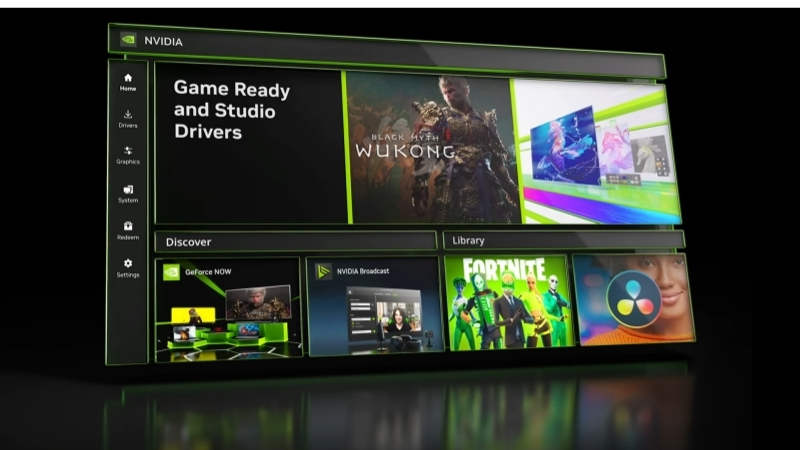
NVIDIA App vs GeForce Experience is the exact question running through the mind of every long-time GeForce owner who just opened their PC and found the familiar software gone or nagging them to switch. If you spent years with GeForce Experience and now feel disoriented by the change, you want one thing: a clear, side-by-side account of what you gain, what you lose, and whether switching is actually worth it. This comparison lays it out plainly, so you can decide in a couple of minutes instead of digging through release notes or watching a long walkthrough.
NVIDIA App vs GeForce Experience: The Quick Verdict
The short story is that this is not a rivalry between two competing products; it is a generational replacement. NVIDIA built the NVIDIA App to succeed GeForce Experience and the aging Control Panel, folding both into one modern interface. That framing matters because you are not choosing between two supported options long term, you are deciding when to move to the tool that is replacing the one you know. Here is the core of that decision.
As an Amazon Associate we earn from qualifying purchases at no extra cost to you.


Why NVIDIA Retired GeForce Experience
GeForce Experience carried years of baggage: a mandatory login, a dated interface, and a split from the separate NVIDIA Control Panel that forced users to jump between two programs for related settings. Those friction points drove constant complaints.
The NVIDIA App was NVIDIA’s answer, rebuilding the experience around no forced account, a cleaner layout, and a unified home for drivers, optimization, the overlay, and display settings. It is a deliberate reset rather than a minor update.
Understanding that GeForce Experience is on the way out reframes the whole comparison: the real question is not which is better today, but whether to switch now or later.
It also explains why some features arrived in the NVIDIA App first and never came back to GeForce Experience. NVIDIA is directing all new development, including the latest RTX feature toggles and interface refinements, into the app, so the gap between the two only widens over time. Staying on the old software means slowly falling behind on features you already own the hardware to use.
What You Gain and What You Lose
Most people switching worry about losing a feature they rely on. In practice the NVIDIA App keeps the essentials and adds convenience, with only a few workflow changes to relearn. The table below distills the trade at a glance for busy readers who just want the bottom line.
| Aspect | GeForce Experience | NVIDIA App |
|---|---|---|
| Account login | Required | Not required |
| Control Panel | Separate program | Merged in |
| Interface | Older, heavier | Modern, lighter |
| Driver updates | Yes | Yes, faster |
| Game optimization | Yes | Yes, refined |
| RTX feature hub | Limited | Central (VSR, RTX HDR) |
| Ongoing support | Being retired | Actively developed |
Quick Verdict: Should You Switch
For nearly everyone, the answer is yes, switch to the NVIDIA App. It keeps every core function you actually use, drops the most-hated feature (the login), and is the version NVIDIA will keep improving.
The only reason to delay is if you have a very specific overlay or workflow habit you want to confirm carries over first. Otherwise, staying on retired software only postpones an inevitable move and misses out on newer features.
Deep Dive Face-Off: Features, Login, and Performance
A verdict is easy to state, but if you are a long-time user you want to know exactly how daily tasks change. The differences concentrate in three areas: how you sign in, how settings are organized, and how the software sits on your system. Comparing them feature by feature shows why the switch feels like an upgrade rather than a lateral move for most people. Here is the detailed face-off.
No More Login vs Mandatory Account
The single biggest practical difference is the account. GeForce Experience required you to create and log into an NVIDIA account just to update drivers, a step many users resented. The NVIDIA App removes this entirely; you install it and it works.
This is not a cosmetic change. It removes a point of failure where login servers, password resets, or two-factor prompts could block you from a simple driver update. For anyone who was ever locked out of GeForce Experience at the wrong moment, this alone justifies switching.
The optional account still exists for reward programs, but nothing essential is gated behind it anymore.
Overlay, Optimization, and the Control Panel
The in-game overlay carried over and was refined, still offering performance monitoring, recording, and highlights, now with a cleaner design and generally lighter footprint. Users report it feeling more responsive than the older ShadowPlay-era overlay.
Game optimization works the same in concept, scanning titles and recommending settings for your GPU, with tuning that many find more sensible than before. The headline structural change is the merged Control Panel: resolution, refresh rate, color, and 3D settings now sit in the same app, ending years of switching between two programs.
For power users, having everything, drivers, features, and display controls, in one window is the quiet productivity win of the whole redesign.
Performance is the other quiet improvement. Because the NVIDIA App was rebuilt rather than patched onto old code, users generally report a lighter memory footprint and a snappier interface than GeForce Experience, which had grown sluggish over years of additions. On lower-spec systems that difference is noticeable when the overlay is active during a game. It is not a dramatic frame-rate gain, but a leaner background tool leaves marginally more headroom for the game itself, which is the opposite of what people feared when the switch was announced.
Pros and Cons of Making the Switch
Even a clear upgrade has trade-offs worth naming honestly, especially for users with entrenched habits. Weighing them plainly helps you switch with realistic expectations rather than surprises.
Pros of switching: no forced login, unified interface, faster and cleaner driver updates, a central hub for RTX features, and ongoing development that GeForce Experience no longer receives. For most users these outweigh everything else.
Cons of switching: a short relearning curve for where settings moved, the loss of a few very old GeForce Experience quirks some users grew attached to, and the usual first-install jitters that a clean reinstall resolves. Minor, but real.
The Alternative and Final Recommendation
Not everyone wants to live inside NVIDIA’s software at all, and some readers ask what the switch really signals about their hardware. This section covers the option for people who prefer a lighter or third-party approach, connects the software change to when it might hint at an upgrade, and then gives a clear recommendation by user type. Here is how to close the decision out.
The Alternative: Third-Party Tools if You Dislike Both
If you dislike both NVIDIA interfaces, a minimalist route exists: download drivers manually from NVIDIA and skip the app entirely, optionally using a clean-driver utility to strip old files before installing. This gives you the leanest possible setup with no background process.
The cost is convenience and, critically, access to RTX features that are managed through the app. This path suits advanced users who tune everything by hand, not the average GeForce owner who benefits from automatic updates and one-click feature toggles.
It is worth being realistic about who this actually fits. If you update drivers a few times a year, monitor performance with a standalone tool, and never touch RTX Video Super Resolution or RTX HDR, the manual route genuinely costs you nothing. But if you own an RTX card and want those features to work, skipping the app means skipping the only convenient way to control them, which defeats the purpose of buying RTX hardware in the first place.
Hardware Angle: When the App Signals an Upgrade
Switching to the NVIDIA App sometimes reveals something uncomfortable: the newest features are greyed out because your GPU does not support them. That is the software quietly telling you the limit is your hardware, not your driver.
If you moved to the NVIDIA App hoping for RTX Video Super Resolution, RTX HDR, or AV1 encoding and found them unavailable, an older card is the reason. Those capabilities are tied to RTX silicon, and the app simply exposes what your GPU can and cannot do.
If the switch has made it clear your card is falling behind, compare current prices and specs on newer RTX graphics cards through the links on this page to see exactly which features an upgrade would turn on.
See More:
Final Verdict: Who Should Switch, Who Can Wait
Switch now if you own an RTX card or simply want the modern, login-free experience with active support. That covers the large majority of readers, and the sooner you switch, the sooner the login headaches disappear.
You can wait a little only if you have a niche workflow to verify first, but waiting is a delay, not an escape, since GeForce Experience is being retired. For everyone else, the NVIDIA App is the clear and future-proof choice.
If you do switch, take two minutes to do it right: uninstall GeForce Experience, install the NVIDIA App from the official source, and run a clean driver install on first launch so no old settings carry over. Done that way, the transition is painless and you immediately land on the version NVIDIA will keep supporting for years.
Weighing NVIDIA App vs GeForce Experience comes down to a simple truth: the new app keeps what you use, removes what you hated, and is the version NVIDIA will keep building on, while the old one is winding down. Switching costs a few minutes of relearning and returns a cleaner, login-free, unified tool. And if the move exposes that your GPU can no longer run the latest features, check the recommended RTX cards through the links here to see what the next upgrade would unlock.
Top-Rated Picks


| Product | Brand | Rating | Reviews | Price |
|---|---|---|---|---|
| ARCTIC MX-4 (4 g) – Premium Performance Thermal Paste… | ARCTIC | ★ 4.8 | 104k | $4.99 |
| ARCTIC MX-4 (incl. Spatula, 4 g) – Premium Performanc… | ARCTIC | ★ 4.8 | 71.9k | $5.49 |
| Crucial 8GB DDR4 RAM 3200MHz (PC4-25600), Downclockab… | Crucial | ★ 4.8 | 62.8k | $74.99 |
| AMD Ryzen 5 5600X 6-core, 12-thread unlocked desktop … | — | ★ 4.8 | 30.2k | $177.60 |
| NVIDIA Shield Remote; Voice Search, Motion-Activated,… | — | ★ 4.7 | 10.6k | $25.99 |
Frequently Asked Questions
What are the main improvements in the NVIDIA app?
No mandatory account login, a unified interface that merges GeForce Experience with control panel settings, faster driver downloads, per-game filters including RTX HDR and RTX Dynamic Vibrance, a redesigned statistics overlay, and DLSS override options that let you force newer DLSS model versions in older titles.
Is GeForce Experience still supported?
It has reached end of life and no longer receives feature updates, with NVIDIA directing all users to the new app. Installing the NVIDIA app automatically removes GeForce Experience, so there is no benefit to staying behind other than avoiding the transition itself.
Does the new app hurt performance?
Early versions had a reported overlay overhead of a few percent in some titles, which NVIDIA addressed in subsequent releases. If you are chasing every frame, you can disable the in-game overlay entirely in settings while keeping driver management and game filters, which removes the hook from your games.
Do I still need the old NVIDIA Control Panel?
Less and less. Most 3D settings, display configuration and video options have migrated into the app, though a handful of legacy options still open the classic panel. Both can coexist, and settings changed in one are reflected in the other since they write to the same driver configuration.
Should I switch now?
Yes for most users, particularly RTX owners who want DLSS overrides, RTX HDR and the improved capture stack. The one reason to delay is if you rely on a specific GeForce Experience workflow or third-party tool that has not been updated, in which case verify compatibility before upgrading.






Write Your Review
No reviews yet. Be the first to share your experience!