
- Top Pick: ZER-LON GeForce GTX 1660 Super 6GB Graphics Cards, GDRR6 192Bit PCIE 3.0X16 Computer Gaming Gpu, Dual Freeze Fans Video Card with HDMI/DP/DVI Ports Support 4K and 8K HD
- Best Value: EVGA 06G-P4-1068-KR GeForce GTX 1660 Super Sc Ultra Gaming, 6GB GDDR6, Dual Fan, Metal Backplate
- Premium Choice: MSI Gaming GeForce GTX 1660 Super 192-bit HDMI/DP 6GB GDRR6 HDCP Support DirectX 12 Dual Fan VR Ready OC Graphics Card (GTX 1660 Super VENTUS XS OC) (Renewed)


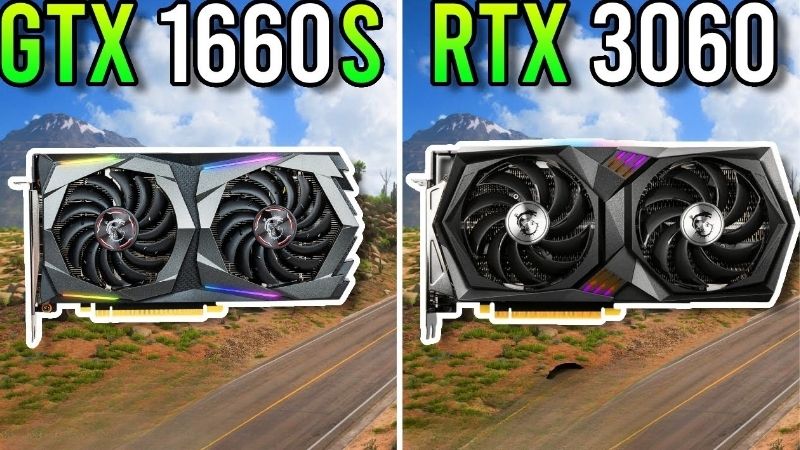
1660 Super vs 3060 is usually asked by someone with a 1660 Super and a 1080p monitor, quietly wondering whether the next upgrade could also be a resolution upgrade. That is the real question and almost nobody answers it. Comparison videos give you 1080p charts because that is where the 1660 Super lives, which tells you nothing about the thing you actually want to know: does moving to a 3060 let you move to 1440p, or are you buying a faster card for the same screen? This page answers that specifically, with both resolutions in the same table.
The Quick Verdict: 1660 Super vs 3060 in One Minute
The RTX 3060 is roughly 45-55% faster and has 12GB against the 1660 Super’s 6GB. But the honest answer to the 1440p question is: partly. A 3060 handles 1440p in esports comfortably and in modern AAA titles only at Medium settings with DLSS enabled. It is a 1440p card in the way a hatchback is a motorway car — it does it, and it is working. Your 1660 Super, by contrast, is a 1080p card with no path to 1440p at all. So the upgrade genuinely opens a door, it just does not open it all the way. If you were hoping to buy a 1440p 144Hz panel to go with it, read the tables below before you order the monitor.
As an Amazon Associate we earn from qualifying purchases at no extra cost to you.



The 1440p Question, Answered Honestly
2560×1440 is 78% more pixels than 1080p. That is the whole difficulty, and it is why a 50% faster card does not automatically become a 1440p card — the resolution increase eats more than the performance increase provides.
Concretely: a 3060 at 1440p High in a modern AAA title lands around 35-40 FPS native. With DLSS Quality it recovers to roughly 45-52. That is playable and it is not comfortable. At 1440p Medium with DLSS it clears 60 and becomes genuinely fine.
So the accurate framing is that the 3060 is a 1440p-capable card at Medium settings, and a very good 1080p card at High. Your 1660 Super is neither — at 1440p it does not reach 30 FPS in anything modern, and its 6GB compounds it.
Who Should Make This Upgrade
If you are getting stutter rather than low frame rates at 1080p, upgrade now regardless of the monitor question. That stutter is your 6GB buffer overflowing and it is unfixable in settings — the driver spills assets across PCIe into system RAM, producing second-long freezes that no average frame rate reveals.
Upgrade also if you touch AI work. Stable Diffusion, local models, CUDA coursework — the 1660 Super has zero tensor cores, not fewer, none, and 6GB will not load what 12GB will. This is a capability gap rather than a speed one.
And upgrade if you stream. Ampere’s newer NVENC block is visibly better than Turing’s older encoder at the same bitrate.
Who Should Keep the 1660 Super
If your library is CS2, Valorant, Rocket League and older single-player titles at 1080p, your card is fine. The 1660 Super clears 120+ FPS in all of them and 6GB never binds at those settings. The upgrade would buy you frames a 144Hz panel cannot show.
Keep it also if you are within eighteen months of a bigger jump. Moving 1660 Super to 3060 buys you a tier; waiting and jumping to a 5060 buys you two, plus Frame Generation, plus a warranty.
Specs and Frame Rates at Both Resolutions
The specification table first. Note the bandwidth row — it is the one that surprises people about the 1660 Super.
Core Specifications Side by Side
| Specification | GTX 1660 Super | RTX 3060 12GB |
|---|---|---|
| Architecture | Turing (TU116) | Ampere (GA106) |
| Launch year / MSRP | 2019 / $229 | 2021 / $329 |
| CUDA cores | 1,408 | 3,584 |
| Boost clock | ~1.79 GHz | ~1.78 GHz |
| VRAM | 6GB GDDR6 | 12GB GDDR6 |
| Memory speed | 14 Gbps | 15 Gbps |
| Memory bus | 192-bit | 192-bit |
| Bandwidth | 336 GB/s | 360 GB/s |
| Tensor cores | None | 112 |
| TDP | 125W | 170W |
| PSU recommended | 450W | 550W |
The bandwidth row is the interesting one. 336 GB/s against 360 — only 7% apart, from cards two years and a full architecture removed. The 1660 Super’s 14 Gbps memory was unusually fast for its class and it is why the card punched above its price for years.
That also means the 3060’s advantage is almost entirely shader count and memory capacity, not bandwidth. Which matters for the 1440p question: at higher resolutions, bandwidth is what carries you, and here the 3060 has barely any more of it. This is a large part of why the 3060 is a Medium-settings 1440p card rather than a High-settings one.
1080p and 1440p Side by Side
The table that answers your actual question. High preset, no upscaling, both resolutions.
| Game | 1660 Super @1080p | 3060 @1080p | 3060 @1440p |
|---|---|---|---|
| Counter-Strike 2 | ~185 FPS | ~205 FPS | ~145 FPS |
| Valorant | ~230 FPS | ~240 FPS | ~175 FPS |
| GTA V Enhanced | ~95 FPS | ~98 FPS | ~68 FPS |
| Elden Ring | ~46 FPS | ~57 FPS | ~40 FPS |
| Cyberpunk 2077 | ~37 FPS* | ~55 FPS | ~36 FPS |
| Hogwarts Legacy | ~32 FPS* | ~54 FPS | ~37 FPS |
| Black Myth: Wukong | ~24 FPS* | ~42 FPS | ~28 FPS |
Read the last column against the first. In esports, the 3060 at 1440p still beats your 1660 Super at 1080p — 145 against 185 is a drop, but 145 saturates most panels anyway. That is the good news and it is real: for competitive titles, this upgrade genuinely buys you a resolution.
Now the bottom three rows. The 3060 at 1440p lands at 28-37 FPS, which is roughly what your 1660 Super manages at 1080p today. In modern AAA titles, upgrading and moving to 1440p leaves you exactly where you started. That is the finding that decides whether you should buy that monitor, and no comparison chart will show it to you.
Add DLSS Quality and those figures recover to roughly 36-48 — playable, not comfortable. Drop to Medium and 1440p works properly.
What the Upgrade Actually Costs
The number nobody calculates. A working 1660 Super still sells on the used market, because used prices are anchored by a new market that has stopped falling. Subtract that from a used 3060 and the net cost typically lands around $100-140.
Then add what nobody mentions. Your 1660 Super runs on a 450W supply; the 3060 wants 550W. If you are on a basic unit, budget $60-80. Thermal paste on a used 3060: $15. And if you are also buying a 1440p monitor, add $200-300 for a decent 144Hz panel.
So the honest total for “upgrade and move to 1440p” is $315-535, not $100. That is a different decision from the one most people think they are making.
Deep Dive: What You Gain and What You Do Not
Three areas separate these cards, and one of them is routinely oversold to people making exactly this upgrade.
The 6GB Wall Is the Real Reason to Move
Set the resolution question aside, because this is what actually justifies the money.
6GB at 1080p High is insufficient in a growing number of 2026 titles. The failure mode is not a lower frame rate — it is second-long freezes and textures resolving visibly late as you turn. Your 1660 Super averages 32 FPS in Hogwarts Legacy while its 1% lows drop below 15. The average says “slow”. The experience says “broken”.
The 3060’s 12GB ends that permanently, at 1080p and at 1440p Medium alike. That is worth $100-140 on its own, independent of any monitor you may or may not buy.
DLSS, Frame Generation and the FP8 Catch
The 3060 has 112 tensor cores; your 1660 Super has none. DLSS on your current card is not slow, it is architecturally impossible, permanently, in every game.
But two caveats matter before you buy for this reason. First: the RTX 3060 does not have Frame Generation and never will. That needs Ada’s optical flow accelerator, hardware Ampere does not contain. If Frame Generation is what you actually want, you need a 4060 or newer and this is the wrong upgrade.
Second: DLSS 4.5’s newer models — M and L — rely on native FP8, which Ampere lacks. Nvidia’s own guidance is that RTX 30 series owners should generally stay on Model K, the DLSS 4.0 model. So you gain DLSS, and you gain a two-generation-old version of it at full benefit. Roughly 30% recovered at 1080p Quality — real, but not what the marketing implies.
Pros and Cons of Each Card
| GTX 1660 Super | RTX 3060 12GB | |
|---|---|---|
| Pros | 336 GB/s is only 7% behind the 3060; ties in esports at 1080p; 125W on a 450W PSU; you already own it; nothing to buy | 12GB ends the stutter; 45-55% faster in modern titles; 1440p viable at Medium; 112 tensor cores for DLSS and AI; better NVENC; real resale value |
| Cons | 6GB is the hard wall; zero tensor cores means no DLSS ever; no 1440p path at all; 1% lows collapse in new titles; near-zero resale | Only 7% more bandwidth, which caps it at 1440p; no Frame Generation ever; no FP8 for DLSS 4.5’s best models; 170W may force a PSU upgrade; AI buyers inflate its used price |
The 3060’s first con is the one relevant to your question. It is a 12GB card on a 192-bit bus with 1660 Super-class bandwidth. That combination is exactly why it survives 1440p at Medium and struggles at High.
The Used Market and What It Means for You
Both sides of this transaction — what you pay and what you sell for — are set by a market that has stopped behaving normally.
Why the 1660 Super Still Sells for Real Money
Component and laptop prices have kept trending upward rather than settling back, and entry-level new cards absorbed the sharpest share because memory is a large fraction of what they cost to build. When the cheapest acceptable new card refuses to drop below launch pricing, every used card beneath it is held up by it.
The 1660 Super was one of the best-selling budget cards of its era, which means the used supply is enormous — and it still has not become cheap. That tells you the anchor is real rather than a supply artefact. Its price is set from above, not by its age or its abundance.
The useful half for you: that same anchor means your card fetches more than a 2019 budget GPU has any right to, which lowers the net cost of moving. The mechanism that hurts you as a buyer helps you as a seller.
Prices Flattened, But Relief Is Years Out
The good news is genuine and deserves precision rather than optimism. The steep climb of late 2025 has eased. Framework, which publishes unusually candid component pricing updates, has described a stretch of relative stability while still warning that volatility has not ended. Stabilisation is not a decline.
New capacity is coming. OEMs can now source DDR5 from Chinese manufacturers such as CXMT, and Micron is building two fabs in Idaho. Both add real supply. Neither runs before 2027-2028 — two GPU generations away, by which point a 3060 will be the card you are upgrading from.
So there is no arrival date for the discount. Decide on today’s numbers.
The Alternative: If 1440p Is the Actual Goal
Here is the honest recommendation if the monitor is what you really want. The 3060 will disappoint you at 1440p in modern titles — the tables above show it landing at 28-37 FPS, which is where your 1660 Super sits at 1080p today.
If 1440p High is the goal, the entry point is genuinely the RX 9070 or RTX 5070 tier, and that is a different budget. If 1440p Medium is acceptable, the 3060 works and the upgrade is fine. And if you are spending money anyway, a new RTX 4060 gets you Frame Generation, 115W so no PSU concern, and a warranty — against a used 3060 with none of those.
Compare current used 3060 listings against new 4060 and 5060 pricing, and check what your 1660 Super currently fetches — those three numbers move independently, and the gap to a warrantied new card is frequently smaller than people assume.
See More:
- GTX 1650 vs RTX 3050
- Nvidia DIGITS
- Nvidia cuDNN
- Radeon RX 9070 XT vs RTX 5090
- PNY GeForce RTX 5080 review
Final Verdict: 1660 Super vs 3060
The 1660 super vs 3060 upgrade is worth making if you are getting stutter rather than low frame rates — that is your 6GB buffer, it is not fixable in settings, and the 3060’s 12GB ends it permanently. At a net cost of $100-140 after selling your card, that is money well spent for a machine that stays sensible until 2028.
But answer the 1440p question honestly before you buy a monitor. The 3060 makes 1440p possible at Medium settings and in esports, where it still beats your current card at 1080p. In modern AAA titles at 1440p High it lands at 28-37 FPS — right back where you are today. Its bandwidth is only 7% above your 1660 Super’s, and at higher resolutions bandwidth is what carries you. If 1440p High is the real goal, save for the RX 9070 or RTX 5070 tier instead. With prices flat rather than falling, there is no reward for waiting — but there is also no sense in buying a card for a resolution it cannot properly serve.
Frequently Asked Questions
Is 1440p realistic on either card in 2026?
The RTX 3060 12GB can do 1440p in most titles at medium to high settings with DLSS quality mode, landing in the 50 to 70fps range in modern games. The GTX 1660 Super has only 6GB, no tensor cores and no DLSS, so 1440p means low settings and frequent dips below 45fps in anything demanding.
How big is the raw performance gap?
The RTX 3060 is roughly 30 to 40 percent faster at 1080p and pulls further ahead at 1440p as bandwidth and VRAM pressure rise. The 3060 has 192-bit GDDR6 at 360GB/s against 336GB/s on the 1660 Super, but the bigger advantages are twice the memory capacity and the Ampere shader architecture.
Does DLSS alone justify the upgrade?
For many players it does. DLSS quality mode at 1440p typically adds 30 to 45 percent frame rate with little visible cost, and DLSS is now in hundreds of titles. The 1660 Super can only use FSR, which works but is a spatial or temporal fallback that looks softer at the same internal resolution.
What are the power and PSU differences?
The 1660 Super is a 125W card with a single 8-pin and runs on almost any 450W supply. The RTX 3060 is 170W, also with a single 8-pin or 12-pin on some models, and Nvidia recommends 550W. Ampere cards are also known for brief transient spikes, so an older or cheap 500W unit can trip.
Is the 3060 worth paying for on the used market?
If the price gap is under about 60 dollars, yes without hesitation, mainly for the 12GB buffer that will outlast the card compute ability. If the gap is over 100 dollars, look at an RTX 3060 Ti, a used RX 6700 XT or a new Arc B580 instead, all of which offer more performance per dollar.








Write Your Review
No reviews yet. Be the first to share your experience!