
- Top Pick: Nvidia GeForce GTX 1070 Founders Edition (Renewed)
- Best Value: Nvidia Geforce RTX 2060 Super Founders Edition Graphics Card (Renewed)
- Premium Choice: SPEECH AI AND MULTIMODAL MODELS WITH NVIDIA NEMO: Build automatic speech recognition, text-to speech, and vision-language systems with production-grade neural models
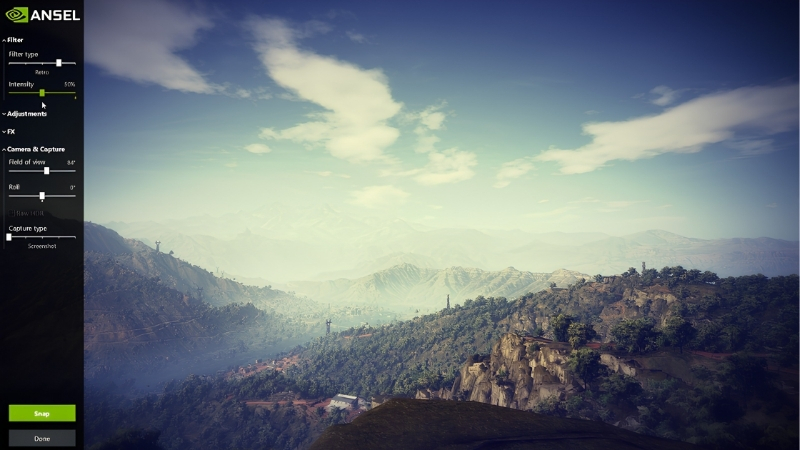
NVIDIA Ansel is the tool that turns a routine screenshot into an actual photograph, letting you freeze the action, move a free camera anywhere in the scene, and capture your game at resolutions far beyond your monitor. If you love hunting for the perfect in-game shot, it is one of the more genuinely creative features on a GeForce card. This review explains what Ansel does, where to find it in the current NVIDIA software, which games support it, and whether it is still worth using today, based on how photography-minded players describe the results they get.
What NVIDIA Ansel Does and Where to Find It
Ansel began as a dedicated in-game photography mode and its capabilities now live inside the NVIDIA App overlay, sitting alongside game filters and photo capture. The core idea has not changed: pause the game, detach the camera, compose like a photographer, and capture at extraordinary quality. Understanding the toolkit before you launch it is what separates a throwaway screenshot from a frame worth printing. Here is what the feature actually gives you.
As an Amazon Associate we earn from qualifying purchases at no extra cost to you.






The Free Camera and Super Resolution Capture
The headline tool is the free camera. In a supported game, Ansel pauses the action and lets you fly the viewpoint around the scene, above, behind, or into places the normal camera never goes, so you can frame a shot exactly how you want it.
Super Resolution capture is the other standout. It renders the screenshot at a multiple of your display resolution, so even a 1080p monitor can produce an image with far more detail than the screen shows, ideal for wallpapers or prints.
Together these turn screenshotting from a lucky button-press into deliberate composition, which is the whole appeal for players who treat games as a photographic canvas.
The super resolution numbers are worth appreciating. Depending on the game and your GPU, Ansel can render a capture several times larger than your screen in each dimension, producing images with pixel counts far beyond a standard 4K screenshot. That extra resolution is what lets a shot survive cropping, printing, or use as a high-resolution wallpaper without looking soft. It is also why the feature leans on your graphics card so heavily, since the GPU briefly renders a frame far larger than anything it draws during normal play.
Filters, 360, and Special Capture Modes
Ansel includes adjustable filters and post-processing, exposure, contrast, color, and creative looks, applied live before you capture, so you tune the mood of a shot without external editing. It overlaps with NVIDIA’s Freestyle filters in the same overlay.
Special modes extend what you can capture: 360-degree panoramas for VR viewers and high-dynamic-range output in supported titles. These are niche but powerful for the right project.
For most users, the practical value is the combination of a free camera plus filters, enough to produce striking images without ever leaving the game.
How to Launch Ansel and the Overlay
You open Ansel through the NVIDIA App in-game overlay using its hotkey, then select the photo or Ansel mode if the game supports it. The in-game overlay must be enabled first, or the option will not appear.
From there you compose with the free camera, apply filters, choose a capture quality including super resolution, and save. The workflow is quick once you know it, though the first launch can be unintuitive if you do not know the overlay hotkey.
If the mode is greyed out or missing entirely, that almost always means the specific game does not support Ansel, which the next section addresses.
Which Games Support Ansel and How Well
Ansel is not universal; it only works in titles that specifically integrate it, and support quality varies from full free-camera control to none at all. Knowing which games qualify, and how their built-in photo modes compare, saves the frustration of launching the overlay only to find nothing happens. This section covers how to find supported games and how Ansel stacks up against native photo modes.
Finding Ansel-Enabled Games
Support is per-game and depends on the developer integrating Ansel. NVIDIA maintains a list of Ansel-enabled titles, and many major single-player games from recent years include it, while multiplayer titles often omit it to prevent unfair camera exploits.
The quickest test is simply launching the overlay in your game and checking whether the photo or Ansel mode activates. If it does not, the title is not supported and no setting will change that.
Newer games increasingly ship their own photo modes instead, which changes the calculus on how essential Ansel is today.
Native Photo Modes vs Ansel
Many modern single-player games now include built-in photo modes that rival or exceed Ansel, offering free cameras, filters, and depth-of-field tuned specifically for that game’s engine. Where a strong native mode exists, it often produces better-integrated results.
Ansel’s advantage is consistency and super resolution: it brings a familiar toolset to any supported game and can capture above your display resolution, which some native modes cannot. It also applies NVIDIA’s filter suite uniformly.
The realistic picture is that Ansel shines in games without a good native mode and in cases where you want ultra-high-resolution captures, while native modes have narrowed its lead in titles that include them.
There is also a consistency argument in Ansel’s favor. If you play many different games, learning one photography interface that behaves the same everywhere is easier than relearning a new photo mode for every title. Native modes are often more polished within their own game, but they are all slightly different, whereas Ansel’s controls and filters carry over. For a dedicated screenshot hobbyist who moves between titles, that uniformity is a quiet but genuine advantage the feature comparisons often overlook.
Pros and Cons Users Report
Because Ansel is free and creative rather than essential, its value depends heavily on how much you care about in-game photography. Weighing the enthusiast praise against the common gripes gives an honest sense of what to expect.
What users like: the free camera for impossible angles, super resolution captures that make stunning wallpapers, live filters that remove the need for editing, and the sheer creative fun of it. Screenshot hobbyists consistently call it a favorite feature.
What users criticize: limited and shrinking game support, an occasionally clunky first-time launch, redundancy with strong native photo modes, and no effect at all in unsupported or multiplayer titles. It is a joy where it works and simply absent where it does not.
Getting the Best Shots and Is Ansel Worth It
Ansel rewards a photographer’s mindset more than any setting, but a few habits and the right hardware noticeably raise the quality of what you capture. This final section shares practical tips for better in-game photos, the gear that makes those super-resolution shots worth taking, and a clear verdict on whether Ansel still earns a place in your workflow today.
Practical Tips for Better In-Game Photos
Treat it like real photography: mind your composition using the rule of thirds, use the free camera to find an angle the normal view cannot, and let the game’s lighting do the work by shooting at golden hour or during dramatic weather.
Go easy on filters. A subtle contrast and color adjustment usually beats a heavy preset, which can make a shot look artificial. And use super resolution for anything you plan to keep, since you can always downscale a large capture but never add detail to a small one.
Small deliberate choices here matter more than any hardware, though the right setup lets those choices reach their full potential.
One more habit pays off: capture the same scene a few times from slightly different angles and heights rather than settling on the first frame. Because Ansel pauses the game, there is no cost to experimenting, and the best shot is often the one you would not have found from the default camera position. Reviewing them afterward at full super-resolution size, where fine detail becomes visible, frequently changes which frame you thought was the keeper.
Hardware That Elevates Your Screenshots
Super resolution capture is GPU-intensive, since it renders far above your display resolution, so a stronger graphics card produces higher-quality captures with less slowdown and unlocks the biggest resolutions. On a modest card, the largest super resolution options can stutter or fail.
A high-resolution, color-accurate monitor also helps you compose and evaluate shots properly, and generous fast storage matters because ultra-high-resolution captures are large files that accumulate quickly. Together these turn Ansel from a fun toy into a serious capture pipeline.
If you want your in-game photography to reach its full quality, compare current prices on capable RTX graphics cards, high-resolution monitors, and fast storage through the links on this page.
See More:
- NVIDIA Broadcast vs OBS
- RTX HDR settings
- NVIDIA App download
- NVIDIA RTX Video Super Resolution
- GeForce Experience alternative
Final Verdict
Ansel remains worth using if you enjoy in-game photography and play titles that support it, especially for its free camera and super resolution captures that no ordinary screenshot can match. For that audience it is a delightful, creative feature.
If you mostly play multiplayer games or titles with strong native photo modes, Ansel matters less, and you may rarely reach for it. Its value is real but increasingly specific to the games and the mindset you bring to it.
In the end, NVIDIA Ansel is a genuinely creative tool for anyone who sees games as photographs waiting to happen, offering a free camera, live filters, and super resolution captures in every title that supports it. Its reach has narrowed as native photo modes improved, but where it works it still delivers shots your monitor alone could never show. If you want those captures at their best, check the recommended graphics cards, monitors, and storage through the links here to give your in-game photography the hardware it deserves.
Top-Rated Picks


| Product | Brand | Rating | Reviews | Price |
|---|---|---|---|---|
| ARCTIC MX-4 (4 g) – Premium Performance Thermal Paste… | ARCTIC | ★ 4.8 | 104k | $4.99 |
| ARCTIC MX-4 (incl. Spatula, 4 g) – Premium Performanc… | ARCTIC | ★ 4.8 | 71.9k | $5.49 |
| Crucial 8GB DDR4 RAM 3200MHz (PC4-25600), Downclockab… | Crucial | ★ 4.8 | 62.8k | $74.99 |
| AMD Ryzen 5 5600X 6-core, 12-thread unlocked desktop … | — | ★ 4.8 | 30.2k | $177.60 |
| NVIDIA Shield Remote; Voice Search, Motion-Activated,… | — | ★ 4.7 | 10.6k | $25.99 |
Frequently Asked Questions
Is Ansel still available in 2026?
The classic Ansel overlay has been folded into the NVIDIA app’s game filters and photo mode functionality, and GeForce Experience, its original host, has been retired. Supported titles still expose free-camera capture, but the feature set now lives under the NVIDIA app overlay rather than a separately branded Ansel panel.
Which games support it?
Support requires developer integration, so the list is limited to titles that added it, including many NVIDIA-partnered releases such as Cyberpunk 2077, Witcher 3 and various Ubisoft games. In non-integrated titles you can still apply filters and take high-resolution screenshots, but the detached free camera is unavailable.
What is super resolution capture and what does it cost?
It renders the scene in tiles at a multiple of your display resolution and stitches them into a single enormous image, sometimes exceeding 30 times native pixel count. Capture is slow and memory-hungry, so expect several seconds of freeze and ensure you have both VRAM headroom and disk space for the resulting files.
Does using it risk an anti-cheat ban?
Photo mode and free camera are disabled in most multiplayer titles precisely because a detached camera would be an unfair advantage. Filters that only alter colour are usually permitted, but never force overlays into competitive games via unsupported methods, as that can be flagged by anti-cheat systems.
Are there better alternatives for game photography?
Third-party tools such as universal camera hooks offer deeper control in unsupported games, at some risk of instability. For supported titles, the built-in filters plus a game’s own photo mode remain the safest route, and shooting at a DLDSR resolution can yield sharper images than filters alone.











Write Your Review
No reviews yet. Be the first to share your experience!