
NVIDIA G-Sync Compatible is the label you keep seeing on monitor listings, and if you are about to buy a screen for your GeForce card, it is the single spec that decides whether your games look buttery smooth or plagued by tearing and stutter. The confusion is understandable: G-Sync, G-Sync Compatible, and G-Sync Ultimate are three different things, and not every monitor that claims variable refresh actually delivers a clean experience. This review cuts through it, explains how to check compatibility before you buy, covers what specs truly matter, and factors in today’s pricing climate so you can time the purchase well.
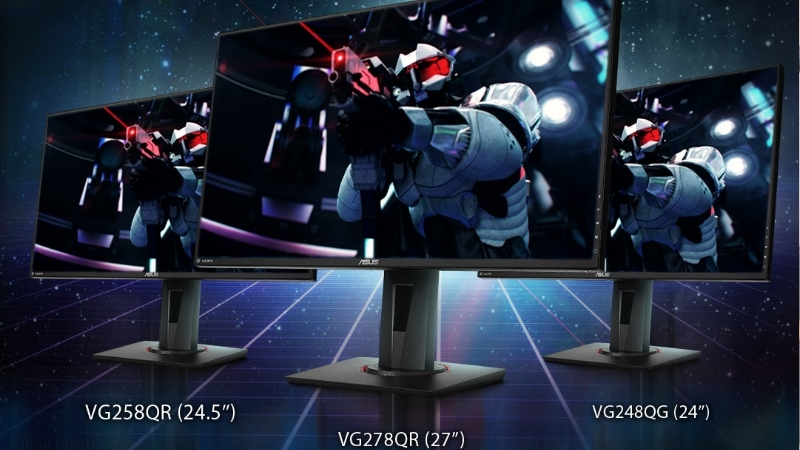
What G-Sync Compatible Means and How to Check
Before spending on a monitor, you need to know what the badge actually promises, because the three G-Sync tiers deliver noticeably different experiences at very different prices. G-Sync Compatible is the most common and affordable path, and for most gamers it is exactly what they should buy, but only if the specific model is verified to work well. Getting this right up front saves you from a screen that tears, flickers, or fails to sync at the frame rates you actually play at. Here is what the label means and how to confirm it.
As an Amazon Associate we earn from qualifying purchases at no extra cost to you.





G-Sync vs G-Sync Compatible vs G-Sync Ultimate
The three tiers matter for your wallet and your experience. Native G-Sync monitors contain a dedicated NVIDIA hardware module, which adds cost but guarantees a wide variable refresh range and strict quality control. G-Sync Ultimate is that module plus high-brightness HDR and premium panels, the top and most expensive tier.
G-Sync Compatible is different: these are VESA Adaptive-Sync (FreeSync) monitors that NVIDIA has tested and validated to run G-Sync’s variable refresh over DisplayPort without a hardware module. They are far cheaper and, when validated, deliver the same tear-free smoothness for the vast majority of players.
For most buyers, G-Sync Compatible is the sweet spot: near-identical results to native G-Sync at a fraction of the price. You only need the pricier tiers for specific high-end HDR or professional cases.
How to Check if a Monitor Is G-Sync Compatible
There are two reliable ways to verify. First, NVIDIA maintains an official list of validated G-Sync Compatible monitors; if a model is on it, NVIDIA has tested it and it will enable G-Sync automatically. This is the fastest, most trustworthy check before buying.
Second, even monitors not on the list often work, because any DisplayPort Adaptive-Sync display can usually run G-Sync Compatible mode; it just is not officially certified. In that case, results vary, and you rely on user reports for that exact model rather than a guarantee.
The practical rule: if it is on NVIDIA’s validated list, buy with confidence. If it is not but supports Adaptive-Sync over DisplayPort, it will probably work, but check owner feedback for flicker or a narrow sync range first.
Enabling G-Sync in the NVIDIA App
Once you have a compatible monitor, you enable the feature in the NVIDIA App or Control Panel section, under the display settings, where you turn on G-Sync for the connected screen. Validated monitors often enable it by default; unvalidated ones may need you to tick the box manually.
Connect over DisplayPort rather than HDMI for the broadest compatibility, since G-Sync Compatible operates over DisplayPort on most displays. Then confirm the refresh rate is set to the panel’s maximum in Windows.
A quick in-game test, watching for tearing during fast camera movement, tells you immediately whether it is working. If tearing persists, recheck the cable, the enabled toggle, and that the frame rate falls within the monitor’s variable range.
Choosing a G-Sync Compatible Monitor Today
Compatibility is only the entry ticket; a great gaming monitor also needs the right refresh rate, panel type, and variable refresh range, and today it needs to be bought with an eye on a pricing environment that has been anything but stable. This section covers the specs that genuinely affect your experience and the current buying climate, so you invest in the right screen at the right time rather than overpaying or buying the wrong panel. Here is what to weigh.
What Specs Actually Matter
Refresh rate is the headline: 144Hz is the practical sweet spot for smooth gaming, with 240Hz and beyond reserved for competitive players. A high refresh rate is where variable refresh technology like G-Sync Compatible pays off most, since it keeps that fast motion tear-free.
Panel type shapes the look: IPS for accurate color and wide viewing angles, VA for deeper contrast, and OLED for perfect blacks and the fastest response at a premium. Response time and a low input lag matter for fast games, while the variable refresh range, the span of frame rates over which G-Sync works, should be as wide as possible.
Resolution should match your GPU’s horsepower: 1080p for entry cards, 1440p as the current mainstream balance, and 4K only if your graphics card can drive demanding games at high frame rates. Buying a resolution your GPU cannot feed leads to disappointment no sync technology can fix.
Buying Timing: Component Prices and What to Expect
Timing matters right now more than usual, because PC hardware pricing has been volatile. Laptop and component prices have been trending upward, and while the steepest climbs of late 2025 have eased, the market has only stabilized rather than fallen. If you have been waiting for prices to drop before buying a monitor or refreshing the rest of your build, the honest picture is that meaningful relief is not imminent.
The reasons are structural. Memory in particular saw sharp increases, and although new supply is on the way, DDR5 sourcing from manufacturers like CXMT and Micron’s two new plants under construction in Idaho, those facilities are not expected to come online until 2027 to 2028. In other words, added capacity is coming, but it is years out, not months.
There are genuinely positive signs, they are simply modest and further off than buyers would like. Prices have stopped climbing at the pace they did through late 2025, and some manufacturers have noted a stretch of relative stability, even while cautioning that further swings remain possible. The takeaway for a monitor buyer is practical: a display itself is less exposed to the memory crunch than RAM or laptops, so a monitor purchase is comparatively safe to make now, but if your upgrade also involves memory or a new system, waiting for a price collapse is unlikely to be rewarded before 2027. Buying the parts you need when you need them, rather than holding out for relief that is structurally delayed, is the more realistic strategy in this climate.
For the specific case of a G-Sync Compatible monitor, this argues for buying the screen now if you need it, since panels are not the volatile category, while being clear-eyed that the surrounding components in a full upgrade may cost more than they did a year ago and are not about to plummet.
Pros and Cons of Going G-Sync Compatible
Choosing the G-Sync Compatible tier over native G-Sync is the right call for most, but it is still a trade worth understanding before you spend. Here is the balanced view drawn from how owners describe living with these monitors.
Pros: dramatically lower cost than native G-Sync for near-identical smoothness, a huge selection of validated models across every price point, and cross-compatibility since these panels also work with AMD FreeSync. For the money, it is the best-value way to get tear-free gaming.
Cons: unvalidated models can show flicker or a narrower sync range, results are not guaranteed off the official list, and the very best HDR experiences still favor the pricier G-Sync Ultimate tier. For most gamers these caveats are minor, but they are real.
Getting the Best Experience and Final Recommendation
With compatibility, specs, and timing settled, the last step is matching the monitor to your specific GPU and picking a model that fits your budget and games. A great screen paired with an underpowered card, or vice versa, wastes money on both ends. This final section covers how to balance the pairing and which types of G-Sync Compatible monitors make sense for different players, then the bottom line. Here is how to close it out.
Matching the Monitor to Your GPU
The monitor and GPU are a pair, not separate purchases. There is no point buying a 240Hz 4K panel if your card can only push 60 frames in the games you play; you would pay for capability you cannot use. Match the resolution and refresh rate to what your GPU can actually deliver.
A mid-range RTX card pairs beautifully with a 1440p high-refresh G-Sync Compatible monitor, the current mainstream sweet spot. Entry cards are happier at 1080p high-refresh, while only the strongest GPUs justify 4K high-refresh panels.
Getting this balance right is where G-Sync Compatible feels its best, because the variable refresh smooths out exactly the frame-rate fluctuations that a well-matched pairing produces.
Recommended G-Sync Compatible Monitors to Consider
For most gamers, a validated 1440p IPS monitor at 144Hz or higher hits the ideal balance of sharpness, speed, and value, and there are many on NVIDIA’s list at competitive prices. Competitive players should look at high-refresh 1080p or 1440p panels prioritizing response time, while those wanting the best image can step up to a G-Sync Compatible OLED.
Whatever tier you choose, prioritize models on NVIDIA’s validated list for a guaranteed experience, and match the resolution to your graphics card. That combination delivers the smooth, tear-free gaming the technology promises.
Ready to upgrade your screen? Compare current prices, refresh rates, and panel types on validated G-Sync Compatible monitors through the links on this page to find the right fit for your GPU and budget.
See More:
- NVIDIA Broadcast vs OBS
- RTX HDR settings
- NVIDIA App download
- NVIDIA RTX Video Super Resolution
- GeForce Experience alternative
Final Verdict
G-Sync Compatible is the smart buy for the vast majority of GeForce owners, delivering the same tear-free smoothness as native G-Sync at far lower cost, provided you choose a validated model and match it to your GPU. For most people, the pricier tiers are unnecessary.
Verify the model on NVIDIA’s list, connect over DisplayPort, enable it in the NVIDIA App, and pair it sensibly with your card. Do that and you get the full benefit of variable refresh without overspending on a hardware module you do not need.
Choosing an NVIDIA G-Sync Compatible monitor comes down to verifying the model on NVIDIA’s validated list, matching its resolution and refresh rate to your GPU, and buying at the right time in a market where component prices have stabilized but not fallen. Panels are the safer purchase to make now, so if you need a screen, there is little reason to wait. Compare the current deals on validated G-Sync Compatible monitors through the links here to lock in smooth, tear-free gaming for your setup.
Top-Rated Picks


| Product | Brand | Rating | Reviews | Price |
|---|---|---|---|---|
| Sceptre Prime Curved 30-inch Gaming Monitor 200+Hz Fr… | SceptreInc | ★ 4.6 | 255 | $175.97 |
| INNOCN 49" Curved Gaming Monitor 144Hz Ultrawide 32:9… | INNOCN | ★ 4.5 | 244 | $499.96 |
| Kado Trio Monitor 3-Pack 27" Curved 1500R 1920×1080 7… | Kado | ★ 4.7 | 61 | $299.89 |
| Kado 3-Pack Trio 27" Curved 1500R 1920×1080 75Hz FHD … | Kado | ★ 4.4 | 65 | $289.89 |
| ASUS TUF Gaming Series 5 24.5” 1080P Gaming Monitor (… | — | ★ 4.5 | 27 | $199.00 |
Frequently Asked Questions
What does G-Sync Compatible actually mean?
It marks a VESA Adaptive-Sync or FreeSync monitor that NVIDIA has tested and certified to run variable refresh without flickering, blanking or artefacts. There is no dedicated G-Sync module inside, so you avoid the price premium, but you also miss module-exclusive features such as variable overdrive tuning on some panels.
How do I enable it on an uncertified monitor?
Turn on FreeSync or Adaptive-Sync in the monitor’s own menu first, then open the NVIDIA Control Panel, select Set Up G-SYNC, tick Enable G-SYNC for windowed and full screen mode, and check Enable settings for the selected display model. Uncertified panels often work fine; test for flicker in dark scenes.
Do I need DisplayPort or will HDMI work?
DisplayPort is the safest choice and supports adaptive sync across all generations. HDMI variable refresh rate works on many recent monitors and televisions with HDMI 2.1 and Turing or newer GPUs, but older HDMI 2.0 panels typically require DisplayPort. Use a certified cable rated for your resolution and refresh rate.
What is LFC and why does the refresh range matter?
Low Framerate Compensation repeats frames when your fps drops below the panel’s minimum refresh, keeping the experience smooth. It requires the maximum refresh to be at least roughly 2.4 times the minimum, so a 48-144Hz panel handles low frame rates gracefully while a narrow 90-144Hz range does not.
Should I still enable V-Sync alongside G-Sync?
Yes, in the control panel only. With G-Sync active, control-panel V-Sync acts as a safety net that prevents tearing if frame rate briefly exceeds the refresh ceiling, and it adds no latency while you stay inside the variable range. Keep in-game V-Sync off and cap frame rate a few below maximum refresh.











Write Your Review
No reviews yet. Be the first to share your experience!