
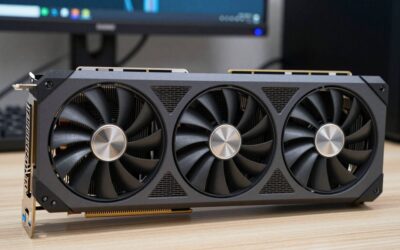
- Top Pick: msi Gaming GeForce RTX 3090 24GB GDRR6X 384-Bit HDMI/DP Nvlink Tri-Frozr 2 Ampere Architecture OC Graphics Card (RTX 3090 Gaming X Trio 24G)
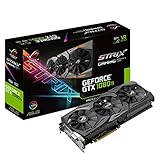
- Best Value: ASUS ROG STRIX GeForce GTX 1080 TI 11GB VR Ready 5K HD Gaming Graphics Card (ROG-STRIX-GTX1080TI-11G-GAMING) (Renewed)
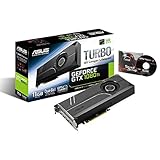
- Premium Choice: ASUS GeForce GTX 1080 TI 11GB Turbo Edition VR Ready 5K HD Gaming HDMI DisplayPort PC GDDR5X Graphics Card TURBO-GTX1080TI-11G (Renewed)
mobile gpu vs desktop gpu is the spec debate that decides whether you spend your money on a gaming laptop or a tower this year. The short answer: a desktop card almost always pushes more raw frames, but in 2026 the gap is narrower, more power-dependent, and more situational than a spec sheet alone can show. This comparison breaks the difference down by measurable performance, by the thermal and wattage limits that actually cause it, and by the market conditions that should influence what you buy right now.
As an Amazon Associate we earn from qualifying purchases at no extra cost to you.



The Quick Verdict on Mobile GPU vs Desktop GPU
If you only read one section, read this one. For maximum frames per dollar and long-term upgradability, a desktop GPU wins. For anyone who needs the same machine to game, travel, and work in one bag, a laptop GPU is the rational pick even though it trades away a measurable slice of performance. The decision is less about which chip is “better” and more about which constraint you are willing to accept: a fixed location, or a fixed power budget.
Who Wins on Raw Frames
On identical silicon names, the desktop part is the stronger performer. A desktop card runs at a higher sustained board power and clears more frames per second at the same resolution, often by 25 to 45 percent depending on the title and the laptop’s cooling.
The reason is not branding. It is wattage. A desktop card can draw well over 300 watts; the laptop variant of the same name is frequently capped at 80 to 175 watts. Fewer watts means lower sustained clocks, which means fewer frames, even when the core counts look comparable on paper.
Real numbers make this concrete. At 1440p, a desktop card in the upper-mid tier can hold a comfortable lead of roughly 30 to 40 frames per second over its laptop namesake in demanding titles, simply because it sustains higher clocks without throttling. The gap shrinks at lower settings where neither card is fully stressed, but it never fully disappears.
Who Wins on Value and Portability
A desktop wins on value per frame. You pay less for the same performance tier, you can reuse the case, power supply, and storage across upgrades, and you can swap only the GPU two years from now instead of replacing the whole system.
A laptop wins on the things a desktop physically cannot do. It runs on battery, fits in a backpack, and consolidates your gaming rig and your work machine into one device. For students, commuters, and people in small apartments, that consolidation is worth the frame deficit.
Quick Comparison Table
The table below distills the practical trade-offs so you can decide in seconds rather than reading every benchmark in this guide.
| Factor | Mobile GPU | Desktop GPU |
|---|---|---|
| Typical board power | 80–175 W | 200–450 W |
| Relative frames (same name) | Baseline | +25% to +45% |
| Value per frame | Lower | Higher |
| Upgradable later | Rarely | Yes |
| Portability | Excellent | None |
| Runs on battery | Yes | No |
If you already know which side fits your life, you can check current configurations and live pricing for both classes through the buying links in this article before stock and prices shift again.
Deep Dive Face-Off Between Laptop and Tower Graphics
Headline numbers hide the mechanism. To compare a mobile GPU vs a desktop GPU honestly, you have to look at the three levers that create the gap: power delivery, thermal headroom, and how each card scales when the manufacturer lets it stretch its legs.
Power Limits and Thermal Headroom
A desktop card sits in a large case with multiple fans and unrestricted airflow, so it can hold its boost clock for long sessions without throttling. A laptop forces the same class of chip into a chassis a few centimeters thick, where heat has nowhere to go.
That difference is measurable. Under a 30-minute load, a well-cooled desktop holds its clocks flat, while many thin laptops shed 5 to 15 percent of their clock speed as the heatsink saturates. The thicker the laptop and the better its vapor chamber, the smaller that loss becomes.
Performance Scaling and TGP
Two laptops with the exact same GPU name can perform very differently, and the variable that explains it is Total Graphics Power, or TGP. A higher TGP configuration feeds the chip more watts and produces more frames; a low-TGP “efficient” build does the opposite.
This is where buyers get caught. A laptop advertised only by its GPU name tells you almost nothing without the TGP figure. On desktop, this confusion barely exists, because the card is sold at its full rated power by default.
In practical terms, prioritize a laptop that lists a TGP near the top of its chip’s range and pairs it with a vapor chamber and dual or triple fans. That single habit recovers more real-world performance than jumping up a GPU tier inside a thin, low-power shell.
Pros and Cons of Each GPU Class
A clean trade-off list is the fastest way to see which compromise suits you. Both classes are genuinely good in 2026; they simply optimize for opposite priorities.
Mobile GPU pros: portable, all-in-one, battery capable, no separate monitor or peripherals required. Mobile GPU cons: capped wattage, thermal throttling under load, limited or no upgrade path, higher cost per frame.
Desktop GPU pros: highest sustained performance, best value per frame, fully upgradable, quieter under the same load thanks to bigger coolers. Desktop GPU cons: not portable, needs its own peripherals and desk space, and consumes far more wall power.
What Current Market News Means for GPU Buyers
Hardware decisions in 2026 are not made in a vacuum. Three developments are pulling laptop and desktop GPU prices in different directions at once, and understanding them helps you time a purchase instead of overpaying out of panic.
Rising Laptop and Component Prices
Laptop and component prices have been trending upward, driven heavily by memory costs feeding into finished systems. For mobile GPUs this matters more than for desktops, because a laptop is a sealed bundle: when memory and panel costs climb, the whole machine gets pricier and you cannot offset it by reusing old parts.
The practical takeaway is that the value gap favoring desktops widens when component prices rise. A tower lets you buy the GPU now and add the rest gradually, spreading the cost; a laptop forces you to absorb every increase in a single sticker price. If you are budget-sensitive, this alone can tip a borderline decision toward desktop, since you control the timing of each component purchase rather than paying one inflated bundle price up front.
The Nvidia H200 Export Approval and AI Demand
The United States has cleared Nvidia to sell the H200, one of its most powerful AI accelerators, to China. On the surface this is data-center news, but it ripples down to consumers because it confirms that AI demand, not gaming, now sets the priority for advanced memory and packaging capacity.
When the same supply chain that builds gaming GPUs is pulled toward high-margin AI parts, consumer cards compete for what is left. For a buyer choosing between a mobile GPU vs a desktop GPU, the signal is simple: do not assume aggressive consumer price cuts are coming soon, because the most valuable capacity is being routed elsewhere.
Why Real Price Relief Is Still Far Off
There is genuine good news, but it is weak and distant. Prices have stopped climbing as steeply as they did in late 2025, and parts of the supply chain have logged a stretch of relative stability, though vendors still warn of volatility ahead.
New supply is opening up as well: makers can source DDR5 from Chinese suppliers such as CXMT, and Micron is building two plants in Idaho. But those plants are not expected to run until 2027 to 2028. In short, prices have only flattened, not fallen, and meaningful relief is years away, which argues for buying the configuration you actually need now rather than waiting for a discount that may not arrive.
The Alternative and Final Recommendation
Not everyone fits cleanly into the laptop or desktop camp. If both the top mobile chip and a flagship tower feel like too much money or too much commitment, there is a sensible middle path worth considering before you decide.
A Practical Middle-Ground Alternative
If raw power tempts you but portability still matters occasionally, a mid-tier laptop paired with an external GPU enclosure or a compact small-form-factor desktop bridges the two worlds. You keep a portable machine for travel and add desktop-class graphics at home.
This route costs more than committing fully to one side, and the external-GPU path carries a bandwidth penalty over a true internal card. But for people who genuinely split time between travel and a fixed desk, it removes the hardest part of the decision.
Who Should Choose a Mobile GPU
Choose a mobile GPU if you move between locations, share one device for play and work, or simply do not have room for a tower and a monitor. Prioritize models that publish a high TGP figure and use a thicker chassis with a vapor chamber, because those reclaim much of the lost performance.
For these buyers, the frame deficit is a fair price for a machine that goes everywhere. You can compare current high-TGP laptop configurations and pricing through the links here.
Who Should Choose a Desktop GPU
Choose a desktop GPU if your machine stays on a desk, you want the most frames per dollar, and you intend to upgrade in stages over the next few years. The tower rewards you with sustained clocks, quieter cooling, and a clear upgrade path that a sealed laptop cannot match.
If that describes you, it is worth securing a card sooner rather than later given the supply pressures above. You can review available desktop GPUs and live prices through the buying links provided.
See More:
- best gpu for stable diffusion
- best gpu for deep learning
- best gpu for ai training
- best gpu for ai
- best gpu for machine learning
Final Verdict
In the end, the mobile GPU vs desktop GPU question is answered by your constraints, not by raw numbers. A desktop delivers more frames per dollar and a real upgrade path; a mobile GPU trades a measurable slice of performance for a machine you can carry anywhere. With component prices flat but not falling and AI demand absorbing the best supply, the smartest move is to buy the class that matches how you actually live rather than waiting on relief that is still years out. Whichever side you land on, decide by your real workflow and resolution first, and let price timing be the tiebreaker. Use the links in this guide to compare current configurations and pricing before the next supply shift moves the market again.
Top-Rated Picks



| Product | Brand | Rating | Reviews | Price |
|---|---|---|---|---|
| ARCTIC MX-4 (4 g) – Premium Performance Thermal Paste… | ARCTIC | ★ 4.8 | 104k | $4.99 |
| ARCTIC MX-4 (incl. Spatula, 4 g) – Premium Performanc… | ARCTIC | ★ 4.8 | 71.9k | under $10 |
| Crucial 8GB DDR4 RAM 3200MHz (PC4-25600), Downclockab… | Crucial | ★ 4.8 | 62.8k | under $80 |
| AMD Ryzen 5 5600X 6-core, 12-thread unlocked desktop … | — | ★ 4.8 | 30.2k | under $200 |
| NVIDIA Shield Remote; Voice Search, Motion-Activated,… | — | ★ 4.7 | 10.6k | under $30 |
Frequently Asked Questions
Is a laptop GPU the same chip as the desktop version?
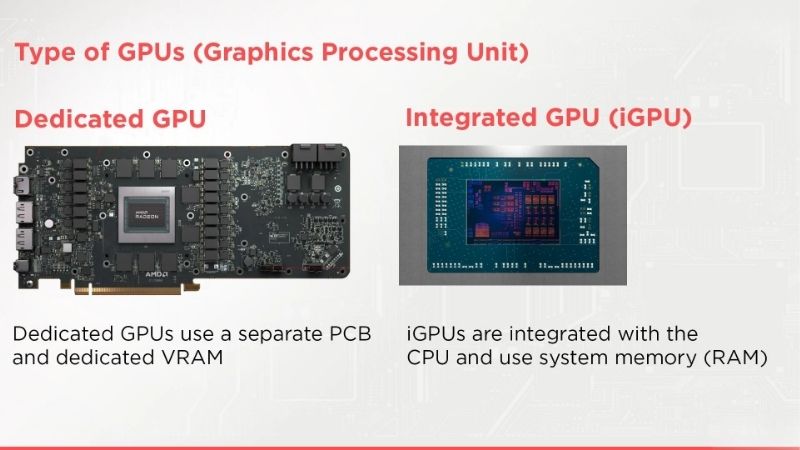
No. Despite shared model names, mobile parts frequently use a smaller die with fewer cores, a narrower memory bus and less video memory. A mobile seventy class chip, for example, is built on the same silicon that serves a lower desktop tier, which is the root of most buyer confusion.
How big is the real performance gap?
As a rough rule, a mobile chip performs about one desktop tier below its name, sometimes more in memory heavy or ray traced workloads. The gap widens at higher resolutions where bandwidth and video memory matter, and narrows in lighter esports titles that neither part struggles with.
Why can’t laptops match desktop performance?
Power and heat. A desktop card can draw three hundred watts or more into a large triple slot cooler with unrestricted airflow, while a laptop shares a limited thermal budget between the processor and GPU inside a few millimetres of chassis. Sustained clocks are consequently far lower.
Do laptops get less video memory too?
Often yes, and it is one of the most important differences. Several mobile tiers carry less memory than the desktop card sharing their name, which affects texture settings and ray tracing far more than a modest core speed deficit. Always check the memory figure rather than inferring it from the model.
Is a desktop plus a cheap laptop better value?
For pure performance per pound, almost always yes, and a desktop is also upgradeable, quieter and easier to repair. The laptop wins only when portability is a genuine requirement. Some buyers split the difference with a modest laptop plus an external GPU enclosure for use at the desk.
Ready to decide? Our #1 pick for 2026 is the Typical board power.
Live price & availability on Amazon.

Write Your Review
No reviews yet. Be the first to share your experience!