
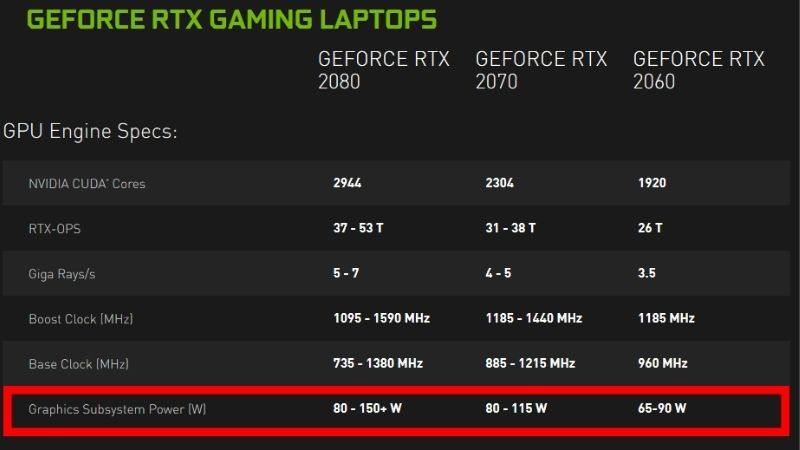
Laptop GPU tier list cuts through the noise of Nvidia’s sprawling mobile lineup by sorting every RTX chip into clear S, A, B, C, and D rankings. Rather than a dry spec table, a tier list tells you at a glance which cards lead, which offer the best value, and which to avoid for your goals. This 2026 ranking weighs raw performance, VRAM, DLSS generation, and real-world value across the RTX 30, 40, and 50 series, giving you a fast, opinionated map to the entire market.
How The Tier List Is Ranked
A useful tier list needs transparent criteria, so this section explains the logic before the rankings. Placement reflects more than raw frames, blending performance, longevity, and value into each chip’s grade.
As an Amazon Associate we earn from qualifying purchases at no extra cost to you.





The Criteria Behind Each Grade
Raw performance, measured through CUDA cores and real benchmark behavior, forms the backbone of each ranking. VRAM capacity and memory type weigh heavily, since they determine how long a card stays relevant at higher resolutions.
DLSS generation factors in as well, because frame generation and Multi Frame Generation meaningfully boost effective performance. Value relative to price nudges cards up or down, rewarding chips that punch above their cost.
Why Tiers Beat Raw Numbers
A tier list compresses a dozen overlapping specifications into a single intuitive grade, which is faster to act on than a spreadsheet. It captures the practical reality that a card’s worth is more than its core count alone.
This approach also accounts for cross-generation overlap, where a newer mid-tier chip outranks an older high-tier one. The grades reflect how the cards actually compete, not just where their names suggest they sit.
The DLSS And Architecture Weighting
The experimental dimension carries real weight here, since Blackwell’s DLSS 4 and Ada’s DLSS 3 extend a card’s effective lifespan. Newer architectures earn a placement bump for their access to Nvidia’s latest AI features.
This is why several RTX 50 chips rank above their raw-spec peers from earlier generations. Future driver optimization and feature support are part of a card’s true value, and the tiers reflect that trajectory.
The S And A Tiers: The Best Chips
The top grades belong to cards that lead in performance, features, or value with few compromises. These are the chips worth stretching for, whether you chase flagship power or smart high-end value.
S Tier: RTX 5090 And RTX 5080
The RTX 5090 laptop sits alone at the peak with 10,496 CUDA cores, 24GB of GDDR7, and DLSS 4, the uncontested king of mobile graphics. The RTX 5080 laptop joins S tier with 7,680 cores, 16GB of GDDR7, and the same Blackwell feature set, delivering near-flagship power with modern AI.
These chips target 4K gaming, high-refresh 1440p, and demanding creative workloads. Their combination of large VRAM buffers and DLSS 4 makes them the most future-proof options on the entire list.
A Tier: RTX 4090, RTX 5070 Ti And RTX 4080
The RTX 4090 laptop earns A tier as the former Ada flagship, with 9,728 cores and 16GB that still handle 4K, held back only by DLSS 3. The RTX 5070 Ti laptop lands here with 12GB of GDDR7 and DLSS 4, while the RTX 4080 laptop secures its place with 12GB and strong 1440p muscle.
These cards deliver excellent high-end performance without the absolute top price. The Blackwell 5070 Ti is the standout value of the group, pairing 12GB and DLSS 4 for buyers who want longevity at a lower flagship-adjacent cost.
The Value Verdict For The Top Tiers
The advantage of buying into S or A tier is headroom: these cards game comfortably for years and resist obsolescence thanks to ample VRAM and current DLSS support. They suit buyers who keep laptops long and play demanding titles.
The drawback is cost, since top-tier chips carry premiums that not every gamer needs to pay. For 1080p players, these tiers are overkill, and the value tiers below deliver a smarter spend.
The B, C And D Tiers: Value And Budget
The middle and lower grades hold the cards most buyers actually purchase, where value and budget take priority. These tiers reward matching the chip precisely to your resolution rather than overspending.
B Tier: RTX 5070, RTX 4070 And RTX 5060
The RTX 5070 laptop ranks in B tier with 4,608 cores, GDDR7, and DLSS 4, a strong 1440p entry with modern features. The RTX 4070 laptop sits alongside it on raw value, while the RTX 5060 laptop earns its place with 8GB of GDDR7 and DLSS 4 for future-ready 1080p play.
These chips define the mainstream sweet spot, handling 1080p effortlessly and 1440p capably. The shared 8GB buffer is their common ceiling, but their DLSS support keeps them competitive and well-rounded.
C Tier: RTX 4060 And RTX 3070 Ti
The RTX 4060 laptop anchors C tier as the value volume seller, with 3,072 cores, 8GB, and DLSS 3 for solid 1080p gaming. The older RTX 3070 Ti laptop lands here too, with 5,888 cores and 8GB but only DLSS 2, which limits its effective performance against newer rivals.
These cards remain perfectly capable for 1080p high-refresh play at friendly prices. The 4060’s DLSS 3 support gives it the edge over the Ampere 3070 Ti, making it the better long-term value despite fewer raw cores.
D Tier: RTX 4050 And RTX 3060
The RTX 4050 laptop occupies D tier with 2,560 cores and just 6GB of VRAM, suitable for budget 1080p and esports. The RTX 3060 laptop sits here with 6GB and DLSS 2 only, a once-popular chip now showing its age against modern options.
These entry cards serve the most cost-sensitive buyers who play lighter or competitive titles. Their 6GB buffers are the chief limitation, so they fit modest ambitions rather than demanding modern AAA gaming.
Final Thoughts On Using The Tier List
A tier list is most powerful when paired with awareness of pricing and a clear sense of your own needs. This closing section connects the rankings to the current market and a confident recommendation.
How Pricing And Supply News Shifts The Tiers
The market currently rewards decisive buyers. Gaming laptop prices have continued trending upward under tight memory supply, lifting machines at every tier of this list. The reassuring news is that the steep late-2025 climb has eased, with some makers reporting relative stability, though they caution volatility continues.
Genuine relief remains distant. Fresh DDR5 and GDDR supply is emerging from makers like CXMT, and Micron is building two plants in Idaho, but those will not ramp until 2027 to 2028. Because prices have plateaued rather than dropped, buying the right tier now beats waiting for cuts unlikely to arrive in 2026.
Picking Your Tier With Confidence
Match your grade to your resolution: D and C tiers for 1080p budget play, B tier for the 1080p-to-1440p sweet spot, and S and A tiers for 1440p maximum or 4K gaming. This keeps you from overpaying or underbuying.
Used this way, the tier list turns a confusing lineup into a confident decision. Ready to shop your tier? Explore current laptop deals across the rankings through the links on this page.
Pros And Cons Of Shopping By Tier List
The strength of a tier list is speed and clarity, distilling complex specifications into an instant verdict that prevents costly mistakes. It frames value as well as raw power, which raw spec sheets fail to do.
The limitation is that grades cannot capture every laptop’s TGP variation or the latest price swings. Treat the tier list as a sharp guide, then confirm wattage and current pricing for the specific machine you choose.
Top-Rated Picks



| Product | Brand | Rating | Reviews | Price |
|---|---|---|---|---|
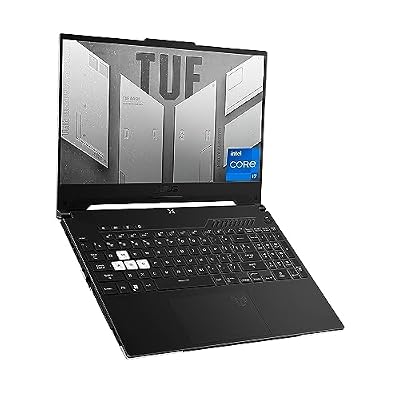
| ASUS TUF Dash 15 (2022) Gaming Laptop, 15.6" 144Hz FH… | — | ★ 4.5 | 1.5k | $995.00 |
| ASUS ROG Strix G16 Gaming Laptop, 165Hz Display, NVID… | — | ★ 4.5 | 1.1k | $1,600.00 |
| msi Raider 18" QHD+ 240Hz Gaming Laptop, Intel Core U… | — | ★ 4.5 | 1.1k | $4,789.00 |
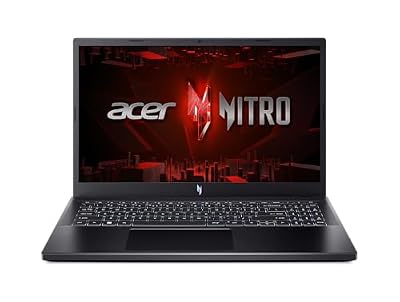
| Acer Nitro V Gaming Laptop | Intel Core i5-13420H Pro… | — | ★ 4.5 | 1.1k | $799.99 |
| ASUS ROG Strix G16 (2025) Gaming Laptop, 16” FHD+ 16:… | — | ★ 4.5 | 477 | $1,539.00 |
Frequently Asked Questions
Readers using this laptop GPU tier list frequently ask these questions about how the grades are assigned.
How is each GPU placed in a tier?
Placement blends raw performance, VRAM, memory type, DLSS generation, and value relative to price into a single grade.
This captures real-world competitiveness rather than ranking chips by their model names alone.
Why do some RTX 50 cards rank above older RTX 40 cards?
Newer Blackwell cards earn a placement bump for GDDR7 memory and exclusive DLSS 4 Multi Frame Generation.
Those features extend a card’s effective lifespan, which the tiers reward alongside raw performance.
Which tier is the best value?
The B tier, including the 5070, 4070, and 5060, tends to offer the strongest balance of price and capability for most gamers.
S and A tiers suit demanding 1440p and 4K players, while C and D tiers serve budget 1080p buyers.
Applying The Tier List To A Purchase
A tier list earns its value when it shapes a real buying decision, so this section turns the grades into practical steps. It connects the rankings to budgets and goals.
Pick A Tier By Resolution
Start by matching your resolution to a tier band: D and C for budget 1080p, B for the 1080p-to-1440p sweet spot, and S or A for 1440p maximum and 4K.
This keeps you from overpaying for unused power or settling below your real needs.
Confirm The Specific Laptop
Within a tier, compare laptops by TGP and cooling, since implementation heavily influences sustained performance. A grade sets the ceiling, not the guaranteed result.
Checking wattage is the step that distinguishes two machines carrying the same ranked GPU.
Factor In Features And Value
Finally, weigh DLSS generation and VRAM, which lifted several Blackwell cards above their raw-spec peers in these rankings. Those features add genuine longevity.
Used this way, the tier list becomes a fast, confident guide rather than a rigid verdict, pointing you to the smartest grade for your budget.
See More:
The Bottom Line
This laptop GPU tier list ranks the RTX 5090 and 5080 in S tier, the 4090, 5070 Ti, and 4080 in A tier, the 5070, 4070, and 5060 in B tier, the 4060 and 3070 Ti in C tier, and the 4050 and 3060 in D tier. The grades blend performance, VRAM, and DLSS generation with value, and with prices plateaued rather than falling, picking the tier that matches your resolution and buying now is the smartest way to use this ranking in 2026.











Write Your Review
No reviews yet. Be the first to share your experience!