
- Top Pick: Wentronic Y05 Wireless Bluetooth Headphone, Noise Cancelling, Starlight | Wireless Over-Ear Headphones, Hi-Res Audio, 48H Playtime, Built-in Mic, Comfort & Connectivity, Works with iOS, Android & PC
- Best Value: Wentronic Y01 Wireless Noise Canceling Headphones Bluetooth 5.3 Over Ear Headphones with Microphone, Hi-Res Audio, 48H Playtime, Foldable Comfortable Earpads,Compatible with iOS,Android,PC, Blue
- Premium Choice: Wentronic Y04 Wireless Over-Ear Headphones, Active Noise Cancelling, Purple | Wireless Bluetooth Headphones with 48H Playtime, Hi-Res Audio, Foldable & lightweight, Soft Ear Cushion All-Day for Comfort
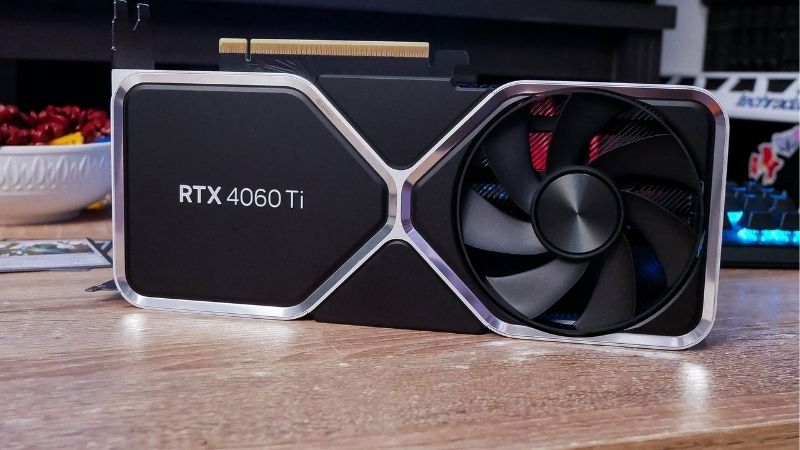
4060 ti vs 5070 is a question about arithmetic, not about silicon, and the arithmetic changes every week as clearance pricing moves. Here is the fixed part: the RTX 5070 is roughly 40% to 55% faster, carries 12 GB on a 192-bit bus against the 4060 Ti’s 128-bit path, and runs DLSS 4 Multi Frame Generation — which the 4060 Ti cannot, because that feature is Blackwell-exclusive at the hardware level. Here is the variable part: what each costs today. Any review video you find was filmed at prices that no longer exist. This comparison gives you the spec table, the real frame rates, and the exact price gap where the discount stops being worth it.
The Quick Verdict on 4060 Ti vs 5070
Buy the RTX 5070 unless the 4060 Ti is at least $170 cheaper. The performance gap is large enough that a modest discount does not close it, and the Multi Frame Generation exclusion means you would be buying a previous-generation Nvidia card while locked out of Nvidia’s headline feature. Below that threshold, the 4060 Ti becomes defensible — above it, it does not.
When the RTX 5070 Is the Buy
Choose the 5070 if you game at 1440p. Its 192-bit bus and roughly 672 GB/s of GDDR7 bandwidth are more than double the 4060 Ti’s 288 GB/s, and at 1440p that is exactly where the 4060 Ti’s narrow memory path runs out of road.
Choose it if you want DLSS 4 with Multi Frame Generation. Blackwell can generate up to three additional frames per rendered frame using a hardware flip metering unit; Ada is limited to single frame generation. This is silicon, not a driver gate, and the 4060 Ti will never receive it.
And choose it if you plan to keep the card three years. 12 GB against 8 GB is the difference between adjusting texture settings and not thinking about them.
When the 4060 Ti Discount Wins
Choose the 4060 Ti if the gap exceeds roughly $170 and you game at 1080p. At that resolution the memory bandwidth deficit matters far less, the 24 MB of L2 cache does its job, and you are pocketing real money for performance you would not have used.
Choose the 16 GB variant specifically if you find one discounted. It carries more VRAM than the 5070 — 16 GB against 12 GB — which matters for Blender, local AI work, or heavy texture mods even though it is slower in games.
Choose it also if your PSU is the constraint. The 4060 Ti draws 160W against the 5070’s 250W, and on a 500W supply that is decisive.
4060 Ti vs 5070 Spec Comparison Table
Read the bus width and frame generation rows. Those two lines explain both the performance gap and the feature gap.
| Specification | RTX 4060 Ti 8GB | RTX 4060 Ti 16GB | RTX 5070 |
|---|---|---|---|
| Architecture | Ada Lovelace | Ada Lovelace | Blackwell (current) |
| CUDA Cores | 4,352 | 4,352 | 6,144 |
| VRAM | 8 GB GDDR6 | 16 GB GDDR6 | 12 GB GDDR7 |
| Memory Bus | 128-bit | 128-bit | 192-bit |
| Bandwidth | ~288 GB/s | ~288 GB/s | ~672 GB/s |
| L2 Cache | 32 MB | 32 MB | 48 MB |
| Board Power | 160W | 165W | 250W |
| Power Connector | 1x 8-pin | 1x 8-pin | 1x 8-pin / 16-pin |
| Recommended PSU | 550W | 550W | 650W |
| Frame Generation | DLSS 3 FG only | DLSS 3 FG only | DLSS 4 + Multi FG |
| Encoder | NVENC 8th gen | NVENC 8th gen | NVENC 9th gen |
| Launch MSRP | $399 | $499 | $549 |
The bandwidth row is the headline. 672 GB/s against 288 is a 133% advantage, and it is why the 5070’s lead widens rather than narrows as resolution climbs. The 4060 Ti’s larger cache compensates at 1080p and stops compensating above it.
Deep Dive Face-Off: Where the Discount Stops Mattering
Aggregated across published benchmark suites, the gap is resolution-dependent in a way that maps precisely onto the memory subsystem — which makes it predictable rather than mysterious.
Frame Rates at 1080p and 1440p
At 1080p high settings the 5070 leads the 4060 Ti by roughly 35% to 45%. Both are comfortable 1080p cards — the 4060 Ti holds 80 to 120 fps in most modern titles — so a share of the 5070’s lead goes to frames a 60 Hz or 144 Hz panel may not fully use.
At 1440p the lead extends to roughly 45% to 60%. The 4060 Ti lands at 50 to 75 fps in demanding titles while the 5070 reaches 80 to 115. That is the difference between a card that needs upscaling to be pleasant and one that does not.
Now the arithmetic you came for. At $549 for a 5070 and $330 for a discounted 4060 Ti 8GB, you pay 66% more for roughly 50% more performance — the discount wins on frames per dollar. At $549 against $430, you pay 28% more for 50% more, and the 5070 wins decisively. The crossover sits near a $170 gap. Find both current prices and the decision makes itself.
The Multi Frame Generation Exclusion
This is the fact that videos selling discounted 4060 Ti stock tend to skip. DLSS 4 is not one thing. The improved transformer upscaling model reached Ada cards including the 4060 Ti — that part is shared. Multi Frame Generation did not, and will not.
Blackwell’s hardware flip metering unit and its updated optical flow path are what enable up to three generated frames per rendered frame. Ada has the hardware for single frame generation only. If a listing or a video sells you a 4060 Ti on “DLSS 4,” that is a partial truth doing real work.
Whether you want frame generation at all is a legitimate question — it adds latency, and plenty of people dislike it. But buying a previous-generation Nvidia card specifically for Nvidia’s feature stack, while being excluded from its newest feature, is a contradiction worth resolving before you spend.
Practical Fit: Power and What Your Build Supports
The 90W gap between these cards is larger than it looks on paper, and for some builds it is the deciding factor rather than a footnote.
The 4060 Ti’s 160W runs on a 550W supply with one 8-pin, and it fits compact cases at roughly 200 to 250 mm. The 5070’s 250W wants 650W, and some partner designs use the 16-pin 12V-2×6 with an adapter rather than a standard 8-pin. Check which connector your specific model uses before ordering — if it is 12V-2×6 on an older ATX 2.x supply, seat it fully, because partial seating is the documented cause of the melting reports.
If your PSU is 500W or 550W and unbranded, that is your first purchase regardless of which card you choose. The instant-reboot-under-load fault that people blame on a defective GPU is almost always a power supply tripping its protection on transient spikes. A quality 650W or 750W 80+ Gold unit is worth pricing alongside the 5070 — and it is the component that makes the whole upgrade work rather than an accessory.
Pros, Cons and a Third Option
Here is the plain ledger for both, plus the card worth pricing if neither number works.
RTX 5070: Pros and Cons
Pros: 40% to 55% faster, and the gap grows with resolution. 192-bit bus with ~672 GB/s — 133% more bandwidth. DLSS 4 with Multi Frame Generation, which Ada cannot have. 12 GB of GDDR7. Ninth-generation NVENC with dual AV1. Current architecture with years of driver priority ahead. Genuinely comfortable at 1440p without leaning on upscaling.
Cons: 250W needs a 650W PSU — a real cost if yours is 550W. 12 GB is less than the 4060 Ti 16GB, which matters for creative and AI work. Some designs use the 16-pin connector. More expensive. Physically larger. 192-bit is generous next to 128-bit but modest against the tier above.
RTX 4060 Ti: Pros and Cons
Pros: 160W and a 550W PSU — fits most existing builds with no other purchase. Compact designs for small cases. The 16GB variant carries more VRAM than a 5070. Receives the improved DLSS 4 transformer upscaling model. Mature, thoroughly debugged drivers. Clearance pricing can make it genuinely good value at 1080p. Standard 8-pin on nearly every design.
Cons: No Multi Frame Generation — permanently. 128-bit bus and 288 GB/s is the defining limitation and it bites hard at 1440p. 8 GB on the base model is already tight. 35% to 60% slower. Out of production, so stock only shrinks. Ada driver priority declines from here. Eighth-generation NVENC rather than ninth.
The Alternative: RX 9070 or RTX 5070 Ti
If the 5070’s price is the obstacle, the Radeon RX 9070 is worth pricing — 16 GB of VRAM, FSR 4’s machine-learning upscaling, roughly 220W, and standard 8-pin connectors. You give up CUDA and Multi Frame Generation, and you gain 4 GB and a lower power requirement.
If you can stretch above the 5070, the 5070 Ti carries 16 GB of GDDR7 with roughly 896 GB/s — it fixes both the VRAM and bandwidth questions in one step and keeps the full Nvidia stack.
All four reprice weekly at this tier, and a single clearance cut reorders the ranking entirely. Worth checking today’s listing on each before you commit to any of them.
Why the Discount Is Not Getting Better
Your whole decision hinges on the 4060 Ti’s price, so it is worth knowing what is setting it. Three developments explain why the discount you are looking at is probably as good as it gets.
Component Prices Are Still Trending Up
The broad direction for laptops and PC components remains upward, and memory is the driver. AI infrastructure is consuming DRAM and GDDR at a scale consumer graphics cannot outbid, and that cost flows into every board partner’s bill of materials.
This hits the 4060 Ti specifically. It is out of production — there is no mechanism by which more appear. When remaining stock is priced against a rising replacement-cost market rather than a two-year-old MSRP, “old card equals cheap card” stops being reliable. Sellers know what a 5070 costs, and they price accordingly.
The behavioural takeaway: stop anchoring to the $399 launch MSRP. Judge every 4060 Ti listing against what a 5070 costs today, and apply the $170 rule.
The Good News Is Real, But Weak and Distant
Prices have at least stopped climbing at the pace they set through late 2025. Framework, which publishes unusually candid supply commentary, has reported a stretch of relative stability while still warning that volatility has not ended. The steep climb flattened. Nothing reversed.
A plateau is not a discount. If you were waiting for the 4060 Ti to fall far enough to clear the $170 threshold, the supply picture does not support that — you would be waiting on a shrinking pool of stock with less warranty runway.
New Memory Supply Arrives in 2027 at the Earliest
Fresh capacity is genuinely opening up. OEMs can increasingly source DDR5 from Chinese suppliers such as CXMT, and Micron is building two fabs in Idaho. Both are real and both are large. Neither runs before 2027 or 2028.
So relief exists, but it is weak and years away. Waiting for memory economics to make this tier cheaper means waiting through two more product generations.
Which settles it. Find both prices today, apply the $170 rule, and buy. The number will not be meaningfully better next quarter.
See More:
Final Verdict and Recommendation
The 4060 ti vs 5070 decision reduces to one check you can run in thirty seconds. Find both current prices. If the 4060 Ti is at least $170 cheaper and you game at 1080p, take the discount — the 5070’s 133% bandwidth advantage buys you frames you would not use at that resolution, and 160W on a 550W supply may save you a second purchase. If the gap is narrower than that, buy the 5070: you get 40% to 55% more performance, a 192-bit bus that keeps working at 1440p, and Multi Frame Generation that the 4060 Ti is locked out of at the silicon level.
What does not hold up is paying near-5070 money for a 4060 Ti because it is Nvidia. It is out of production, its driver priority only declines, and it cannot run the feature Nvidia is currently selling the platform on. If you need more than 12 GB for creative or AI work, the 4060 Ti 16GB is the exception worth taking. Check your PSU before either — 550W for the 4060 Ti, 650W for the 5070, and verify whether your 5070 model uses an 8-pin or a 12V-2×6. With prices flat but high, 4060 Ti stock finite, and no memory relief before 2027, the discount you see today is the discount. Check both listings, apply the rule, and buy.
Frequently Asked Questions
Can a discounted RTX 4060 Ti beat an RTX 5070?
Not on performance. The RTX 5070 delivers roughly 60 to 80 percent more frames depending on the game, because it pairs far more shader cores with 12GB of GDDR7 on a 192-bit bus against the 4060 Ti narrow 128-bit GDDR6 setup. A discount only wins if it is deep enough that you accept 1080p as your permanent target.
Is 12GB on the 5070 enough, or is the 16GB 4060 Ti smarter?
The 16GB 4060 Ti has more capacity but only about 288 GB/s of bandwidth, so it fills VRAM it cannot feed quickly. The RTX 5070 offers around 672 GB/s, which matters far more at 1440p. Choose the 16GB 4060 Ti only for local AI models or heavy texture mods where capacity beats speed.
What PSU and connector does each card require?
The RTX 4060 Ti draws about 160W and is happy on a 500W supply with a single 8-pin. The RTX 5070 pulls roughly 250W and NVIDIA suggests 650W, using a 12V-2×6 connector fed either natively by an ATX 3.1 supply or through the bundled dual 8-pin adapter, which must be seated fully.
Will either card fit a small form factor case?
The 4060 Ti is the friendlier option, with many dual-fan models near 200mm long and two slots thick, and low-profile versions exist. RTX 5070 boards typically run 240 to 300mm and 2.5 to 3 slots, so check your case GPU clearance and side-panel depth for the power cable bend before ordering.
Which is better for streaming and video editing?
Both include NVENC with AV1 encoding, so stream quality is similar. The RTX 5070 pulls ahead in timeline scrubbing, effects and AI-accelerated tools thanks to more compute and bandwidth, and Blackwell adds a newer encoder revision. If you only stream gameplay at 1080p, the 4060 Ti is entirely adequate.
As an Amazon Associate we earn from qualifying purchases at no extra cost to you.









Write Your Review
No reviews yet. Be the first to share your experience!