
- Top Pick: Gpu Backplate Radiator, Alloy Fast Heat Sink 4 Pin Backplane Gpu Backplate Aluminum Cooler Memory Cooler for Rtx3090 3080 3070
- Best Value: Cooler Master Vertical GPU Card Holder Kit V3, PCIe 4.0 5.0 Motherboards GPUs RTX 5090 RX 9070 XT, ABS Casing, 165mm Length, Modula Adjustable for E-ATX ATX Micro ATX Case
- Premium Choice: SCCCF Dual 92mm Graphic Card Fans, Graphics Card Cooler, Video Card VGA Cooler, PCI Slot Fan GPU Cooler
GPU cooler comparison is exactly what you need before buying a graphics card, because the cooler determines how hot your card runs, how loud it gets, and whether it fits your case, even though every version of a given GPU performs the same. From compact blowers to triple-fan open-air designs and liquid-cooled hybrids, each cooler type suits a different build and priority. This guide compares the main GPU cooler designs objectively, explains how each handles heat and noise, and helps you match the right cooler to your card, your case, and your tolerance for fan noise.
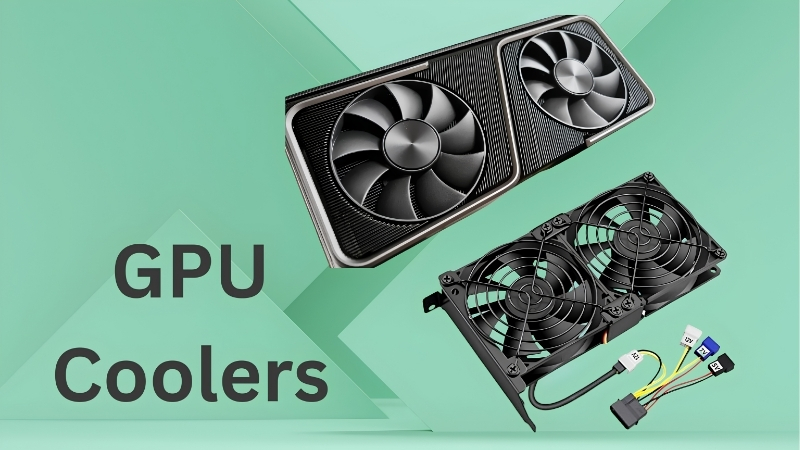
GPU Cooler Types Explained: How Each Design Works
Before comparing performance, it helps to understand the main cooler designs and the principle behind each. The cooler’s job is to pull heat off the GPU and dump it somewhere, and the different types do that in distinct ways with different trade-offs in temperature, noise, size, and price. The three designs below cover the vast majority of cards on the market.
As an Amazon Associate we earn from qualifying purchases at no extra cost to you.




![Aairhut 4 Pack 13 W/m.K Thermal Pads, 100 x 100 mm x [0.5 mm+1 mm+1.5 mm+2 mm] Silicone Cooling Pad Non Conductive Heat Resistance Extreme Odyssey Cover with Dual Self-Adhesive Films for PC Laptop PS4](https://m.media-amazon.com/images/I/31n7GBS4ErL._SL160_.jpg)
Blower Coolers
A blower cooler uses a single fan to push air across the heatsink and exhaust it directly out the rear of the case. Its defining trait is that it expels almost all the GPU’s heat outside the case rather than into it, which keeps internal case temperatures lower.
That makes blowers useful in cramped, poorly ventilated, or multi-GPU builds where dumping heat outside is valuable. The trade-off is that they are generally louder and run the GPU hotter than modern open-air designs, since a single fan and a narrow channel are less efficient at cooling the card itself. For most single-GPU gaming builds, blowers have fallen out of favour.
Open-Air Dual and Triple-Fan Coolers
Open-air coolers, the most common design today, use two or three fans to push air through a large heatsink, releasing heat into the case where case fans then exhaust it. This approach is far more efficient at cooling the GPU itself, which is why open-air cards run cooler and quieter than blowers.
Dual-fan versions are more compact and suit lower and mid-power cards and smaller cases, while triple-fan versions add cooling capacity for high-power cards and quieter operation under load. The main consideration is that they rely on good case airflow to remove the heat they release, so they pair best with a well-ventilated chassis. For the majority of builds, an open-air cooler is the right choice.
Within the open-air category, the choice between dual and triple-fan comes down to the same factors that drive cooling generally: the card’s power draw and your case size. A higher-power card and a roomy case favour a triple-fan model, while a modest card or a compact case favours a dual-fan one, so the open-air design scales neatly to almost any build.
Hybrid and AIO Liquid Coolers
Hybrid or all-in-one liquid-cooled cards combine a fan with a liquid cooler and radiator, moving heat to a radiator mounted elsewhere in the case. This delivers excellent temperatures and very low noise, even on the hottest, highest-power cards, which is their main appeal.
The trade-offs are practical: they require space to mount the radiator, they cost more than air-cooled cards, and they add a little complexity to the build. For a high-power card in a quiet-focused or high-performance build, a liquid-cooled design can be worth it, but for most buyers an air cooler is simpler and sufficient.
GPU Cooler Comparison: Thermals, Noise and Use Cases
With the designs explained, the practical question is how they actually compare on the things you feel day to day: temperatures, noise, and how well each suits your particular build. This section puts the designs side by side so you can see which trade-offs matter for your situation.
Cooling Performance Compared
On outright cooling, the ranking is fairly consistent. Liquid-cooled hybrids generally run coolest, followed by large triple-fan open-air designs, then dual-fan open-air coolers, with blowers typically the warmest for the card itself. The gaps widen on high-power cards and shrink on efficient ones.
What matters is matching the cooling to the card’s heat output. A hot, high-power GPU genuinely benefits from a triple-fan or liquid cooler, while a cool, efficient card is perfectly happy on a dual-fan design. Over-cooling a low-power card buys headroom you will not use, so more cooling is not automatically better; it is better only when the card needs it.
This is why reading temperatures in reviews matters more than counting fans. A well-designed dual-fan card can outperform a poorly designed triple-fan one, and a card’s rated power draw tells you more about its cooling needs than the cooler’s appearance does. Judge a cooler by the temperatures and noise it actually produces for the card it sits on, not by its size alone.
Noise Levels Compared
Noise tracks closely with cooling capacity, because a cooler that dissipates heat easily can run its fans slower and quieter. Liquid-cooled and large triple-fan cards are usually the quietest under load, dual-fan cards are fine on modest GPUs, and blowers are typically the loudest due to their single high-speed fan.
Most modern open-air and liquid coolers also support fan-stop, staying completely silent at idle and during light desktop use. The real noise difference shows up under sustained gaming load on high-power cards, which is exactly where a better cooler pays off for noise-sensitive users.
For a quiet-focused build, this is the single most useful insight: invest in cooling on the cards that actually run hot, and do not overpay for it on the ones that do not. The quietest system comes from matching cooling capacity to heat output, not from buying the biggest cooler available regardless of the card.
Matching the Cooler to Your Build
The right cooler depends on three things: your card’s power draw, your case size and airflow, and how much you care about noise. A high-power card in a roomy, well-ventilated case with quiet as a priority points toward a triple-fan or liquid cooler, while a modest card in a compact case points toward a dual-fan design.
| Cooler type | Cooling | Noise | Best for |
|---|---|---|---|
| Blower | Warmest | Loudest | Cramped or multi-GPU builds |
| Dual-fan open-air | Good | Quiet on modest cards | Compact builds, lower-power GPUs |
| Triple-fan open-air | Better | Quiet under load | High-power GPUs, standard cases |
| Hybrid / liquid | Coolest | Quietest | Hot cards, quiet or high-end builds |
Choosing the Right GPU Cooler for Your PC
With the comparison clear, the final step is turning it into a buying decision. This section covers what to look for, the common mistakes that trip buyers up, and a straightforward recommendation so you can choose the right cooler with confidence.
What to Look for When Buying
Start with your card’s power draw and your case dimensions, since those two numbers rule out unsuitable options immediately. Check the card’s length against your case’s maximum GPU clearance, and confirm your case has enough airflow to support an open-air cooler, which releases heat internally.
Beyond fit, weigh how much noise matters to you and whether you plan to push the card hard. For a quiet build or a high-power card, prioritize a larger or liquid cooler; for a modest card or a compact case, a dual-fan design is usually all you need. Aesthetics and price then narrow the choice within the right category.
It also helps to think a step ahead. If you might upgrade to a hotter card later or move the build into a different case, choosing a cooler with a little extra headroom now can save you trouble down the line. For a card you intend to keep for years, modest future-proofing on cooling is rarely wasted.
Common Mistakes to Avoid
The most common mistake is buying a cooler that does not fit, so always measure your case clearance before committing to a long triple-fan card. The second is over-spending on cooling a low-power card does not need, where the extra capacity simply goes unused.
Another frequent error is pairing an open-air card with a poorly ventilated case, then wondering why temperatures are high; open-air coolers depend on case airflow to work properly. Finally, do not assume a heavier factory overclock on a premium cooler means meaningfully more performance, since the gains are usually only a couple of percent.
A final mistake is ignoring case airflow entirely and focusing only on the GPU cooler. Even the best card cooler relies on the case to move hot air out, so a couple of well-placed intake and exhaust fans often do more for temperatures than upgrading to a larger GPU cooler would. Treat the card cooler and the case as one cooling system, not two separate decisions.
Final Recommendations
For most builders, a dual or triple-fan open-air card is the right choice: dual-fan for compact cases and lower-power GPUs, triple-fan for high-power cards and quieter operation. Liquid-cooled designs are worth it for the hottest cards in quiet-focused or high-end builds, while blowers now make sense only in cramped or multi-GPU systems.
Match the cooler to your card’s heat output and your case, and you will get the temperatures and noise you want without overpaying. Once you know which cooler type suits your build, compare well-reviewed models in that category through the links here to find the best value for your needs.
See More:
- Colorful iGame RTX 4090
- Founders Edition vs AIB
- Best RTX 4080 Super card
- Best RTX 5080 AIB
- Best RTX 5070 Ti card
Conclusion: Making Sense of the GPU Cooler Comparison
The key lesson from this GPU cooler comparison is that there is no single best design, only the best fit for your card and case. Blowers suit cramped or multi-GPU builds, dual-fan open-air coolers suit compact builds and modest GPUs, triple-fan designs handle high-power cards quietly, and liquid coolers excel on the hottest cards. Since every version of a GPU performs the same, choosing the cooler is really about temperatures, noise, and fit, so match the design to your build and you will be happy with the result for years.
Top-Rated Picks


| Product | Brand | Rating | Reviews | Price |
|---|---|---|---|---|
| EZDIY-FAB RTX 3000 Series 12 Pin to Dual 8 Pin PCIe S… | EZDIY-FAB | ★ 4.6 | 428 | $15.59 |
| 87MM PLD09220S12H RTX3080 RTX3070 Graphics Card Fan R… | LTANDBR | ★ 4.6 | 61 | $29.98 |
| Compatible with GIGABYTE GeForce RTX 5060/5050 OC Low… | NIVXE | ★ 3.9 | 12 | $29.92 |
| Hilitand GPU Backplate Radiator, Aluminum Alloy Graph… | Hilitand | ★ 3.9 | 8 | $26.81 |
| NVIDIA GX Spark – Founders Edition, W129251900 | — | ★ 1.0 | 1 | $10,309.00 |
Frequently Asked Questions
What is the actual difference between blower, dual-fan and triple-fan coolers?
A blower uses one radial fan to push air across a shrouded heatsink and exhaust it out the rear bracket, keeping heat outside the case. Dual and triple-fan open-air designs use axial fans that blow down through fin stacks and dump heat inside the chassis, trading case airflow demands for far lower noise and better temperatures.
Are blower cards ever the right choice?
Yes, in three situations: very small form factor cases with almost no airflow, multi-GPU workstations where cards sit directly against each other, and enclosures where exhausting heat externally matters more than acoustics. For a normal single-GPU gaming tower with decent case fans, an open-air cooler is quieter and cooler in every measurable way.
Does a triple-fan cooler make a card faster?
Indirectly, yes. Modern GPUs boost according to available thermal and power headroom, so a cooler that holds the die and hotspot lower lets the card sustain higher clocks instead of throttling during long sessions. The gain is usually a few percent in frame rate, with the bigger benefit being much lower fan noise.
How many slots and how much length should I budget?
Blower cards are typically two slots and around 250mm. Dual-fan models range from roughly 200mm to 280mm at two to two and a half slots. Triple-fan coolers on high-wattage cards commonly reach 320mm to 360mm and three to four slots, which can block adjacent PCIe slots and front radiator mounts.
Do vapour chambers and heatpipe counts matter when comparing coolers?
They matter most on cards above roughly 250W. A vapour chamber spreads heat from a small die across the whole fin stack more evenly than heatpipes alone, which helps the hotspot and memory temperatures rather than just the core reading. Below 200W, fin area and fan quality influence noise far more than the base plate technology.











Write Your Review
No reviews yet. Be the first to share your experience!