
- Top Pick: ASRock Radeon RX 7900 XTX Phantom Gaming 24GB OC Graphics Card, 2615 MHz Boost Clock, 24GB GDDR6, DisplayPort 2.1, HDMI 2.1, Triple Fan Cooling
- Best Value: ASUS Prime Radeon RX 9070 XT 16GB GDDR6 OC Edition Gaming Graphics Card
- Premium Choice: GIGABYTE Radeon™ RX 9070 XT Gaming OC ICE 16G Graphics Card (16GB GDDR6, 256-bit, PCIe 5.0, HDMI/DP 2.1, 2.7 Slot, Hawk Fan, Server-Grade Thermal Gel, Reinforced Structure)
RX 7900 XTX is AMD’s RDNA 3 flagship, and if you are reading this you are almost certainly a 4K gamer weighing it against NVIDIA’s RTX 4080-class cards. The pitch is simple and compelling: flagship rasterization and a huge 24GB frame buffer, usually for less than the NVIDIA alternative. The catch is equally clear: ray tracing and upscaling are a step behind. This review focuses on the numbers that decide a 4K purchase, the practical realities of running a 355W card, and the recurring praise and complaints from owners who actually game on it.
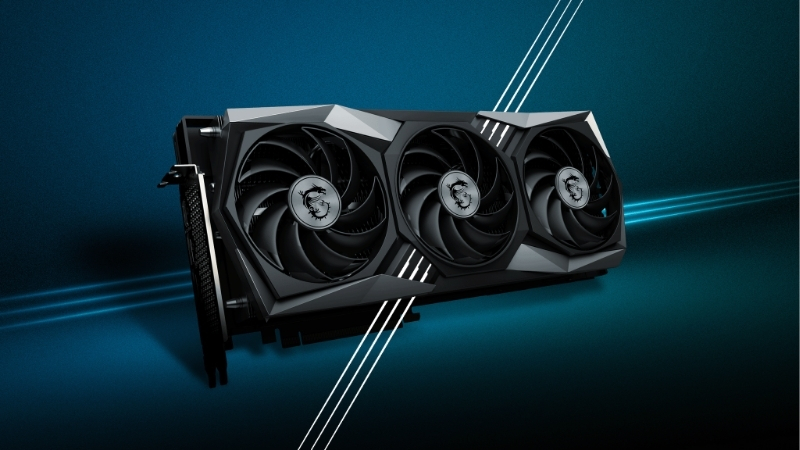
RX 7900 XTX Performance: A 4K Rasterization Flagship
At the architecture level the 7900 XTX is built for 4K, with 24GB of GDDR6 on a wide 384-bit bus and enough shader throughput to trade blows with the RTX 4080 and 4080 Super in traditional gaming. Where it stands and where it stumbles comes down to one theme that repeats throughout this review: it is a rasterization powerhouse that asks you to compromise on ray tracing. Below, performance is broken down the way a 4K buyer evaluates it.
As an Amazon Associate we earn from qualifying purchases at no extra cost to you.




4K Ultra Gaming and Frame Rates
In rasterized 4K, the 7900 XTX is genuinely a flagship. It clears 4K/60 at high or ultra settings across essentially the entire modern library and pushes well beyond that in lighter and competitive titles, making it a real high-refresh 4K card rather than a 4K-on-paper one.
The 24GB frame buffer is its quiet strength. At 4K with maxed textures, in heavily modded games, and in some creative workloads, that buffer removes any VRAM ceiling for years to come, which is a meaningful edge over 16GB rivals as games grow more memory-hungry.
The practical read: for pure rasterized 4K, this card delivers flagship frame rates and the largest VRAM in its class, and it often does so at a lower price than the comparable NVIDIA card.
Ray Tracing and FSR Upscaling
This is where the compromise lives. The 7900 XTX can run ray tracing, but its RDNA 3 ray-tracing hardware trails NVIDIA’s, so in the heaviest ray-traced and path-traced titles it falls behind the 4080-class cards rather than matching them. For light-to-moderate ray tracing it is fine; for the showcase path-traced titles it is the weaker option.
On upscaling, the card relies on FSR, including FSR 3 with Frame Generation, which is good and widely supported but generally a notch behind DLSS in image quality. It is worth being clear on one experimental limitation: FSR 4, AMD’s newer AI-based upscaling, runs on RDNA 4 hardware and is not available on this RDNA 3 card, so the 7900 XTX does not benefit from that specific leap.
If ray tracing and the best upscaling are your priorities, this is the wrong card. If they are secondary to raw raster and VRAM, the compromise is easy to accept.
What Owners Praise and Criticize
Synthesizing owner feedback, the praise is consistent: flagship 4K rasterization, the generous 24GB of VRAM, and strong value relative to the RTX 4080, which is the core reason most buyers choose it. Many also highlight how well it holds high frame rates in their favourite traditional titles.
The criticisms are equally consistent and worth weighing. Ray-tracing performance is the most common, followed by the card’s high power draw and the heat that comes with it, occasional reports of elevated idle power on multi-monitor setups, and the perennial note that AMD’s drivers, while much improved, can still trail NVIDIA in day-one polish. None are dealbreakers for a raster-focused buyer, but they shape expectations.
| Strengths | Trade-offs |
|---|---|
| Flagship rasterized 4K performance | Ray tracing trails the RTX 4080 class |
| 24GB VRAM, the most in its class | High 355W power draw and heat |
| Strong value versus NVIDIA rivals | No FSR 4 (RDNA 3 hardware) |
| Excellent in traditional high-refresh titles | Driver polish still slightly behind NVIDIA |
RX 7900 XTX Build Fit: Power, Size and Cooling
A 355W flagship demands a build that can feed and cool it, so before buying you need three things to line up: a power supply with real headroom, a case that fits a large card, and airflow that keeps this warm-running GPU comfortable. Each is covered below, because getting any one wrong turns a flagship into a thermal and acoustic headache.
Power Draw and PSU Requirements
With a 355W board power and aggressive transient spikes, the 7900 XTX wants a quality 850W power supply as a sensible floor, with 1000W the comfortable choice alongside a high-core-count CPU. It draws power through standard 8-pin connectors, which many builders prefer over the 16-pin connector on NVIDIA’s flagships.
Rail stability matters as much as raw wattage here, since the spikes can trip protection on weaker units. If your power supply is older or borderline, this is the card that justifies an upgrade to a solid, modern unit.
It is worth budgeting for the power supply as part of the card’s true cost. A buyer coming from a mid-range GPU may have a 600W to 650W unit that is fine for a 7800 XT but marginal for a 355W flagship, so factor a possible PSU upgrade into the total when you compare the XTX against more efficient alternatives.
Card Size and Case Compatibility
Partner 7900 XTX cards are large, typically in the 2.5 to 3-slot range and often over 320 mm long, so confirm your case clearance before buying. Reference and smaller models exist for tighter builds, but the higher-end coolers are sizeable.
Check both length against front radiators or fans and thickness against the slot below, which a 3-slot card can block. In a glass-panel build, also verify the gap to the side panel, since the chunkier coolers sit close.
Weight is the other practical factor. These coolers are heavy, and over months of use that mass stresses the PCIe slot, so a support bracket is worth fitting from day one. Many partner cards include one in the box, but if yours does not, an inexpensive bracket is cheap insurance for an expensive flagship.
Cooling, Noise and Temperatures
Because it draws a lot of power, the 7900 XTX runs warmer than the more efficient current-generation cards, and hotspot temperatures are worth monitoring on the smaller coolers. The larger partner designs handle the heat well and stay reasonably quiet, while compact models work harder.
An undervolt is the single best tweak here: many owners report meaningfully lower temperatures and power draw with negligible performance loss, which also reduces noise. For a warm-running flagship, it is a tweak worth doing.
Case airflow is the other half of the equation. The 7900 XTX rewards a well-ventilated chassis with good intake and exhaust, so pairing it with a case that has solid front-to-back airflow keeps both the GPU and the rest of your components comfortable during long sessions.
RX 7900 XTX Pricing, Value and When to Buy
The 7900 XTX’s whole appeal is flagship performance at a value price, so pricing is central to the verdict, and the current component market is part of that calculation. This section covers where prices sit, how the card stacks up against its rivals, and exactly which buyer it suits.
Where Prices Stand Right Now
Context matters for a value flagship. PC component prices have broadly trended upward, driven largely by memory costs, and that pressure reaches graphics cards and the parts around them. The encouraging news is real but modest: the steep climb of late 2025 has cooled, and some makers, Framework among them, have reported a relatively stable recent stretch while still warning of further swings.
New supply is on the way but not soon. OEMs can now source DDR5 from suppliers like CXMT, and Micron is building two fabs in Idaho, yet those plants are not expected to come online until 2027–2028. The honest reading: prices have stopped spiking rather than started falling, so meaningful relief is still some way off.
For a 7900 XTX buyer, the takeaway is to judge it on its live price against the NVIDIA alternative rather than waiting for a near-term drop. When it sits clearly below an RTX 4080-class card, its value case is at its strongest.
RX 7900 XTX vs the Competition
Against the RTX 4080 and 4080 Super, the 7900 XTX generally wins on rasterization and VRAM while losing on ray tracing and upscaling polish, usually at a lower price. Against its own sibling, the 7900 XT, it offers more performance and 4GB more VRAM for a price premium that is only worth it if you genuinely need the extra 4K headroom.
The decision is a values test: prioritize raster and VRAM per dollar and the XTX wins; prioritize ray tracing and DLSS and the NVIDIA card does. For a 4K gamer who plays mostly traditional titles, the XTX is frequently the smarter buy.
There is also a longevity dimension to weigh. The 24GB buffer is the most future-resistant amount of VRAM in the class, which matters as 4K textures and modded games grow more demanding, while the ray-tracing gap is the part most likely to age the card in newer showcase titles. How you weight those two opposing trends, more VRAM headroom versus weaker ray tracing, should guide the call as much as today’s average frame rates.
Who Should Buy the RX 7900 XTX
Buy it if you game at 4K, play mostly rasterized titles, want the largest VRAM buffer in the class, and prefer to spend your money on raw performance rather than ray-tracing features. With a strong PSU and a roomy case, it rewards that buyer with years of flagship 4K gaming.
Look elsewhere if ray tracing and the best upscaling are central to how you play, or if you cannot accommodate its power and heat. If you are the raster-focused 4K buyer it was made for, check the current price and availability for the RX 7900 XTX through the link here, especially when it is sitting below the NVIDIA competition.
See More:
- Colorful iGame RTX 4090
- Founders Edition vs AIB
- Best RTX 4080 Super card
- Best RTX 5080 AIB
- Best RTX 5070 Ti card
Conclusion: Is the RX 7900 XTX Worth It?
The RX 7900 XTX remains a compelling 4K flagship for the right buyer: it delivers flagship rasterization, the largest 24GB VRAM buffer in its class, and strong value against the RTX 4080, with the clear trade-off of weaker ray tracing and no access to FSR 4. If you game at 4K in mostly traditional titles and can feed and cool a 355W card, it is one of the best raster-per-dollar options available. With component prices stabilizing rather than falling, there is little reason to wait, so if the RX 7900 XTX matches your priorities and lands below the NVIDIA alternative, it earns a confident recommendation.
Top-Rated Picks


| Product | Brand | Rating | Reviews | Price |
|---|---|---|---|---|
| ARCTIC MX-4 (4 g) – Premium Performance Thermal Paste… | ARCTIC | ★ 4.8 | 104k | $4.99 |
| ARCTIC MX-4 (incl. Spatula, 4 g) – Premium Performanc… | ARCTIC | ★ 4.8 | 71.9k | $5.49 |
| Crucial 8GB DDR4 RAM 3200MHz (PC4-25600), Downclockab… | Crucial | ★ 4.8 | 62.8k | $74.99 |
| AMD Ryzen 5 5600X 6-core, 12-thread unlocked desktop … | — | ★ 4.8 | 30.2k | $177.60 |
| NVIDIA Shield Remote; Voice Search, Motion-Activated,… | — | ★ 4.7 | 10.6k | $25.99 |
Frequently Asked Questions
Is the RX 7900 XTX a true 4K flagship?
For rasterized rendering, yes. With 96 compute units, 24GB of GDDR6 and a 384-bit bus it sustains 4K ultra above 60fps in the large majority of modern titles without upscaling. The qualifier is ray tracing, where it performs roughly like a previous-generation NVIDIA high-end card rather than a current flagship.
How much power does the RX 7900 XTX draw?
Reference board power is 355W and factory overclocked partner cards can exceed 400W under sustained load. Two 8-pin PCIe connectors are standard. Plan on a good 850W supply, and if your case has limited exhaust, note that most of that heat is dumped straight into the chassis by open-air coolers.
Is 24GB of VRAM useful for anything besides gaming?
Yes. Twenty-four gigabytes is enough for large local language models, high-resolution Stable Diffusion work, 8K video timelines and complex 3D scenes. The caveat is software support, since many AI and rendering tools are written for CUDA first and require ROCm or DirectML paths that can be slower or less mature on Radeon.
How does the RX 7900 XTX compare to the RTX 4080 Super?
They trade places depending on workload. The XTX typically leads in pure rasterization at 4K and offers 24GB against 16GB, while the 4080 Super wins ray tracing decisively, uses less power, and benefits from DLSS upscaling with generally better image stability than FSR at the same preset.
Do I need a large case for the RX 7900 XTX?
Almost certainly. Partner models commonly run 320mm to 350mm long and three or more slots thick to handle 355W. Verify GPU length, slot count and the distance to any front-mounted radiator before buying, and confirm your motherboard PCIe slot area has support, since these cards are heavy enough to need an anti-sag bracket.











Write Your Review
No reviews yet. Be the first to share your experience!