
- Top Pick: Micro Center AMD 9600X Processor with GIGABYTE B850 Gaming WiFi Motherboard
- Best Value: Micro Center AMD Ryzen 5 9600X Processor with MSI PRO B850-P WF Motherboard
- Premium Choice: NEWEGG Motherboard CPU Memory Combo-B850 Motherboard Bundle with Ryzen 5 9600X 6-Core 3.9 GHz CPU and 16GB (2 x 8GB) 288-Pin PC RAM DDR5 6000 Desktop Memory
The best motherboard for 9600X is easier to pick than it looks, because AMD’s Zen 5 Ryzen 5 9600X runs a modest 65W TDP (105W PPT boost) that almost any current B650 board handles comfortably. The real decision points are BIOS readiness, storage generation, and how much headroom you want for a future CPU swap.
As an Amazon Associate we earn from qualifying purchases at no extra cost to you.





As an Amazon Associate we earn from qualifying purchases at no extra cost to you.
By Ryan Cole
How to Choose the Right Motherboard for 9600X
Because the 9600X is a lighter-TDP chip than its 7000-series predecessor’s flagship parts, board selection is less about brute VRM capacity and more about BIOS support, connectivity, and future upgrade flexibility. Here’s what to weigh before you check out with any board on this list.
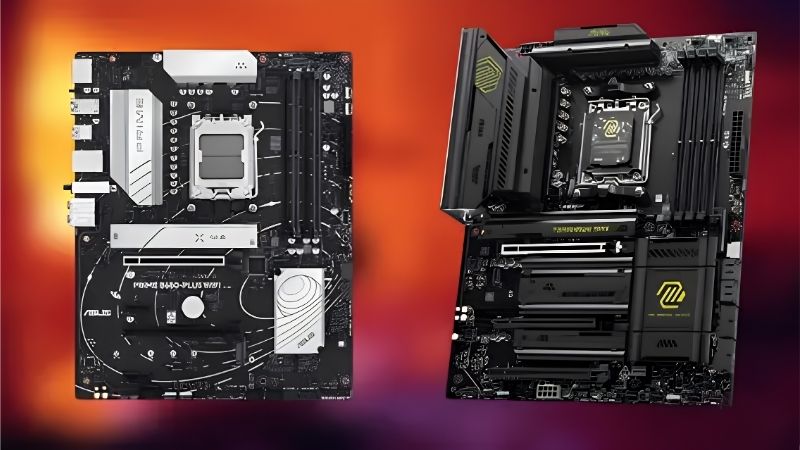
BIOS readiness for Ryzen 9000
Since the 9600X launched after the original AM5 rollout, older B650/X670 boards may ship with a BIOS that predates Ryzen 9000 support. Look for a BIOS Flashback button, which lets you update firmware without an already-compatible CPU installed, a genuine convenience if you’re buying a board that’s been sitting on a shelf.
Newer board revisions and recent production runs generally ship “9000-series ready” out of the box, so checking the listing date or manufacturer’s QVL avoids the issue entirely.
If you’re building around a bare CPU with no spare Ryzen 7000 chip to borrow for an update, BIOS Flashback isn’t optional convenience, it’s the difference between a working build and a return trip to the retailer.
VRM is rarely the bottleneck here
A 12+2 phase 60A VRM, like on the ASUS TUF Gaming B650-PLUS WiFi, comfortably handles the 9600X’s power draw with room to spare. You don’t need a 20+2 flagship VRM unless your upgrade plan includes a 16-core Ryzen 9 9950X down the line.
Where extra VRM headroom does help is sustained all-core workloads like video encoding, since a cooler-running VRM avoids thermal throttling during long sessions even on a modest-TDP chip.
In short, VRM specs matter far less for the best motherboard for 9600X than they would for a flagship 16-core chip, so don’t let phase-count marketing push your budget toward a board tier you don’t actually need.
EXPO memory support and DDR5 speed
Zen 5 sees a real benefit from faster EXPO-profile DDR5 kits, so confirm the board’s memory QVL supports at least DDR5-6000 CL30 kits, the commonly cited sweet spot for Zen 5 memory latency and bandwidth. Most current B650/B650E boards handle this without issue.
Four-DIMM boards sometimes struggle to hit their rated speeds with all slots populated; check reviews specifically for 2-DIMM vs 4-DIMM EXPO stability if you’re planning 64GB+ of RAM.
This memory-compatibility check is one of the easiest steps to skip when shopping for the best motherboard for 9600X, but it has a bigger real-world impact on gaming frame times than most other spec-sheet differences on this list.
Top Picks: Best Motherboard for 9600X
These five boards are all confirmed compatible with Ryzen 9000-series CPUs, spanning budget to premium tiers for a 9600X build.
| Motherboard | Chipset | VRM | Form Factor | Networking |
|---|---|---|---|---|
| ASUS TUF Gaming B650-PLUS WiFi | B650 | 12+2 (60A) | ATX | WiFi 6, 2.5GbE |
| MSI MAG B650 Tomahawk WiFi | B650 | 14+2+1 (80A) | ATX | WiFi 6E, 2.5GbE |
| ASRock B650M Pro RS WiFi | B650 | 8+2+1 Dr.MOS | Micro ATX | WiFi 6E, 2.5GbE |
| Gigabyte B650 AORUS Elite AX | B650 | 14+2+1 | ATX | WiFi 6E, 2.5GbE |
| ASUS ROG Strix B650E-F Gaming WiFi | B650E | 12-phase (80A) | ATX | WiFi 6E, 2.5GbE |
ASUS TUF Gaming B650-PLUS WiFi
This remains the best motherboard for 9600X for most builders. Its 12+2 teamed VRM is more than sufficient for a 65W-TDP chip, and it ships current production runs with 9000-series-ready BIOS, so out-of-box compatibility isn’t a concern for recent stock.
Its audio codec and only-partial Gen5 M.2 support are the main compromises versus pricier boards, but neither affects a 9600X gaming build’s actual performance in any measurable way.
MSI MAG B650 Tomahawk WiFi
The Tomahawk’s 14+2+1 phase, 80A VRM is well beyond what a 9600X requires, which translates to cooler VRM temps and quieter fan curves during long sessions. M.2 Shield Frozr heatsinks add a genuine thermal benefit for NVMe drives under sustained transfers.
All three M.2 slots cap at PCIe 4.0 rather than Gen5, so builders chasing the fastest available SSD speeds should look elsewhere. For a 9600X’s realistic workload, Gen4 bandwidth isn’t a limiting factor, and the board’s WiFi 6E module and dual PCIe x16 slots round out a genuinely well-rounded package for the price.
ASRock B650M Pro RS WiFi
For a compact 9600X build, this micro-ATX board offers a genuine PCIe 5.0 “Blazing M.2” slot alongside two more Gen4 slots, WiFi 6E, and 2.5G LAN on an 8+2+1 VRM that’s correctly sized for a lower-TDP chip. It’s one of the more frequently recommended options for the best motherboard for 9600X among space-constrained builds.
Buyer feedback flags occasional manual WiFi/Bluetooth driver installs and a build quality that, while solid, doesn’t match ASUS’s TUF or ROG lines in fit and finish. At this price, it’s still a strong value pick.
Gigabyte B650 AORUS Elite AX
The Elite AX’s 14+2+1 power phase and PCIe 5.0 primary M.2 slot give it comfortable headroom above what a 9600X needs, and the newer V2 revision’s 5-year warranty is a meaningful long-term reassurance most competitors don’t match. It also carries 2.5GbE LAN and WiFi 6E as standard, so networking isn’t a compromise here.
Gigabyte’s BIOS interface has historically been less polished than ASUS or MSI’s, and some early units reported slow first-boot times, both fixed with a firmware update but worth knowing before your first power-on.
ASUS ROG Strix B650E-F Gaming WiFi
If a future upgrade toward a higher-core Ryzen chip is part of your plan, the B650E-F’s mandatory PCIe 5.0 chipset and 12-phase 80A VRM give real headroom the 9600X itself won’t use today but a future CPU swap could. Its three heatsink-covered M.2 slots and Q-Release GPU latch are welcome quality-of-life touches during the build itself.
The premium here is real: expect to pay noticeably more than the TUF Gaming B650-PLUS for capability a 65W-TDP chip doesn’t currently need. It only makes sense if you’re deliberately buying ahead of your CPU upgrade cycle, since AMD’s AM5 socket commitment through at least 2029 means that headroom won’t go to waste.
Market Context: Should You Buy Now or Wait?
“Should I wait?” is the most common question around the best motherboard for 9600X right now, so here’s a straight answer grounded in what’s actually happening in the market rather than a fear-of-missing-out nudge. Two factors settle the timing question pretty clearly for this chip.
The next CPU generation is still quarters away
AMD’s next desktop CPU wave, Zen 6 / Ryzen 10000, isn’t expected until CES in early 2027 at the earliest. That means there’s no imminent successor to the 9600X, and waiting buys you nothing but months of using an older PC. If you need a machine now, building around the 9600X today doesn’t leave you a launch-day away from regret.
Put simply, “wait for the next thing” only makes sense when the next thing is close. Here it isn’t, so the 9600X and a good B650 board are a rational buy for anyone who needs the system in 2026.
AM5 support extends to at least 2029
AMD confirmed at Computex 2026 that AM5 will keep receiving new CPUs through the end of 2029. So even the buyers who do want to wait for Zen 6 can buy a 9600X board today and simply drop in that future chip later, without changing platforms. The board is a safe long-term foundation either way.
That’s the reassuring part of the timing math: whether you upgrade the CPU soon or years from now, a quality B650 board bought for the 9600X keeps its usefulness across multiple Ryzen generations rather than becoming e-waste at the next socket change.
Where the real deals are right now
Worth a caution: this year, blanket “wait for holiday sales” advice is unreliable for some parts, since memory and prebuilt pricing is under upward pressure. Motherboards, coolers, and cases are the categories where genuine discounts still show up, so a 9600X board itself is a reasonable thing to watch for a deal on, even if you shouldn’t count on RAM getting cheaper alongside it.
Frequently Asked Questions
Common questions builders ask while narrowing down the best motherboard for 9600X.
Does the 9600X need a BIOS update on older B650 boards?
Possibly, if the board’s BIOS predates Ryzen 9000 support. Look for a BIOS Flashback button or confirm “9000-series ready” firmware on recent production stock before buying older clearance inventory, and keep a wired keyboard handy in case you need to navigate the UEFI menu during the flash.
Is B650E worth it for a 9600X build?
Generally not necessary. The 9600X’s modest TDP and typical gaming workload don’t demand B650E’s mandatory PCIe 5.0 GPU lane; standard B650 covers the CPU’s needs while costing less, freeing up budget for a faster SSD or better cooler instead.
What memory speed should I target for the 9600X?
DDR5-6000 CL30 EXPO kits are widely cited as the practical sweet spot for Zen 5’s memory controller. Confirm your chosen board’s QVL supports your specific kit at that speed with all DIMM slots populated if you’re running 64GB+.
Can I use a budget B650 board with the 9600X?
Yes. The 9600X’s power draw is modest enough that even entry-level 8-12 phase VRMs handle it without throttling. Prioritize BIOS readiness and M.2/networking features over VRM headroom for this specific chip.
See More:
- Best MSI motherboard
- Best motherboard processor combo for gaming
- Best B550 motherboard
- Best CPU for streaming
- What is the best AM4 CPU for gaming
Final Thoughts
The best motherboard for 9600X doesn’t require chasing the highest VRM phase count on the shelf. The ASUS TUF Gaming B650-PLUS WiFi covers most builds well, the MSI MAG B650 Tomahawk WiFi adds thermal headroom for sustained workloads, and the ASRock B650M Pro RS WiFi is the smart pick for a compact case. Whichever you pick, BIOS readiness matters more here than raw VRM specs.











Write Your Review
No reviews yet. Be the first to share your experience!