
- Top Pick: ASUS ROG Strix NVIDIA GeForce RTX 3080 Ti OC Edition Gaming Graphics Card (PCIe 4.0, 12GB GDDR6X, HDMI 2.1, DisplayPort 1.4a, Axial-tech Fan Design, 2.9-Slot, Super Alloy Power II, GPU Tweak II)
- Best Value: ASUS ROG Strix LC NVIDIA GeForce RTX 3080 Ti OC Edition Gaming Graphics Card (PCIe 4.0, 12GB GDDR6X, HDMI 2.1, DisplayPort 1.4a, Full-Coverage Cold Plate, 240mm Radiator, 600mm tubing, GPU Tweak II)
- Premium Choice: ASUS ROG Strix NVIDIA GeForce RTX 3070 Ti OC Edition Gaming Graphics Card (PCIe 4.0, 8GB GDDR6X, HDMI 2.1, DisplayPort 1.4a, Axial-tech Fan Design, 2.9-Slot, Super Alloy Power II), 3 Year Warranty
The ASUS ROG Strix GeForce RTX 3080 Ti in 2026 is a card best suited to 1440p high-refresh gaming and light 4K work, held back mainly by its 350W+ power draw and massive 2.9-slot footprint rather than by raw performance, which still lands ahead of most current-generation midrange cards. If you’re evaluating a used unit, the decision hinges on three things: whether it physically fits your case, whether your PSU can feed it safely alongside the rest of your system, and whether the price reflects what a three-year-old flagship should cost against newer alternatives.
As an Amazon Associate we earn from qualifying purchases at no extra cost to you.


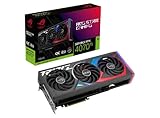
The Physical Footprint: Does It Actually Fit?
The ROG Strix RTX 3080 Ti is not a subtle card. ASUS built it at 2.9 slots wide and roughly 318mm long, with the triple-fan shroud adding extra height that eats into the top PCIe slot region on many boards. This was already a tight fit in 2021-era cases, and it hasn’t gotten easier with time since most modern mid-tower cases haven’t grown to compensate.
Before buying a used unit, check these three clearances:
- GPU length vs. case spec: 318mm clears most mid-towers, but front-mounted radiators or drive cages in compact cases (sub-400mm interior depth) can force a compromise.
- Slot width vs. motherboard layout: at 2.9 slots, the cooler often overhangs the second PCIe slot and blocks the first M.2 heatsink on boards where that slot sits directly below the CPU socket.
- Side panel clearance: tempered glass panels with less than 45mm of clearance from the motherboard tray can conflict with the shroud’s thickness, especially on cases originally speced for slimmer blower-style cards.
If you’re coming from a card like a reference RTX 3070 or anything blower-style, treat this as a full case-compatibility check, not an afterthought.
Thermals Under Sustained Load
The card’s cooling design uses three axial fans across that 2.9-slot heatsink, and it’s genuinely effective at spreading heat across a large surface area. The tradeoff is that effectiveness depends entirely on case airflow. In a well-ventilated case with two or more intake fans, sustained gaming load typically holds the GPU in the mid-60s to low-70s°C range with fan noise that stays reasonable at 1200-1600 RPM. In a poorly ventilated or closed case with weak exhaust, the same workload can push into the high-70s to low-80s°C, at which point the fan curve ramps aggressively and becomes noticeably audible.
The practical takeaway: this card rewards good case airflow more than most, because its cooler is oversized relative to the 350W it’s dissipating. A card with a smaller cooler running the same wattage would throttle sooner in a bad case, but the Strix’s headroom means the difference between a good and bad case shows up as noise, not performance loss, until conditions are genuinely poor.
Power Draw: The Real Budget Math
ASUS rates the ROG Strix RTX 3080 Ti’s board power around 350W, and that’s the number that matters more than the GPU’s on-paper TDP when you’re planning a PSU. Here’s a worked example for a typical build pairing this card with a mid-range Ryzen or Core CPU:
| Component | Typical Draw Under Load |
|---|---|
| RTX 3080 Ti (ROG Strix, boosted) | 350-380W |
| CPU (8-core, e.g. Ryzen 7 / Core i7 class) | 120-150W |
| Motherboard, RAM, fans | 40-60W |
| Storage (NVMe x2) | 10-15W |
| Total system draw under gaming load | 520-605W |
Applying a standard 20% headroom margin for transient spikes (which this card, like most Ampere flagships, is prone to) pushes the recommended PSU capacity to roughly 625-725W minimum, and that’s before accounting for PSU efficiency curves dropping off below 20% load. In practice, a quality 750W unit is the comfortable floor, and 850W gives room to upgrade the CPU later without a second PSU purchase. If you’re inheriting a used 3080 Ti and your current PSU is a 650W unit from a lower-power build, check its 12V rail capacity and transient response before assuming it’ll hold up, since undersized or older PSUs are a common cause of random shutdowns under GPU load spikes rather than outright crashes.
Where It Lands Against Current Cards
Used RTX 3080 Ti pricing in 2026 usually falls in the $280-$420 range depending on condition and cooler wear, which puts it in direct competition with newer cards that draw less power and take up less space. The performance comparison depends heavily on resolution:
| Resolution | RTX 3080 Ti Position | Notes |
|---|---|---|
| 1080p | Overkill, often CPU-bound | You’re paying for headroom you won’t use unless running high-refresh esports titles at 240Hz+. |
| 1440p | Strong, comfortably high settings at 100+ fps in most titles | This is the card’s best-fit resolution today. |
| 4K | Competent but not effortless | Native 4K at max settings in demanding 2025-2026 titles often needs upscaling to sustain 60fps. |
For context within ASUS’s own Ampere lineup: the ROG Strix RTX 3080 (non-Ti) shares a similar cooler and footprint but with 10GB of VRAM instead of 12GB, which matters more now than it did at launch as VRAM-hungry textures and ray tracing effects have crept upward — the 3080 Ti’s extra 2GB buys some longevity at 1440p and above. The ROG Strix RTX 3070 Ti sits a tier below both, with a smaller cooler, lower power draw (around 290W), and a noticeably smaller physical footprint, making it the easier upgrade path for anyone who found the 3080 Ti’s size or power requirements impractical but still wants the same build quality and cooling philosophy.
Decision Matrix: Is a Used ROG Strix RTX 3080 Ti Right for You?
| Your Situation | Recommendation |
|---|---|
| 1440p gaming, case supports 320mm+ cards, PSU is 750W+ | Good buy if priced under $380 |
| 4K gaming with upscaling acceptable, willing to tune settings | Reasonable buy, expect to lean on DLSS/FSR for demanding titles |
| Compact case (mATX/ITX) or sub-650W PSU | Skip, look at the RTX 3070 Ti-class footprint instead |
| 1080p-only gaming | Skip, you’re overpaying for unused headroom |
| Budget under $300 and case/PSU both check out | Strong value if cooler and fans show no wear or grinding noise |
The core question isn’t whether the card still performs, it clearly does at 1440p and holds up reasonably at 4K with upscaling. It’s whether your case and PSU were built with a card this large and this power-hungry in mind. If they weren’t, the upgrade cost isn’t just the GPU price, it’s a case and PSU refresh on top of it.










Write Your Review
No reviews yet. Be the first to share your experience!