
- Top Pick: Nvidia RTX 2000 ADA 16GB Graphics Card
- Best Value: PNY NVIDIA RTX 6000 ADA
- Premium Choice: PNY NVIDIA RTX A2000 12GB
NVIDIA Chat with RTX runs a capable AI chatbot entirely on your own graphics card, letting you ask questions about your personal documents without sending a single word to the cloud. For anyone interested in local, private AI, or who simply wants a chatbot that works offline and knows their own files, it is a compelling look at what an RTX GPU can do beyond gaming. This review explains how it works, what hardware it demands, how private it really is, and where it shines or falls short, aimed at the technically curious who want the practical details fast.
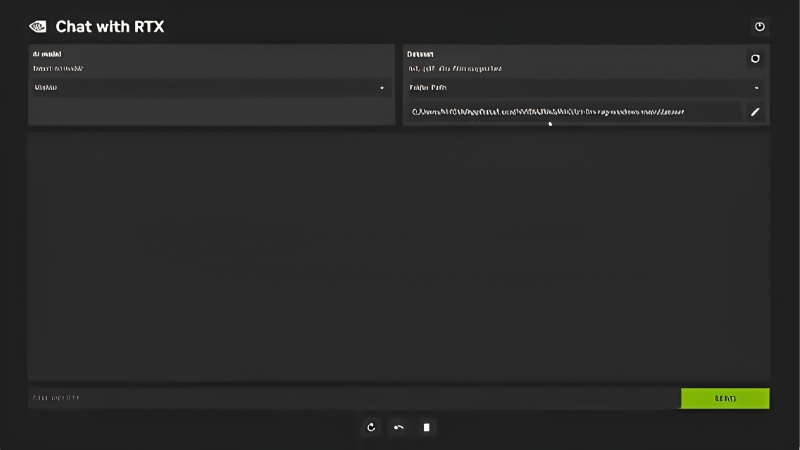
What Chat with RTX Is and Why Local AI Matters
Chat with RTX is a demo application that runs a large language model locally on your RTX graphics card, rather than on a remote server. Its standout capability is letting you point it at your own documents and then ask questions about them, all processed on your machine. This local approach is the whole point, and it carries real advantages in privacy and offline use that cloud chatbots cannot match. Understanding how it runs AI on your own hardware is the foundation for judging whether it is useful to you. Here is what it does.
As an Amazon Associate we earn from qualifying purchases at no extra cost to you.



How It Runs AI on Your Own GPU
Instead of connecting to a cloud service, Chat with RTX loads an AI language model directly onto your RTX card and runs all the processing on your GPU’s Tensor cores. Your queries never leave your computer, and no internet connection is required once it is set up.
This is possible because modern RTX cards have enough AI horsepower and memory to run capable language models locally, something that used to require data-center hardware. The GPU does the heavy lifting that a cloud server normally would.
The result is a self-contained AI assistant on your own PC, which is both the technical achievement and the practical draw for privacy-conscious and offline users.
Chatting with Your Own Documents
The most useful feature is retrieval over your own files. You point Chat with RTX at a folder of documents, notes, PDFs, and text, and it can then answer questions using that content, effectively a personal AI that knows your material.
This is genuinely handy for searching and summarizing large collections of your own information, finding a detail buried across many files, or getting quick answers grounded in your documents rather than the open internet. It turns a pile of files into something you can query in plain language.
Because this all happens locally, you can do it with sensitive material you would never upload to a cloud service, which is a meaningful practical advantage.
The technique behind this is worth understanding briefly, because it explains both the strength and the limits. Rather than the model having memorized your files, it retrieves the most relevant passages from your documents at query time and uses them to ground its answer. This is why it can cite specific details from your material accurately, but also why the quality depends on how well your documents are organized and how clearly your question maps to what is written. Well-structured source files produce noticeably better answers than a chaotic dump of mixed content, which is a practical detail that rewards a little preparation.
Privacy and Offline Benefits
The privacy angle is the strongest argument for local AI. Since nothing is sent to a server, your questions and documents stay entirely on your machine, which matters for confidential work, personal data, or anyone uncomfortable with cloud processing.
Offline capability is the other benefit. Once installed, Chat with RTX works without internet, so it keeps functioning on a plane, in a secure environment, or anywhere connectivity is unavailable or restricted.
For technically minded users who value control over their data, these two benefits, privacy and offline operation, are exactly what local AI offers that cloud chatbots structurally cannot.
Setting Up and Using Chat with RTX
Local AI is powerful but hardware-hungry, so before getting excited it is worth knowing what your system needs and what setup involves. Running a language model on your own GPU demands a capable card with sufficient memory, and the install is more involved than a typical app. This section covers the requirements, the setup process, and the honest trade-offs, so you know whether your hardware is up to it.
System Requirements and VRAM Needs
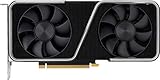
Chat with RTX requires a modern RTX card, the RTX 30, 40, or 50 series, with a meaningful amount of VRAM, since the AI model has to fit in graphics memory. A card with at least 8GB of VRAM is the baseline, and more is better for larger models and smoother performance.
VRAM is the key constraint here, more so than raw gaming performance. The language model and its context occupy graphics memory, so cards with generous VRAM can run larger, more capable models, while lower-VRAM cards are limited to smaller ones.
You also need adequate disk space and system memory, since the models and their data are sizable. This is a feature that rewards a well-specified modern RTX system rather than an entry-level one.
Installation and the Models It Uses
Setup is more involved than a typical app: you download a sizable installer, which pulls in the AI models and dependencies, and let it configure everything. It is not difficult, but it is larger and slower than installing a normal program, and it takes some patience.
The app ships with selectable language models, and it uses a retrieval technique to combine the model with your own documents. Once installed, you interact through a simple chat interface in your browser, pointed at the local app.
For the technically comfortable, the process is straightforward if lengthy; for the impatient, the download size and setup time are the main friction before you can start using it.
One practical note for smoother performance: close other GPU-heavy applications while running it, since the language model wants as much free VRAM as it can get. Running a demanding game and Chat with RTX at the same time on a lower-VRAM card can slow both, so treating local AI as a dedicated task rather than a background one gives noticeably better responses.
Pros and Cons Users Report
Since Chat with RTX is free but demanding, the honest question is whether local AI is useful enough to justify the hardware and setup. Weighing the praise against the complaints clarifies who benefits.
What users like: complete privacy with no cloud, offline operation, the genuinely useful ability to query their own documents, and impressive proof of what an RTX card can do. Privacy-focused and offline users find it valuable.
What users criticize: heavy VRAM and storage requirements, a large and slow install, models that are less capable than the largest cloud services, and its nature as a demo rather than a polished product. It is a promising showcase more than a finished tool.
Getting the Most from Local AI
Chat with RTX is most rewarding for specific use cases and specific hardware, so knowing where it fits and what powers it best determines whether it earns a place on your machine. VRAM is the deciding factor for how capable your local AI can be. This final section covers the best use cases, the hardware that unlocks better local AI, and the bottom line on whether it is worth setting up.
Best Use Cases for Chat with RTX
It shines when you have a large body of your own documents to search and question, research notes, manuals, reports, or personal archives, and you want answers grounded in that material without uploading it anywhere. That private, document-aware querying is its killer feature.
It is also ideal for anyone who needs AI assistance offline or in a secure environment where cloud tools are off-limits. For general open-ended chat, cloud services remain more capable, so local AI suits these specific, privacy-driven scenarios best.
Matching Chat with RTX to these use cases, rather than expecting it to replace a top cloud chatbot, is how you get real value from it.
Hardware That Unlocks Better Local AI
Local AI is fundamentally limited by VRAM, so a graphics card with more memory unlocks larger, smarter models and smoother responses. This is the single most important hardware factor for a good experience, more than gaming benchmarks suggest.
A modern RTX card with generous VRAM lets you run more capable models and handle larger document sets, turning a limited demo into a genuinely useful assistant. As local AI tools mature, high-VRAM cards will only become more valuable for this kind of work.
If you want to run local AI well, now or as the field grows, compare current prices and specs on high-VRAM RTX graphics cards through the links on this page.
See More:
- NVIDIA Broadcast vs OBS
- RTX HDR settings
- NVIDIA App download
- NVIDIA RTX Video Super Resolution
- GeForce Experience alternative
Final Verdict
Chat with RTX is worth trying for technically curious users with a capable, high-VRAM RTX card who value privacy, offline operation, or querying their own documents. As a glimpse of local AI’s future, it is genuinely impressive and useful in the right scenarios.
It is not a replacement for the most powerful cloud chatbots, and its hardware demands and demo status temper it. Match it to private, document-focused use on strong hardware, and it delivers something cloud AI cannot.
In the end, NVIDIA Chat with RTX turns your graphics card into a private, offline AI assistant that can answer questions about your own files, an impressive demonstration of local AI on RTX hardware. It rewards a modern card with plenty of VRAM and suits privacy-driven, document-based use best. Since memory is the key limit, check the recommended high-VRAM RTX graphics cards through the links here to run local AI at its full potential now and as the technology matures.
Top-Rated Picks


| Product | Brand | Rating | Reviews | Price |
|---|---|---|---|---|
| ARCTIC MX-4 (4 g) – Premium Performance Thermal Paste… | ARCTIC | ★ 4.8 | 104k | $4.99 |
| ARCTIC MX-4 (incl. Spatula, 4 g) – Premium Performanc… | ARCTIC | ★ 4.8 | 71.9k | $5.49 |
| Crucial 8GB DDR4 RAM 3200MHz (PC4-25600), Downclockab… | Crucial | ★ 4.8 | 62.8k | $74.99 |
| AMD Ryzen 5 5600X 6-core, 12-thread unlocked desktop … | — | ★ 4.8 | 30.2k | $177.60 |
| NVIDIA Shield Remote; Voice Search, Motion-Activated,… | — | ★ 4.7 | 10.6k | $25.99 |
Frequently Asked Questions
What GPU do I need to run it?
You need a GeForce RTX 30, 40 or 50 series card, or a matching RTX professional card, with at least 8GB of video memory and a recent driver. It is Windows-only and will not install on GTX cards or on RTX 20-series hardware, since it relies on TensorRT-LLM optimisations for newer architectures.
Does it send my documents to the cloud?
No. The whole point is local inference: the model weights, the vector index and your source files stay on your own machine, and the application works with networking disabled. That makes it suitable for sensitive notes, contracts or research material you would not paste into a hosted chatbot.
What file types can it index?
It builds a retrieval index over plain text, PDF and Word documents in a folder you choose, and can also ingest YouTube video transcripts from a supplied URL. Point it at a modest, well-organised folder rather than an entire drive, because indexing time and answer quality both degrade with sprawling, noisy corpora.
How good are the answers compared to cloud models?
The bundled models are small by cloud standards, so reasoning depth and long-context handling lag well behind flagship hosted assistants. For finding and summarising facts inside your own documents it is genuinely useful, but do not expect it to match a frontier model on complex analysis or coding.
How much disk space and setup time does it need?
Budget roughly 35-40GB for the installer, model weights and TensorRT engine files, plus a lengthy first-run build step while engines are compiled for your specific GPU. Install to a fast NVMe drive and avoid paths containing spaces or non-ASCII characters, which are a frequent cause of setup failures.











Write Your Review
No reviews yet. Be the first to share your experience!