
- Top Pick: Lacdo Hard Drive Carrying Case for Western Digital WD Elements/WD My Passport/My Passport Ultra Portable External Hard Drive HDD 1TB 2TB 4TB 5TB 6TB USB 3.0 Protective Storage Travel Bag, Black
- Best Value: ProCase External Hard Drive Travel Case for 2.5" HDD/SSD -Black
- Premium Choice: GLCON Red External Hard Drive Case, Shockproof EVA Travel Bag
Will my GPU fit my case is the question that can save you from an expensive, frustrating return, because a graphics card that looks perfect on paper is useless if it physically will not go in. Modern cards have grown enormous, and case compatibility is now one of the most common pre-purchase worries. The good news is that confirming fit takes just three measurements and a few minutes. This review explains exactly what to check, how to measure it, and what to do if your dream card is simply too big.

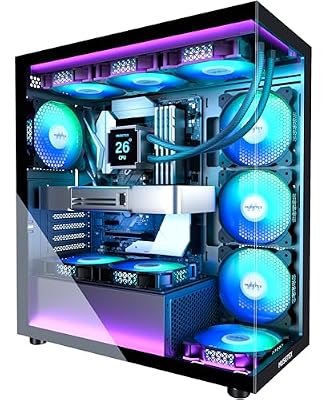

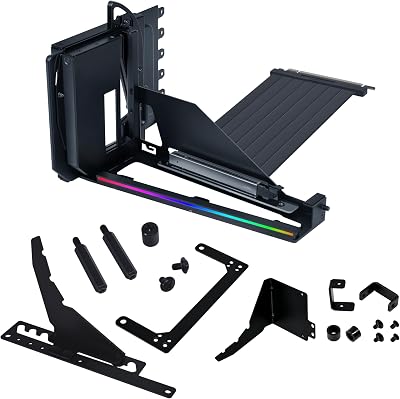

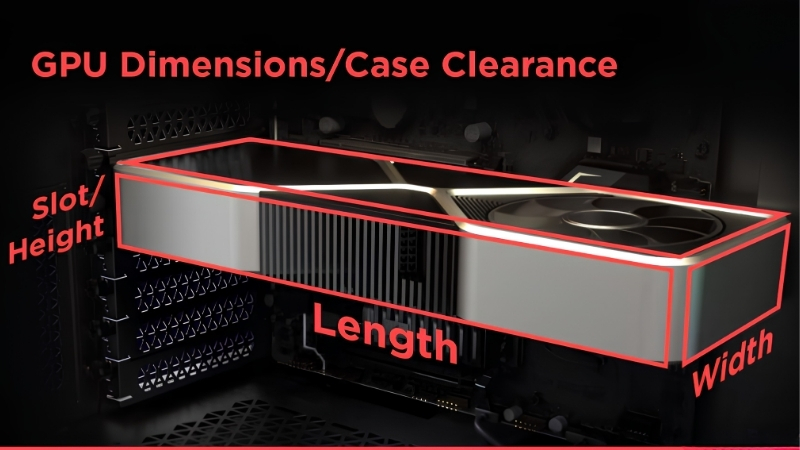
Will Your GPU Fit Your Case? The Three Measurements
The quick answer: a GPU fits your case if its length, its thickness in slots, and its height all sit within your case’s stated clearances. Length is the most common dealbreaker, slot thickness catches out buyers of chunky modern cards, and height occasionally clashes with side panels or cables. Check all three against your case specification and you will know for certain before you spend a cent.
As an Amazon Associate we earn from qualifying purchases at no extra cost to you.



Length: The Most Common Problem
A card’s length, measured from the bracket to the far end of the cooler, is by far the most frequent fit issue. Every case lists a maximum GPU length in millimeters, and your card must come in under it.
The catch is that front-mounted radiators or fans eat into that maximum. If your case has a liquid cooler or fans at the front, the real available length can be significantly shorter than the headline figure.
Always compare the card’s length against your case’s clearance with any front cooling already accounted for, not the empty-case number on the spec sheet.
It is worth measuring twice here, because length mismatches are the number-one reason cards get returned. A card just a few millimeters too long simply will not seat, with no workaround short of removing other components.
Manufacturers sometimes quote the card length without the bracket or the protruding power connector, so add a small margin to the figure you find. Treating the listed length as a minimum rather than an exact number keeps you safe from a near-miss.
Thickness and Slot Count
Modern cards are thick, often occupying three or even four expansion slots. Your case and motherboard must have enough slot space below the top PCIe slot for the cooler to fit without blocking other components.
A card described as 3-slot or 3.5-slot needs that many slots clear beneath it. In compact cases, a thick card can also press against a vertical-mount bracket or a bottom-mounted fan, so the slot figure is a real constraint, not just a number.
Slot thickness also affects what else you can install. A four-slot card can cover the lower PCIe slots entirely, so if you rely on a sound card, capture card, or second device, confirm the GPU will not physically block the slot you need.
Height and Cable Clearance
Height, sometimes called width, is measured from the PCIe slot to the top edge of the card. In cases with a tempered glass side panel or a tight layout, a tall card can press against the panel or leave no room for the power cable.
This is the measurement people most often forget. A card can be short enough and thin enough yet still foul the side panel once its bulky power connector and cable are attached, so leave clearance above the card for the plug.
This is especially relevant in slim or small form factor cases, where every millimeter counts. If your build is compact, treat the height figure and the connector clearance as seriously as the length, since a tall card with a top connector is a common cause of a side panel that will not close.
How to Check GPU Clearance Before You Buy
Confirming fit is a simple, methodical process rather than guesswork. With your case’s specification and the card’s dimensions in hand, this section shows you how to compare them correctly, including the easy-to-miss factors that turn a paper fit into a real-world clash.
Finding Your Case’s Max GPU Length
Your case manufacturer publishes a maximum supported GPU length, usually in the specifications on their website or in the manual. This is the single most important number for compatibility.
Note whether the figure assumes an empty front, since many cases quote the absolute maximum and then a reduced figure when a front radiator or fans are fitted. Use the realistic number for your actual build, not the best-case one.
If you cannot find the figure, the manual or a quick search of the case model usually lists it. Reputable case makers publish these clearances precisely because GPU fit is such a common concern, so the information is almost always available.
Accounting for Front Fans and Radiators
If you run, or plan to run, a front-mounted radiator or thick fans, subtract their depth from the case’s maximum length. A 30-millimeter fan plus a radiator can easily remove 50 to 60 millimeters of GPU clearance.
This is the single most common cause of a card that “should” fit but does not. Picturing the card and the front cooling occupying the same space at once, and measuring accordingly, prevents the nastiest surprises.
If you are determined to run both a long card and front cooling, consider mounting the radiator on the top of the case instead. Moving the cooling out of the card’s path is often the simplest way to reclaim the length you need.
Do Not Forget the Power Connector Clearance
The power connector adds height above the card, and the cable needs room to curve gently rather than kink. In a tight case, this extra clearance can be the difference between a clean fit and a side panel that will not close.
For cards with a top-mounted 16-pin connector, leave room above the card for the plug and a soft cable bend. Some builders solve a tight squeeze with an angled adapter, but planning the clearance from the start is always the cleaner option.
The newer 12V-2×6 connectors sit a little lower and some cables exit at an angle, which can help in tight builds. If clearance is marginal, a power supply with a native angled cable is worth seeking out before resorting to a separate adapter.
What to Do If Your GPU Does Not Fit
If your measurements reveal a clash, you still have good options rather than a dead end. This section weighs the common fixes, helps you pick a case that swallows big cards, and shares simple ways to confirm fit with total confidence before you commit.
Pros and Cons of the Common Fixes
When a card does not fit, you have a few routes, each with trade-offs:
- Choose a shorter card – Pros: guaranteed fit, often cheaper. Cons: may mean a lower performance tier.
- Buy a bigger case – Pros: fits the card you want, better airflow. Cons: added cost and a full rebuild.
- Remove front fans or a radiator – Pros: frees up length for free. Cons: can reduce cooling performance.
For most people, matching the card to a case that comfortably fits it is the cleanest solution, avoiding compromises on cooling or performance.
Choosing a Case That Fits Big GPUs
If you want a high-end card, buy a case rated for a generous GPU length, ideally with room to spare beyond the card’s stated size. A little extra clearance makes installation easier and improves airflow around the card.
Mid-tower and full-tower cases designed for modern hardware usually list 350 millimeters or more of GPU clearance, which comfortably swallows even the largest cards. The recommended spacious cases linked in this review are good starting points for a big-GPU build.
Airflow improves with extra room, too. A card with space around it breathes more easily and runs cooler, so a slightly larger case is not just about fit; it also helps your expensive GPU perform at its best.
Tips to Confirm Fit With Confidence
Before buying, write down three numbers for the card, length, slots, and height, and three for the case, then compare them directly. If every card figure is smaller than the matching case figure with a little margin, you are safe.
A simple trick is to cut a strip of paper or cardboard to the card’s length and lay it inside your case along the slot, with any front cooling in place. Seeing the space with your own eyes removes any lingering doubt before you commit to the purchase.
If you would rather not measure by hand, many case and card listings include the exact dimensions, and some retailers flag known compatible combinations. Cross-checking those figures is a quick, reliable alternative to the paper test.
Either way, the few minutes spent confirming fit are nothing next to the hassle and cost of returning a card that simply will not go in.
Confirming that a graphics card fits your case is quick, free, and saves a world of frustration. Whether you are choosing a new card or a roomier case to hold it, take a look at the recommended spacious cases and well-sized cards linked throughout this review and pick the combination that fits with room to spare.
See More:
- How to clean a GPU heatsink
- GPU vertical mount thermals
- GPU thermal throttle temp
- What PSU for RTX 4090
- What PSU for RTX 5080
Conclusion
So, will my GPU fit my case? It will, as long as the card’s length, slot thickness, and height all sit within your case’s clearances, with front fans and the power connector accounted for. Length is the usual culprit, so measure it carefully against a realistic figure rather than the empty-case maximum. Check all three dimensions, use the paper trick if you are unsure, and you will buy with total confidence. Check the recommended cases and cards above to build a system that fits perfectly.
Frequently Asked Questions
What is the fastest way to check fit before ordering?
Look up the card’s exact length, height and slot count on the manufacturer specification page, not the retailer listing, then compare against your case manual’s maximum graphics card clearance. Follow that with a physical tape measure check inside the case, because installed radiators, drive cages and cable channels routinely reduce the advertised figure by 20mm or more.
My card is 5mm shorter than the case limit. Is that enough?
Probably not, once cables are attached. The power connector adds height or length depending on its orientation, and a 16-pin plug needs at least 35mm of straight run before it bends. If clearance is that tight, plan for an angled adapter from a reputable brand or choose a shorter variant of the same GPU.
Will a thick card block my second PCIe slot or M.2 drive?
A three-slot cooler will cover the slots directly beneath it and often sits close enough to the board to trap heat over a second M.2 socket. Sound cards and capture cards may need to move to a lower slot. Check the motherboard layout diagram before you buy if you rely on additional expansion cards.
What if the card sags once installed?
Heavy triple-fan cards put real leverage on the slot and the rear bracket. A support bracket that rests on the case floor, or an anti-sag brace attached to the top of the card, costs very little and prevents long-term stress on the PCIe connector and the solder joints around it. Most flagship cards now include one.
Is a smaller case worth the compromise?
Small chassis look great but restrict both card size and airflow, which pushes temperatures up and fan noise with them. If you want a high-power card, a mid-tower with mesh intake will run five to ten degrees cooler and quieter for the same hardware. Choose the case around the card, not the other way around.











Write Your Review
No reviews yet. Be the first to share your experience!