
- Top Pick: LINKUP PCIE 5.0 Riser Cable | for Vertical GPU Mount | Right Angle | Graphics Card GPU Ready | Usable with PCIe 4.0 & RX 9070/ RTX5090 | 20cm (Total Length: 24cm)
- Best Value: Okinos Aqua UNO Micro ATX Case, No Radiator Support, Max GPU Length 309mm, Quick-Release Panoramic Tempered Glass, 3x120mm ARGB Fan Pre-Installed, Type-C 5Gbps, Two-Tone Limited Edition (Black&White)
- Premium Choice: NVRADCHUA ARGB GPU Support Bracket, GPU Brace Support, 5V 3Pin addressable GPU Holder, 5v 3pin RGB GPU Support Stand Video Card sag Holder, Adjustable Length and Height GPU Stand (Black)
GPU length compatibility is the single biggest reason a brand-new graphics card ends up going back in the box, because length is the dimension that most often clashes with a case. As cards have grown longer and cases have filled up with radiators and fans, knowing whether a card will physically fit has become a real pre-purchase skill. This review explains how GPU length is measured, gives you typical lengths by card class, and shows exactly how to match a card to your case so you buy with confidence rather than crossing your fingers.
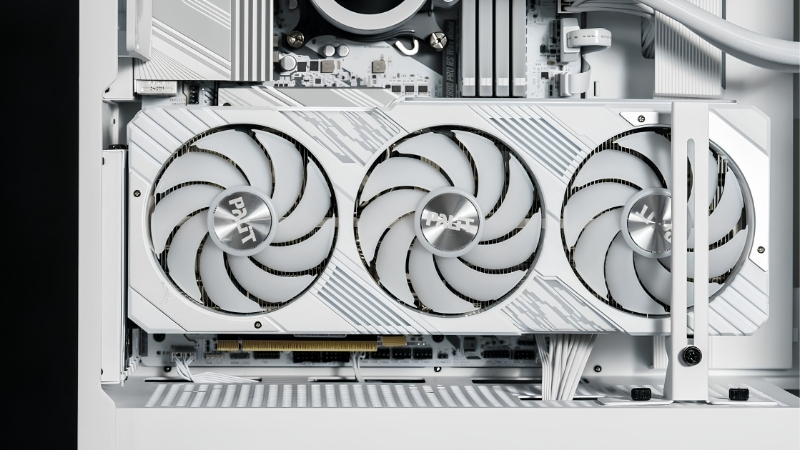
Understanding GPU Length Compatibility
The quick answer: a card fits your case on length if its measurement in millimeters is smaller than your case’s stated maximum GPU length, after you subtract the depth of any front-mounted radiator or fans. Most compatibility failures come down to forgetting that front cooling steals length, so the real clearance is often shorter than the headline figure. The detail below makes this easy to get right.
As an Amazon Associate we earn from qualifying purchases at no extra cost to you.


How GPU Length Is Measured
A graphics card’s length is measured along its longest edge, from the metal bracket that screws into the case to the far tip of the cooler shroud. Manufacturers publish this figure in millimeters, and it is the number you compare against your case.
Be aware that some listings quote the bare PCB length while others include the full cooler and even the protruding power connector. When two figures exist, always use the largest, since that is what actually has to fit inside the case.
Some manufacturers also measure from slightly different reference points, which is another reason figures can vary by a few millimeters between sources. When in doubt, trust the largest number you can find and treat it as the true length to plan around.
Reviews and community spec sheets can help confirm a figure when manufacturer pages are vague. If several independent sources agree on a card’s length, you can plan around that number with confidence even when the official listing is unclear.
Adding a small margin of a few millimeters to whatever figure you find protects you from a near-miss caused by these measurement differences.
That habit costs nothing and saves a great deal of frustration. A card that is technically a millimeter under the limit can still be a nightmare to seat, so the small margin is about ease of installation as much as raw clearance.
Typical GPU Lengths by Class
Card length tracks closely with performance class, so knowing the rough range for each tier helps you plan before you even pick a model. The table below shows the typical spread.
| Card class | Typical length | Common fit |
|---|---|---|
| Compact / ITX | 170-220 mm | Small form factor cases |
| Mid-range dual-fan | 240-280 mm | Most mid-tower cases |
| High-end triple-fan | 300-360 mm | Larger mid and full towers |
As you can see, the jump from a mainstream dual-fan card to a high-end triple-fan model can add 60 to 90 millimeters, which is often exactly the margin that decides whether it fits.
It is worth knowing that even within a class, models vary. Two high-end cards of the same tier can differ by 30 or 40 millimeters depending on the cooler design, so always check the specific model you want rather than assuming the class figure applies.
Why Front Cooling Changes the Math
The maximum GPU length a case lists usually assumes an empty front. The moment you add a front-mounted radiator or thick fans, that available length shrinks, sometimes dramatically.
A front radiator plus fans can occupy 50 to 60 millimeters of depth, which comes straight off your usable GPU length. This is the most common reason a card that looks compatible on paper refuses to fit in reality.
Top-mounted cooling avoids this problem entirely, since it sits out of the card’s path. If you have the choice, moving a radiator to the top of the case is often the simplest way to reclaim the length a long card needs.
Matching GPU Length to Your Case
Once you understand how length is measured and how front cooling affects it, matching a card to your case is a simple, reliable process. This section walks through finding the right numbers, the margin to leave, and the extra care that compact builds demand.
Finding Your Case’s Max Length
Every case manufacturer publishes a maximum supported GPU length in the specifications on their website or in the manual. This figure is the foundation of your compatibility check, so track it down first.
Many cases list two numbers: one for an empty front and a reduced one with cooling installed. Use the figure that matches your actual build, not the optimistic best case, or you risk planning around clearance you do not really have.
If the specification is unclear, the case manual usually shows the supported length with and without front cooling in a diagram. A quick look there removes any ambiguity before you commit to a card.
The Clearance Buffer to Leave
Rather than aiming for the tightest possible fit, leave a buffer of 10 to 20 millimeters between the card and the case maximum. This margin makes installation far easier and leaves room for the power cable to curve gently rather than kink.
A tight fit also restricts airflow at the front of the card, where it draws in fresh air. A little breathing room is good for both your patience during the build and the card’s temperatures afterward.
A buffer also leaves space for future cards. Graphics cards have trended longer over time, so a case chosen with room to spare today is more likely to accept your next upgrade without another compatibility headache.
Small Form Factor Considerations
In compact and ITX cases, length is the dominant constraint, and the margins are unforgiving. Many small cases support only shorter cards, so your choice of GPU is narrower from the start.
If you are set on a small build, check the case’s GPU length limit before choosing a card, not after. Plenty of capable shorter cards exist for exactly these builds, so it is usually a matter of selecting the right model rather than compromising on a tier.
Compact-friendly versions of popular cards are increasingly common, designed specifically to fit small cases without giving up much performance. Seeking out one of these shorter variants is often all it takes to build a powerful system in a tiny footprint.
Choosing a Card That Fits
With the measurements understood, the final step is turning them into a confident purchase. This section weighs the trade-offs between long and short cards, shares simple ways to verify length, and helps you decide when a compact card is the smarter choice.
Pros and Cons of Long Versus Short Cards
The length of a card is tied to its cooling and performance, so the trade-off is real:
- Longer cards – Pros: bigger coolers, lower temperatures, quieter fans, and usually higher performance tiers. Cons: harder to fit, clash with front cooling, and rule out small cases.
- Shorter cards – Pros: fit almost any case, easy to install, ideal for compact builds. Cons: smaller coolers can run a little warmer, and they are often mid-range models.
Neither is simply better; the right choice depends on your case size and whether you value maximum performance or guaranteed, easy compatibility.
Tips to Verify Length Before Buying
Write down two numbers before you buy: the card’s length and your case’s realistic maximum. If the card is comfortably shorter with your buffer included, you are safe.
For extra certainty, cut a strip of paper or card to the GPU’s length and lay it inside your case along the slot, with any front cooling in place. Seeing the space occupied removes any doubt before you commit money.
This physical check is especially worth doing for a borderline fit. When a card is within a few millimeters of your limit, the paper test settles the question in seconds and saves the cost and hassle of a return.
When to Choose a Compact Card
If your case is small, your front is full of cooling, or you simply want a hassle-free install, a compact card is the sensible choice. Modern shorter cards deliver strong performance for most users despite their smaller size.
Choosing a card that fits comfortably also future-proofs your patience, since you will not be fighting clearance every time you work inside the case. For many builders, that ease is worth more than the last few percent of performance.
A comfortably fitting card is also easier to clean and maintain over its life, since you can reach around it without removing other parts. That long-term convenience adds up every time you open the case.
In short, a card that fits with room to spare is simply easier to live with for as long as you own the system, not just on the day you install it.
Getting GPU length compatibility right turns a stressful purchase into a confident one, and it takes only a couple of measurements. Whether you need a card that fits your current case or a roomier case for the card you want, take a look at the recommended cards and spacious cases linked throughout this review and pick the combination that fits with room to spare.
See More:
- How to clean a GPU heatsink
- GPU vertical mount thermals
- GPU thermal throttle temp
- What PSU for RTX 4090
- What PSU for RTX 5080
Conclusion
GPU length compatibility comes down to one comparison: the card’s length in millimeters against your case’s realistic maximum, with front cooling subtracted and a small buffer left over. Card length scales with class, so high-end triple-fan models demand the most clearance, and front radiators are the usual hidden culprit behind a tight fit. Measure carefully, leave margin, and use the paper trick if unsure. Check the recommended cards and cases above to build a system where everything fits the first time.
Top-Rated Picks


| Product | Brand | Rating | Reviews | Price |
|---|---|---|---|---|
| ARCTIC MX-4 (4 g) – Premium Performance Thermal Paste… | ARCTIC | ★ 4.8 | 104k | $4.99 |
| ARCTIC MX-4 (incl. Spatula, 4 g) – Premium Performanc… | ARCTIC | ★ 4.8 | 71.9k | $5.49 |
| Crucial 8GB DDR4 RAM 3200MHz (PC4-25600), Downclockab… | Crucial | ★ 4.8 | 62.8k | $74.99 |
| AMD Ryzen 5 5600X 6-core, 12-thread unlocked desktop … | — | ★ 4.8 | 30.2k | $177.60 |
| NVIDIA Shield Remote; Voice Search, Motion-Activated,… | — | ★ 4.7 | 10.6k | $25.99 |
Frequently Asked Questions
How long are current high-end graphics cards?
Founders Edition style cards tend to land between 300mm and 320mm, while partner designs with triple fans and oversized heatsinks frequently run 330mm to 360mm. Mid-range dual-fan cards usually sit between 240mm and 280mm, and compact ITX models are often under 200mm. Always check the specific SKU, because the same chip can ship in three very different chassis.
What do the terms dual-slot and triple-slot mean in practice?
They describe how many rear expansion slot positions the cooler occupies. A dual-slot card takes 40mm of vertical space, a triple-slot takes around 60mm, and some flagship coolers now push past four slots. This matters for motherboard layouts with a second graphics slot, for capture cards, and for cases with only a few rear cutouts.
Can I remove the front fans to make a long card fit?
You can, and it typically frees 25mm to 30mm, but it removes your main source of cool intake air. A large card running with no front intake in a closed case will recirculate its own exhaust and gain several degrees. Prefer a slim 15mm fan or a case with a removable drive cage instead.
Does a longer card always cool better?
Longer coolers usually carry more fin area and a third fan, which lowers fan speed for a given temperature and makes the card quieter. But a long card in a cramped case can perform worse than a compact card in a well-ventilated one. Airflow through the chassis matters at least as much as heatsink size.
How do I measure my own case accurately?
Remove the side panel, place a tape measure against the inside face of the rear slot bracket, and extend it forward to the nearest obstacle, which is usually the drive cage, a front radiator, or the fan hub. Subtract 30mm for power cable routing and treat that number as your true maximum card length.











Write Your Review
No reviews yet. Be the first to share your experience!