
- Top Pick: ASUS TUF Gaming Z890-PLUS WiFi Z890 LGA 1851 ATX Motherboard, Intel® Core™ Ultra Series 2 Ready, Advanced AI PC-Ready, 16+1+2+1 Stages, DDR5, PCIe® 5.0, Thunderbolt™ 4 Type-C®, 4X M.2, Wi-Fi 7, 2.5Gb
- Best Value: ASUS ROG Strix Z890-E Gaming WiFi Intel® Z890 LGA 1851 ATX Motherboard, Advanced AI PC-Ready, 18+2+1+2 Stages, DDR5, WiFi 7, 7X M.2, Thunderbolt™ 4, USB Type-C®, AI Overclocking, Cooling & Networking
- Premium Choice: ASUS ProArt Z890-CREATOR WIFI Z890 LGA 1851 ATX Motherboard, Intel® Core™ Ultra Processor Series 2 Ready, 16+2+1+2 stages, PCIe® 5.0, DDR5, Thunderbolt™ 5 Type-C®, 10+2.5 Gb LAN, WiFi 7, 5x M.2, AI OC
Best Z890 motherboard shortlists have settled considerably since Arrow Lake launched, and the sensible picks are now clear. Z890 is Intel’s enthusiast chipset for Core Ultra 200 processors on LGA 1851, and this guide ranks six boards from a sub-$180 entry to a genuinely over-built flagship alternative.
As an Amazon Associate we earn from qualifying purchases at no extra cost to you.


As an Amazon Associate we earn from qualifying purchases at no extra cost to you.
By Ryan Cole
How to Choose the Best Z890 Motherboard
Every Z890 board unlocks memory overclocking and gives PCIe 5.0 to the graphics slot, so the chipset is not the differentiator. What makes one the best Z890 motherboard for your build is power delivery, storage provision and rear connectivity, in that order.
Power Delivery for the Core Ultra 9 285K
The 285K is the part that actually stresses a VRM on this platform. A 16-phase arrangement using 80A power stages, as found on the MAG Z890 Tomahawk, runs it at stock without thermal complaints, and that is the realistic floor for the top chip.
Flagship boards advertise 22+2+1+2 or 24+1+2+2 configurations. Those matter for sub-ambient overclocking and very little else. If your cooling is a 360mm AIO or a large air tower, the extra phases will never become the limiting factor.
Count the M.2 Slots You Will Actually Fill
Z890 boards range from three M.2 sockets to seven. The ROG Strix Z890-E leads on raw count, while the Tomahawk offers five and the AORUS Elite four, which is already more than most builds populate in five years of ownership.
Check how the slots are wired rather than just counting them. Some secondary sockets share bandwidth with SATA ports or drop the GPU slot to x8 when populated, which is worth knowing before you install a second Gen5 drive.
Networking and USB4 on the Rear Panel
2.5GbE is the entry point on Z890 and 5GbE appears from roughly $250 upward. Thunderbolt 4 or USB4 is a genuine Intel platform advantage, and dual 40Gbps ports on boards like the Strix Z890-E cover docks and external NVMe enclosures for years.
Wi-Fi 7 is effectively standard across the range, so it should not drive your decision. Prioritise the wired connection and the USB4 provision, because those are the specifications you cannot add later with a cheap PCIe card.
Diagnostics and Tool-Free Assembly
A two-digit Q-code display saves genuine time when a build refuses to POST, and it is missing from most boards below the $250 mark. Basic status LEDs tell you which subsystem failed; a Q-code tells you approximately why.
Tool-free M.2 latches and quick-release GPU catches have spread down the range and are more useful than they sound, particularly in a case where the graphics card sits over the primary drive slot. They are worth a small premium if you upgrade often.
What the 2026 Market Means for Z890 Buyers
Buying into LGA 1851 in the second half of 2026 requires clear eyes about where the platform goes next. Three market realities should shape how much the best Z890 motherboard for you is actually worth paying.
LGA 1851 Is the End of This Upgrade Path
Intel’s Nova Lake requires a new LGA 1954 socket, so no future Intel processor will drop into a Z890 board. Whatever CPU you install is the one that machine keeps, which changes the calculation entirely against AMD’s AM5 socket.
The practical response is to buy the processor you want up front rather than starting with a Core Ultra 5 and planning to upgrade. It also argues against spending heavily on a board whose only role is to host one CPU for its service life.
Nothing New Arrives Until CES 2027
Nova Lake, Zen 6 and the RTX 50 Super refresh have all moved to CES in January 2027. Anyone asking whether to wait is looking at six months minimum before announcement, and longer before boards and CPUs are actually on shelves at sane prices.
That makes Z890 a reasonable buy today rather than a mistimed one. Firmware is mature, the memory compatibility issues that dogged early Arrow Lake releases are largely resolved, and current boards will not be superseded on this socket.
Mid-Range Boards Have Absorbed a Price Increase
Motherboard unit sales have dropped more than 25 percent and vendors have concentrated their SKUs in the mid and upper tiers, while promotional pricing policies ended in February 2026. Entry Z890 boards are consequently thinner on features than they were a year ago.
If a genuine discount appears on a mid-tier board, take it. Waiting for November is unlikely to help, since Black Friday stock is built from components bought at this year’s elevated contract prices rather than last year’s.
Top Picks: Six Contenders for Best Z890 Motherboard
These six cover the useful range of the chipset, from a budget entry to a heavily provisioned enthusiast board, so the best Z890 motherboard for you is somewhere in this list. Stock has been inconsistent since launch, so verify availability and pricing first.
| Board | Power Stages | M.2 Slots | Networking | Q-Code | Tier |
|---|---|---|---|---|---|
| MSI MAG Z890 Tomahawk WiFi | 16+1+1+1, 80A | 5 | 5GbE + Wi-Fi 7 | Yes | Mid-range |
| ASUS ROG Strix Z890-E Gaming | 18+2+1+2 | 7 | Wi-Fi 7 + dual USB4 | Yes | High-end |
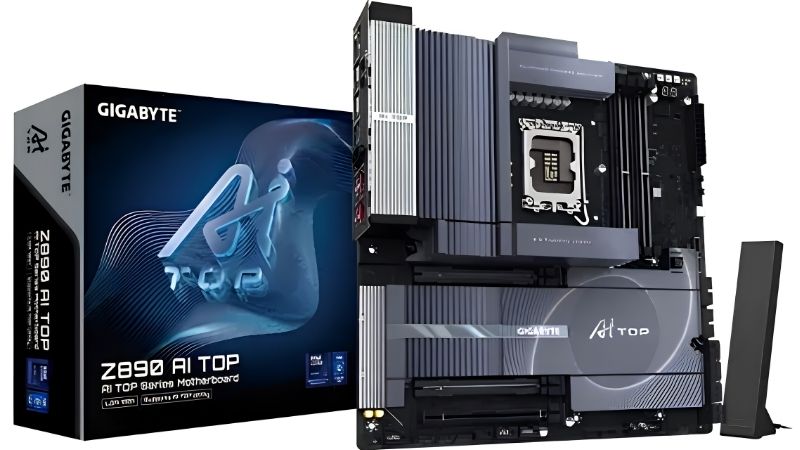
| GIGABYTE Z890 AORUS Elite WIFI7 | Mid-tier | 4 | 2.5GbE + Wi-Fi 7 | No | Value |
| ASRock Z890 Taichi Lite | Enthusiast | 6 | Dual NIC | Yes | Enthusiast |
| ASUS Prime Z890-P WiFi | Entry | 3 | 2.5GbE + Wi-Fi 7 | No | Budget |
| GIGABYTE Z890 Eagle WIFI7 | Entry | 3 | 2.5GbE + Wi-Fi 7 | No | Budget |
MSI MAG Z890 Tomahawk WiFi
At roughly $250 the Tomahawk is where most Z890 builds should land. Its 16+1+1+1 arrangement with 80A stages handles a Core Ultra 9 285K at stock without VRM thermal issues, and it pairs that with 5GbE, Wi-Fi 7, five M.2 slots and Thunderbolt 4.
MSI’s Click BIOS is the most approachable in the category, which matters more than the spec sheet suggests. The real caveat is availability, which has been inconsistent since launch; paying well over $250 for one undermines the entire value argument.
ASUS ROG Strix Z890-E Gaming WiFi
The Strix Z890-E is the storage and connectivity champion short of a flagship. Seven M.2 slots, an 18+2+1+2 power stage design, Wi-Fi 7 and dual USB4 ports make it the natural choice for a dense creator-gaming hybrid with several Gen5 drives.
Its AI overclocking and cooling features depend on Armoury Crate, and plenty of builders decline to install it. The board remains excellent without that software, but you are paying for capability you may never use in a simple two-drive gaming system.
GIGABYTE Z890 AORUS Elite WIFI7
The AORUS Elite is the value anchor of the range, combining PCIe 5.0, four M.2 slots, Thunderbolt 4, 2.5GbE and Wi-Fi 7 at a mid-range price, with GIGABYTE’s five-year warranty behind it.
The shortcomings are software and diagnostics. Gigabyte Control Center is clumsy, some AORUS boards ship with Marvell network controllers that have needed driver attention, and there is no Q-code display. None of that affects day-to-day performance once the system is running.
ASRock Z890 Taichi Lite
The Taichi Lite strips the retail packaging and accessory bundle from the standard Taichi while keeping the engineering. You get robust power delivery, six M.2 sockets, dual network controllers and dual Thunderbolt connectivity for meaningfully less than the full version.
It is comfortably more board than Arrow Lake can consume, which is the honest criticism. Unless you genuinely need six drives or a dual-NIC configuration, the Tomahawk delivers the same gaming outcome. ASRock’s support experience is also the least polished among the four brands.
ASUS Prime Z890-P WiFi
The Prime Z890-P is the sensible budget route onto the chipset. It supplies Wi-Fi 7, 2.5GbE and a competent VRM for a Core Ultra 5 or Core Ultra 7 build, at well under the price of the mid-tier boards while keeping ASUS memory tuning menus.
Storage and networking are where it economises, with three M.2 slots and no 5GbE. There is no Q-code display either, so troubleshooting means reading LEDs. Pair it with a mid-tier CPU rather than a 285K and it is a solid foundation.
GIGABYTE Z890 Eagle WIFI7
Under roughly $180 the Eagle is the cheapest Z890 board worth considering. It carries Wi-Fi 7, 2.5GbE, PCIe 5.0 to the graphics slot and three M.2 sockets, which is a surprisingly complete feature set at the bottom of the range.
The VRM is sized for mainstream chips, and pushing a 285K through it under sustained all-core load is not the intended use. Accept it as a Core Ultra 5 platform and its value proposition is hard to argue with.
Frequently Asked Questions
These questions come up most often once builders narrow the search for a best Z890 motherboard down to a handful of models rather than the chipset in general.
What is the best Z890 motherboard for the Core Ultra 9 285K?
The MSI MAG Z890 Tomahawk WiFi at around $250 handles the 285K at stock without VRM thermal issues, which makes it the value answer. If you need more than five M.2 slots or dual USB4, step up to the ROG Strix Z890-E instead.
Do I need Z890, or will B860 do the job?
B860 covers gaming perfectly well and costs less, with boards like the MAG B860 Tomahawk offering Wi-Fi 7, 5GbE and Thunderbolt 4 near $227. Z890 adds memory overclocking headroom, more Gen5 lanes and stronger power delivery for the top-tier CPUs.
Will a future Intel CPU fit my Z890 board?
No. Nova Lake moves to the LGA 1954 socket, so Z890 boards will not accept it. Plan your Z890 build around the processor you install now, because no drop-in upgrade path exists for this platform.
Is Wi-Fi 7 worth prioritising on a Z890 board?
It is effectively standard across the range, so it rarely changes a decision. Give more weight to wired networking and USB4 provision, since those are harder to add later. A 2.5GbE port is the practical floor and 5GbE is a genuine step up if your network supports it.
See More:
- Who makes the best motherboard
- Best budget AM5 CPU for gaming
- What is the best thermal paste pattern
- Best mini ITX computer case
- Best desktop RAM for gaming
Final Thoughts
Picking the best Z890 motherboard is mostly a question of how much board your CPU actually needs. The MAG Z890 Tomahawk is the correct answer for the majority of Arrow Lake builds, the Strix Z890-E earns its premium only on dense storage configurations, and the Eagle or Prime cover budget systems well. Just buy the processor you want now, because LGA 1851 offers no upgrade path. Pricing reflects the market in August 2026 and should be verified before purchase.











Write Your Review
No reviews yet. Be the first to share your experience!