
- Top Pick: Silicon Power Value Gaming DDR4 RAM 16GB (2x8GB) 3200MHz (PC4 25600) 288-pin CL16 1.35V UDIMM Desktop Memory Module with Heatsink Grey SU016GXLZU320BDAJ5
- Best Value: Gaming Laptop 2026,Office & Windows 11 Pro Laptops with 16GB RAM 512GB SSD
- Premium Choice: GMKtec M6 Ultra Gaming Mini PC Ryzen 7640HS 32GB RAM DDR5 1TB SSD
Best RAM Speed for Gaming is not simply the highest number a kit advertises. Every platform has a point where the memory controller stops keeping pace, and past it a faster kit can perform worse than a cheaper one running in step with the processor.
As an Amazon Associate we earn from qualifying purchases at no extra cost to you. Product prices and availability are accurate as of the date shown and are subject to change.








As an Amazon Associate we earn from qualifying purchases at no extra cost to you. Product prices and availability are accurate as of the date shown and are subject to change.
By Ryan Cole, hardware writer at NVIDIAReview.
How to Find the Best RAM Speed for Gaming on Your Platform
Memory affects frame rates most in simulation, strategy and open-world titles, and barely at all in graphics-limited scenarios. The best ram speed for gaming is the one your memory controller can run in step with, at a latency you did not overpay for. Four checks find it.
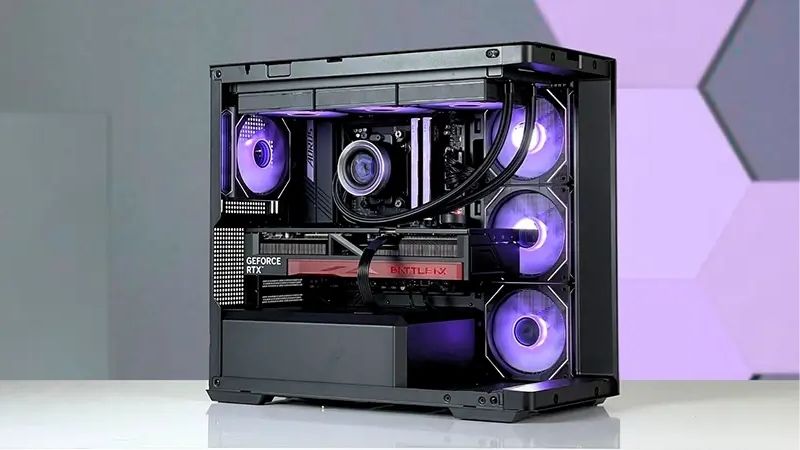
Frequency and Latency Are One Number, Not Two
A kit’s real latency in nanoseconds comes from its timing divided by its frequency. A DDR5-6000 kit at CL30 and a DDR5-7200 kit at CL36 land in similar territory, so the headline speed alone tells you little.
That is why cheap high-frequency kits with loose timings often lose to slower, tighter ones. Compare the two figures together, and treat any kit that publishes only its frequency with suspicion.
Sub-timings matter too, but they are rarely published. Kits built on well-regarded memory chips generally tune better, which is what separates otherwise identical specifications on paper.
Reviews that test games rather than synthetic bandwidth are the useful ones here. Bandwidth figures scale neatly with frequency, while frame rates often flatten out well before the fastest kit on the chart.
Your Platform Sets the Practical Ceiling
On the current AMD platform, the memory controller runs in step with the memory up to around DDR5-6000 to 6400. Beyond that it shifts to a divided ratio, and the added latency usually cancels out the extra bandwidth.
Current Intel platforms handle higher frequencies more comfortably, and clocked memory modules push that further still. If you are building on Intel, faster kits are worth considering in a way they are not on AMD.
Board layout affects the ceiling as well. Two-slot boards generally reach higher stable frequencies than four-slot designs, and filling all four slots often forces a lower speed to remain stable.
Capacity Beats Speed Once You Have Enough
Thirty-two gigabytes is now the practical target for gaming, since a modern title plus a browser, chat client and recording software can push past sixteen. Running out of capacity costs far more than a slower kit does, because the system starts swapping to storage.
That penalty appears as long stalls rather than lower frame rates, which is the same pattern as running short of graphics memory and equally unpleasant to play through.
Given how memory pricing has moved this year, buying the capacity you need in one kit is also the cheaper route. Mixing modules later risks compatibility problems and unknown future pricing.
Beyond thirty-two gigabytes, gaming sees almost nothing. Larger capacities are for content work or virtual machines, so a sixty-four gigabyte kit is a productivity purchase rather than a frame rate one.
An Unconfigured Kit Runs Slowly
Memory installed and left alone runs at a conservative baseline speed regardless of what the box says. Enabling the EXPO or XMP profile in firmware is what actually delivers the advertised specification.
Verify afterwards rather than assuming. A quick look at the reported frequency and timings confirms the profile applied, and it is the single most common reason a new build underperforms.
Run a stability test afterwards too. A profile that posts is not always stable under load, and an hour of memory testing catches problems that would otherwise appear as random crashes weeks later.
Top Picks: Kits at the Best RAM Speed for Gaming
These kits sit at or around the best ram speed for gaming, from the mainstream sweet spot to one high-frequency option for current Intel builds. Specifications are manufacturer-listed, and retail pricing at the time of writing in August 2026 changes weekly.
| Kit | Capacity | Speed | Timing | Best for |
|---|---|---|---|---|
| G.Skill Flare X5 | 32 GB | DDR5-6000 | CL30 | AM5 default choice |
| Corsair Vengeance | 32 GB | DDR5-6000 | CL30 | Wide availability |
| G.Skill Trident Z5 Neo RGB | 32 GB | DDR5-6000 | CL28 | Tighter timings |
| Kingston Fury Beast | 32 GB | DDR5-6000 | CL36 | Value kit |
| Crucial Pro | 32 GB | DDR5-5600 | CL46 | Lowest cost entry |
| G.Skill Trident Z5 CK | 48 GB | DDR5-8000 | Clocked modules | High-speed Intel builds |
G.Skill Flare X5 32 GB DDR5-6000 CL30
This is the kit most AM5 builds end up with, and for good reason. The speed sits exactly where the memory controller runs in step with the memory, the timings are tight, and the EXPO profile applies without fuss on the great majority of boards.
There is no lighting and the heat spreaders are plain, which matters only if the build is on display. Pushing it much beyond its rated speed rarely gains anything on this platform.
Corsair Vengeance 32 GB DDR5-6000 CL30
Functionally equivalent to the above with broader retail availability and both AMD and Intel profile versions, which makes it the easy option when stock is the deciding factor.
Check the exact model, since the Vengeance name covers a wide range of speeds and timings. Some variants use lower-binned chips that tune less well if you plan to adjust anything manually.
G.Skill Trident Z5 Neo RGB 32 GB DDR5-6000 CL28
Two clock cycles tighter than the standard kits, which translates into a small but measurable latency improvement in memory-sensitive titles. The build quality and lighting suit a visible build.
You pay a clear premium for that margin, and the gain in most games is a frame or two. Tall heat spreaders can also interfere with wide air coolers, so check clearance first.
Kingston Fury Beast 32 GB DDR5-6000 CL36
Same frequency at looser timings for less money, which makes it the sensible value pick when the tighter kits are priced well above it. Real-world difference in games is small.
The looser timings do cost a little in memory-sensitive titles, and the kits are less rewarding to tune manually. As a set-and-forget purchase it does the job.
Crucial Pro 32 GB DDR5-5600
The entry point. It runs below the sweet spot but still comfortably within the platform’s synchronised range, and the capacity matters more than the last few hundred megahertz.
Timings are conservative and performance in memory-heavy games sits behind the 6000 kits. Choose it when the price gap is large enough to fund something else in the build.
G.Skill Trident Z5 CK 48 GB DDR5-8000
Clocked modules push frequency well beyond what standard kits manage, which current Intel platforms can genuinely use. The larger capacity also suits builds that game and create on the same machine.
On the AMD platform most of that speed is wasted, since the controller moves to a divided ratio. It is expensive, and board support for very high frequencies varies by model.
What 2026 Memory Pricing Means for This Choice
Memory is the component most affected by current market conditions, which changes how to weigh the best ram speed for gaming against capacity. Three points matter.
Prices Are Still Rising Through the Year
Forecasts for both the third and fourth quarters of 2026 were revised upward, with DRAM rising by double digits quarter on quarter. The slowdown that has appeared reflects buyers reaching their limit rather than supply improving.
New production capacity is not expected before late 2027, and at least one major supplier has already sold out its 2026 output. Waiting for prices to fall is unlikely to work in the near term.
Black Friday Will Not Rescue Memory Buyers
Stock selling in November was manufactured against high contract pricing, so genuine discounts on memory, drives and prebuilt systems are unlikely this year. That advice runs against the usual seasonal habit.
Coolers, cases, fans and power supplies are the categories where real markdowns remain. Plan your memory purchase on need rather than on the calendar.
Buy Capacity Once, at the Sweet Spot Speed
Because adding modules later means paying unknown prices and risking compatibility problems, decide on thirty-two gigabytes now rather than starting at sixteen with the intention of expanding.
Paying a premium for frequency above your platform’s synchronised range is the wrong use of that budget. Buy the sweet spot speed at the capacity you need and put the difference into storage or the graphics card.
Frequently Asked Questions
These come up most often once someone has settled on the best ram speed for gaming and starts comparing individual kits.
Does faster memory increase frame rates?
In simulation, strategy and open-world titles, yes, by a measurable margin. In graphics-limited scenarios at higher resolutions, the difference between good kits is usually within a couple of frames.
Is DDR5-6000 CL30 still the answer on AM5?
For most builds, yes. It keeps the memory controller running in step with the memory, which is where the platform performs best without manual tuning.
Should I buy two modules or four?
Two. A two-module kit is easier for the memory controller to run at high speed, and four modules frequently force a lower frequency to remain stable. Buy the capacity you want as a matched pair rather than adding a second kit later.
Do I need to enable EXPO or XMP?
Yes. Without it the kit runs at a conservative baseline speed regardless of its rating, which is the most common reason a new build performs below expectations.
See More:
- What Is the Best Thermal Paste
- Best PC Case Fans 120mm
- Thermal Paste Best Brand
- Best Thermal Paste Brands
- Best CPU Cooler Reddit
Final Thoughts
The best ram speed for gaming is whatever your platform runs in step with, which currently means DDR5-6000 with tight timings on AM5 and higher frequencies on current Intel hardware. Buy thirty-two gigabytes as a two-module kit, enable the profile, confirm it applied, and spend any remaining budget on the graphics card rather than on frequency your controller cannot use.




Write Your Review
No reviews yet. Be the first to share your experience!