
- Top Pick: KOTIN Prebuilt Gaming PC RTX 5070 12GB, Ryzen 7 9700X, 32GB DDR5, 1TB SSD
- Best Value: ZYNEEX Prebuilt Gaming Desktop PC, AMD Ryzen 5 5500, GeForce RTX 3050 6GB,16GB DDR4 3200MHz RAM, 1TB NVMe SSD, ARGB Air Cooling, Wi-Fi,Tower Computer for Gaming, Streaming, Editing
- Premium Choice: iBUYPOWER Element SE Gaming PC Desktop Computer AMD Ryzen 5 8400F CPU, NVIDIA GeForce RTX 3050 6GB GPU, 16GB DDR5 RAM, 1TB NVMe SSD, Windows 11 Home, Gamer Keyboard and Mouse – ESA5N3501
The best PC build for gaming and streaming is not simply a gaming machine with more cores bolted on. Encoding, chat software and a browser full of dashboards all run alongside the game, so memory capacity and encoder headroom matter as much as raw frame rate does. Getting that balance wrong shows up as dropped frames rather than lower scores.
As an Amazon Associate we earn from qualifying purchases at no extra cost to you.


As an Amazon Associate we earn from qualifying purchases at no extra cost to you.
By Ryan Cole
How to Plan the Best PC Build for Gaming and Streaming
A streaming system carries a second workload that never appears in a benchmark chart. These four decisions shape whether the machine holds a steady frame rate with the encoder running, or whether viewers see dropped frames every time something demanding happens on screen. Working out the best PC build for gaming and streaming starts here.
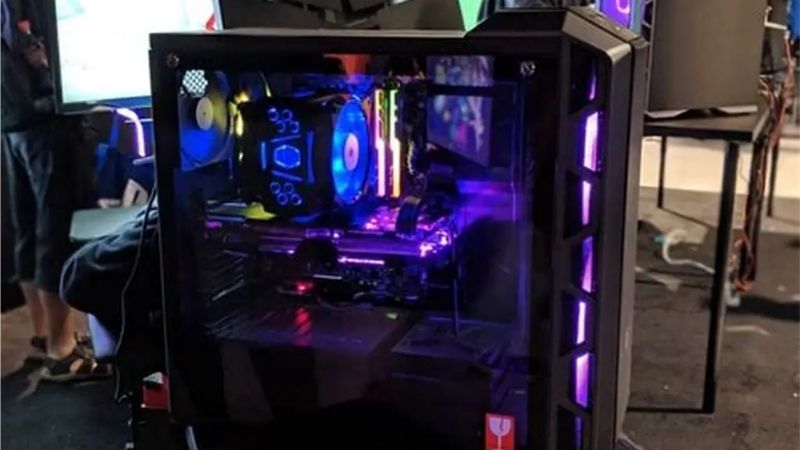
Where the encoding actually happens
Modern graphics cards include a dedicated hardware encoder, so the video work no longer lands on the processor the way it did a decade ago. NVIDIA cards use NVENC, AMD cards use their own encoder, and both run largely independently of the cores handling the game itself.
That changes the old advice about needing a very high core count. A hardware encoder frees the processor for the game, which is why an eight-core chip with strong single-thread performance now beats a sixteen-core part with lower clocks for most single-PC streaming setups.
Memory capacity is the quiet bottleneck
Streaming software, a browser with several tabs, chat overlays and voice communication together consume a serious amount of memory before the game even loads. On a 16GB system that leaves very little slack, and the result is stutter that looks like a graphics problem but is not.
Thirty-two gigabytes is the sensible target for a machine that streams, and it is worth buying in one kit rather than adding modules later. Mixing kits often forces lower speeds or manual timing work.
Storage layout and capture space
Recording locally writes a continuous file to disk, so a drive that is nearly full or busy loading game assets will eventually cause dropped frames. Keeping the capture target on a separate drive from the game library removes that conflict entirely.
A Gen4 NVMe drive of two terabytes covers most setups comfortably. Sustained write speed matters more than the headline sequential figure here, because a long recording session eventually exhausts the fast cache on cheaper drives and falls back to much slower writes.
Power supply headroom and standards
Current graphics cards draw sharp transient spikes rather than a steady load, which is what the ATX 3.1 specification was written to handle. A unit built to that standard with a native 12V-2×6 connector avoids adapter clutter and shutdowns during sudden power peaks.
Eight hundred and fifty watts covers a mainstream build with room to spare, and buying a good unit once is cheaper than replacing it after an upgrade. Japanese capacitors and a warranty of seven years are reasonable markers of quality.
Top Picks: Parts for the Best PC Build for Gaming and Streaming
These five components form the backbone of a single-PC streaming setup in 2026. They are listed in the order they constrain the build, so start with the processor and graphics card before spending anywhere else in the parts list. Stock was checked in August 2026 against current listings.
| Component | Pick | Key specification | Why it is here |
|---|---|---|---|
| Processor | AMD Ryzen 7 9800X3D | 8 cores, 16 threads, AM5 | Game performance with encoder offloaded |
| Graphics card | NVIDIA GeForce RTX 5070 Ti | Hardware NVENC encoder | Encoding headroom while gaming |
| Memory | 32GB DDR5-6000 CL30 kit | Two 16GB modules | Room for overlays and browser tabs |
| Storage | WD Black SN850X 2TB | PCIe Gen4 NVMe | Separate capture and game drives |
| Power supply | Corsair RM850x | 850W, ATX 3.1, 12V-2×6 | Handles transient spikes cleanly |
AMD Ryzen 7 9800X3D
Eight Zen 5 cores with second-generation 3D V-Cache give this chip the game performance that matters most, and with encoding handled by the graphics card the core count is more than sufficient. It sits on socket AM5, which AMD has confirmed will take new processors through the end of 2029.
It is expensive and rarely discounts, since it sits at the top of the gaming stack. It also runs warm enough to require a large tower cooler or a 240mm radiator, and no heatsink is bundled with it.
NVIDIA GeForce RTX 5070 Ti
The graphics card carries both the rendering and the encoding load in a single-PC setup, and NVIDIA’s NVENC implementation remains the most widely supported option across streaming software. That support matters more than a small difference in raw rendering performance for this use case.
Pricing is the problem. Card prices rose roughly 19% globally through late 2025 and into 2026, with this tier moving up around 25%, so the graphics card now dominates the budget. AMD’s Radeon RX 9000 series uses GDDR6 and has been less affected, which makes it worth comparing.
32GB DDR5-6000 CL30 kit
A matched pair of 16GB modules at DDR5-6000 with CL30 timings is the sweet spot for current AM5 systems, since that speed aligns well with the memory controller. Buying a single kit avoids the compatibility problems that appear when modules from different batches are combined later.
Memory is the line item that has moved most this year, with contract prices rising sharply and further increases forecast through the fourth quarter. There is no clean way around it, so budget for the capacity now rather than planning to add a second kit at a later date.
WD Black SN850X 2TB
A Gen4 drive of this class holds high sustained write speeds long enough to handle local recording alongside a game, and two terabytes leaves room for a reasonable library. The SN850X has been a consistent performer since launch and is widely available in most markets.
Gen5 drives are faster on paper but run hot enough to need a substantial heatsink, and the extra speed rarely shows up in gaming or recording. Solid state pricing has also risen with the wider memory market, so buying more capacity than you need is harder to justify this year.
Corsair RM850x
Eight hundred and fifty watts with ATX 3.1 support and a native 12V-2×6 connector covers this build with headroom for a future card upgrade. The fully modular cabling keeps a streaming machine tidy, which matters when the case sits in shot behind you during a broadcast.
It costs more than a basic unit of the same wattage, and power supply prices have moved up roughly 6% to 10% this year. The fan can also be audible under heavy sustained load, which is worth knowing if the machine sits close to a microphone.
What 2026 Pricing Means for the Best PC Build for Gaming and Streaming
Two market conditions change how you should sequence this purchase, and both argue for building now rather than waiting. Both change how you should stage a purchase this year.
Memory and storage are the expensive part
DRAM contract prices have risen through 2026 with further quarterly increases forecast, and no significant new production capacity is expected before late 2027. Flash memory has followed a similar path, which is why memory and storage now take a larger share of a build budget than usual.
The practical response is to buy the capacity you actually need in one go rather than staging it. Prices quoted here reflect August 2026 and should be verified against the live listing, since this category has moved faster than any other during the year.
Waiting for November will not help here
Genuine Black Friday reductions are unlikely on memory, solid state drives or prebuilt systems this year, because stock shipping in November was manufactured from components bought at high contract prices earlier in 2026. That breaks the usual advice about timing a build.
Coolers, cases, fans, power supplies and motherboards sit outside that constraint and should still see real discounts around 27 November. Splitting the purchase along those lines is more useful than trying to buy the whole parts list on a single day.
No new platform arrives before CES 2027
AMD’s next Ryzen generation and Intel’s Nova Lake have both moved to CES in January 2027, and Nova Lake requires a new LGA 1954 socket. There is nothing imminent to wait for, so no launch will make your parts look dated.
Socket AM5 also carries confirmed support through 2029, so a board bought now has a clear upgrade path. For a streaming machine that needs to stay stable for several years, that predictability is worth more than chasing a launch that remains well over a year away.
Frequently Asked Questions
The questions readers ask most when planning a machine that games and broadcasts at the same time, covering dual-PC setups, capture cards, memory and encoder choice. They come up most from readers planning the best PC build for gaming and streaming as a single machine rather than a two-computer setup.
Do I need a second PC for streaming?
Not with a modern graphics card. Hardware encoding handles the video work with very little impact on game performance, and a dual-PC setup mainly makes sense for capture-heavy production work or for streamers running demanding titles at very high frame rates.
Is a capture card necessary on a single-PC setup?
Only if you are also bringing in a console or a second machine. For a single computer, streaming software captures the game directly, so a capture card adds cost and cabling without improving the broadcast in any measurable way. On a single machine, the best PC build for gaming and streaming needs no capture hardware at all.
Is 16GB of memory really not enough?
It works, but with overlays, a browser and voice chat running there is very little headroom left. The symptoms look like a graphics problem, which is why so many streamers chase a card upgrade when the actual constraint is available system memory.
Should I record locally as well as stream?
Local recording gives you a much higher quality source for clips and video uploads. Keep the capture file on a separate drive from the game library, and check the sustained write performance rather than the headline sequential speed on the drive you use.
See More:
- best CPU cooler for Ryzen 5 5600X
- best small form factor CPU cooler
- best SFF CPU cooler
- best CPU cooler for i9-14900K
- What is the best AIO CPU cooler
Final Thoughts
The best PC build for gaming and streaming balances encoder support, memory capacity and storage layout rather than chasing the highest core count available. Buy the memory and storage you need in one purchase, then spend what remains on the graphics card.











Write Your Review
No reviews yet. Be the first to share your experience!