
Best Buy NVMe SSD searches usually come from someone who needs storage today rather than in three days. Physical retail does carry NVMe drives, but the range on a shelf is narrower than the full catalogue, so knowing which specification you need saves a wasted trip.
As an Amazon Associate we earn from qualifying purchases at no extra cost to you.


As an Amazon Associate we earn from qualifying purchases at no extra cost to you.
By Ryan Cole, PC hardware writer at NVIDIA Review.
Buying a Best Buy NVMe SSD in Practice
Storage is one of the better categories for physical retail, since the major brands have real shelf presence. Four points determine whether a Best Buy NVMe SSD purchase collected today is the right approach for you.
What Stores Typically Stock
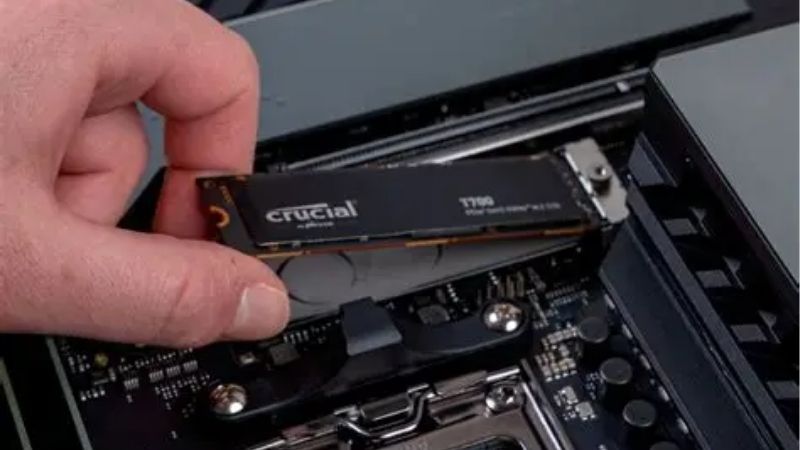
In-store selection for a Best Buy NVMe SSD centres on mainstream Gen4 drives from Samsung, WD and Crucial, usually in 1TB and 2TB capacities. Higher-capacity models and newer Gen5 drives are far more often online-only items.
Selection varies by store size. Larger locations with a proper components section carry several models, while smaller branches may hold a single 1TB drive and an external portable unit alongside it.
Check Availability Before You Travel
Checking per-store stock on the retailer’s website before leaving costs nothing and prevents the most common frustration. Listings show which nearby branch actually holds the drive rather than simply selling it nationally.
Reserving for pickup is the middle path. If the model is available at a branch you can reach, ordering online for collection means the unit is set aside rather than sold while you are on your way over.
How Retail Compares With Ordering Online
Online wins on range and usually on price per terabyte. Four-terabyte drives, Gen5 models and the value DRAM-less options are all readily available, and you can compare endurance ratings properly rather than reading a shelf tag.
Endurance is the specification worth comparing while you are there. Rated write capacity varies considerably between drives at the same price, and it is rarely printed anywhere on retail packaging.
Physical retail wins on speed alone. If a drive has failed and the machine is unusable, paying slightly more for something you can collect within the hour is an entirely rational decision rather than a poor one.
Match the Drive to Your Slot, Not the Biggest Number
A Gen5 drive in a Gen4 socket runs at Gen4 speeds, so the premium is wasted. Check which generation your motherboard’s primary M.2 socket supports before choosing based on the sequential figures printed on the box.
Heat matters too. Gen5 drives generate enough heat to require a substantial heatsink, and in a case where the socket sits under the graphics card that becomes a real thermal constraint rather than a theoretical one.
Decide Between DRAM and DRAM-less Drives
Drives with an onboard DRAM cache maintain performance during sustained writes, while DRAM-less models borrow system memory instead. For a boot drive the difference is worth paying for; for bulk game storage it matters far less.
Shelf labels rarely mention this. If a drive’s price looks unusually low for its sequential figures, the missing DRAM cache is normally the reason, and that shows up when copying large files rather than in benchmarks.
NVMe Drives Worth Buying, In Store or Online
Whether or not your local branch stocks the Best Buy NVMe SSD you had in mind, these six cover budget through flagship. Specifications come from manufacturer documentation; verify the capacity you are buying, since speeds differ between sizes.
| Drive | Interface | Sequential Read | DRAM Cache | Best For |
|---|---|---|---|---|
| Samsung 990 PRO | PCIe 4.0 x4 | Up to 7,450 MB/s | Yes | All-round flagship |
| WD Black SN850X | PCIe 4.0 x4 | Up to 7,300 MB/s | Yes | Gaming libraries |
| Crucial T500 | PCIe 4.0 x4 | Up to 7,400 MB/s | Yes | Value performance |
| Samsung 9100 PRO | PCIe 5.0 x4 | Up to 14,800 MB/s | Yes | Gen5 boards |
| Samsung 990 EVO Plus | PCIe 4.0 x4 | Up to 7,250 MB/s | No | Balanced value |
| WD Black SN770 | PCIe 4.0 x4 | Up to 5,150 MB/s | No | Budget capacity |
Samsung 990 PRO
The 990 PRO remains the safe flagship choice for a Gen4 socket. Sequential reads reach 7,450 MB/s, it includes a DRAM cache for consistent random performance, and Samsung’s firmware support has been dependable over time.
Heatsink and non-heatsink versions are both sold, which matters depending on whether your board provides one. The drawback is price, since Samsung’s brand premium persists even where competitors match the performance figures.
WD Black SN850X
The SN850X is the drive most often recommended for large game libraries. It reaches around 7,300 MB/s sequentially with a DRAM cache, and its sustained write behaviour holds up well during long file transfers.
Capacities extend to 8TB, which is useful when installs routinely exceed 100 GB. The reservation is heat under sustained load, so a board-supplied heatsink or the heatsink version is worth having in a warm case.
Crucial T500
The T500 is Micron’s value play at the top of Gen4 and it delivers. Around 7,400 MB/s sequential reads with a DRAM cache puts it alongside the flagships, usually at a lower price per terabyte.
Micron manufacturing its own NAND gives it consistent supply and behaviour. The trade-off is that peak random performance sits slightly behind Samsung’s flagship in synthetic testing, which rarely shows in everyday use.
Samsung 9100 PRO
If your board has a CPU-connected Gen5 socket, this is where the extra bandwidth appears. Sequential reads reach around 14,800 MB/s, roughly double what any Gen4 drive can deliver on the same connection.
For large media files that difference is genuinely visible. Two caveats apply though: game loading times barely change compared with a good Gen4 drive, and the heat output demands a substantial heatsink.
Samsung 990 EVO Plus
The 990 EVO Plus sits between the flagship and budget tiers, reaching around 7,250 MB/s sequentially while using a flexible interface that also works in reduced-lane configurations on some laptops and compact boards.
For a secondary drive holding a large game library it is well judged. The limitation is the absence of a DRAM cache, so sustained write performance falls behind the 990 PRO during long transfers.
WD Black SN770
When capacity matters more than peak speed, the SN770 makes sense. It reaches around 5,150 MB/s sequentially at a lower price per terabyte than the DRAM-equipped drives above it.
For a secondary game drive it is entirely adequate. The limitation is the absence of a DRAM cache, which shows up as reduced sustained write performance once the drive’s faster cache area is exhausted.
Capacity per pound is where it earns its place. For a drive holding installed games that are read far more often than written, that trade-off costs very little in practice and saves a meaningful amount.
Frequently Asked Questions
These are the questions people ask most often when buying storage in a hurry, often with a dead drive already removed.
Does every branch have a Best Buy NVMe SSD in stock?
No. Larger locations with a components section usually hold several mainstream models, while smaller branches may carry one or none. Checking per-store availability online before travelling is the only reliable approach.
Is a Gen5 drive worth it for gaming?
Rarely. Game loading times are largely unaffected by the difference between a good Gen4 and a Gen5 drive, since the bottleneck sits elsewhere. Gen5 mainly benefits large file transfers and professional media work.
Do I need a heatsink on an NVMe drive?
For Gen4 drives, usually only if your board does not provide one. For Gen5 drives a substantial heatsink is effectively mandatory, since sustained transfers generate enough heat to trigger thermal throttling without one.
What capacity should I buy?
Two terabytes is the sensible baseline now that individual games routinely exceed 100 GB. One terabyte fills quickly on a gaming machine, and the price gap per terabyte usually favours the larger drive.
See More:
- Best MSI motherboard
- Best motherboard processor combo for gaming
- Best B550 motherboard
- Best CPU for streaming
- What is the best AM4 CPU for gaming
Final Thoughts
Buying a Best Buy NVMe SSD in store makes sense when a drive has failed and the machine needs to work today. For anything less urgent, ordering online gives access to larger capacities and better prices per terabyte, and a good Gen4 drive like the SN850X or T500 serves a gaming build just as well as a Gen5 model would.











Write Your Review
No reviews yet. Be the first to share your experience!