
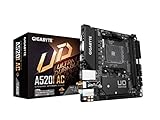
- Top Pick: Gigabyte A520I AC (AMD Ryzen AM4/Mini-ITX/Direct 6 Phases Digital PWM with 55A DrMOS/Gaming GbE LAN/Intel WiFi+Bluetooth/NVMe PCIe 3.0 x4 M.2/3 Display Interfaces/Q-Flash Plus/Motherboard)
- Best Value: ASRock A520M-ITX/AC Supports 3rd Gen AMD AM4 Ryzen™ / Future AMD Ryzen™ Processors (3000 and 4000 Series Processors) Mini ITX Motherboard
- Premium Choice: GIGABYTE B550M K AMD AM4 Micro-ATX Motherboard, Supports Ryzen 5000/4000/3000 Series Processors, DDR4, 3+3 Power Phase, 2X M.2, PCIe 4.0, USB 3.2 Gen 1, GbE LAN, Q-Flash
Best AM4 ITX motherboard choices are limited by design, because manufacturers produced far fewer Mini-ITX boards than ATX ones and AM4 is now a finished platform. That makes knowing the genuine differences between the surviving options more valuable than on any other form factor.
As an Amazon Associate we earn from qualifying purchases at no extra cost to you.


As an Amazon Associate we earn from qualifying purchases at no extra cost to you.
By Ryan Cole, PC hardware writer at NVIDIA Review.
How to Choose the Best AM4 ITX Motherboard
Mini-ITX imposes constraints that do not exist on larger boards, and those constraints drive the decision. Four checks determine whether the best AM4 ITX motherboard for you will actually fit your case alongside your existing parts.
Two DIMM Slots Is a Feature, Not Just a Limit
Every Mini-ITX board here carries two memory slots rather than four. That caps capacity at 64 GB using two 32 GB modules, which is far more than any gaming build requires and adequate for most productivity work as well.
The upside is stability at higher frequencies. Shorter memory traces and only two populated slots make it easier to run a fast DDR4 kit at its rated timings, which matters on Ryzen where memory speed influences frame rates directly.
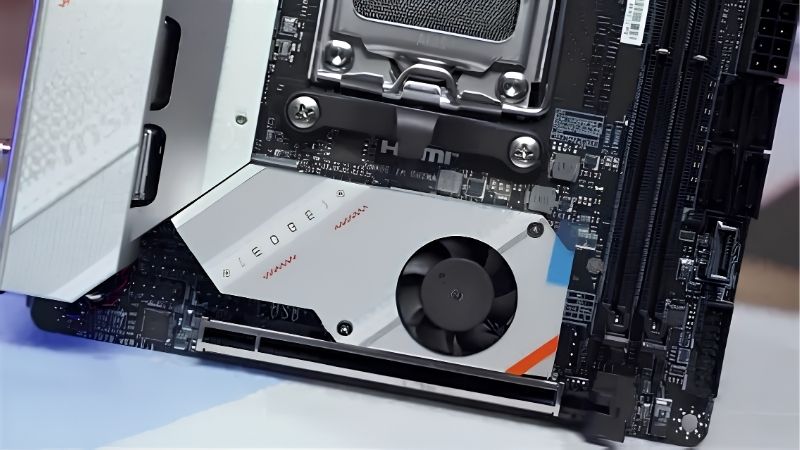
VRM Cooling Matters More in a Small Case
A compact board packs the power stages into a tight area with limited airflow around them. That is fine for a 65W processor but becomes a real constraint with a 105W chip like the 5800X3D or a 5900X.
Look for a proper finned heatsink over the power stages rather than a thin plate. In a small chassis, case airflow contributes as much as the heatsink itself, so plan your intake fans alongside the board choice.
Check Cooler Clearance and M.2 Placement
On Mini-ITX the socket sits close to the memory slots, the rear I/O shroud and the VRM heatsink. Large dual-tower air coolers frequently overhang the first DIMM slot or exceed the case height limit entirely.
M.2 placement varies more than you would expect. Several boards mount the second socket on the rear of the PCB, which is space-efficient but means removing the board from the case to change that drive later.
Graphics card length is set by the case rather than the board, but it interacts with cable routing. In the smallest enclosures a long card leaves almost no room for the 24-pin cable, so plan both together.
Weigh B550 Against X570 for Your Storage Plan
B550 gives the graphics slot and one M.2 socket PCIe 4.0 from the processor, which covers a single card and a fast boot drive. X570 extends Gen4 to the chipset lanes for a second fast drive.
The catch on Mini-ITX is that X570 boards use an actively cooled chipset with a small fan, and in a confined case that fan is more audible than it would be in a mid-tower. Weigh the bandwidth against the noise.
Top Picks: Best AM4 ITX Motherboard Options in 2026
The best AM4 ITX motherboard for you depends on your processor and how much storage bandwidth you need, so these six span B550 value boards to X570 flagships. Specifications come from manufacturer sheets; Mini-ITX stock on AM4 is now genuinely scarce.
| Model | Chipset | M.2 Sockets | Ethernet | Chipset Cooling |
|---|---|---|---|---|
| ASUS ROG Strix B550-I Gaming | B550 | 2 | 2.5 Gb | Passive |
| Gigabyte B550I AORUS Pro AX | B550 | 2 | 2.5 Gb | Passive |
| MSI MPG B550I Gaming Edge WiFi | B550 | 2 | 2.5 Gb | Passive |
| ASRock B550M-ITX/ac | B550 | 1 | Gigabit | Passive |
| Gigabyte X570 I AORUS Pro WiFi | X570 | 2 | 2.5 Gb | Active fan |
| ASUS ROG Strix X570-I Gaming | X570 | 2 | 2.5 Gb | Active fan |
ASUS ROG Strix B550-I Gaming
This is the strongest all-round Mini-ITX option on the platform. It pairs a well-cooled power delivery with two DDR4 slots, two M.2 sockets including one on a vertical daughterboard, 2.5 Gb Ethernet and Wi-Fi 6.
The stacked M.2 arrangement saves space and keeps both drives accessible from the top of the board. The drawbacks are price, which held up well on the second-hand market, and a VRM heatsink that runs warm with a 5900X in a sealed case.
Gigabyte B550I AORUS Pro AX
The AORUS Pro AX is the practical alternative and often the better value. Two DDR4 slots, two M.2 sockets with the second mounted on the rear of the board, 2.5 Gb Ethernet and Wi-Fi 6 cover a complete build.
Its VRM heatsink is substantial for the size, handling a 5800X3D without difficulty. The compromise is that rear-mounted M.2 socket, which requires removing the board from the case if you want to change that drive later.
MSI MPG B550I Gaming Edge WiFi
MSI’s Mini-ITX entry covers similar ground with a clean layout and slightly more breathing room around the socket than some competitors. Two DDR4 slots, two M.2 sockets, 2.5 Gb Ethernet and Wi-Fi 6 make it complete.
Cooler clearance is marginally more forgiving here, which matters when fitting a larger air cooler. The reservation is VRM temperature under sustained load with a 5900X, where it sits behind the Strix in a poorly ventilated chassis.
ASRock B550M-ITX/ac
This is the budget entry into Mini-ITX AM4 and it makes sense for a 65W processor. It supports Ryzen 5000 with current firmware, provides two DDR4 slots and an M.2 socket, and keeps costs to a minimum.
For an office machine or a compact 1080p gaming build it does the job. The limitations are real though: a single M.2 socket, gigabit rather than 2.5 Gb Ethernet, and a lighter VRM better suited to six-core chips.
Rear connectivity is also thinner than the boards above it. In a small build where expansion slots are already unavailable, running short of USB ports is a more practical annoyance than it would be in a mid-tower.
Gigabyte X570 I AORUS Pro WiFi
If you want Gen4 storage on both M.2 sockets, this is the Mini-ITX board that provides it. Two DDR4 slots, dual Gen4 M.2 sockets, 2.5 Gb Ethernet and Wi-Fi 6 fit onto the standard 170 mm square layout.
Power delivery is strong enough for a 5950X if airflow is adequate. The drawback is the chipset fan, which sits in a confined space and becomes more noticeable over time as dust accumulates around it.
ASUS ROG Strix X570-I Gaming
The X570 Strix is the enthusiast Mini-ITX option, combining a heavy VRM for its size with dual Gen4 M.2 sockets, two DDR4 slots and a well-regarded audio implementation on a daughterboard.
It handles high-core-count chips in small cases better than most. The trade-offs are the active chipset fan, a price that stayed high on the used market, and a dense layout that makes cable routing fiddly during assembly.
Where Mini-ITX AM4 Sits in the 2026 Market
Two conditions shape whether building or rebuilding a compact AM4 machine makes sense right now, and both concern the cost of the alternative.
Mini-ITX Boards Were Never Made in Volume
Motherboard sales fell by more than a quarter overall and manufacturers concentrated production on mid and high-tier current models, with promotional pricing withdrawn in February 2026. Small-form-factor boards on retired platforms felt that hardest.
The practical effect is scarcity and inconsistent pricing rather than a uniform increase. Watching listings across a couple of weeks usually reveals a wide spread, so patience is worth more here than on any full-size board.
Owning DDR4 Is a Genuine Advantage Now
DRAM contract pricing rose sharply through 2026, with further increases forecast into the fourth quarter and no meaningful new manufacturing capacity expected before late 2027. DDR5 kits absorbed the largest share of that rise.
If you already own a 32 GB DDR4 kit and an AM4 cooler, completing a compact build on B550 avoids replacing the most inflated components in the market. That shifts the maths clearly in favour of finishing what you have.
AM5 Is the Better Platform for a New Small Build
AMD confirmed at Computex 2026 that AM5 accepts new processors through the end of 2029, so a Mini-ITX AM5 board bought today has a real upgrade path. AM4 has none, since Ryzen 5000 is the permanent ceiling.
That matters more in small builds, where replacing the board later means dismantling the whole machine. If you are starting from nothing, AM5 is the sounder choice despite requiring DDR5 at current prices.
Frequently Asked Questions
These questions come up most often from people planning a compact AM4 build around parts they already own.
Does the best AM4 ITX motherboard limit gaming performance?
No. Mini-ITX boards run the same processors at the same speeds as ATX ones. What they limit is expansion, memory slot count and cooler clearance, none of which affects frame rates in a single graphics card build.
Can I run a 5950X on a Mini-ITX board?
On the stronger boards, yes, provided case airflow is good. VRM temperatures are the constraint rather than the socket, so pair a 16-core chip with a Strix or AORUS board rather than an entry-level model.
Which cooler fits a Mini-ITX AM4 build?
A 240 mm AIO or a compact tower cooler is usually the tidier answer. Large dual-tower air coolers frequently overhang the memory slots or exceed case height limits, so check both figures before ordering anything.
Is two memory slots a real limitation?
Rarely. Two 32 GB modules reach 64 GB, which exceeds what gaming needs. Running two sticks also makes high-frequency profiles easier to stabilise than filling four slots on a full-size board would.
See More:
- Best MSI motherboard
- Best motherboard processor combo for gaming
- Best B550 motherboard
- Best CPU for streaming
- What is the best AM4 CPU for gaming
Final Thoughts
The best AM4 ITX motherboard for most builds is a B550 model, with the Strix B550-I and AORUS Pro AX leading on features and cooling. X570 versions add Gen4 chipset lanes at the cost of a small chipset fan, and the whole exercise makes most sense when you already own the processor and DDR4 memory.











Write Your Review
No reviews yet. Be the first to share your experience!