
- Top Pick: ARCTIC MX-4 (4 g) – Premium Performance Thermal Paste for All Processors
- Best Value: Thermal Grizzly Kryonaut – 1 Gram – Extremely High Performance Thermal Paste + 12 Cleaning Wipes 6 Wet & 6 Dry – for Demanding Applications and Overclocking CPU/GPU/PS4/PS5/Xbox
- Premium Choice: Easycargo 1g Silver Thermal Paste Kit, High Performance Thermal Conductive Grease, Heatsink Silver Thermal Compound for Cooling Heat Sink Interface Processor CPU GPU VGA LED Transistors (1g)
Best thermal paste for processor recommendations fall apart when they ignore what is under the cooler. A 65W six-core chip, a 250W Intel flagship, a delidded processor on bare silicon and a laptop with a thin die all reward completely different compounds, for reasons that have little to do with the conductivity number printed on the tube.
As an Amazon Associate we earn from qualifying purchases at no extra cost to you.
By Ryan Cole, PC hardware writer at NvidiaReview
How to Choose the Best Thermal Paste for Processor Cooling
Choosing the best thermal paste for processor use starts with the chip class rather than a conductivity chart. Three things decide it: how much heat is concentrated in how small an area, what shape the heat spreader is, and whether you value peak numbers or long-term stability more.
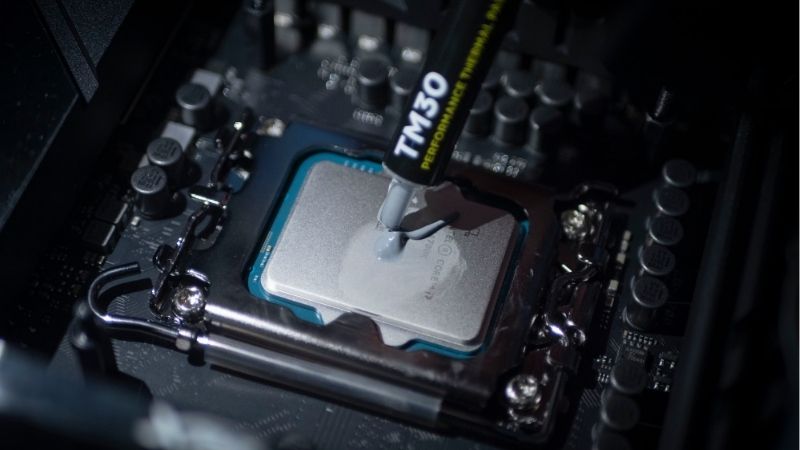
Match the Compound to the Processor Class
On a mainstream 65W chip under a decent tower cooler, the gap between a mid-tier compound and a premium one is usually a degree or two, which is well within run-to-run variance. Almost any reputable non-conductive paste is the right answer, and the money is better spent elsewhere.
High-TDP processors change that. A chip pushing 200W or more concentrates heat into a small die area and spikes hard on short loads, which is where a higher-conductivity compound genuinely earns its place. The same applies to 3D V-Cache parts, where the stacked die makes the hot spot smaller still.
Heat Spreader Shape and Mounting Pressure
Rectangular AMD AM5 lids spread compound differently from square Intel ones. A single centre dot works well on a square heat spreader, while a thin line down the long axis, or a dot flanked by two shorter lines, gives better end-to-end coverage on the elongated AM5 design.
Mounting pressure does the spreading, so tighten cooler screws diagonally in stages rather than fully seating one corner first. On Intel LGA1700 boards, a contact frame that evens out pressure distribution measurably improves contact, and several current coolers now include one in the box.
Peak Performance Versus Long-Term Stability
Thin, high-conductivity compounds often post the best numbers on day one and then migrate out of the hot centre over two or three years, which is why temperatures creep up without any hardware change. Denser formulations trade a fraction of a degree for holding position far longer.
Phase-change materials take that further, melting into the gap on the first heat cycles and then staying put for years. That makes them the natural choice for machines that will not be opened again, including laptops and handhelds, where repasting means a full disassembly rather than four screws.
Top Picks: Best Thermal Paste for Processor Types
These five picks for the best thermal paste for processor cooling are organised by the chip they suit rather than by a leaderboard position. All figures are manufacturer-rated. Availability and pricing tiers were checked in August 2026 and shift with stock levels.
| Compound | Rated conductivity | Type | Common sizes | Suited to |
|---|---|---|---|---|
| Arctic MX-4 | 8.5 W/mK | Ceramic paste | 2g / 4g / 8g | Mainstream 65W chips |
| Prolimatech PK-3 | 11.2 W/mK | Metal oxide paste | 1.5g / 5g | High-TDP processors |
| Noctua NT-H2 | Not published | Hybrid paste | 3.5g / 10g | Any build, low risk |
| Kryonaut Extreme | 14.2 W/mK | High-end paste | 1g / 2g | Delid and direct-die |
| Honeywell PTM7950 | 8.5 W/mK | Phase-change sheet | Cut-to-size | Laptops and handhelds |
Arctic MX-4 – Best for Mainstream Processors
Rated at 8.5 W/mK, non-conductive and non-capacitive, MX-4 needs no cure time and spreads under mounting pressure without warming the syringe first. On a 65W to 120W processor with a competent cooler, it performs within a degree or two of compounds costing several times as much.
It gives ground on genuinely hot chips, where the higher-conductivity options pull ahead measurably. That is the only real criticism. For the majority of desktop builds, including every mid-range gaming machine, this is the tube to buy and then forget about for the next few years.
Prolimatech PK-3 – Best for High-TDP Chips
PK-3 is rated at 11.2 W/mK, is non-conductive, and has a dense consistency that resists migrating out from under the hot centre of a die. That combination suits processors drawing 200W or more, where both peak conductivity and resistance to pump-out actually matter over time.
The thickness that gives it stability makes application harder in a cold room, and it benefits from a spreading tool rather than relying on mount pressure alone. Availability is patchier than the mainstream brands too. For a flagship Intel chip under heavy load, it is a quietly excellent choice.
Noctua NT-H2 – Best Low-Risk All-Rounder
Noctua publishes no headline conductivity figure, rating NT-H2 instead for up to five years in application, and bundles NA-SCW1 cleaning wipes so a poor first attempt can be wiped away and redone. The viscosity is middle of the road and behaves predictably on both AM5 and Intel lids.
You pay Noctua prices for a compound whose peak performance sits below the specialist options above. If you want one tube that suits any processor in the house without thinking about it, that premium buys a genuinely forgiving product and removes a variable from every future cooler swap.
Thermal Grizzly Kryonaut Extreme – Best for Delidded Chips
Rated at 14.2 W/mK, Kryonaut Extreme is aimed at bare silicon and direct-die mounting, where every fraction of a degree can change a boost bin. Small 1g and 2g syringes keep the cost of entry reasonable for a single project rather than forcing you into a large tube.
On a stock cooler with a standard heat spreader you will never see the difference, and it is expensive per gram. It is also thicker than standard Kryonaut and needs care on a direct-die mount where there is no lid to protect the silicon. Reserve it for delidded chips and serious tuning.
Honeywell PTM7950 – Best for Laptops and Handhelds
PTM7950 is a phase-change sheet rather than a conventional paste. It softens once the die passes roughly 55C and then locks into the gap, which makes it exceptionally resistant to pump-out on the small bare dies used in laptops, handheld consoles and compact mini PCs.
You cut it to size, peel two films and accept that temperatures only settle after several heat cycles, and it underperforms slightly on cold starts. Counterfeits are also common, so buy from a reputable seller. For any machine that is painful to open, it is the right long-term answer.
What the 2026 Market Means for Repasting
Compound is one of the cheapest components in a PC, but where a small upgrade budget should go has changed this year, and that affects how much the best thermal paste for processor cooling is worth to you. Three market factors are worth knowing before spending on an existing machine.
Repasting Is the Cheapest Real Gain Available
Graphics card prices have risen steeply and memory has followed, which puts a full upgrade beyond many builders right now. A syringe of compound costs less than a takeaway and frequently recovers several degrees on a machine running the same layer it received three or four years ago.
If your processor throttles during long gaming or rendering sessions, start there before buying hardware. Repasting, cleaning heatsink fins and checking case filters usually takes one evening and often restores most of the sustained clock speed you assumed had been lost to component ageing.
Avoid the Bargain-Basement Tubes
Cooling components have risen roughly 6 to 8 percent as manufacturers concentrate on mid-range and premium lines, and the promotional pricing that used to offset that was withdrawn in February 2026. The unbranded end of the market has expanded as a result, and it is not worth the saving.
The difference between an unnamed tube and a reputable one is a couple of pounds on a component protecting a processor worth several hundred. Buy something with a printed conductivity rating and a stated non-conductive formulation, in the smallest size that covers your planned builds.
Late-Year Sales Still Work for Cooling
The usual advice to wait for November discounts does not apply to memory, storage or prebuilt systems this year, because that stock was built from expensive contract components. Compound, coolers, fans and cases sit outside that problem and continue to discount properly in that window.
For a single syringe the swing is small enough that buying today is fine. If you are also replacing a cooler or adding case fans, grouping the purchase into late November is sensible. All pricing described here reflects August 2026 and should be verified before you place an order.
Frequently Asked Questions
The questions that come up most during a repaste: whether premium compounds are genuinely worth it, how laptops differ from desktops, what actually happens if you apply too much, and how often the job needs redoing on a machine that runs heavy workloads every day.
Does a premium compound actually lower temperatures?
On a hot, high-TDP processor, yes, typically by a few degrees against a budget tube. On a mainstream 65W chip under a good cooler, the difference is usually within measurement noise. The cooler and the case airflow have far more influence on your temperatures than the compound does.
Is laptop repasting different from desktop?
Yes, in two ways. Laptop dies are bare silicon with no heat spreader, so coverage must be precise and the compound must not squeeze onto surrounding components. They also cycle temperature aggressively, which causes pump-out faster, making phase-change material a better fit than a thin paste.
What happens if I apply too much?
Excess squeezes out around the socket, where it insulates rather than helps and can reach nearby components. With a non-conductive compound that is a cleaning job rather than damage, but the cooling is no better and often slightly worse. A quarter of a gram covers a desktop processor.
How long before I should repaste again?
Two to three years on a typical desktop, or sooner if heavy sustained loads push the best thermal paste for processor use past its comfort zone. Watch the trend rather than the calendar: if temperatures climb five degrees over a year with clean fans, the compound has migrated.
See More:
- Best thermal compound paste
- Thermal paste at Best Buy
- Graphics card at Best Buy
- Best AM4 CPU for gaming
- Best motherboard for 9800x3d
Final Thoughts
The best thermal paste for processor cooling depends entirely on the chip. MX-4 covers mainstream desktops properly, PK-3 suits high-TDP processors that spike hard, NT-H2 is the safe all-rounder, and PTM7950 belongs in anything painful to open. Only reach for Kryonaut Extreme if you are working on bare silicon.
As an Amazon Associate we earn from qualifying purchases at no extra cost to you.














Write Your Review
No reviews yet. Be the first to share your experience!