
Best PC Thermal Paste decisions get overthought more than almost any other part of a build. The compound matters, but how easily it spreads, how safe it is around the socket and how many mounts a tube covers matter just as much as the number on the packaging.
As an Amazon Associate we earn from qualifying purchases at no extra cost to you.



As an Amazon Associate we earn from qualifying purchases at no extra cost to you.
By Ryan Cole, hardware writer at NVIDIAReview.
How to Choose the Best PC Thermal Paste for a Desktop
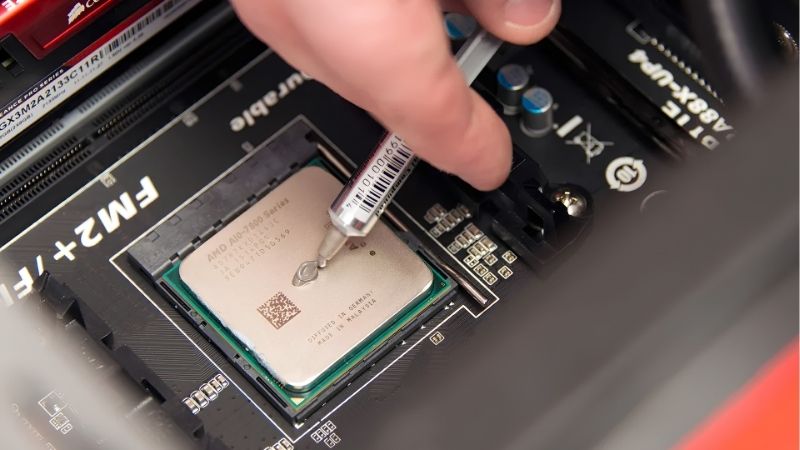
A good mount with an average compound beats a poor mount with an expensive one every time, so the best pc thermal paste is the one you can apply cleanly. These four checks cover what actually changes your temperatures.
Viscosity Decides How Easy the Job Is
Thin compounds spread with light pressure and suit a bare die or a low-pressure mounting system. Thick ones need firm cooler pressure to flatten out, which is fine on a tower with a backplate and awkward everywhere else.
Temperature affects consistency more than people expect. A thick paste applied in a cold room is stubborn, and warming the tube in your hands for a minute makes a noticeable difference to how cleanly it spreads.
If this is your first build, the best pc thermal paste is a mid-viscosity compound in a smooth syringe. The neat mount you get from an easy compound is worth more than a degree of theoretical performance on a chart.
Rated Conductivity Versus the Temperature You Will Actually See
Watts per metre-kelvin figures are measured under different standards by different companies, so a compound rated at 12.5 is not automatically ahead of one rated at 8.5 in a real mount. Noctua declines to publish a figure at all for that reason.
Between good compounds on a properly mounted cooler, the spread on a desktop processor is typically one to three degrees. That is worth having, but it will not rescue an undersized cooler or a bad installation.
Non-Conductive Compounds Are the Safer Default
Ceramic and carbon-loaded pastes do not conduct electricity, so a small amount squeezed onto the substrate is a cleanup job rather than a dead board. That alone makes them the right default for a general build.
Silver-loaded compounds can be capacitive, and liquid metal conducts freely and attacks aluminium. Both have their place, but neither belongs in a first build or a machine you want to forget about.
The risk is worth weighing against the reward. A conductive compound might buy you a couple of degrees on a bare die, while a spill near the socket can cost you a motherboard, which is a poor trade on a daily driver.
Tube Size, Shelf Life and What One Build Needs
A processor application uses a few tenths of a gram. A one gram syringe covers several mounts, and a four gram tube will outlast most people’s interest in re-pasting, which is why cost per gram is the honest comparison.
Opened tubes stay usable for years if the cap is replaced properly and the tip is wiped clean. Storing paste in a cold garage is the main way to ruin it before its time.
Buying larger also changes how you treat a build. When a tube costs little per gram, you stop hesitating over a remount, which is exactly when most people discover their cooler was seated unevenly in the first place.
Top Picks for the Best PC Thermal Paste in 2026
These six cover value tubes, premium compounds and one high-conductivity option. Ratings are manufacturer figures measured under differing standards, and retail pricing at the time of writing in August 2026 moves weekly.
| Product | Rated conductivity | Type | Sizes | Best for |
|---|---|---|---|---|
| Arctic MX-6 | Not directly comparable | Carbon-based | 2 g to 135 g | All-round value |
| Noctua NT-H2 | Not published | Hybrid compound | 3.5 g and 10 g | Long-term desktops |
| Thermal Grizzly Kryonaut | 12.5 W/mK | Ceramic-loaded | 1 g to 5.55 g | Peak performance mounts |
| Thermalright TFX | 14.3 W/mK | Ceramic-loaded | 2 g and up | High rating, low price |
| Gelid GC-Extreme | 8.5 W/mK | Ceramic-loaded | 1 g to 10 g | Stability over years |
| Arctic MX-4 | 8.5 W/mK | Carbon-based | 2 g to 20 g | Cheapest per mount |
Arctic MX-6
MX-6 is the compound to buy if you want one tube that handles everything. It is carbon-based, electrically non-conductive, soft enough to spread under mounting pressure and sold in sizes from two grams to a workshop tub.
Peak numbers sit slightly behind the highest-rated compounds on a bench. In a closed case over several years that difference disappears, and the cost per application is a fraction of the premium tubes.
Noctua NT-H2
Noctua publishes no conductivity figure and still lands near the top of independent comparisons. NT-H2 is thick, non-conductive, non-corroding and includes cleaning wipes, with a recommended in-use period measured in years rather than months.
That thickness needs a firm mount, so it is less forgiving on a bare die or a light-pressure bracket. Price per gram is high, though most people buy one tube and use it across several builds.
Thermal Grizzly Kryonaut
Rated at 12.5 W/mK, Kryonaut spreads easily at room temperature and delivers among the best fresh-mount results in the ceramic group. It remains the reference point for people chasing the lowest number on day one.
Longevity on hot processors is its weakness, since the compound can dry out faster than thicker rivals. Combined with a high price per gram, it suits enthusiasts who re-paste regularly rather than set-and-forget builds.
Thermalright TFX
TFX carries a 14.3 W/mK rating, one of the highest on the market, at a price far below the premium brands. It is electrically non-conductive and performs well on both processors and bare graphics dies.
The consistency is thick and stiff, which makes application harder than it should be, especially in a cold room. Packaging and instructions are minimal, in keeping with the rest of the brand’s approach.
Gelid GC-Extreme
GC-Extreme has a long reputation for holding its temperatures over years rather than months. Rated at 8.5 W/mK, thick and non-conductive, it is a sensible choice for a machine you intend to close and ignore.
Spreading it takes patience, and regional availability comes and goes. Warming the tube before use solves most of the handling complaints people have with it.
Arctic MX-4
MX-4 remains the cheapest sensible option, rated at 8.5 W/mK with an eight-year durability claim and tube sizes up to twenty grams. For servicing several machines it is difficult to justify anything else.
It is a generation behind Arctic’s own MX-6 and will not match the high-conductivity compounds on a bench. As the tube you keep in the toolbox, that hardly matters.
What 2026 Conditions Mean for This Purchase
Paste is cheap, but current conditions change how much value the best pc thermal paste adds against other upgrades right now. Three points are relevant.
Small Upgrades Are Where the Gains Are
Graphics card pricing remains elevated and no new processor generation arrives before CES in January 2027, so there is nothing worth waiting for. Replacing dried compound on a three-year-old mount is the cheapest measurable improvement available.
The result is usually a few degrees, which means higher sustained boost clocks and less fan ramping under load. It costs less than a game and takes twenty minutes once the cooler is off.
Bulk Tubes Have Become Clearly Better Value
Cooler and power supply pricing has drifted up roughly six to eight percent as makers concentrated on mid and upper tiers, and the promotional pricing that supported entry-level products was withdrawn in early 2026.
Paste itself has held steadier, so the gap between a small premium syringe and a four gram mainstream tube is wider than it was. Buying once in a larger size is the obvious call.
Cooling Still Has Real November Deals
Memory, drives and prebuilt systems are unlikely to see genuine Black Friday discounts this year, because stock was built against high contract pricing. Paste, coolers, fans and cases remain a category with honest markdowns.
If your re-paste is routine maintenance, waiting for that window is sensible. If your processor is throttling now, take the few degrees today instead.
Frequently Asked Questions
These are the practical questions that follow once someone has picked the best pc thermal paste for their build and is ready to apply it.
How should I clean off the old compound?
Wipe the bulk away with a lint-free cloth, then finish with isopropyl alcohol at ninety percent or higher on a coffee filter or microfibre cloth. Let the surface dry completely before applying new paste.
Is spreading with a card better than a centre dot?
For a standard integrated heat spreader, a centre dot works because mounting pressure does the spreading. Manual spreading is only worth the effort on a bare die, where uneven coverage is a real risk.
Does new paste help graphics card temperatures?
On an older card, often yes, since factory compound dries out over time. Remember that the memory and power stages rely on thermal pads, and those need replacing with the correct thickness rather than paste.
How long does thermal paste last in a desktop?
Three to five years is a reasonable expectation for a quality compound in a normal system. Re-paste whenever the cooler comes off, or if temperatures have climbed noticeably with no other change to the build.
See More:
- What Is the Best Thermal Paste
- Best PC Case Fans 120mm
- Thermal Paste Best Brand
- Best Thermal Paste Brands
- Best CPU Cooler Reddit
Final Thoughts
The best pc thermal paste for most builds is a mid-viscosity, non-conductive compound bought in a tube large enough to cover several mounts. Arctic and Thermalright win on cost per gram, Noctua and Gelid on staying power, and Kryonaut on fresh-mount numbers. Spend your effort on a clean surface and an even mount rather than on the last rated degree.











Write Your Review
No reviews yet. Be the first to share your experience!