
Best capture card choices come down to one question before any specification matters: what is feeding the card. A console on a shared monitor, a second gaming PC and a mirrorless camera all place very different demands on passthrough, latency and the connection standard your own machine actually supports today.
As an Amazon Associate we earn from qualifying purchases at no extra cost to you.
By Ryan Cole, PC hardware writer at NvidiaReview
How to Choose the Best Capture Card
Buying the best capture card is mostly about matching three things to the setup you already own: how the card connects to your PC, what resolution it can pass through to your own display, and whether your system can handle the encoding load on top of whatever else it is doing mid-stream.
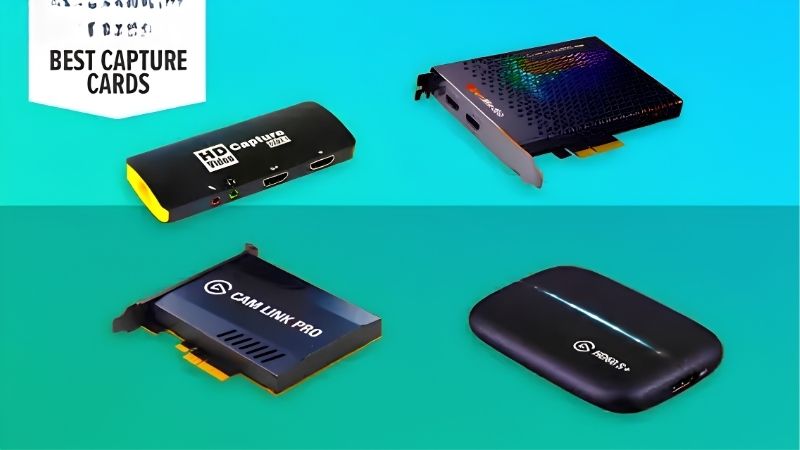
Internal PCIe Versus External USB
Internal cards sit in a PCIe slot and generally deliver lower preview latency because the data path is shorter, which matters if you play on the capture preview rather than a passthrough display. They also free your USB controller for microphones, controllers and camera feeds during a busy session.
External USB units are portable, work with laptops, and are far easier to move between machines. The trade is bandwidth: a 4K60 HDR capture device needs a USB 3.2 Gen 2 port running at 10Gbps, and plugging one into an older 5Gbps port will force a lower resolution or frame rate.
Passthrough Resolution and Refresh Rate
Passthrough is what your own monitor sees, and it is usually higher than what the card records. Current units commonly capture at 4K60 while passing through 4K144, 1440p240 or 1080p240, which means you can play at a high refresh rate while the recording stays at a manageable resolution.
Check variable refresh rate support if you use it. Not every card passes VRR cleanly, and a card that breaks adaptive sync will introduce tearing on your display even though the recording looks fine. Console users should also confirm HDR passthrough if they play HDR titles regularly.
Encoding Load and Single-PC Versus Dual-PC Setups
On a single-PC setup, the card hands raw frames to your machine and your processor or graphics card does the encoding, which costs performance in the game you are playing. Modern GPU encoders handle this well, but a card that offers onboard hardware encoding takes more work off the system.
In a dual-PC arrangement the gaming machine stays untouched and the streaming PC does everything, which is why the setup remains popular for demanding titles. That configuration needs a card with reliable passthrough and enough bandwidth headroom, since the capture machine is doing nothing else.
Top Picks: Best Capture Card for Each Setup
These five picks for the best capture card cover console streaming, dual-PC rigs and camera work, in both internal and external formats. All figures are vendor-published specifications. Availability and pricing tiers were checked in August 2026 and change frequently.
| Device | Connection | Max capture | Max passthrough | Best for |
|---|---|---|---|---|
| Elgato Game Capture 4K X | USB 3.2 Gen 2 | 4K60 HDR10 | 4K144 / 1080p240 | High refresh setups |
| Elgato 4K Pro | PCIe | 4K60 HDR10 | 4K144 | Dual-PC streaming |
| AVerMedia Live Gamer Ultra 2.1 | USB 3.2 Gen 2 | 4K60 HDR | 4K144 | Console players |
| Elgato HD60 X | USB 3.0 | 1080p60 / 4K30 | 4K60 HDR10 | Budget console capture |
| Elgato Cam Link 4K | USB 3.0 | 4K30 / 1080p60 | None | Camera as webcam |
Elgato Game Capture 4K X – Best Overall
The 4K X captures 4K60 with HDR10 while passing through up to 4K144, 1440p240 or 1080p240 with variable refresh rate support, which means a high refresh monitor keeps behaving normally while you record. It connects over USB 3.2 Gen 2 and works with both consoles and a second PC.
It needs a genuine 10Gbps USB-C port, and plugging it into an older 5Gbps connector quietly limits what it can do. The software ecosystem is also fairly Elgato-centric. If your setup runs above 60Hz and you want one device that covers every source, this is the straightforward answer.
Elgato 4K Pro – Best Internal Card
The 4K Pro drops into a PCIe slot and captures 4K60 HDR10 with passthrough up to 4K144, keeping the data path inside the machine rather than across a USB controller. For dual-PC streaming where the capture machine has slots to spare, an internal card is the cleaner engineering answer.
It only suits a desktop, obviously, and installing it means opening the case and giving up a slot that a sound card or extra storage might want. It also costs more than the external equivalent. In a dedicated streaming PC that never moves, it is worth the money and the slot.
AVerMedia Live Gamer Ultra 2.1 – Best for Console Players
AVerMedia specifies 4K60 HDR capture with 4K144 passthrough over USB 3.2 Gen 2, which covers current consoles running in performance modes without forcing you to drop your own display down. Setup is simple and the unit works with standard capture software rather than requiring its own suite.
The plastic housing feels less solid than the price suggests, and the bundled software is functional rather than polished. Like all 10Gbps devices, it needs the right USB port to hit its rated figures. For a console feeding a PC that also runs the stream, it is a strong, uncomplicated choice.
Elgato HD60 X – Best Budget Option
The HD60 X captures up to 1080p60, or 4K30 if you need the resolution more than the frame rate, while passing through 4K60 HDR10 and 1080p120 with VRR support. It runs over ordinary USB 3.0, so it works with laptops and older desktops that lack a 10Gbps port entirely.
Capturing above 1080p60 is off the table, which matters if you archive footage for editing rather than just streaming. Most viewers watch at 1080p anyway. As the cheapest sensible route into console capture, it does the important part properly and skips the specifications you may not use.
Elgato Cam Link 4K – Best for Camera Work
Cam Link is a different tool: it turns an HDMI camera into a webcam, capturing 4K30 or 1080p60 over USB 3.0 without any passthrough. If you want a mirrorless or DSLR image on stream instead of a webcam sensor, this is the small, cheap adapter that makes it happen.
It offers no passthrough at all, so it cannot serve as a console capture device, and camera compatibility depends on clean HDMI output from your specific body. Some cameras also overheat during long sessions. Within its narrow purpose, nothing else is as simple or as widely supported.
What the Late 2026 Calendar Means for Streamers
Demand for the best capture card options tends to follow the games release calendar rather than component pricing, and the next few months have an unusual shape to them. Three factors are worth understanding before you decide exactly when to buy and what to test beforehand.
Console-Exclusive Releases Are Driving PC Streamers to Capture
GTA 6 arrives on 19 November for PlayStation 5 and Xbox only, with no PC version announced. Historically the wait has been long: GTA V took roughly 19 months to reach PC and Red Dead Redemption 2 took around 13. Call of Duty Modern Warfare 4 lands earlier, on 23 October.
That combination pushes PC-first streamers toward buying a console and feeding it into their existing setup, which is exactly the job a capture device does. If you are in that position, buy the card before the launch week rather than during it, when stock and pricing tend to move against you.
No New Hardware Generation Until CES 2027
The next wave of processors and graphics cards has slipped to CES in January 2027, so there is no pending hardware launch that would change what your streaming PC can encode. If you were holding off on a capture purchase until the platform picture cleared, the picture is already clear.
Practically, that means buying to fit the machine you have. Check your USB port speeds and free PCIe slots first, since those constraints are fixed until you rebuild. Prices referenced here reflect August 2026, and the late November sales are a reasonable window for accessories like these.
Accessory Discounts Still Land in Late November
Black Friday falls on 27 November this year, after both major releases. Unlike memory and storage, where this year’s stock was built from expensive contract components, peripherals and capture hardware still see genuine reductions during that window most years.
That creates a timing decision rather than an urgent one. If you need the card for the October release, buy now and test the chain properly. If your first recording project is later, waiting a few weeks is reasonable, since the hardware itself is not going to change before CES 2027.
Frequently Asked Questions
The questions that come up most when setting up console or dual-PC streaming: how much system performance capture actually costs you, which cables are required, whether passthrough introduces any lag on your own display, and whether the best capture card really has to be an internal PCIe model.
Does a capture card reduce gaming performance?
On a dual-PC setup, no, because the gaming machine only outputs a video signal. On a single PC, the card itself costs very little, but the encoding does use processor or graphics card resources. Using your GPU hardware encoder keeps that overhead small in most modern titles.
Is passthrough delayed compared with a direct connection?
Passthrough on current cards is effectively instant, since the signal is split before any processing. The delay you see is on the capture preview window, which can run a frame or more behind. Always play on the passthrough display rather than the preview if latency matters to you.
What HDMI cable do I need?
Match the cable to the passthrough figure, not the capture one. Running 4K144 or 1440p240 requires certified high-bandwidth cables on both the input and output sides, and a cheap cable is a very common cause of a signal that drops out or refuses to negotiate the higher refresh rate.
Can one card handle both a console and a camera?
A card with HDMI input will accept a camera signal, but only one source at a time. Streamers who want game footage plus a camera image usually run a capture card for the console and a separate small adapter such as Cam Link for the camera, since both feeds are needed simultaneously.
See More:
- Best thermal compound paste
- Thermal paste at Best Buy
- Graphics card at Best Buy
- Best AM4 CPU for gaming
- Best motherboard for 9800x3d
Final Thoughts
The best capture card is the one matched to your source and your ports. The 4K X covers almost every setup if you have a 10Gbps USB-C connection, the 4K Pro suits a dedicated streaming PC, and the HD60 X does the job cheaply when 1080p60 is all you need. Check your port speeds before ordering anything rated at 4K60.
As an Amazon Associate we earn from qualifying purchases at no extra cost to you.














Write Your Review
No reviews yet. Be the first to share your experience!