
- Top Pick: Sapphire 11348-03-20G Pulse AMD Radeon™ RX 9070 XT Gaming Graphics Card with 16GB GDDR6, AMD RDNA 4
- Best Value: XFX Mercury AMD Radeon RX 9070XT OC Gaming Edition with RGB 16GB GDDR6, HDMI 3xDP, AMD RDNA 4 RX-97TRGBBBA
- Premium Choice: PowerColor Hellhound AMD Radeon RX 9070 XT 16GB GDDR6 Reva Edition


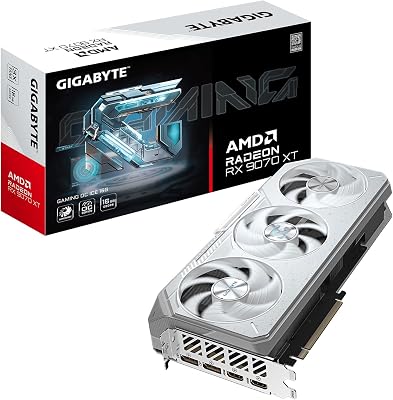
radeon rx 9070 vs rtx 5070 is a comparison usually written for people who already speak the language – full of acronyms, bus widths and relative percentages that assume you know what they mean. This one is written for everyone else. If you are buying a graphics card for the first time in years, or ever, this guide explains what these two cards are, what the terms actually mean in plain English, and which one suits you – without pretending you already know. Both cost $549. Both are good. They are good at different things, and that is the whole decision. Our detailed spec-by-spec breakdown covers the technical depth if you want it afterwards.
What These Two Cards Actually Are
Before comparing anything, it helps to know what you are looking at. These are the two mainstream graphics cards of this generation from the only two companies that make them for gaming – AMD and Nvidia. They launched at the same price, they target the same buyer, and they are close enough in performance that the choice comes down to what you value rather than which is better.
As an Amazon Associate we earn from qualifying purchases at no extra cost to you.


Decoding the Names
The names look like noise and are actually a code, which becomes obvious once someone explains it.
Take “Radeon RX 9070.” Radeon is AMD’s brand for graphics cards, the way Ryzen is their brand for processors. RX is the product line. The 9 means ninth generation – the newest. The 070 is the tier within that generation: higher numbers are faster, so a 9070 sits above a 9060 and below a 9080. A suffix like XT would mean a faster version of the same card.
Now “RTX 5070.” RTX is Nvidia’s brand – the RT stands for ray tracing, a lighting technology they introduced. The 50 means fiftieth series, their newest. The 70 is the tier, same logic: a 5070 sits above a 5060 and below a 5080. A Ti suffix would mean a faster version.
So both names say roughly the same thing: newest generation, upper-middle tier. That is why they are compared – they are aimed at the same person with the same $549. The naming is not marketing noise; it is a map, and once you can read it the whole product stack stops being intimidating.
The Two Terms That Actually Decide This
You can ignore most specifications. Two matter, and both are explainable in a paragraph.
VRAM is the first. It is memory on the graphics card itself, separate from your system RAM, and it holds the textures and data the card is currently drawing. Think of it as counter space in a kitchen. If you have enough, everything is within reach. If you run out, the card has to keep fetching things from slower storage – and that shows up not as a smoothly lower frame rate but as stuttering and textures loading in late while you watch. The RX 9070 has 16GB. The RTX 5070 has 12GB. Both are fine today. The 16GB has more room for the future.
Upscaling is the second, and it is the closest thing to free performance in modern gaming. The card renders the game at a lower resolution, then uses AI to intelligently enlarge the image to your monitor’s resolution. Done well, it looks nearly identical and runs much faster. Nvidia’s version is called DLSS. AMD’s is called FSR. Both work. DLSS is currently a bit better at holding fine detail steady when the camera moves – things like foliage, fences, and hair.
That is genuinely it. VRAM is headroom. Upscaling is free frames. Everything else on the spec sheet is detail that will not change your decision.
Simple Comparison Table
The whole thing, in plain terms.
| What it is | Radeon RX 9070 | RTX 5070 | What it means for you |
|---|---|---|---|
| Price | $549 | $549 | Identical – price does not decide this |
| VRAM (headroom) | 16GB | 12GB | AMD has more room for future games |
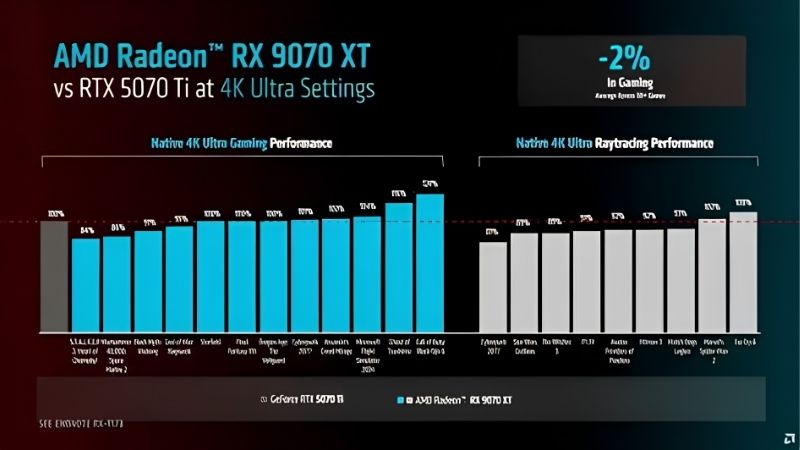
| Normal game speed | Slightly faster | Slightly slower | A few percent – you will not feel it |
| Ray tracing speed | Slower | Faster | Matters only if you turn RT on |
| Upscaling quality | FSR 4 – good | DLSS 4 – better | Nvidia edges this |
| Extra frames feature | No | Multi Frame Generation | Helps on 144Hz+ monitors |
| Power used | ~220W | ~250W | AMD is gentler on your PSU |
| Power supply needed | 650W | 650W | Check yours before buying |
| Video editing / 3D work | Limited | Works properly | Nvidia is required for some apps |
| Streaming | Good | Better | Nvidia if you record or stream |
Read the last column top to bottom. Two rows favour AMD meaningfully. Four favour Nvidia. And one – price – is a tie. That is why this comparison exists: nobody wins outright, so it comes down to which rows describe you.
Which One Suits You
Forget which card is better. It is the wrong question, and it is the question every twenty-minute video spends nineteen minutes failing to answer. The right question is which set of strengths matches what you actually do with the computer – so here are the three profiles that cover almost everyone.
Choose the Radeon RX 9070 If This Sounds Like You
You play games and that is essentially it. You do not stream. You do not edit video or make 3D models. You keep a computer for four or five years and would rather not think about it again.
Then the 16GB matters more to you than anything Nvidia offers. Games use more memory every year, and the card with more room is the one that will still hold high-quality textures in 2029 without stuttering. You are buying breathing space.
The lower power draw helps too – 220W instead of 250W means less heat in your room, a bit less strain on your power supply, and slightly quieter operation. And AMD uses the older, simpler power cables that plug in without any fuss, which removes a small but real risk we will come back to.
Choose the RTX 5070 If This Sounds Like You
You want ray tracing on. You stream or record your gameplay. You use Blender, Premiere, DaVinci Resolve, or any creative software. Or your monitor runs at 144Hz or higher and you want it filled.
Ray tracing is where Nvidia is genuinely ahead, and if you intend to actually turn it on rather than admire it in screenshots, this is the card. For creative software the situation is stricter than a preference: many of those applications are built around Nvidia’s technology and simply work better – or only work – on Nvidia hardware. That is not a performance gap you can tune around.
Multi Frame Generation is the other reason and it deserves a plain explanation. The card uses AI to create additional frames between the ones it actually draws, which makes motion look smoother on a high-refresh monitor. Whether that feels right to you is personal – some people notice a slight difference in responsiveness. But on a 144Hz screen it does what it claims, and it is the kind of feature Nvidia keeps improving after you have already bought the card.
Pros and Cons in Plain English
| Radeon RX 9070 | RTX 5070 | |
|---|---|---|
| Good | More memory means it ages better; slightly faster in normal games; uses less power and runs cooler; simple power cables; AMD often discounts more over time | Much better at ray tracing; better upscaling; makes extra frames for high-refresh monitors; required for most creative software; better for streaming; holds resale value well |
| Not so good | Ray tracing is noticeably weaker; will not run some creative software properly; upscaling supported in fewer games | Less memory on a card that costs the same; the newer power cable must be pushed in fully or it can overheat; slightly slower in normal games |
That power cable point is worth a sentence more, because it is the one thing on this page that can actually damage hardware. The 5070 uses a newer, smaller connector. It must be pushed in until it clicks. Nearly every reported failure comes from a cable that was not seated all the way. Push it, tug it, look at it. Thirty seconds.
Why Waiting for a Better Price Will Not Work
If you are new to this, you might reasonably assume graphics cards get cheaper over time the way phones and televisions do. That used to be true. Right now it is not, and knowing why will save you from a bad plan.
Prices Stopped Rising – But They Are Not Coming Down
Through late 2025, the cost of computer memory rose sharply, and that pushed up the price of nearly everything with a chip in it – laptops, components, graphics cards. The good news is real but small: that steep climb has stopped. Manufacturers including Framework have reported a period of relative stability, while still warning that prices could move again.
Here is the part that matters to you. Stopped rising is not the same as falling. There is no sign that either of these cards will be meaningfully cheaper in three months. The rush to buy before things got worse has passed – but the reward for being patient never arrived either.
So if you need a card, buy one. Waiting used to be a way to save money. Currently it is just waiting.
More Memory Is Being Made – But Not Until 2027 or 2028
There is genuine relief coming. Computer makers can now buy memory chips from new suppliers such as CXMT in China, and Micron is building two new factories in Idaho. These are real, funded projects, not rumours.
The problem is how long factories take. Those Idaho plants will not start producing until 2027 or 2028. Chip factories are built over years, not months. Whatever you buy in 2026 happens long before any of that reaches a shop.
This is also why the 16GB versus 12GB question matters more than it looks. If cards got cheaper every year, buying less memory now and upgrading sooner would be sensible. In a market that is not getting cheaper, the card with more room is quietly worth more – because replacing it later will cost you full price again.
What to Buy With the Card
Two things regularly ruin an otherwise correct purchase, and both are cheap.
Airflow first. A graphics card is a heater, and it needs cool air fed to it. If your case has one fan and a solid glass front, the card will get hot and slow itself down to protect itself – which means you paid for performance you are not receiving. Two intake fans at the front cost less than a game and fix this permanently.
The power cable second, if you choose Nvidia. If your power supply is a few years old, the 5070 comes with an adapter. Adapters work, but a proper cable made for your specific power supply removes the risk entirely.
See More:
- A fan curve msi afterburner
- amd radeon rx 9070 vs rtx 5070
- 5060 ti vs 5070 benchmark
- rx 6600 vs rtx 3050
- 2060 vs 3060
Final Verdict
On radeon rx 9070 vs rtx 5070, there is no wrong answer – only a mismatched one, and mismatches come from buying what someone else needs.
If you only play games and want the card to stay useful for years, choose the Radeon RX 9070. The extra memory is the thing you cannot add later, and in a market where prices are not falling, that headroom is worth more than it looks.
If you want ray tracing, if you stream, if you use creative software, or if you have a 144Hz monitor to fill, choose the RTX 5070. Those are real advantages that a spec sheet undersells, and they are the reason the comparison is close despite AMD winning on paper.
Whichever you pick: check that your power supply is at least 650W, make sure your case has fans pulling air in at the front, and if you go Nvidia, push that cable in until it clicks. Get those three things right and either card will serve you well for years – which, at $549, is the outcome you are actually buying.
Frequently Asked Questions
Which card wins on memory capacity?
The RX 9070 carries 16GB of GDDR6 on a 256-bit bus, while the RTX 5070 carries 12GB of GDDR7 on a 192-bit bus. The Radeon has the better long-term buffer for 1440p and 4K textures, while the GeForce recovers some ground through faster GDDR7 bandwidth per pin.
How much power does each one need?
The RX 9070 sits around 220W and the RTX 5070 around 250W. Both are comfortable on a quality 650W to 750W supply. The 5070 usually ships with a 12V-2×6 connector and an adapter, so seat that cable fully until it clicks to avoid the connector heat issues seen on higher-wattage cards.
Is ray tracing still an Nvidia win here?
The margin narrowed a lot with RDNA 4. The 5070 still leads in path-traced showcase titles that lean hard on ray reconstruction, but in typical hybrid ray tracing the RX 9070 is competitive. If path tracing in a handful of games is your priority, the Nvidia card remains the safer purchase.
Which delivers better 1440p 144Hz gaming?
Both comfortably clear 144fps at 1440p in esports and reach it in AAA titles with upscaling enabled. The RX 9070 tends to hold frame times better where VRAM pressure builds, while the 5070 can post far higher counters using multi frame generation, though that helps smoothness more than responsiveness.
What about drivers and software stability?
Both vendors are in a solid place now. Nvidia has the edge in day-one profiles for new releases and broader creative application support through CUDA. AMD Adrenalin offers a cleaner all-in-one interface with per-game tuning and undervolting built in, which many owners prefer over splitting duties across the Nvidia App and Control Panel.







Write Your Review
No reviews yet. Be the first to share your experience!