
⚡ Key Takeaways
- What Ray Tracing Actually Does
- How It Differs From Traditional Rendering
- The Hardware Behind Ray Tracing
- The Performance Cost
- How Upscaling Makes Ray Tracing Practical
- Is Ray Tracing Worth It?
- Types of Ray-Traced Effects
- How to Decide Game by Game
- What You Need to Run Ray Tracing Well
- The Future of Ray Tracing
- Top-Rated Picks
- Related Guides
- Frequently Asked Questions
- Conclusion
- Related Articles
- Related Guides
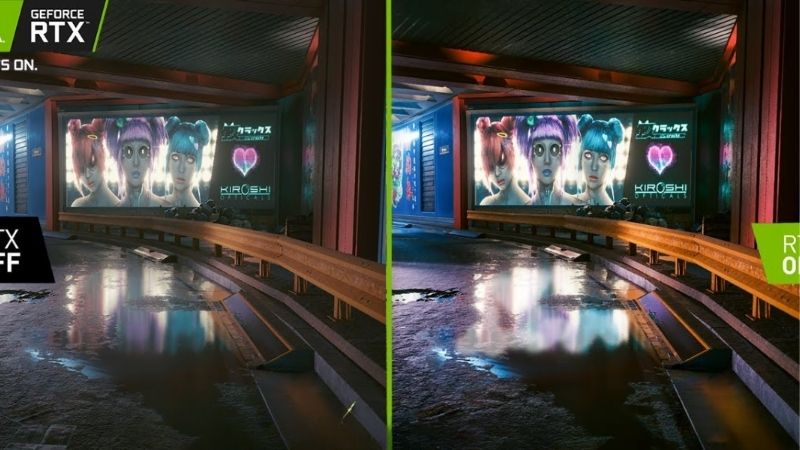
- Ray tracing is a rendering technique that simulates how light behaves in the real world.
- For decades, games used rasterization, a fast method that projects 3D objects onto your 2D screen and approximates lighting with pre-baked tricks.
- Real-time ray tracing only became feasible because modern GPUs include dedicated hardware for it.
- Enabling it can cut your frame rate substantially, sometimes by 30-50% depending on the game and how heavily it uses the effect.
Ask a dozen gamers about ray tracing and you’ll get a dozen opinions, so let’s settle it. Understanding what is ray tracing, how it works, and whether it’s worth the performance cost is essential when choosing a graphics card in 2026. Ray tracing is the technology behind the lifelike lighting, reflections, and shadows in modern games, and it’s a major reason NVIDIA RTX and AMD RX 9000 cards command the prices they do. This explainer breaks down the technology in plain language and helps you decide whether it deserves a place in your gaming setup.
As an Amazon Associate we earn from qualifying purchases at no extra cost to you.



Related: RTX 5090 vs RTX 5080.
Related: best GPUs for 4K gaming.
Related: best GPUs for 1440p gaming.
What Ray Tracing Actually Does
Ray tracing is a rendering technique that simulates how light behaves in the real world. Instead of using clever shortcuts to fake lighting, it traces the path of individual light rays as they bounce off surfaces, pass through transparent materials, and cast shadows. The result is dramatically more realistic illumination: reflections that accurately show the surrounding scene, soft and accurate shadows, and global illumination where light bounces naturally between surfaces, picking up color along the way.
How It Differs From Traditional Rendering
For decades, games used rasterization, a fast method that projects 3D objects onto your 2D screen and approximates lighting with pre-baked tricks. Rasterization is efficient but limited: reflections are often faked with cube maps, shadows can look harsh or imprecise, and lighting doesn’t respond dynamically to the scene. Ray tracing solves these problems by computing light physically, but that accuracy comes at a steep computational cost.
A concrete example makes the difference clear. In a rasterized game, a puddle might use a screen-space reflection trick that breaks down when you look at it from certain angles, or show a reflection that’s missing objects just off-screen. With ray tracing, that same puddle reflects the actual scene accurately from any angle, including things behind you. Similarly, a character walking through a doorway casts realistic soft shadows that shift naturally with the light, rather than the flat, pre-computed shadows of older techniques. These are the moments where ray tracing announces itself.
| Aspect | Rasterization | Ray Tracing |
|---|---|---|
| Reflections | Faked, often inaccurate | Accurate, scene-aware |
| Shadows | Approximated | Soft and physically correct |
| Global illumination | Pre-baked, static | Dynamic, realistic bounce light |
| Performance cost | Low | High |
| Hardware needed | Any GPU | RT-capable GPU |
The Hardware Behind Ray Tracing
Real-time ray tracing only became feasible because modern GPUs include dedicated hardware for it. NVIDIA RTX cards use RT cores, and AMD RX 9000 cards use ray accelerators, both purpose-built to handle the intense math of tracing light rays. Without this dedicated hardware, ray tracing would be far too slow for playable frame rates. This is why ray tracing performance varies so much between cards and is a key differentiator when comparing the best graphics cards.
The Performance Cost
Here’s the catch: ray tracing is demanding. Enabling it can cut your frame rate substantially, sometimes by 30-50% depending on the game and how heavily it uses the effect. Path tracing, the most advanced form that traces many light bounces, is even more punishing. This is why ray tracing was historically a luxury reserved for high-end cards. The technology that makes it practical today is AI upscaling.
How Upscaling Makes Ray Tracing Practical
NVIDIA’s DLSS 4 and AMD’s FSR 4 render the game at a lower internal resolution then use AI to reconstruct a sharp, high-resolution image, recovering much of the frame rate lost to ray tracing. NVIDIA’s multi-frame generation goes further, generating additional frames to multiply smoothness. The combination of ray tracing plus upscaling is what makes stunning lighting playable on mainstream hardware. Without upscaling, ray tracing would remain impractical for most gamers.
Is Ray Tracing Worth It?
The honest answer is: it depends on what you play and what you value. Consider these scenarios.
- Worth it if: you play visually rich single-player games (open-world adventures, atmospheric RPGs, cinematic titles) and want the most immersive, realistic visuals. In these games ray tracing genuinely transforms the experience.
- Not worth it if: you play fast-paced competitive shooters or esports titles where you prioritize the highest possible frame rates and lowest latency. Here, the performance cost outweighs visual benefits you won’t notice mid-match.
- Situational: for mixed players, having an RT-capable card lets you toggle it on for story games and off for competitive play, the best of both worlds.
Types of Ray-Traced Effects
Ray tracing isn’t all-or-nothing; games implement it in pieces, and each has a different cost and visual payoff. Knowing the categories helps you decide what to enable.
- Ray-traced reflections: Often the most noticeable upgrade, showing accurate reflections of the actual scene in water, glass, and shiny surfaces. Moderate cost, high visual impact.
- Ray-traced shadows: Softer, more accurate shadows that respond correctly to light sources. Subtle but adds realism.
- Ray-traced global illumination: Realistic bounce lighting where surfaces pick up color from their surroundings. Transformative for atmosphere but expensive.
- Path tracing: The full package, simulating many light bounces for film-like lighting. Stunning but the most demanding by far, requiring high-end hardware and upscaling.
Many games let you toggle these individually, so you can enable cheap high-impact effects like reflections while skipping the most punishing options.
How to Decide Game by Game
Rather than a blanket on/off rule, evaluate ray tracing per title. In a slow-paced, visually driven game where you’ll stop to admire the environment, the lighting upgrade is worth the frame rate cost, especially with upscaling smoothing things out. In a twitch shooter where you need every frame and the lighting barely registers during play, leave it off. Use your card’s monitoring overlay to see the real frame rate cost in each game, then judge whether the trade feels worth it to your eyes. This pragmatic, case-by-case approach beats dogmatic rules in either direction.
What You Need to Run Ray Tracing Well
To enjoy ray tracing without a slideshow, you need a capable RT GPU and ideally upscaling support. NVIDIA generally leads in ray tracing performance, with cards from the RTX 5070 up handling it well at 1440p, and the RTX 5080 and RTX 5090 excelling at 4K ray tracing. AMD’s RX 9070 XT has made ray tracing genuinely viable. These cards run hot under ray-traced loads, so good cooling with quality GPU cooler fans and adequate power through a proper GPU power supply cable help maintain consistent performance.
The Future of Ray Tracing
Ray tracing has shifted from a rare novelty to an increasingly standard part of modern game engines. More titles ship with it enabled by default for at least some effects, and a growing number build their lighting around it from the ground up rather than bolting it on. As hardware grows more capable and AI upscaling continues to improve, the performance penalty keeps shrinking, making ray tracing practical on ever more affordable cards. This trajectory means that even if ray tracing feels like an optional luxury today, an RT-capable card is a sensible investment in a future where the technology becomes the norm rather than the exception. Buying with at least competent ray tracing performance helps your card stay relevant as games lean into it.
Top-Rated Picks


| Product | Brand | Rating | Reviews | Price |
|---|---|---|---|---|
| ARCTIC MX-4 (4 g) – Premium Performance Thermal Paste… | ARCTIC | ★ 4.8 | 104k | $4.99 |
| ARCTIC MX-4 (incl. Spatula, 4 g) – Premium Performanc… | ARCTIC | ★ 4.8 | 71.9k | $5.49 |
| Crucial 8GB DDR4 RAM 3200MHz (PC4-25600), Downclockab… | Crucial | ★ 4.8 | 62.8k | $74.99 |
| AMD Ryzen 5 5600X 6-core, 12-thread unlocked desktop … | — | ★ 4.8 | 30.2k | $177.60 |
| NVIDIA Shield Remote; Voice Search, Motion-Activated,… | — | ★ 4.7 | 10.6k | $25.99 |
Frequently Asked Questions
Does ray tracing make a noticeable difference?
In games that implement it well, yes, particularly for reflections, shadows, and global illumination in atmospheric single-player titles. In fast competitive games the difference is harder to appreciate.
How much does ray tracing lower frame rates?
Typically 30-50% depending on the game and effect intensity, though AI upscaling like DLSS 4 or FSR 4 recovers much of that loss.
Can older or budget GPUs do ray tracing?
Any RT-capable card can technically run it, but budget cards take a heavy frame rate hit. Pairing them with upscaling helps, but the experience is best on mid-range and higher cards.
Is path tracing the same as ray tracing?
Path tracing is an advanced, more complete form of ray tracing that simulates many light bounces. It looks stunning but is far more demanding, requiring high-end hardware and upscaling.
Should ray tracing affect which GPU I buy?
If you care about ray tracing, yes. NVIDIA leads in RT performance, so it’s the stronger choice for ray-tracing enthusiasts, while value-focused rasterization players may prefer AMD.
Conclusion
Ray tracing is a genuine leap in visual realism, simulating light the way it behaves in the real world for accurate reflections, shadows, and illumination. It costs significant performance, but AI upscaling has made it practical for mainstream gamers. Whether it’s worth it comes down to your games: a transformative upgrade for immersive single-player titles, and an optional extra for competitive players who prize raw frame rates.











Write Your Review
No reviews yet. Be the first to share your experience!