
- Top Pick: ASRock AMD Radeon RX 6400 Challenger ITX 4GB GDDR6 0dB Silent Cooling 16 Gbps Graphics Card 8K 64bit 7680 x 4320 HDMI DisplayPort PCI Express 4.0 (Renewed)
- Best Value: ASRock Radeon RX 6400 Challenger ITX 4GB Graphics Card, 2321 MHz Boost Clock, AMD RDNA 2 Architecture, GDDR6, Low-Profile, Single Fan, PCIe 4.0, HDMI 2.1, DisplayPort 1.4
- Premium Choice: XFX Speedster SWFT105 Radeon RX 6400 Gaming Graphics Card with 4GB GDDR6, AMD RDNA 2 RX-64XL4SFG2
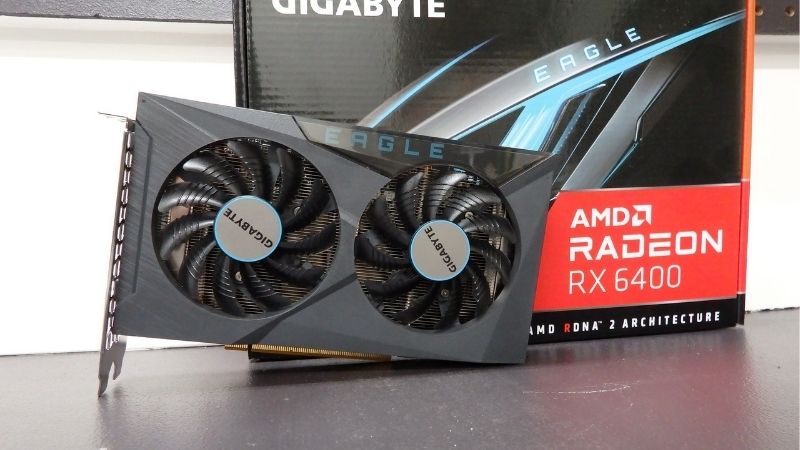
RX 6400 is one of the most specialized budget graphics cards on the market, built for tiny, low-power PCs where no other GPU will fit. Drawing just 53W with no extra power connector, it slots into slim office machines and home-theater builds that cannot take anything larger. But the RX 6400 comes with real trade-offs you must understand before buying. This review breaks down its specs, honest performance, the compatibility catches, and exactly who this ultra-efficient card is right for in 2026.
RX 6400 in 2026: Specs and Real-World Performance
Before buying, it is essential to understand exactly what the RX 6400 offers and, just as importantly, what it deliberately leaves out. This card was designed around extreme efficiency and small size rather than raw speed, and that focus shapes everything about it. Here is a grounded look at its specifications and the performance you can realistically expect.
As an Amazon Associate we earn from qualifying purchases at no extra cost to you.



RX 6400 Key Specs at a Glance
The RX 6400 is built on AMD’s RDNA 2 architecture but trimmed down aggressively for low power and low cost, which explains both its strengths and its limitations.
| Spec | RX 6400 |
|---|---|
| Architecture | RDNA 2 |
| VRAM | 4GB GDDR6 |
| PCIe interface | x4 |
| Board power | ~53W |
| Power connector | None required |
| Hardware encoder | None |
| Typical price | ~$110–$140 |
The standout RX 6400 specs are its remarkably low 53W power draw and the fact that it needs no power connector, drawing everything from the PCIe slot. The catches are equally important: a narrow x4 PCIe interface, only 4GB of VRAM, and no hardware video encoder at all.
These numbers define the card’s entire purpose. The RX 6400 is engineered to fit and run where nothing else can, trading raw performance and features for the ability to slot into the smallest, most power-limited systems on the market.
1080p Gaming Performance Today
At 1080p, the RX 6400 handles esports and lighter games well, delivering playable frame rates in titles like popular competitive shooters and older games at reasonable settings. For its intended role as an ultra-efficient card, that is a respectable showing.
In demanding modern AAA games, however, the RX 6400 shows its limits quickly. The 4GB VRAM buffer and modest core count mean you will be lowering settings and resolution scaling to stay smooth, so this is not a card for high-settings modern gaming.
The x4 PCIe interface is the crucial performance wrinkle. On a modern PCIe 4.0 system the RX 6400 performs as intended, but on an older PCIe 3.0 board that narrow link is effectively halved, causing a noticeable performance drop that can make the difference between playable and frustrating.
Put in practical terms, the RX 6400 is comfortable with competitive shooters, indie games, and older titles at 1080p, but it is not built to push modern AAA blockbusters at high settings. Set your expectations around light and esports gaming and it delivers exactly what its design promises; expect it to chew through the latest demanding releases and you will be disappointed. On the right PCIe 4.0 system, tuned to sensible settings, it turns a non-gaming PC into a capable casual machine.
What Owners Say: Strengths and Common Complaints
Owner feedback on the RX 6400 is sharply split by expectation. Buyers who purchased it for the right reason—a tiny, low-power build—tend to be delighted, praising how it transforms a slim office PC into a light gaming machine without a power supply upgrade.
The most common complaints come from buyers who expected more. Frequent criticisms include the PCIe 3.0 performance penalty, the lack of any hardware encoder for streaming or recording, and the limited display outputs on some models, all of which catch people who did not research the card first.
The consensus is clear: the RX 6400 is an excellent card for its narrow niche and a frustrating one outside it. Understanding its constraints before buying is the single most important factor in being happy with it.
Is the RX 6400 Worth Buying?
The specs and performance make the RX 6400’s identity clear, but whether it is worth buying depends entirely on your specific build and needs. This is a card that is either exactly right or clearly wrong for a given situation. Here is an honest assessment of where it excels and where it falls short.
Where the RX 6400 Still Shines
The RX 6400 is at its best in the smallest, most power-limited builds. For a slim office prebuilt, a home-theater PC, or a compact system with a weak power supply and no spare connector, it is often the only real gaming GPU that will physically fit and run.
It is also a genuinely good pick for light gaming and media use in those constrained machines. Paired with a modern PCIe 4.0 platform, it turns an otherwise non-gaming PC into a capable esports and casual-gaming box while sipping power and generating little heat.
For anyone whose primary constraint is size and power rather than raw performance, the RX 6400 solves a problem that few other cards can, which is exactly why it exists.
Pros and Cons of the RX 6400 in 2026
The RX 6400 is a card of extremes, with clear strengths and equally clear weaknesses. Here is the direct breakdown to help you decide.
- Pros: Extremely low 53W power draw, no power connector needed, single-slot low-profile options, ideal for tiny and weak-PSU builds, cool and quiet.
- Cons: x4 PCIe penalty on older boards, no hardware encoder, only 4GB VRAM, limited display outputs, weak in demanding modern games.
The balance strongly favors the RX 6400 for compact, power-limited builds on a modern platform, and just as strongly against it for anyone who wants raw performance, streaming, or a card for an older PCIe 3.0 system.
Power, Size, and System Compatibility
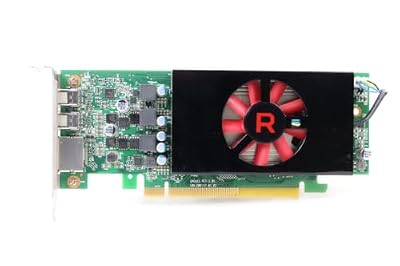
Compatibility is the RX 6400’s whole reason for being. Its ~53W draw and connector-free design mean it runs on the weakest power supplies, and its single-slot, low-profile models fit slim cases where standard cards cannot go.
The critical compatibility check is your motherboard generation. Because the card uses a x4 PCIe link, pairing it with a PCIe 4.0 board is strongly recommended to avoid the significant performance loss it suffers on older PCIe 3.0 systems.
You should also confirm the specific model’s display outputs match your monitor setup, since some RX 6400 cards offer limited connectivity. Get these details right and the card fits beautifully; overlook them and you may hit avoidable frustrations.
Buying the RX 6400: Value and Alternatives
If the RX 6400 matches your build, the final step is confirming it is the right value and knowing your alternatives. Because it serves such a specific niche, the best choice depends heavily on your exact constraints. Here is what to weigh, how it compares, and who should ultimately buy it.
Fair Pricing and What to Check
The RX 6400 typically sells around $110–$140, whether new or lightly used. At that price, the key is making sure the card truly fits your needs rather than chasing the lowest number, since buying the wrong card for your system is the real cost here.
Before purchasing, confirm three things: that your motherboard is PCIe 4.0 for full performance, that the model’s outputs match your monitors, and that its physical size fits your case. These checks matter far more for the RX 6400 than for a typical card.
If buying used, apply the usual care—ask for photos, verify the card works, and test it within any return window—but the compatibility checks above are what really determine whether you will be happy.
RX 6400 vs Alternatives
If your build can handle a bit more, better options exist. A GTX 1650 offers full x16 bandwidth, a hardware encoder, and more display outputs while staying connector-free, making it the safer pick for older systems or anyone who wants to record gameplay.
For builds with a little more room and power, a used RX 6600 delivers dramatically more performance for a modest price increase, and is the clear upgrade target if size and power are not hard limits.
The RX 6400 wins only when your constraints are genuinely extreme; the moment your build can accommodate a larger or more powerful card, one of these alternatives makes more sense.
It is worth being clear-eyed about that trade-off. The RX 6400 exists to solve a physical problem—fitting a gaming-capable GPU into a machine that cannot take anything bigger—rather than to offer the best performance for the money. If you are not fighting a hard size or power limit, you are almost always better served spending similar money on a card that does not carry the PCIe penalty, the missing encoder, and the smaller VRAM buffer. That honest framing is the key to being satisfied with the purchase.
See More:
Final Verdict: Who Should Buy the RX 6400
The RX 6400 is the right choice for a very specific buyer: someone building the smallest, most power-limited PC on a modern PCIe 4.0 platform, who needs a connector-free card and does not plan to stream. For that person, it is close to perfect.
It is the wrong choice for almost everyone else. If your system has any headroom in size or power, or you want streaming, more VRAM, or PCIe 3.0 compatibility, a GTX 1650 or RX 6600 will serve you far better.
If your constraints match the RX 6400’s strengths exactly, it solves a problem few other cards can. You can compare current pricing and models through the links on this page to find the right fit.
In summary, the RX 6400 is a specialist tool rather than a general-purpose GPU, delivering light gaming in the tiniest, most power-limited builds thanks to its 53W draw and connector-free design. Its trade-offs—the PCIe 3.0 penalty, missing encoder, and 4GB VRAM—only matter if you buy it for the wrong system. Match the RX 6400 to a compact, modern, efficiency-first build, and it becomes the ideal card; use it anywhere else, and a more capable alternative is the smarter buy.
Top-Rated Picks


Best Seller
XFX Speedster SWFT105 Radeon RX 6400 Gaming Graphics Card with 4GB GDDR6, AMD RDNA 2 RX-64XL4SFG2


| Product | Brand | Rating | Reviews | Price |
|---|---|---|---|---|
| ARCTIC MX-4 (4 g) – Premium Performance Thermal Paste… | ARCTIC | ★ 4.8 | 104k | $4.99 |
| ARCTIC MX-4 (incl. Spatula, 4 g) – Premium Performanc… | ARCTIC | ★ 4.8 | 71.9k | $5.49 |
| Crucial 8GB DDR4 RAM 3200MHz (PC4-25600), Downclockab… | Crucial | ★ 4.8 | 62.8k | $74.99 |
| AMD Ryzen 5 5600X 6-core, 12-thread unlocked desktop … | — | ★ 4.8 | 30.2k | $177.60 |
| NVIDIA Shield Remote; Voice Search, Motion-Activated,… | — | ★ 4.7 | 10.6k | $25.99 |
Frequently Asked Questions
Does the RX 6400 really need no power connector?
Correct, it draws roughly 53W entirely from the PCIe slot, which is well within the 75W slot limit. That makes it ideal for prebuilt office systems with small proprietary power supplies where adding a graphics card with a PCIe cable is impossible without replacing the whole unit.
Does it fit in low-profile and small form factor cases?
Yes, most RX 6400 cards are single-slot or slim dual-slot and ship with low-profile brackets, making them one of the easiest discrete GPUs to fit into slim desktops. Always verify bracket type and card length against your chassis, since a few partner models are full height only.
What are the RX 6400 biggest limitations?
It has 4GB of VRAM on a 64-bit bus, a PCIe 4.0 x4 link that bottlenecks on older PCIe 3.0 boards, and no hardware video encoder. It also typically offers only two display outputs. These cuts matter more than the modest raw performance deficit.
What performance should I expect from the RX 6400?
Expect comfortable 1080p esports gaming, with titles like CS2, Valorant, Rocket League and Dota running well above 60fps at medium settings. Demanding modern AAA games require low settings, 720p, or FSR upscaling to stay playable. It is a light gaming and media card, not a AAA card.
How does it compare to the GTX 1650 for a no-connector build?
The GTX 1650 draws about 75W and is usually slightly faster in raster while adding NVENC hardware encoding and more display outputs. The RX 6400 wins on power draw and physical size. If your machine can supply 75W from the slot, the GTX 1650 is generally the more flexible pick.











Write Your Review
No reviews yet. Be the first to share your experience!