
- Top Pick: Abstract Vibrance Colorful Modern Abstract Canvas Print, Vibrant Wall Art, Dynamic Shapes, for Living Room, Bedroom & Home Décor
- Best Value: Acrylic Painting Practice Book – Vibrance: An Artistic Journey into Painting with Rich Color and Dynamic Light
- Premium Choice: Watercolor Painting Practice Book: Vibrance: An Artistic Journey into Bold Color and Dynamic Watercolor
RTX Dynamic Vibrance is one of the more useful free features hiding inside the Nvidia app, yet many RTX owners have never switched it on. It is an AI-powered Freestyle filter that enhances on-screen color and clarity in real time, using your GPU’s Tensor cores to make games pop without crushing detail. This review explains exactly what RTX Dynamic Vibrance does, how it differs from the old Digital Vibrance, how to enable and tune it, and whether it is worth using on your RTX graphics card in 2026.
What RTX Dynamic Vibrance Actually Does
Before deciding whether to use it, you need to understand what this feature is and how it works. RTX Dynamic Vibrance is not a hardware upgrade or a game setting; it is a post-processing filter applied by your GPU through Nvidia’s software. Its job is to improve how your games look with minimal effort.
As an Amazon Associate we earn from qualifying purchases at no extra cost to you.


An AI-Powered Freestyle Filter
RTX Dynamic Vibrance is part of Nvidia’s Freestyle suite, accessed through the Nvidia app, the companion software that has unified the old Control Panel and GeForce Experience. It analyzes the colors on your screen in real time and intelligently boosts them.
The key word is intelligently. Rather than uniformly cranking saturation, the filter aims to make colors pop while preserving balance, minimizing the color crushing that simpler saturation boosts cause. The result is meant to be more vivid yet still natural.
Because it is AI-powered, the feature leans on the Tensor cores built into GeForce RTX GPUs. That hardware acceleration is what allows it to enhance the image in real time without a meaningful performance cost in most situations.
This is an important practical point. Because the work runs on dedicated AI hardware rather than the cores doing your actual game rendering, the filter generally does not noticeably reduce your frame rate. You get the visual benefit without the performance penalty that older, heavier post-processing filters sometimes imposed.
How It Differs From Digital Vibrance
Longtime Nvidia users will remember Digital Vibrance, a simple saturation slider buried in the old Control Panel. RTX Dynamic Vibrance is the modern, smarter successor to that beloved tool.
The original Digital Vibrance applied a blunt, global saturation increase that could oversaturate and crush detail if pushed too far. The new filter uses AI to apply enhancement more selectively, improving clarity and letting you distinguish in-game elements more easily.
It also works on a per-application basis, so you can tune the effect differently for each game rather than applying one setting system-wide. That flexibility is a meaningful upgrade over the old approach.
The per-game approach matters more than it first appears. A bright, stylized game and a dark, realistic one benefit from very different amounts of enhancement, and applying a single global setting to both inevitably compromises one of them. Being able to save a tailored profile for each title means every game can look its best rather than merely acceptable.
Which GPUs Support It
Because RTX Dynamic Vibrance relies on AI acceleration, it requires a GeForce RTX GPU, specifically the RTX 20-series or newer, the same requirement as features like DLSS.
That covers a wide range of cards, from the RTX 2060 up through the latest RTX 50-series. Owners of GTX cards or older hardware cannot use it, since they lack the Tensor cores the filter depends on.
If you own any modern RTX card, the feature is available to you for free through the Nvidia app, with no additional purchase or subscription required. It is simply a matter of enabling it.
Using RTX Dynamic Vibrance and Real-World Impact
Knowing what the feature does is only half the picture; what matters is how it looks and feels in actual games and how easily you can set it up. Synthesizing user experiences and hands-on impressions, here is the practical reality of living with the filter day to day.
How to Enable and Tune It
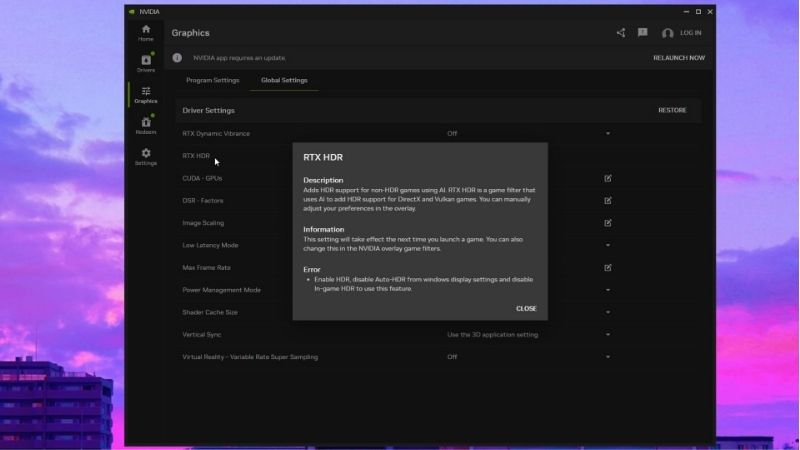
Turning on RTX Dynamic Vibrance is straightforward through the Nvidia app. You select the Graphics section, choose the game you want to adjust, and find the RTX Dynamic Vibrance option among the driver settings, where you set an Intensity value.
The Intensity slider is the heart of the feature, letting you dial the effect from subtle to strong. A common starting point is a moderate value like 50%, which you can then raise or lower to taste, with changes taking effect after relaunching the game.
You can also adjust it on the fly through the in-game overlay, making it easy to compare the effect on and off in real time. Tuning per game is worthwhile, since the ideal intensity varies between bright, colorful titles and darker, moodier ones.
What It Looks Like in Games
In practice, the effect is most noticeable in games with rich, varied color palettes, where it makes environments look more vivid and easier to read. Foliage, skies, and lighting can gain a welcome punch.
For competitive players, the improved clarity can help distinguish enemies and details against busy backgrounds, a practical benefit beyond pure aesthetics. Many users pair it with RTX HDR for an even bigger visual lift on compatible displays.
That competitive angle is why some players keep it enabled specifically in fast shooters, where spotting a target a fraction of a second sooner matters. The added clarity can make enemies stand out against cluttered environments without the harsh, unnatural look that aggressive saturation would produce.
That said, the effect is a refinement rather than a transformation on its own. On muted or already-saturated games it does less, and some users find it most valuable when combined with other filters rather than used in isolation.
It is also worth setting expectations about subtlety. The feature is designed to enhance without looking artificial, so a well-tuned result often reads as the game simply looking right rather than obviously filtered. Some users initially expect a dramatic change and miss the more refined improvement it actually delivers, which is a feature of its careful design rather than a shortcoming.
Pros and Cons of RTX Dynamic Vibrance
Bringing the experience together gives a clear verdict on whether to use the feature. Here is the balance sheet for RTX Dynamic Vibrance.
- Pros: free for RTX owners, AI-enhanced color without heavy crushing, per-game tuning, minimal performance cost, improves clarity, pairs well with RTX HDR.
- Cons: requires an RTX 20-series or newer GPU, effect varies by game, modest on its own, occasional app quirks when sliders are zeroed out.
The pattern is clear: as a free, low-cost enhancement it is well worth trying, even if it is a polish rather than a game-changer for every title.
Is It Worth Using in 2026?
With the basics and the experience covered, the final question is whether RTX Dynamic Vibrance deserves a place in your setup, and how it fits the broader value of owning an RTX card today. This section offers practical guidance and a verdict.
Getting the Best Results
To get the most from the feature, treat it as one tool in a larger visual toolkit. Tune the Intensity per game, start moderate, and compare on and off using the overlay so you can judge the effect honestly rather than assuming more is better.
Pairing it with RTX HDR on a capable display often yields the biggest improvement, since the two AI filters complement each other. Keeping the Nvidia app updated also helps, as Nvidia continues to refine these filters over time.
Above all, match the intensity to each game’s existing look. A subtle touch on an already-vivid title and a stronger setting on a washed-out one will serve you better than a single global preference.
The Value of RTX Features Today
Features like this add real value to the RTX ecosystem, and that matters in 2026. With GPU prices elevated by a severe memory shortage and strong AI-driven demand keeping cards expensive, getting more from the card you already own is genuinely worthwhile.
Free software enhancements like RTX Dynamic Vibrance, RTX HDR, and DLSS are part of what makes an RTX card a compelling long-term purchase even at today’s prices. They extend the value of your hardware without any extra cost, which is a meaningful consideration when every card commands a premium.
Final Verdict: Should You Use It
If you own an RTX card, RTX Dynamic Vibrance is absolutely worth trying. It is free, easy to enable, costs little to no performance, and can make many games look noticeably more vivid and readable.
Approach it as a refinement to tune per game rather than a magic switch, ideally paired with RTX HDR, and you will likely keep it on for your favorite titles. For the effort involved, it is one of the easiest visual wins available to RTX owners, and since it costs nothing and is fully reversible, there is genuinely little reason not to at least experiment with it across your whole game library.
See more:
- What graphics card do I have?
- How to tell what graphics card I have
- 5070 Ti vs 4080
- 5060 vs 3080
- RTX 2060 graphics card
Recommended Products

PNY
PNY GeForce RTX™ 4060 Ti 8GB Verto™ OC Dual Fan Graphics Card DLSS 3 (128-bit, PCIe 4.0, GDDR6, HDMI/DisplayPort, Supports 4k, 2 Slot)

ZOTAC
ZOTAC Gaming GeForce RTX 4060 8GB Twin Edge OC DLSS 3 8GB GDDR6 128-bit 17 Gbps PCIE 4.0 Compact Gaming Graphics Card, ZT-D40600H-10M
GIGABYTE
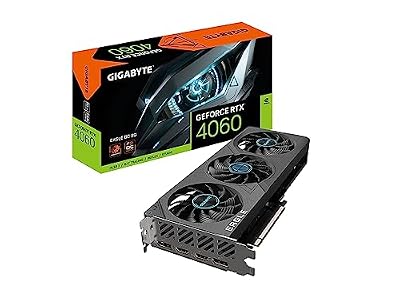
Gigabyte GeForce RTX 4060 Eagle OC 8G Graphics Card, 3X WINDFORCE Fans, 8GB 128-bit GDDR6, GV-N4060EAGLE OC-8GD Video Card
As an Amazon Associate we earn from qualifying purchases. Product prices and availability are accurate as of the date/time indicated.
Conclusion
RTX Dynamic Vibrance is a free, AI-powered Freestyle filter in the Nvidia app that intelligently enhances color and clarity on any RTX 20-series or newer card, improving on the old Digital Vibrance with smarter, per-game tuning at minimal performance cost. It is a refinement rather than a transformation, but paired with RTX HDR and tuned to each title, it is one of the easiest visual upgrades available. With GPU prices elevated in 2026, squeezing more value from the card you own makes good sense. Enable RTX Dynamic Vibrance through the Nvidia app, experiment with the Intensity slider, and if you are still shopping for an RTX card, compare current models on Amazon to access these features.
Frequently Asked Questions
How is RTX Dynamic Vibrance different from the old Digital Vibrance slider?
The legacy Digital Vibrance control applied one flat saturation boost to the whole frame, which crushed detail in already-colourful areas and blew out skin tones. Dynamic Vibrance runs an AI filter on the Tensor cores that analyses the image per scene and selectively lifts saturation and contrast where detail would otherwise be lost.
Which graphics cards support RTX Dynamic Vibrance?
It requires Tensor cores, so it works on RTX 20, 30, 40 and 50 series cards, both desktop and laptop, through the NVIDIA App. GTX 10 and 16 series cards do not qualify because they lack the Tensor hardware the filter runs on, and they are limited to the older Digital Vibrance slider instead.
Does Dynamic Vibrance cost frame rate?
Yes, but modestly. Because the filter runs as a post-process on the Tensor cores each frame, expect roughly a three to eight percent drop depending on resolution and how much headroom your GPU has. The hit is larger at 4K and on lower-tier cards, and smaller when you are already CPU-limited in a competitive shooter.
Is it safe to use in competitive games with anti-cheat?
Dynamic Vibrance is a driver-level output filter rather than a memory hook into the game process, and it is broadly treated the same way as the long-standing Digital Vibrance control. It is generally accepted in casual play, but some tournament rulesets restrict visual filters, so check the specific competition rules before relying on it.
How do I enable and tune it?
Open the NVIDIA App, press Alt+Z for the overlay, choose Game Filters, then add RTX Dynamic Vibrance and adjust the Vibrance and Intensity sliders live while the game runs. Settings save per title, so you can push saturation hard in a foggy shooter and leave a cinematic single-player game closer to neutral.










Write Your Review
No reviews yet. Be the first to share your experience!