
- Top Pick: ZOTAC Gaming GeForce RTX 5060 Solo DLSS 4 8GB GDDR7 128-bit 28 Gbps PCIE 5.0 Gaming Graphics Card, SFF-Ready Ultra Compact Card, ZT-B50600G-10A
- Best Value: ZOTAC Gaming GeForce RTX 5060 Ti 8GB Twin Edge OC DLSS 4 8GB GDDR7 128-bit 28 Gbps PCIE 5.0 Gaming Graphics Card, IceStorm 2.0 Cooling, SFF-Ready, ZT-B50610H-10A
- Premium Choice: ZOTAC Gaming GeForce RTX 5060 Twin Edge OC DLSS 4 8GB GDDR7 128-bit 28 Gbps PCIE 5.0 Gaming Graphics Card, SFF-Ready Compact Card, ZT-B50600H-10A


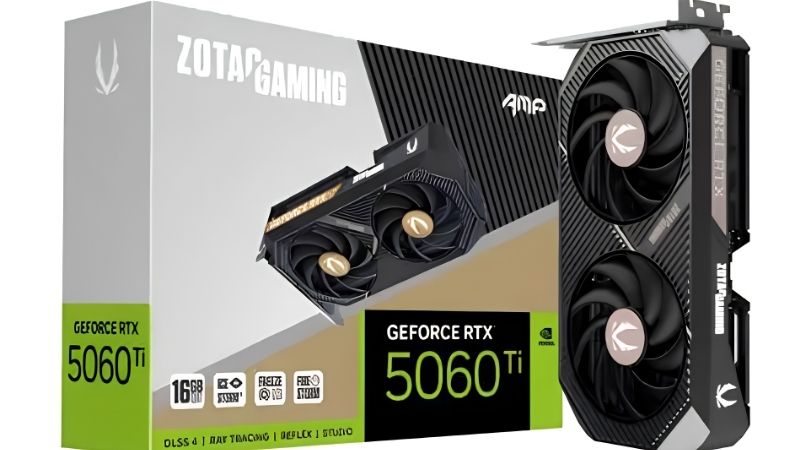
The zotac rtx 5060 ti solo exists to solve a problem no benchmark chart measures: your case is too small for the card you wanted. If you are here, you have probably already worked out that most 5060 Ti models are 240-280mm triple-fan designs, and you have a chassis or an OEM prebuilt that will not take one. This review covers what the Solo’s compact design actually costs you in thermals, the 16GB versus 8GB decision that matters far more than the cooler, and the exact measurements to take before you order. No video is going to tell you whether a card fits your case. A tape measure and this page will.
What the Zotac RTX 5060 Ti Solo Is Built For
Every 5060 Ti runs the same silicon regardless of the shroud: roughly 4,608 CUDA cores, GDDR7 on a 128-bit bus, around 180W of board power, and a $379 or $429 MSRP depending on memory capacity. Zotac’s Solo line does not change any of that. What it changes is physical footprint – and for the buyer this card is aimed at, that is the only specification that matters.
As an Amazon Associate we earn from qualifying purchases at no extra cost to you.


The 16GB vs 8GB Decision Comes First
Before you evaluate a single thing about the cooler, resolve this – because getting it wrong costs far more than any thermal difference on this page.
The 5060 Ti ships in 8GB and 16GB versions sharing the same die and the same clocks. In light workloads they land within 1-2% of each other. In heavy ones they diverge violently. Once a game exceeds 8GB – which at 1440p with high textures is now routine rather than exotic – the 8GB card does not lose 10%. Its 1% lows collapse by 30-50% and it starts hitching.
The failure mode is what makes this decisive. A card short on shader power runs slower, predictably and tunably. A card short on VRAM stutters and streams textures in late while its average frame rate stays deceptively healthy. That mismatch is the single most common complaint in critical owner feedback on 8GB cards at this tier – not that the card is slow, but that the game feels wrong in a way the frame counter does not explain.
The rule: pay the extra for 16GB. In a market where GPU prices are flat rather than falling, the $50 you save on the 8GB variant is the most expensive $50 in the current stack, because your escape route from a VRAM problem is not getting cheaper.
What the Compact Dual-Fan Design Costs You
Physics does not negotiate. A smaller heatsink with fewer fans dissipates less heat than a larger one, and the Solo’s whole purpose is being smaller. The honest question is not whether it runs warmer than a triple-fan card – it does – but whether that matters at 180W.
At this power level, it largely does not. 180W is a modest thermal load, and compact coolers in this class typically settle in the low-to-mid 70s under sustained gaming with a sensible fan curve. That is a handful of degrees above a triple-fan model, and well inside the safe operating range. The card will not throttle in a case with real airflow.
What you do pay is acoustics. A smaller fan moving the same air spins faster, and faster fans are louder – so expect this card to be audible under load where a triple-fan design at the same wattage would not be. If your build sits on your desk rather than under it, that is a real trade rather than a footnote.
The free mitigation is worth knowing: a custom fan curve in MSI Afterburner works on any brand’s card and typically drops sustained temperatures 8-12C, which lets you cap the duty cycle lower and recover most of the noise. On a compact card, the curve matters more than it does on anything else – it is the difference between a card you forget about and one you hear.
The Exact Measurements to Take Before Ordering
This is the section that justifies the whole article, because fit is why you are here.
Measure three dimensions, not one. Length front to back from the rear bracket to the far end of the shroud – compact cards in this class typically run 170-220mm, and your case manual lists a maximum GPU clearance figure that you should treat as optimistic rather than exact, since cable routing eats into it. Height from the PCIe slot upward, which matters in slim chassis where the side panel sits close. And slot thickness – most Solo-class cards are 2 slots, which keeps the slot below usable, unlike the 2.5 and 3-slot designs that dominate this tier.
Verify the exact figures on the product listing before you order rather than trusting a number from a forum post. Board partners revise designs between production batches, and the card in the box may not match the review from eighteen months ago.
Then check power. 180W wants a 550W PSU as a sensible floor, and cards at this tier typically use a single 8-pin PCIe connector rather than the 16-pin found further up the stack – which means no adapter, no seating anxiety, and compatibility with older supplies. That is a genuine advantage of this tier that nobody mentions, and it is exactly why the Solo drops into OEM prebuilts that cannot take anything larger.
How the Solo Compares to Its Alternatives
You are not really choosing between brands here. You are choosing between a compact card that fits and a larger card that does not, and that reframes every comparison on the results page.
Solo vs Triple-Fan 5060 Ti Models
Against a full-size 5060 Ti from any brand, the Solo trades a few degrees and some noise for roughly 60-80mm of length and a slot of thickness. On identical silicon, performance difference under normal conditions is within the margin of measurement error.
The scenario where the triple-fan card genuinely wins is a hot room, a heavily loaded case, or a build that runs sustained loads for hours. Compact coolers have less thermal mass and less headroom to absorb a bad environment. If your case has good airflow and normal ambient temperature, that headroom sits unused.
The scenario where the Solo wins is the one you are in: a chassis that physically cannot take 280mm. In that case the comparison is not Solo versus triple-fan – it is Solo versus nothing.
Pros and Cons of the Zotac RTX 5060 Ti Solo
| Pros | Cons |
|---|---|
| Compact 2-slot footprint fits small cases and OEM prebuilts that reject full-size cards | Runs a few degrees warmer than triple-fan models and is audibly louder under load |
| 16GB variant carries more VRAM than the RTX 5070 costing far more | The 8GB variant shares the same name and is a genuine trap at 1440p |
| 180W runs on a 550W PSU with a single 8-pin – no 16-pin adapter risk | 128-bit bus caps it at 1080p and light 1440p; not a 4K card in any sense |
| Leaves the PCIe slot below usable for capture cards or expansion | Less thermal headroom in hot rooms or poorly ventilated cases |
| Zotac typically prices below equivalent models on identical silicon | RMA experience varies by region more than with the premium brands |
The trade is honest and narrow. You give up a few degrees and some quiet. You get a card that physically exists inside your computer. For the buyer this card is aimed at, that is not a close call.
Who Should Actually Buy This Card
Buy it if you are upgrading a small form factor build or an OEM prebuilt with limited clearance, if you game at 1080p high refresh or light 1440p, if your PSU is 550W with a single 8-pin available, and if you take the 16GB version. That is a real and underserved profile, and this card serves it properly.
Do not buy it if you have a mid-tower with 300mm of clearance – in that case a triple-fan model at a similar price gives you the same performance more quietly, and the compact design buys you nothing. Do not buy the 8GB version for 1440p under any circumstances.
And if the noise concerns you, build the fan curve on day one rather than after you get annoyed. On a compact cooler that single free adjustment is the difference between the two outcomes.
Why This Tier Is Not Getting Cheaper
The value case above rests on today’s price, and that assumption deserves examining – particularly the VRAM argument, which changes entirely depending on where prices go.
Prices Have Flattened but Are Not Falling
The memory-driven surge through late 2025 lifted component and laptop pricing broadly. The genuinely positive news is narrow but real: the steep climb seen at the end of 2025 has stopped, and manufacturers including Framework have reported a period of relative stability – while still warning openly that further volatility remains possible.
Flat is not falling. This card is unlikely to be meaningfully cheaper in three months, which means the $50 gap between the 8GB and 16GB versions is a durable, real $50 rather than something that closes on its own.
That is precisely why the 16GB recommendation is not a luxury. The old strategy – buy 8GB now, upgrade in two years when cards get cheap – assumed cards get cheap. They are not. Buying the smaller buffer today means paying full price again later to escape a problem you chose.
New Memory Capacity Arrives in 2027 or 2028
Genuine relief is under construction. OEMs can now source DDR5 from Chinese suppliers such as CXMT, and Micron is building two fabrication plants in Idaho – funded, structural additions to global supply, not speculation.
The obstacle is the calendar. Those Idaho plants do not come online until 2027-2028. Fabrication capacity takes years to stand up, and this purchase concludes long before that supply reaches a shelf.
So the strategy for a small case build is straightforward: buy the 16GB version now, fix your airflow so the compact cooler is not fighting the chassis, and stop waiting for a correction that arrives after you have already replaced the card.
What to Buy Alongside It
Two things determine whether a compact cooler behaves, and both cost a fraction of the GPU.
Case intake fans come first. A small heatsink has less margin than a large one, which means it is more dependent on the air the chassis supplies – a compact card in a well-ventilated case runs cooler than a triple-fan card in a sealed one. In small form factor builds, one good intake fan is worth more than any cooler upgrade you could buy.
A PCIe riser is the other, if your case supports vertical mounting and your card currently sits flush against a panel breathing its own exhaust.
See More:
- A fan curve msi afterburner
- amd radeon rx 9070 vs rtx 5070
- 5060 ti vs 5070 benchmark
- rx 6600 vs rtx 3050
- 2060 vs 3060
Final Verdict
The zotac rtx 5060 ti solo is a specialist tool, and judged as one it is a good buy.
It exists so that people with small cases and OEM prebuilts can have a current-generation GPU at all, and it does that job with a modest thermal penalty and some extra noise under load. At 180W on a 550W supply with a single 8-pin and a 2-slot footprint, it drops into builds that reject everything else at this tier.
Take the 16GB version – that is the single most important line in this review, and it matters far more than the cooler, the brand, or the price. Measure your case in three dimensions and verify the figures on the listing rather than a forum post. And build a fan curve on day one, because on a compact cooler that free ninety seconds is the difference between a card you forget about and a card you hear all evening.
Frequently Asked Questions
Does the Zotac Solo actually fit small form factor cases?
That is its main appeal. The Solo is a single-fan, dual-slot card roughly 170mm to 180mm long, so it clears the GPU bays in most mini ITX chassis where a triple-fan card cannot. Always confirm your case GPU length limit and that the two-slot thickness does not block a bottom fan.
How hot does a single-fan RTX 5060 Ti get?
Warmer than triple-fan models but within spec. Expect roughly 70 to 78 degrees Celsius under sustained load in a case with decent airflow, with the fan clearly audible under gaming loads. In a cramped case with poor intake, temperatures climb and the card throttles slightly rather than becoming unstable.
Which memory version should I buy?
Buy the 16GB version if the price gap is modest. The 5060 Ti exists in 8GB and 16GB variants with identical cores, and the 8GB card runs into memory limits at 1440p with high textures or ray tracing. The extra capacity is the difference between smooth frame times and stutter in newer titles.
What power supply and connectors do I need?
The card sits around 180W and Nvidia suggests a 550W supply, though a quality 600W unit gives margin in a small case with a hot CPU. Most 5060 Ti models use a single 8-pin PCIe connector, and the small form factor models often prefer that over a 12V-2×6 for cable routing reasons.
Does the narrow PCIe interface matter?
The 5060 Ti uses a PCIe 5.0 x8 link. On a PCIe 5.0 or 4.0 motherboard this is a non-issue. On an older PCIe 3.0 board the effective bandwidth halves and you can lose a few percent of performance, and more in memory-starved scenarios on the 8GB variant, so pair it with a reasonably modern platform.











Write Your Review
No reviews yet. Be the first to share your experience!