
- Top Pick: PNY NVIDIA GeForce RTX™ 5070 Ti Epic-X RGB™ OC Triple-Fan Graphics Card | 16GB GDDR7, 256-bit, Boost Speed: 2640 MHz, PCIe® 5.0, HDMI®/DP 2.1, NVIDIA Blackwell Architecture, DLSS 4.5
- Best Value: PNY NVIDIA GeForce RTX™ 5070 Epic-X RGB™ OC Triple-Fan Graphics Card | 12GB GDDR7, 192-bit, Boost Speed: 2685 MHz, SFF-Ready, PCIe® 5.0, 2.4-Slot, NVIDIA Blackwell Architecture, DLSS 4.5
- Premium Choice: PNY NVIDIA GeForce RTX™ 5080 Epic-X RGB™ OC Triple-Fan Graphics Card
The pny 5070 ti argb oc is bought for a reason no benchmark measures: you are building something you want to look at. The GPU is chosen, the case has a window, and now the question is whether this card’s lighting will actually sync with the rest of your build or sit there glowing a slightly different shade of red than everything else. That is a real problem, it is badly documented, and no video review will answer it for your specific motherboard. This review covers the lighting software situation honestly, the physical checks that matter, and whether the ARGB and OC suffixes are worth paying for.
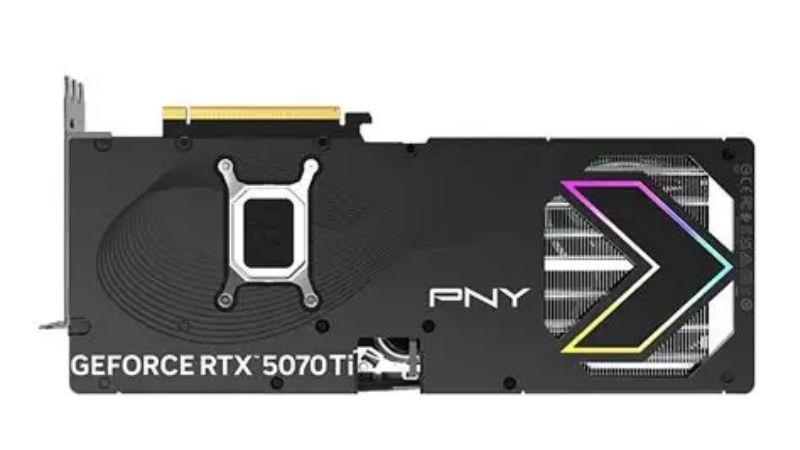
What You Are Actually Buying
Every RTX 5070 Ti runs identical silicon: roughly 8,960 CUDA cores, 16GB of GDDR7 on a 256-bit bus, a 300W board power figure, and a $749 MSRP. PNY changes none of it. What PNY sells you here is a cooler, a factory clock bin, addressable RGB lighting, a warranty, and a price. Two of those five are worth real money and one of them is the lighting – which is the whole reason this specific model exists.
The RGB Sync Question Nobody Answers Properly
This is the section you came for, and the honest answer is more complicated than the box suggests.
ARGB means addressable RGB – each LED can be a different colour, as opposed to plain RGB where the whole strip is one colour at a time. That is what enables gradients, waves, and per-zone effects rather than a flat glow. On a GPU it typically means the shroud and the side logo can run patterns rather than a single tone.
The problem is control. GPU lighting is controlled by the board partner’s own software, not by your motherboard’s ecosystem directly. That means PNY’s utility manages the card, while ASUS Aura, MSI Mystic Light, or Gigabyte RGB Fusion manages everything else. Whether those two talk to each other depends on whether the vendor implemented sync support and whether it currently works – and vendor sync implementations break with updates more often than anyone admits.
The practical consequence: assume you will run two lighting utilities, and assume the colours will not match perfectly across brands. Red on one vendor’s LEDs is a different red on another’s, because the LED hardware and colour calibration differ. This is the single most common complaint in critical feedback about RGB components generally, and it has nothing to do with PNY specifically – it is the state of the entire category.
If perfect sync matters to you more than anything else, the honest advice is to buy your GPU from the same brand as your motherboard. That is the only reliable way to get it, and it is worth knowing before you spend $749 on the assumption that ARGB means it will match.
What the OC Bin Genuinely Adds
Short version: nothing you will notice.
A typical factory overclock at this class adds roughly 2-4% over reference clocks. On a card delivering 110 fps, that is 112-114 fps. You will not feel it and you will not see it without a frame counter running.
The reason is that modern Nvidia cards are not clock-limited in any meaningful way – they are power and thermal limited. GPU Boost already pushes the card as far as its power budget and temperature allow, dynamically, every second. A factory OC raises a ceiling the card reaches only when everything else is already ideal.
What actually sets your sustained clocks is the cooler and the air you feed it. A card held at 65C holds higher boost bins indefinitely than the same silicon at 78C, and that gap is worth considerably more than any factory bin. So read the suffix honestly: it is a marketing label included at no real cost, not a feature to pay a premium for. Build a fan curve in MSI Afterburner – which works on any brand’s card regardless of who made it – and you will exceed what the factory OC gave you, for free, in ninety seconds.
The Physical Checks Before You Order
RGB is why you are here; fit is what will actually ruin your day.
Measure three dimensions. Length front to back – cards in this class commonly run 300-340mm, and your case manual’s clearance figure is optimistic because cable routing eats into it. Height from the slot upward, relevant against side panels and in slim chassis. And slot thickness, since 2.5 to 3 slots is normal here and a 3-slot card blocks the PCIe slot below – which matters if you run a capture card. Verify the exact figures on the product listing rather than a forum post; board partners revise designs between production batches.
Then plan the lighting orientation. This is the detail RGB builders miss and then regret: in a standard horizontal mount, the card’s top edge faces up and its side logo faces the side panel – meaning the pretty part points at your window only if the design intends it to. Look at the product photos carefully and work out which surfaces are lit. Some cards put their best lighting on the edge that ends up facing your PSU shroud, which is a $749 lesson.
Power last. 300W wants a 750W supply and the 16-pin 12V-2×6 connector. If your PSU is ATX 3.0 or newer with a native cable, use it. If not, the bundled adapter must be fully seated until it clicks – partial seating is the mechanism behind essentially every reported melted connector. And a heavy card sags, which puts lateral strain on that same connector. A $12 support bracket is not optional on a card at this weight, and it is also the cheapest way to stop your lighting sitting at a visible angle.
How It Compares to the Alternatives
You are looking at several 5070 Ti models on the same page with identical silicon and a $60-100 spread. Here is how to read that spread when lighting is part of your decision.
PNY vs ASUS, MSI and Gigabyte for an RGB Build
PNY’s positioning is consistent: competent coolers at lower prices with a leaner brand presence. That usually means paying $30-70 less than an equivalent ASUS TUF or MSI Gaming Trio for a card whose sustained temperatures land within a few degrees.
For a pure performance build, that is a straightforward win – a $60 saving on identical silicon beats a 2C temperature difference every time. For an RGB build, the calculation is genuinely different, and this is where I would push back on the value argument.
If your motherboard is ASUS and you buy an ASUS GPU, Aura controls both from one utility and the colours match because the calibration is shared. That is worth something real – not $60 of performance, but $60 of not fighting two utilities and not staring at two slightly different reds every evening in a case you built specifically to look at.
The honest calculus: buy PNY if you want the saving and can live with a second lighting utility and imperfect colour matching. Buy the brand-matched card if the aesthetic is the point of the build. Neither is irrational – they are optimising different things, and only you know which one you actually care about. You can compare current pricing and buyer ratings for the PNY 5070 Ti ARGB OC alongside the ASUS, MSI and Gigabyte models on Amazon here – and check the product photos for which surfaces are lit before you decide, because that detail is not in any spec sheet.
Pros and Cons of the PNY 5070 Ti ARGB OC
| Pros | Cons |
|---|---|
| 16GB GDDR7 on a 256-bit bus – genuine headroom for 1440p high refresh and 4K with DLSS 4 | ARGB sync across brands is unreliable; expect two utilities and imperfect colour matching |
| Typically $30-70 below equivalent ASUS and MSI models on identical silicon | The OC bin adds 2-4% – unmeasurable in practice, not worth a premium |
| Addressable per-zone lighting rather than a single flat colour | 300W demands a 750W PSU, a properly seated 12V-2×6, and a support bracket |
| Triple-fan cooler with zero-RPM idle – dark and silent on the desktop | 300-340mm at 2.5-3 slots blocks the slot below and rules out compact cases |
| Fan curve fully controllable in Afterburner – vendor software optional for cooling | PNY RMA experience varies by region more than the premium brands |
The pattern is the same one PNY always offers, with one wrinkle. Normally you trade brand polish for money and the polish is cosmetic. On an RGB build, the polish is the product – which makes this the one scenario where paying the premium for a brand-matched card is a functional decision rather than vanity.
Who Should Buy This Card
Buy it if you want a 5070 Ti with lighting, you are comfortable running PNY’s utility alongside your motherboard’s, and you would rather have $60 than perfect colour matching. It should live in a mid-tower with real intake airflow, on a 750W ATX 3.0 supply with a native 16-pin cable, with a support bracket underneath.
Do not buy it if colour matching is the reason you are building this machine – buy the card that matches your motherboard brand instead. Do not buy it if your case is compact or your PSU is below 750W. And do not buy it for the OC suffix, which is worth nothing.
Why 5070 Ti Pricing Is Not Improving
The value argument above assumes today’s price, and that assumption deserves a look – because the board partner spread is the only discount that actually exists here.
Prices Have Flattened but Are Not Falling
The memory-driven surge through late 2025 lifted component and laptop pricing broadly. The genuinely positive development is narrow but real: the steep climb seen at the end of 2025 has stopped, and manufacturers including Framework have reported a stretch of relative stability – while still warning openly that further volatility remains possible.
Flat is not falling. This card is not going to be meaningfully cheaper in three months. The panic-buy urgency has eased; the reward for waiting never arrived.
What that changes at model level: since the GPU price itself is not moving, the only saving available to you is the board partner spread. That $30-70 gap between PNY and the premium brands is not noise in a flat market – it is the entire discount that exists on this purchase, which is precisely why it deserves the attention this review gives it.
New Memory Capacity Arrives in 2027 or 2028
Genuine relief is under construction. OEMs can now source DDR5 from Chinese suppliers such as CXMT, and Micron is building two fabrication plants in Idaho – funded, structural additions to global supply rather than speculation.
The obstacle is the calendar. Those Idaho plants do not come online until 2027-2028. Fabrication capacity takes years to stand up, and this purchase concludes long before that supply reaches a shelf.
Which is worth knowing for a build you intend to keep looking at. The 16GB in this card is not getting cheaper to replace, and there is no mid-generation refresh with more memory arriving before that supply does. Buy the card, protect it – bracket, native cable, real airflow – and plan on it being in that window for a while.
What to Buy Alongside It
Three things decide whether this card looks and performs the way you pictured, and together they cost about 5% of the GPU.
A support bracket comes first, and on an RGB build it does double duty – it stops the lateral strain on the 12V-2×6 connector that actually destroys cards, and it stops your expensive lit shroud sitting at a visible droop behind the window. Place it near the far end and raise the card by about half its sag rather than back to level; over-correcting inverts the PCB stress instead of removing it.
A native 12V-2×6 cable is second – it removes the adapter from the chain entirely, and on a windowed build it also routes far more cleanly than a bundled octopus adapter, which is worth something when the cabling is on display. Intake fans are third: a 300W card is only as good as the air the chassis supplies, and ARGB fans solve the airflow and the aesthetic in the same purchase.
See More:
- A fan curve msi afterburner
- amd radeon rx 9070 vs rtx 5070
- 5060 ti vs 5070 benchmark
- rx 6600 vs rtx 3050
- 2060 vs 3060
Final Verdict
The pny 5070 ti argb oc is a good card at a fair price, and two of the three words in its name are worth less than you would expect.
The OC is a rounding error – build a fan curve and beat it for free. The ARGB is real, but cross-brand sync is unreliable enough that you should assume two utilities and slightly mismatched colours rather than the seamless build the photos imply. What you are genuinely buying is 16GB of GDDR7 with a competent triple-fan cooler at $30-70 below ASUS and MSI, with lighting attached.
Take it if you want the saving and can live with the sync situation. Buy brand-matched instead if the aesthetic is the entire point of the build – that is a functional decision, not vanity, and it is the one case where the premium is defensible.
Either way: verify length and slot width on the listing, check the product photos for which surfaces are actually lit, seat that connector until it clicks, fit a support bracket, and fix your intake airflow. Those five checks will affect your experience more than anything on the spec sheet.
Frequently Asked Questions
What software controls the ARGB lighting on this card?
PNY provides its own VelocityX utility for lighting and monitoring control. Many PNY cards also expose standard ARGB behaviour that third-party tools can partially address, but full synchronization with motherboard ecosystems such as ASUS Aura Sync, MSI Mystic Light or Gigabyte RGB Fusion is not guaranteed. If matching your existing lighting exactly matters, verify current software compatibility before buying.
How large is the card and what clearance do I need?
PNY RTX 5070 Ti models with triple-fan ARGB coolers are typically around 330mm long and roughly three slots thick. That requires a full-size ATX mid-tower with at least 340mm of GPU clearance and four available expansion slots. Also allow additional space above the card for the 12V-2×6 power cable and its bend radius.
What power supply is required?
The RTX 5070 Ti carries a 300W total board power rating, so a quality 750W supply is the sensible baseline and 850W gives headroom for a high-end CPU. The card uses a 12V-2×6 connector; use a native cable from an ATX 3.x supply where possible, and always confirm the connector is fully seated until it clicks before powering on.
Does the factory overclock deliver real extra performance?
Only marginally. Factory OC bins on this tier typically raise boost clock by a small percentage, worth roughly two to four frames in a common sixty to one hundred frame scenario, which is not something you will perceive while playing. The larger cooler and raised power limit that accompany OC models matter more, since they sustain higher clocks for longer.
Is the RGB premium worth paying?
Purely on performance, no. All RTX 5070 Ti cards use the same GPU and 16GB GDDR7 configuration, so an ARGB model with a fifty or eighty dollar premium buys aesthetics rather than frames. It is worth paying only if the card is visible through a glass side panel and matching your build lighting genuinely matters to you.
As an Amazon Associate we earn from qualifying purchases at no extra cost to you.













Write Your Review
No reviews yet. Be the first to share your experience!