
- Top Pick: NVIDIA Shield Remote; Voice Search, Motion-Activated, Backlit Buttons, Customizable Menu Buttons, and IR Blaster to Control Your TV (930-13700-2500-100)
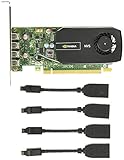
- Best Value: ASUS NVIDIA GeForce GT 730 Graphics Card (PCIe 2.0, 2GB GDDR5 Memory, 4X HDMI Ports, Single-Slot Design, Passive Cooling)
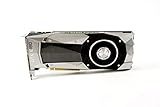
- Premium Choice: NVIDIA GeForce RTX 5080 Founders Edition
Top Nvidia Surround Triple Monitor Gaming Picks for 2026
Here are our current top nvidia surround triple monitor gaming picks, compared on real Amazon owner reviews, price, and features. Live prices update below.
- Top Nvidia Surround Triple Monitor Gaming Picks for 2026
- How Nvidia Surround Works in 2026 — and Where to Find It in the New Nvidia App
- Fixing the Most Common Nvidia Surround Errors and Its Performance Cost
- Compatibility, Alternatives, and Building the Setup
- Recommended Products
- Related Guides
- Frequently Asked Questions
- Related Articles


Nvidia Surround is the driver feature that turns three monitors into an enormous gaming canvas — and in 2026 it is also one of the most misconfigured, because Nvidia is quietly moving where the setting lives. Owners either describe it as the most immersive upgrade they ever made or as a configuration headache they abandoned in a weekend, and both camps are telling the truth about different setups. This guide explains how the feature works in 2026, shows where it now lives in the new Nvidia App, walks through fixing the errors that send people to Google (the greyed-out option chief among them), lays out the real game and GPU compatibility, and compares Surround honestly against AMD Eyefinity so you know which path actually fits your build.
As an Amazon Associate we earn from qualifying purchases at no extra cost to you. Product prices and availability are accurate as of the date shown and are subject to change.




How Nvidia Surround Works in 2026 — and Where to Find It in the New Nvidia App
Nvidia Surround spans two — or far more commonly three — displays into a single virtual monitor at the driver level, so games see one ultra-wide resolution instead of separate screens. Three 1440p panels become a 7680×1440 surface; three 1080p panels become 5760×1080. The driver handles the stitching, applies bezel correction to hide the physical gaps, and presents the result to any game that supports arbitrary resolutions.
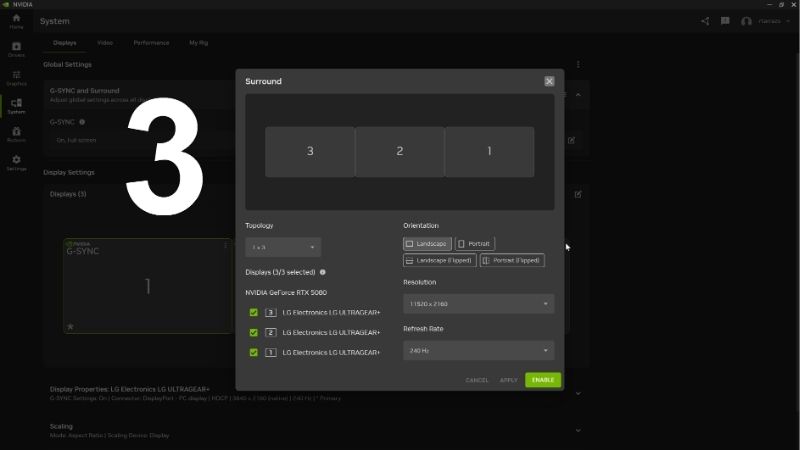
The part that trips people up in 2026 is location. Nvidia is phasing out the legacy Control Panel and migrating its functions into the new Nvidia App, with Surround, custom resolutions, and multi-monitor configuration scheduled to move across over the course of the year. Depending on your driver version, the control may still live in the legacy Control Panel under 3D Settings, listed as “Configure Surround, PhysX,” while newer App builds absorb it into the System and Displays area. If you followed an old tutorial and the menu isn’t where the video showed it, you are not doing anything wrong — the UI moved underneath you, which is exactly why a current written walkthrough beats a two-year-old clip here.
Setup, Requirements, and Bezel Correction
Configuration is quick once the prerequisites hold, but the prerequisites are strict. Identical resolution and refresh rate across all panels is effectively mandatory, matching monitor models is strongly recommended, and every display must connect to the single GPU driving the span. You also should not mix connection protocols across the trio — keep all three on the same type rather than combining, say, one HDMI output with two DisplayPort outputs — because the maximum resolution and refresh rate collapse to the lowest common timing shared between the panels. Setup itself takes minutes when those conditions hold, and the driver remembers the configuration across reboots once it is saved properly.
Bezel correction is the underrated step that separates good setups from great ones: the driver renders the pixels “hidden” behind the monitor bezels so objects pass behind them naturally instead of jumping across the gap. Owners who configure it describe the difference as the moment surround starts feeling like a window rather than three screens — and the ones who skip it file most of the immersion complaints. One operational note worth saving you a crash: exit the game before you remove or hot-swap a Surround display, because pulling a panel mid-session can take the whole game down with it.
Fixing the Most Common Nvidia Surround Errors and Its Performance Cost
Most “Nvidia Surround not working” searches come down to a short list of repeat offenders, and nearly all of them are fixable in a few minutes once you know the cause. The single biggest one is the Surround option being missing or grayed out entirely. Setup fragility accounts for the rest of the cluster: driver updates occasionally drop a saved surround configuration, mixed-monitor setups produce alignment quirks, and G-Sync across spanned displays adds another compatibility layer to untangle. None of these are dealbreakers individually; together they explain why the feature rewards patient enthusiasts and punishes impulse adopters.
The Greyed-Out Option, No-Fullscreen Fixes, and the GPU You Actually Need
If “Configure Surround” is grayed out or simply absent, work through the cause in order. First, confirm every monitor you want to span is physically connected to the Nvidia GPU’s outputs, not to a motherboard port wired to the integrated graphics — this is the number-one culprit, especially on laptops and hybrid systems where some ports route through the CPU’s iGPU instead of the GeForce card. If the option still won’t appear, move your displays to different ports on the card and re-check; when no Surround entry shows up at all, it usually means none of your active outputs are actually being driven by the Nvidia GPU. For the “it enabled but games won’t go fullscreen across all three” problem, make sure the Span displays with Surround box is checked, that you selected the correct topology and spanned resolution, and that the game itself supports the resulting ultra-wide resolution — community-maintained lists are the fastest way to confirm a title before you blame the driver.
The other “error” people report is really a performance problem, and the arithmetic is unforgiving. Triple 1440p means rendering 11 million pixels per frame — 33% more than 4K — and triple 1080p means 6.2 million, roughly 75% of 4K. A game running 120 FPS on a single 1440p panel can land near 45-55 FPS spanned across three before any upscaling assistance, which is why midrange-GPU owners describe the experience as a slideshow. DLSS changes the viability math substantially: upscaling recovers 40-60% of the loss in supported titles, and frame generation on current RTX hardware pushes spanned setups back into high-refresh territory. The practical tiering from measured results is your shopping list: an RTX 5070 Ti handles triple-1080p comfortably, triple-1440p wants an RTX 5080 with DLSS engaged, and triple-1440p at high refresh with modern AAA titles is genuinely RTX 5090 territory. VRAM matters more than usual here too — spanned resolutions inflate frame buffers, making 16GB the practical floor and the reason 12GB cards populate the disappointed reviews. Esports titles soften all of this considerably, since their engines were built for high frame rates at low cost, so a tier-lower GPU often suffices for competitive play and lighter sim sessions.
Compatibility, Alternatives, and Building the Setup
Game compatibility is where Surround either justifies itself or falls apart, and it splits cleanly by genre. Racing and flight simulators are the feature’s home turf — the major sim franchises treat triple-screen as a first-class configuration, map the side monitors to peripheral vision correctly, and deliver depth perception a single screen cannot; community consensus is near-unanimous that sim racing in surround is a different sport. Outside sims, results vary by engine: many AAA titles render ultra-wide correctly but stretch the extreme edges, HUD elements sometimes pin to far corners, and competitive shooters frequently cap supported aspect ratios outright for fairness. The honest scorecard from years of community feedback follows from this — immersion and the zero added cost (Surround ships in every GeForce driver, and the three panels still work as independent displays for productivity) lead the praise, while the performance tax, compatibility lottery, and setup fragility lead the complaints. The most content long-term owners run surround as a saved profile they toggle on for sim sessions and off for everything else.
See more:
- ASUS TUF Gaming GeForce RTX 5090 3080 vs 5080
- Nvidia RTX 4070 Super graphics card
- Sapphire graphics card
- Is HDR good for gaming
- RTX 4080 vs 5070
Surround vs. AMD Eyefinity, the Ultrawide Option, and Hardware to Buy
If you are choosing an ecosystem, the Surround-versus-Eyefinity distinction matters. Both stitch multiple monitors into one gaming surface, but Nvidia Surround treats the trio as a single spanned ultra-wide display, while AMD’s Eyefinity is generally more flexible about display groups with differing resolutions and orientations, which makes mixed-monitor setups easier to configure and gives AMD broader variable-refresh compatibility across mixed panels. Nvidia counters with G-Sync on certified monitors and its stronger DLSS and frame-generation stack, which — as the performance section showed — is precisely what makes spanned resolutions playable on one GPU tier lower than raw pixel math would demand. There is also a third path worth running before you buy anything: a single 49-inch super-ultrawide at 5120×1440 delivers most of the immersion with zero bezels, zero spanning configuration, full G-Sync simplicity, and a lighter GPU load than triple-1440p. Genre decides the winner — sims favor surround for its total width and wrap-around angle, while general gaming increasingly favors the one big ultrawide.
If surround is your lane, treat it as a system purchase and buy correctly the first time. The panels follow one rule above all: buy three identical models in one order, because matched resolution, refresh rate, panel type, and even manufacturing batch eliminate the color-mismatch and alignment complaints that fill the troubleshooting threads — monitor revisions change quietly enough that adding the third panel six months later is a documented regret pattern. Budget for the physical infrastructure first-timers miss too: a triple-monitor mount rated for the combined weight, the desk depth to angle the side panels at roughly 45-60 degrees, and cable management for three feeds plus power. Timing is part of the plan rather than background noise this cycle: the United States has approved Nvidia selling its H200 AI chips to China, reopening data-center demand that competes with consumer GPUs for fabrication and memory, and component and monitor prices are trending upward as AI infrastructure absorbs memory production — with the traditional discount windows failing to appear. For a multi-component build, that rising floor is multiplicative across the GPU and three panels, which makes completing the setup sooner the financially defensible move. The verdict is a study in honest segmentation: for sim racers and flight simmers with the GPU to feed it, Surround remains the single most transformative display upgrade available; for general gaming, a big ultrawide is the saner call. Know which buyer you are and the decision makes itself — and comparing current prices on surround-capable graphics cards and matched monitor sets on Amazon establishes today’s baseline in minutes.
Recommended Products

msi
MSI GeForce RTX 4090 SUPRIM Liquid X 24G Gaming Graphics Card – 24GB GDDR6X, 2625 MHz, PCI Express Gen 4, 384-bit, 3X DP v 1.4a, HDMI 2.1a (Supports 4K & 8K HDR)
View on Amazon
1 day ago

Sapphire
Sapphire 11323-02-20G Pulse AMD Radeon RX 7900 XT Gaming Graphics Card with 20GB GDDR6, AMD RDNA 3
View on Amazon
1 day ago

msi
MSI GeForce RTX 4080 16GB Gaming X Trio Gaming Graphics Card – 16GB GDDR6X, 2610 MHz, PCI Express Gen 4, 256-bit, 3X DP v 1.4a, HDMI 2.1a (Supports 4K & 8K HDR)
View on Amazon
1 day ago
As an Amazon Associate we earn from qualifying purchases. Product prices and availability are accurate as of the date/time indicated.
Frequently Asked Questions
What is the best nvidia surround in 2026?
The best nvidia surround depends on your budget and how you plan to use it. The options compared above are our top-rated picks based on real customer ratings, build quality, and overall value — start with the highest-rated model that fits your budget.
How much should I expect to spend on a nvidia surround?
Prices vary by brand and features. Budget options cover the essentials, while mid-range and premium models add durability, performance, and extra features. Compare the prices in the list above to find the best value for your needs.
What should I look for when buying a nvidia surround?
Focus on what matters most for your use case — build quality, compatibility, performance, warranty, and verified customer reviews. Every pick above is selected to balance these factors.
Are budget nvidia surround options worth it?
Yes. For most people a well-reviewed budget or mid-range nvidia surround delivers excellent value. You only need to spend more if you specifically require premium materials or top-tier performance.
How did we choose these nvidia surround picks?
We compare current Amazon ratings, review counts, key features, and price to surface the options with the best real-world value. The list is refreshed as ratings and availability change.





Write Your Review
No reviews yet. Be the first to share your experience!