
- Top Pick: Graphics Card GPU Brace Support, Video Card Sag Holder Bracket, GPU Stand (L, 74-120mm)
- Best Value: acer GPU Support Bracket, GPU Stand with Magnet Non-Slip Base,(L, 70-120mm)
- Premium Choice: California JOS GPU Support Bracket Graphics Card Brace Anti-Sag Holder Height Adjustable Video Card Stand Large(1 PCAK, Black)
GPU sag is that slightly alarming droop you notice when a heavy graphics card bends downward at its far end after installation, and if you have just spotted it on a new build, it is completely understandable to worry. The good news is that it is common, usually harmless in the short term, and very easy to fix. This guide explains why it happens, whether it can actually damage anything, and the simple steps to straighten your card and prevent it for good.
As an Amazon Associate we earn from qualifying purchases at no extra cost to you.




Understanding GPU Sag and Why It Happens
Graphics cards have grown larger and heavier with every generation, while the slot that holds them has stayed the same size. That mismatch is the root of the problem: a modern card is supported only at one end, so gravity pulls the unsupported far end downward over time. Understanding the cause makes the fix obvious and reassuring.
What GPU Sag Actually Is
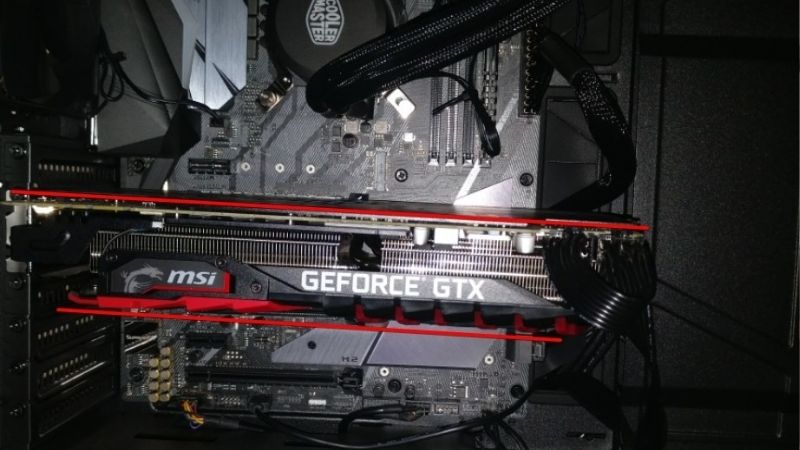
GPU sag is the visible downward bending of a graphics card inside a horizontally mounted case. The card is held firmly by the motherboard slot and the rear bracket on one side, but its opposite end hangs free, and the sheer weight of today’s large coolers drags that end down.
The result is a card that no longer sits perfectly level, sometimes with a clear gap or tilt that was not there on day one. It is a mechanical issue caused by weight and leverage, not a fault with the card or a sign that anything is broken.
Because it is purely about physical support, it is one of the easiest hardware concerns to solve, often with an inexpensive accessory or even a clever free workaround. Few hardware worries are this cheap and this quick to put to rest, which is exactly why seasoned builders treat sag as a minor checklist item rather than a crisis.
Why Modern Graphics Cards Sag
The main driver is weight. High-end cards now carry massive heatsinks, multiple fans, and reinforced shrouds, and all of that mass sits on a circuit board cantilevered out from a single slot. The further the weight extends from the support point, the more leverage gravity has to pull it down.
Case orientation plays a role too. In a traditional tower where the motherboard stands vertically and the card mounts horizontally, the unsupported end has nothing beneath it. Cards also tend to settle further over weeks and months as the board flexes slightly under constant load.
None of this means your card is poorly made; even premium models sag simply because physics does not care how expensive the heatsink is. In fact, the most powerful cards, which carry the largest coolers, are usually the ones that droop the most, so a high-end purchase makes a support more relevant, not less.
Can GPU Sag Actually Damage Your Hardware?
This is the question that worries most people, and the honest answer is reassuring: mild sag is generally harmless, and the vast majority of cards live their whole lives with a slight droop and no ill effects at all. A small amount of bend is normal and expected.
The concern only becomes real with severe, prolonged sag. Extreme bending can, over a long time, stress the PCIe slot or the solder joints where the connector meets the board, and in rare cases affect connection reliability. The practical takeaway is simple: you do not need to panic, but supporting a heavy card is cheap insurance that removes the worry entirely. Given how little a bracket costs compared to the card it protects, treating one as standard equipment on any large GPU is simply sensible.
How to Fix and Prevent GPU Sag
Fixing sag is one of the most satisfying quick wins in PC building, because a small, inexpensive support instantly straightens the card and protects it for the long term. There are a few approaches, from purpose-built brackets to clever workarounds, and all of them are beginner-friendly.
What You Will Need to Fix It
The fix is cheap and simple, and you have a few good options.
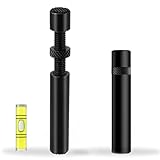
The cleanest solution is a dedicated GPU support bracket or anti-sag stand, a small adjustable prop that sits under the free end of the card and holds it level; a sturdy, height-adjustable metal support bracket is the option most builders reach for because it looks tidy and works with almost any card and case. Some people prefer a magnetic or telescopic support for an even cleaner look, while a basic option costs very little and does the job just as well.
If you would rather not buy anything immediately, you can improvise with a small, firm object of the right height under the card’s end, though a proper support is more secure, more adjustable, and far better looking inside a windowed case. It also stays put over time, whereas an improvised prop can shift or settle and quietly let the sag creep back.
Step-by-Step: Installing a Support Bracket
Use these steps to straighten your card with a support bracket:
- Power down and open the case so you have clear access to the underside of the graphics card and the floor of the case below it.
- Gently lift the sagging end of the card until it sits level with the slot, taking care not to force or twist it.
- Position the support bracket beneath the free end and adjust its height so it just makes contact and holds the card level without pushing it upward too hard.
- Lock the bracket in place and double-check that the card is straight and the bracket is stable, then close the case.
That is all it takes. The card now carries its weight on the support instead of hanging from the slot, and the droop is gone for good with no downside. From that point on you can largely forget about it, which is the whole appeal of solving the problem properly the first time. A few minutes of setup at build time buys years of peace of mind afterwards.
Other Ways to Reduce Sag
Beyond a support bracket, a popular option is mounting the card vertically with a separate vertical GPU mount kit, which hangs the card from the case rather than the motherboard slot and eliminates sag entirely while showing off the card through a side window. It does require the right case and a riser cable, so it is a slightly bigger project.
You can also reduce sag at the source by choosing a case with strong support, ensuring the rear bracket screws are properly tightened, and avoiding moving the PC with the card unsupported. These habits will not fully cure a heavy card on their own, but combined with a support they keep everything reassuringly solid.
Pros, Cons, and Expert Tips for Fixing GPU Sag
Addressing sag is almost all upside, but it is still worth understanding the trade-offs of each method and the small mistakes people make, so you pick the right fix for your build.
The Pros and Cons of Using an Anti-Sag Support
The pros are clear: a support bracket is inexpensive, easy to install, works with virtually any card, instantly straightens the droop, and protects the slot and solder joints from long-term stress. In a windowed case it also simply looks neater to have the card sitting perfectly level.
The cons are minor. A visible bracket may not suit every aesthetic, the cheapest props can look a little plain, and you need to set the height correctly so you support the card without pushing it up too hard. None of these are real obstacles, and for the price the peace of mind is well worth it.
Overall, an anti-sag support is one of the highest-value, lowest-cost accessories you can add to a build with a heavy modern card.
Pro Tips and Mistakes to Avoid
The most common mistake is over-correcting by jacking the support too high and bending the card upward, which is just as undesirable as sag. The goal is level, not lifted, so adjust the height so the card sits flat and natural.
Another mistake is ignoring sag entirely on a very heavy card for years and only acting once a problem appears. Since a support costs so little and installs in minutes, fixing it early is the obvious move rather than gambling on the long term.
A pro tip is to address sag right when you build the PC, before the board has months to settle into a bent shape. Supporting the card from day one keeps everything straight and removes the worry before it ever starts.
See More:
Is GPU Sag Worth Worrying About?
For mild sag, there is no need to lose sleep, since most cards are perfectly fine with a slight droop. But because the fix is so cheap, so quick, and so effective, there is also no reason to leave a heavy card unsupported when a small bracket removes all doubt.
If you own a large, modern graphics card, treating it to a support bracket is simply smart, inexpensive protection for an expensive component. If you would like to straighten your card and stop worrying about GPU sag for good, take a look at the recommended support brackets and vertical mount kits linked below.
To sum up, GPU sag is the natural droop of a heavy graphics card held by a single slot, it is usually harmless in mild form, and it is trivially easy to fix with an inexpensive support. Lift the card level, set a bracket beneath it, and the problem disappears along with the worry. To protect your card and keep it sitting perfectly straight, check the recommended anti-sag support brackets linked below.
Top-Rated Picks


| Product | Brand | Rating | Reviews | Price |
|---|---|---|---|---|
| ARCTIC MX-4 (4 g) – Premium Performance Thermal Paste… | ARCTIC | ★ 4.8 | 104k | $4.99 |
| ARCTIC MX-4 (incl. Spatula, 4 g) – Premium Performanc… | ARCTIC | ★ 4.8 | 71.9k | $5.49 |
| Crucial 8GB DDR4 RAM 3200MHz (PC4-25600), Downclockab… | Crucial | ★ 4.8 | 62.8k | $74.99 |
| AMD Ryzen 5 5600X 6-core, 12-thread unlocked desktop … | — | ★ 4.8 | 30.2k | $177.60 |
| NVIDIA Shield Remote; Voice Search, Motion-Activated,… | — | ★ 4.7 | 10.6k | $25.99 |
Frequently Asked Questions
What causes GPU sag?
Modern cards weigh 1.5 to over 2 kilograms with triple-slot coolers, but they are supported only at the PCIe slot and rear bracket. Gravity pulls the unsupported end downward, flexing the PCB and putting a bending load on the slot connector and its solder joints.
Is sag actually dangerous or just cosmetic?
Mild sag of a few millimetres is cosmetic. Severe or long-term sag can crack solder joints on the PCB, tilt the cooler cold plate off the die and raise hotspot temperatures, damage the PCIe slot retention, and in extreme cases cause intermittent detection or display loss.
How much sag is too much?
If the far end of the card sits noticeably below level, or you can see the PCIe contact edge lifting at one end of the slot, act. A useful check is placing a straight edge along the top of the card; a visible curve rather than a slight droop is the threshold.
What is the best way to fix it?
An anti-sag support bracket or an adjustable stand under the far end is the simplest solution and costs very little. Some cases include a built-in support rail, and vertical mounting eliminates the bending load entirely, though it can raise temperatures against a solid glass panel.
Do I need to worry with a smaller card?
Dual-fan cards under about a kilogram rarely sag enough to matter, and the PCIe bracket handles that load fine. The risk scales with weight and length, so anything with a triple-slot cooler, a full backplate and a vapour chamber deserves support regardless of brand.










Write Your Review
No reviews yet. Be the first to share your experience!