
Is HDR good for gaming is a question with a more nuanced answer than most marketing suggests: HDR can transform how a game looks, but only when your display, your settings, and the game itself all support it properly. This guide explains what HDR actually does, when it genuinely improves the experience, and the practical steps to set it up correctly so you can judge whether it belongs in your own setup.
What HDR Actually Does in Games
Before deciding whether HDR is worth chasing, it helps to understand what the technology changes on screen. HDR is not a resolution feature and has nothing to do with frame rate; it is about the range of brightness and color a display can show at once.
As an Amazon Associate we earn from qualifying purchases at no extra cost to you.




HDR vs SDR: The Core Difference
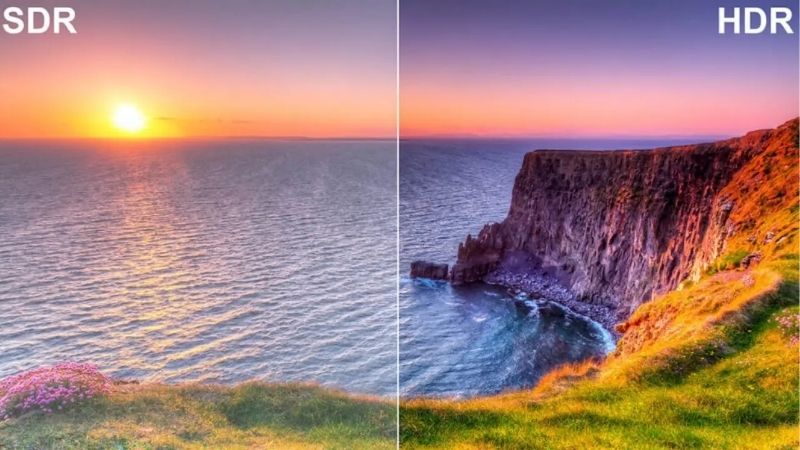
Standard Dynamic Range (SDR) has been the baseline for decades and compresses bright and dark detail into a narrow band. HDR expands that band, letting a scene show bright highlights and deep shadows simultaneously without crushing the detail in either.
In practice that means a sunlit sky, a neon sign, or a muzzle flash can appear genuinely bright while shadowed corners keep their detail. When it works, the image looks closer to how your eyes perceive real-world contrast, which is the single biggest reason players notice the difference.
Brightness, Contrast, and Wide Color
HDR delivers its impact through three measurable things: peak brightness measured in nits, contrast ratio, and a wider color gamut such as DCI-P3. Higher peak brightness lets highlights pop, while strong contrast preserves shadow detail at the same time.
Wide color gamut is the third pillar, allowing more saturated and accurate colors than SDR can reproduce. A display that nails all three produces the vivid, lifelike image HDR promises, while a display weak in any one of them delivers a muted version of the effect that leaves many first-time users underwhelmed.
Why Game Support Matters
HDR only works when the game renders an HDR signal, and not every title does it well. Some games have excellent native HDR; others have a flat implementation that looks worse than well-tuned SDR, which is a major source of disappointment.
The takeaway is that HDR quality is a three-part chain: the display, the operating system pipeline, and the game. If any link is weak, the result underwhelms, so judging HDR fairly means testing it in titles known for strong implementations rather than the first game you launch.
When HDR Is Worth It for Gaming
HDR is not a universal upgrade; it pays off in some setups and barely registers in others. Knowing which category you fall into saves money and prevents the frustration of enabling a feature that your hardware cannot meaningfully deliver.
The Display Specs That Decide Everything
The most important factor is your monitor or TV. Look for genuine HDR performance, not just an HDR-compatible checkbox, since many entry displays accept an HDR signal but cannot actually show its benefits.
- Peak brightness: aim for 600 nits or higher; budget panels rated around 400 nits show only a faint effect.
- Local dimming or OLED: per-zone backlight control or self-lit OLED pixels are what make contrast convincing.
- Wide color gamut: strong DCI-P3 coverage is needed for the saturated colors HDR is known for.
If a display lacks these, enabling HDR often makes the picture look washed out rather than better, which is exactly the experience behind most negative HDR opinions online.
Game Genres Where HDR Shines
HDR has the most visible payoff in visually rich, atmospheric games. Open-world titles with dynamic skies, horror games built on shadow detail, and racing games with bright reflections all benefit dramatically when HDR is done well.
Fast competitive esports titles see far less benefit, since clarity and frame rate matter more than dynamic range, and many competitive players disable it. Matching HDR to the kind of games you actually play is the most practical way to decide if it is worth the effort.
Console-style cinematic experiences played on PC also tend to benefit, especially titles with day-night cycles or heavy use of fire, water, and reflective surfaces. If most of your library is atmospheric and single-player, HDR moves from a nice-to-have to a genuine reason to invest in a capable display.
The Honest Pros and Cons of Gaming HDR
On the plus side, well-implemented HDR delivers a noticeably more immersive and lifelike image, better highlight and shadow detail, and richer color, with no cost to frame rate when your GPU is already capable. For single-player, story-driven games it can be a genuine upgrade.
On the downside, cheap displays produce poor results, Windows HDR handling can be finicky, and some games ship with weak HDR that looks worse than SDR. HDR is worth it when your hardware clears the bar, and a distraction when it does not, which is the honest answer to the question.
How to Set Up HDR Correctly for Gaming
Even great hardware looks bad with HDR configured incorrectly, and bad setup is responsible for a surprising share of negative impressions. Follow these steps in order to give HDR a fair test on your own system.
Step-by-Step: Enabling HDR on Your PC
Getting the pipeline right takes only a few minutes, and doing it in sequence avoids the common washed-out result.
- Confirm your display supports real HDR and connect it with a cable rated for the bandwidth, such as HDMI 2.1 or DisplayPort 1.4. A quality high-bandwidth cable prevents signal limits from capping your HDR experience.
- Enable HDR in Windows under Display settings by switching on Use HDR for your monitor.
- Run Windows HDR Calibration, the free app that sets accurate brightness limits for your specific panel and fixes most washed-out complaints.
- Enable HDR inside each game from its video options, since the in-game toggle is separate from the Windows one.
- Tune the in-game HDR sliders for peak brightness and paper-white to match your display.
If colors still look flat after this, the most likely cause is a display that cannot deliver enough brightness rather than a setup mistake.
Tools and Upgrades That Improve HDR
If your current screen falls short, the highest-impact upgrade is the display itself. A monitor with strong peak brightness, local dimming or OLED panel technology, and wide DCI-P3 coverage is what unlocks real HDR, and it is worth researching specific HDR-capable gaming monitors before buying.
A few supporting pieces help too. A certified high-bandwidth HDMI 2.1 or DisplayPort cable ensures the HDR signal is not bottlenecked, and a modern GPU with current drivers keeps the HDR pipeline stable. When you shop, prioritize verified HDR performance specs over a generic HDR label on the box.
Common HDR Mistakes to Avoid
The most frequent error is judging HDR on a display that cannot produce enough brightness, then concluding the technology is overrated. The second is skipping Windows HDR Calibration, which leaves the image looking dull and gray.
Other avoidable mistakes include leaving SDR content running with HDR forced on, which can wash out the desktop, and forgetting that the game and Windows have separate HDR toggles. Fix these and HDR will finally look the way it is supposed to on capable hardware.
See more:
Recommended Products
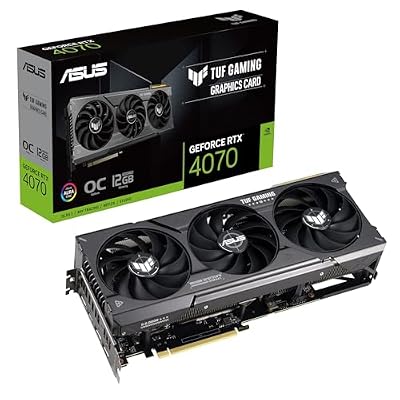
ASUS
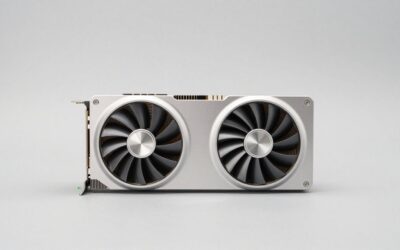
ASUS TUF Gaming NVIDIA GeForce RTX 4070 OC Edition Gaming Graphics Card (PCIe 4.0, 12GB GDDR6X, HDMI 2.1, DisplayPort 1.4a), 3 Year Warranty

Sapphire
Sapphire Pulse AMD Radeon RX 7800 XT Gaming 16GB GDDR6 Dual Video Card

ASUS
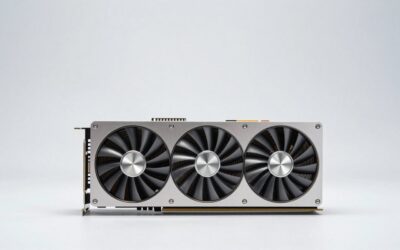
ASUS ROG Strix GeForce RTX 4090 OC Edition Gaming Graphics Card (PCIe 4.0, 24GB GDDR6X, HDMI 2.1a, DisplayPort 1.4a), 3 Year Warranty
As an Amazon Associate we earn from qualifying purchases. Product prices and availability are accurate as of the date/time indicated.
Conclusion
In conclusion, the answer to whether is HDR good for gaming depends entirely on your hardware and the games you play: on a display with high peak brightness, real local dimming or OLED, and wide color, properly configured HDR is a genuine and worthwhile upgrade for immersive single-player titles, while on weak panels it adds little or even hurts the image. Check your display’s real HDR specs, follow the setup steps above, and if your screen falls short, a true HDR-capable gaming monitor is the upgrade that makes the difference — explore current options through the link on this page to see HDR gaming at its best.
Frequently Asked Questions
Does HDR actually improve gaming or is it just marketing?
On a genuinely capable display HDR is one of the biggest visual upgrades available, delivering specular highlights, sunsets and neon signage with brightness a standard display physically cannot produce. On a cheap panel with edge-lit backlighting and no local dimming, HDR mode simply raises gamma and looks worse than SDR, which is where the bad reputation comes from.
What HDR specification should a gaming monitor have?
Treat VESA DisplayHDR 400 as effectively meaningless because it requires no local dimming. DisplayHDR 600 with full-array backlighting is the realistic entry point, DisplayHDR 1000 or True Black 400 on OLED is where the format shines. The number of dimming zones matters far more than the peak brightness figure on the box.
Does turning on HDR hurt frame rates?
The rendering cost of HDR output is negligible, usually under two percent, since the GPU is only outputting a wider colour format. What can cost performance is the higher bandwidth of 10-bit colour at high refresh rates, which may force chroma subsampling or a lower refresh over an older HDMI 2.0 or DisplayPort 1.4 cable.
Why does HDR look washed out on my PC?
Washed-out HDR on Windows almost always means SDR content is being stretched into an HDR container. Run the Windows HDR Calibration app, set the SDR content brightness slider properly, and enable HDR per-game rather than leaving it on system-wide. Also check that the game is using HGiG tone mapping rather than double-tone-mapping against the display.
Is OLED or mini-LED better for HDR gaming?
OLED gives perfect blacks, per-pixel dimming and near-instant response, making it superior for dark games and fast shooters, at the cost of lower full-screen brightness and some burn-in risk with static HUDs. Mini-LED pushes far higher sustained brightness for daylight rooms and HDR highlights, but shows blooming halos around bright objects on dark backgrounds.







Write Your Review
No reviews yet. Be the first to share your experience!