
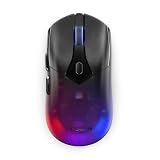
- Top Pick: Lenovo Legion M410 Wireless RGB Gaming Mouse – 6 Button Palm Grip Mouse with 16,000 DPI, 53 Hour Rechargeable Battery, 2-Zone RGB Lighting, NVIDIA Reflex Compatible
- Best Value: PNY NVIDIA T400 Professional Graphic Card 2GB GDDR6 PCI Express 3.0 x16, Single Slot, 3x Mini-DisplayPort, 8K Support, Ultra-quiet active fan
- Premium Choice: msi Gaming GeForce RTX 4060 8GB GDRR6 Extreme Clock: 2505 MHz 128-Bit HDMI/DP Nvlink TORX Fan 4.0 Ada Lovelace Architecture Graphics Card (RTX 4060 Ventus 2X Black 8G OC)
NVIDIA Reflex 2 is the feature competitive players keep asking about, because in fast shooters the gap between clicking and seeing the result on screen decides who wins the duel. Reflex already cut that delay; Reflex 2 pushes it further with a new technique called Frame Warp. If you play FPS titles and care about responsiveness, you want a straight answer on what it actually does, which games support it, and whether it is worth enabling. This review breaks down the technology, the real-world benefit, and how it fits into your whole latency chain, based on how competitive players describe the difference.
What NVIDIA Reflex 2 Is and Why Latency Matters
Reflex is NVIDIA’s low-latency technology, and Reflex 2 is its next step, aimed squarely at reducing the delay between your input and the image reaching your eyes. This matters more than frame rate for competitive feel, because a responsive game lets your aim land where you intend a fraction of a second sooner. Before judging whether Reflex 2 is worth it, you need to understand what latency actually is and what the new Frame Warp technique changes. Here is the foundation.
As an Amazon Associate we earn from qualifying purchases at no extra cost to you.


System Latency Explained
System latency is the total time from your mouse click or movement to the resulting change appearing on your monitor. It is the sum of many small delays: your peripheral, the CPU, the render queue, the GPU, and the display. Frame rate is only part of the picture; a game can run at high fps but still feel sluggish if latency is high.
The render queue is a major, often overlooked contributor. When frames pile up waiting to be processed, your input effectively waits in line behind them. Reflex’s core job is to keep that queue short so your actions are processed promptly.
This is why competitive players obsess over latency rather than just frame rate: lower latency means the game responds closer to instantly, which is exactly what tight aim duels reward.
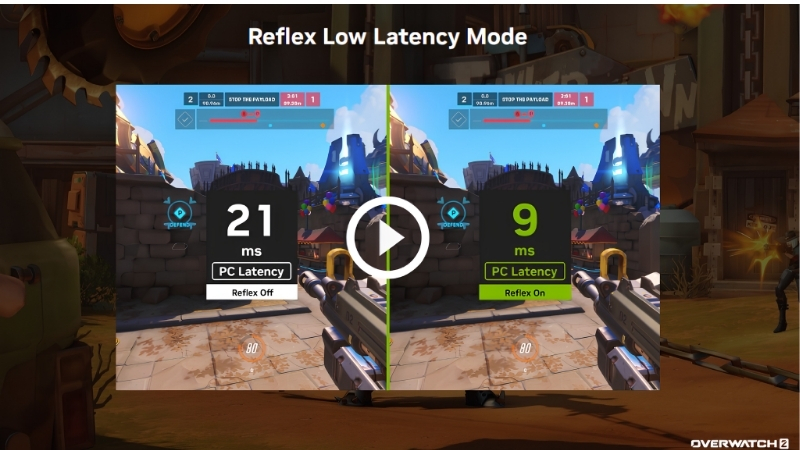
It helps to put rough numbers on it. Total system latency in a fast shooter can range from well over 50 milliseconds on a poorly configured setup down toward the 20s and below on an optimized one, and Reflex targets a meaningful slice of that. A saving of even ten to fifteen milliseconds sounds tiny, but at the moment two players spot each other simultaneously, the one whose shot registers first wins the exchange. That is the concrete stake behind a number most people never think about.
What Frame Warp Adds in Reflex 2
The headline addition in Reflex 2 is Frame Warp. In simple terms, it takes the frame the GPU has just finished and updates it using your very latest mouse input right before it is displayed, shifting the image to reflect where you are actually aiming at the last possible moment.
The effect is a further meaningful reduction in perceived latency on top of what standard Reflex delivers, because the displayed frame accounts for input that arrived after rendering began. For fast aiming, that is precisely the delay players feel most.
It is an ambitious, forward-looking use of the GPU’s capabilities, and it represents NVIDIA pushing latency reduction beyond simply managing the render queue into actively correcting the final image.
Reflex vs Reflex 2
Standard Reflex reduces latency mainly by managing the render queue and synchronizing the CPU and GPU so frames are not needlessly buffered. It is widely supported and delivers a solid, measurable latency cut with essentially no downside.
Reflex 2 keeps that foundation and layers Frame Warp on top for an additional reduction, targeting the input-to-display gap more aggressively. The trade-off is that the newer technique is rolling out to games and hardware over time rather than being universally available on day one.
For players, the practical view is that any Reflex is worth using, and Reflex 2 is the more advanced tier to enable wherever it appears, as support expands across competitive titles.
Using Reflex 2 in Competitive Games
Technology only matters if it works in the games you play and is simple to switch on. Reflex has become common in competitive shooters, and Reflex 2’s Frame Warp is arriving where it counts most. This section covers which games support it, how to enable it correctly, and the honest pros and cons, so you can turn it on with the right expectations rather than assuming it is a magic aim upgrade.
Which Games Support Reflex and Reflex 2
Standard Reflex is already built into a long list of major competitive titles, the fast shooters where latency matters most, and enabling it there is a clear win. If you play popular FPS games, there is a strong chance Reflex is available in the settings.
Reflex 2 with Frame Warp is the newer capability and is expanding across titles and driver support over time, starting with the games where competitive players benefit most. Support grows as developers integrate it and NVIDIA rolls it out.
The practical approach is to check your game’s settings for a Reflex option and enable the most advanced version offered, since the exact availability depends on the specific title and its updates.
How to Enable It and Best Settings
You enable Reflex in the game’s own graphics or gameplay settings, usually as a Reflex Low Latency option with modes like On or On plus Boost. There is no separate app toggle; it is per-game. Turn it on, and where available, choose the Boost variant if you want the most aggressive latency reduction.
For the cleanest result, cap your frame rate slightly below your monitor’s refresh rate when using Reflex, which keeps latency low and avoids the queue building up. Pair it with a high refresh rate display for the full benefit.
Once enabled, there is little to tune; Reflex works in the background. The main decision is simply choosing the strongest mode your game offers and letting it do its job.
Worth noting: enabling Reflex also lets the NVIDIA overlay measure your actual system latency, so you can see the real number drop rather than relying on feel alone, which is reassuring the first time you try it.
Pros and Cons Users Report
Because Reflex is free and low-risk, the honest question is how much of a difference players actually feel. Weighing the praise against the caveats sets realistic expectations before you rely on it competitively.
What users like: a genuinely lower, more responsive feel in fast games, no meaningful downside to standard Reflex, measurable latency reductions in testing, and with Reflex 2, an even snappier response for aim-heavy play. Competitive players widely consider it a must-enable.
What users criticize: the benefit is subtle to some players and profound to others depending on sensitivity, Frame Warp support is still expanding rather than universal, and it cannot fix latency introduced elsewhere in your setup. It sharpens responsiveness but is not a substitute for good peripherals.
Getting the Full Latency Advantage
Reflex 2 reduces the latency the GPU controls, but it is only one link in a chain that runs from your hand to your eyes. To feel the full benefit, the rest of that chain has to keep up, and this is where hardware choices matter as much as the software toggle. This final section explains the whole latency picture and the gear that complements Reflex 2, then the bottom line on whether it is worth it.
The Whole Latency Chain Matters
Reflex cannot compensate for a slow monitor or a laggy mouse. If your display has a high response time or low refresh rate, the frame Reflex delivered promptly still reaches your eyes late. The monitor is often the biggest single latency contributor after the render queue.
Your mouse and its polling rate matter too, since that is where the input chain begins. A high-refresh monitor and a responsive gaming mouse ensure the latency Reflex saves is not given back elsewhere.
Thinking of latency as a chain, not a single setting, is what separates players who feel the full Reflex benefit from those who wonder why it did not help much.
Hardware That Complements Reflex 2
To get the full advantage, pair Reflex 2 with a high-refresh-rate monitor, 144Hz at minimum and 240Hz or higher for serious competitive play, since more frames displayed sooner compounds the latency saving. A fast display is the natural partner to the technology.
A lightweight gaming mouse with a high polling rate and a low-latency wireless or wired connection completes the chain at the input end. Together, a high-refresh screen and a responsive mouse let Reflex 2’s reductions actually reach your hands and eyes.
If you want to feel everything Reflex 2 offers, compare current prices on high-refresh gaming monitors and low-latency gaming mice through the links on this page.
See More:
- NVIDIA Broadcast vs OBS
- RTX HDR settings
- NVIDIA App download
- NVIDIA RTX Video Super Resolution
- GeForce Experience alternative
Final Verdict
Reflex is worth enabling for every competitive player, full stop, since it lowers latency with no real downside, and Reflex 2’s Frame Warp is the more advanced tier to turn on wherever your games support it. For fast, aim-heavy shooters, the responsiveness gain is exactly what you want.
Just remember it is one link in the chain. Enable it in every supported game, choose the strongest mode, and pair it with a fast monitor and mouse to feel the full effect rather than expecting the setting alone to transform your aim.
In short, NVIDIA Reflex 2 is a genuine step forward in reducing input latency for competitive gaming, with Frame Warp pushing responsiveness beyond what standard Reflex already delivers. Enable it in every game that supports it, choose the most aggressive mode, and back it with hardware that keeps the whole latency chain fast. If your monitor or mouse is the weak link, check the recommended high-refresh displays and gaming mice through the links here to feel the full benefit.
Top-Rated Picks


| Product | Brand | Rating | Reviews | Price |
|---|---|---|---|---|
| ARCTIC MX-4 (4 g) – Premium Performance Thermal Paste… | ARCTIC | ★ 4.8 | 104k | $4.99 |
| ARCTIC MX-4 (incl. Spatula, 4 g) – Premium Performanc… | ARCTIC | ★ 4.8 | 71.9k | $5.49 |
| Crucial 8GB DDR4 RAM 3200MHz (PC4-25600), Downclockab… | Crucial | ★ 4.8 | 62.8k | $74.99 |
| AMD Ryzen 5 5600X 6-core, 12-thread unlocked desktop … | — | ★ 4.8 | 30.2k | $177.60 |
| NVIDIA Shield Remote; Voice Search, Motion-Activated,… | — | ★ 4.7 | 10.6k | $25.99 |
Frequently Asked Questions
What is Frame Warp and how does it work?
Frame Warp samples your mouse input again just before a rendered frame is displayed, then geometrically reprojects that frame to match the newest camera position, filling revealed edges with inpainting. The frame you see therefore reflects input captured milliseconds later than the one the GPU actually rendered.
How much latency does it remove?
NVIDIA reports reductions up to around 75% in supported competitive titles compared with Reflex off, with figures such as 56ms falling to roughly 14ms in test scenarios. Real-world gains depend heavily on your base frame rate; the higher your fps already is, the smaller the absolute milliseconds saved.
Does it increase frame rate?
No, and this is the key misunderstanding. Reflex 2 does not create extra frames or raise fps; it reduces the delay between moving your mouse and seeing the result. Frame generation raises smoothness but adds latency, whereas Reflex works in the opposite direction.
Which GPUs support it?
Frame Warp launched first on GeForce RTX 50-series cards, with support extending to earlier RTX generations over time. Standard Reflex remains available on GTX 900-series and newer. As always, the game must implement the SDK, so support arrives title by title rather than through a driver toggle.
Are there visual artefacts?
Because reprojection exposes areas the renderer never drew, the inpainting can produce slight smearing at screen edges or around fast-moving objects, most visible during rapid flicks. In practice the artefacts last a single frame and competitive players generally consider the latency benefit a clear net win.











Write Your Review
No reviews yet. Be the first to share your experience!