
- Top Pick: ARCTIC TP-3: Premium Performance Thermal Pad, 120 x 20 x 1.0 mm (4 Pack)
- Best Value: OwlTree 4 Pack Thermal Pad,100x100mm 0.5mm 1mm 1.5mm 2mm Highly Efficient Thermal Conductivity 6.0 W/mK,Heat Resistant Silicone Thermal Pads for Laptop Heatsink CPU GPU SSD IC LED Cooler
- Premium Choice: OwlTree 3 Pack Thermal Pads, 100x100mm, 0.5mm, 1mm, 1.5mm, Highly Efficient Thermal Conductivity 12.8W/mK, Heat Resistant Silicone Grease for Laptop Heatsink, CPU, GPU, SSD, IC, LED Cooler
GPU thermal pads replacement is the single most cost-effective way to tame a card with sky-high memory junction temperatures, and the kit you choose decides whether you get a 5°C improvement or a 20°C one. After studying the pattern of owner reviews across the most popular pad kits, a clear picture emerges: the winners get thickness accuracy and pump-out resistance right, while the disappointments fail on consistency or supply odd sizes. This review breaks down the specs that actually move temperatures, what high and low star ratings reveal about real-world use, and which kit fits which card. The goal is simple: help you buy the right pads once and drop your VRAM temperatures for years.
What Makes a Good GPU Thermal Pad Replacement Kit
A replacement kit lives or dies on three numbers: thickness accuracy, thermal conductivity, and how well it resists drying out under sustained heat. Marketing leans hard on the conductivity figure, but reviewers who actually repad cards care just as much about getting the exact thickness their model needs. This section explains the specifications that separate a kit worth buying from one that will leave you reseating the cooler twice.
As an Amazon Associate we earn from qualifying purchases at no extra cost to you.


![A ADWITS [ 6-Pack ] Thermal Conductive Silicone Pads, Soft Safe Simple to Apply for SSD CPU GPU LED IC Chipset Cooling -Blue](https://m.media-amazon.com/images/I/31OzO1Rgp6L._SL160_.jpg)


Thermal Conductivity and Thickness Explained
Conductivity is rated in W/mK, and the gap between stock and aftermarket is large. Factory pads commonly sit at 3–5 W/mK, while quality replacements land in the 12–15 W/mK band. On a high-power card that difference frequently translates to a 10–20°C drop in memory junction temperature, the reading most owners are trying to fix.
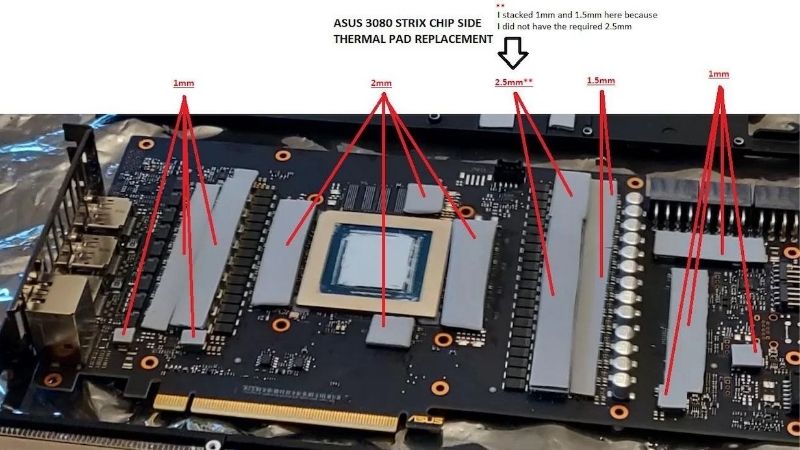
Thickness, measured in millimeters, is the spec that ruins jobs when ignored. Cards mix 1.0 mm, 1.5 mm, 2.0 mm, and sometimes 3.0 mm pads across VRAM and VRM zones. A pad too thin leaves an air gap with no cooling; one too thick prevents the cold plate from seating on the die. Measuring the originals before ordering is the step that prevents most failed repads.
The practical upshot is that a high conductivity rating means nothing if the dimension is wrong. Reviewers consistently rate accuracy of thickness above headline W/mK when scoring a kit.
| Kit Type | Conductivity | Thicknesses Included | Best For |
|---|---|---|---|
| Premium single-thickness | 12–15 W/mK | One size per sheet | Max cooling on a known card |
| Multi-thickness kit | 8–12 W/mK | 1.0 / 1.5 / 2.0 / 3.0 mm | First repad or unknown sizes |
| Budget single-thickness | 6–8 W/mK | One size per sheet | Tight budget, modest gain |
It also helps to know how an error behaves. A pad 0.5 mm too thin can leave a chip effectively uncooled, while one 0.5 mm too thick can stop the cold plate touching the die at all, raising core temperatures even as memory improves. That asymmetry is why a set of cheap digital calipers, accurate to a tenth of a millimeter, pays for itself on the very first repad and removes the guesswork that wrecks otherwise careful jobs.
Pump-Out Resistance and Longevity
Pump-out is the slow process where heat cycles squeeze material out of the contact area over months. A pad that tests well on day one but degrades fast is a poor value, because repadding means opening the card again. The best kits hold their performance through a year or more of heavy gaming.
Four- and five-star reviews of the top kits repeatedly mention stable temperatures many months after installation, which is exactly the durability you want. Lower-star reviews, by contrast, often describe a pad that crumbled during handling or felt too soft to seat cleanly, both signs of weaker longevity.
Who Needs a Repad and Who Does Not
The clearest candidates are high-power Nvidia cards with GDDR6X memory, where junction temperatures can pin near throttle limits and the design runs hot by default. If your monitoring shows memory temperatures consistently in the 95–105°C range while the core looks fine, pads are the targeted fix.
If your card is newer, in warranty, and stable, a repad is unnecessary and risks your coverage. The realistic scenario for most readers is an out-of-warranty card three or more years old, where dried pads are quietly adding heat that fresh material removes.
Diagnosis is straightforward with free monitoring. Log memory junction temperature in HWiNFO or GPU-Z during a demanding game, not just at idle, and watch whether it climbs toward the throttle ceiling. Nvidia’s GDDR6X memory runs hot by design and is rated to tolerate it, so a high reading alone is not failure; the signal to repad is a junction figure pinned near its limit while the core sits comfortably, which points squarely at tired pads rather than the cooler.
Top GPU Thermal Pad Kits Reviewed
Here we synthesize how the leading kits actually perform based on the weight of owner feedback, focusing on results, handling, and value rather than spec sheets alone. The aim is to match a kit to your situation, whether you want maximum cooling, the easiest install, or the best price for a single job.
A useful way to read these reviews is by separating outcome from process. The best-performing kits and the easiest-to-handle kits are not always the same product, and a buyer chasing the lowest possible memory junction temperature should weight conductivity and longevity, while a first-timer doing a single card should weight thickness coverage and how forgiving the material is to cut and seat. Keeping that distinction in mind prevents overpaying for performance you will not use or under-buying on a demanding card.
Best Overall Performance Kits
Premium pads from established thermal brands earn the strongest reviews for raw cooling, with owners reporting the largest memory junction drops and excellent consistency over time. These are the kits enthusiasts reach for when chasing the lowest possible temperatures on a hot card.
The trade-off appears in the lower-star feedback: higher price per sheet and, occasionally, a firmer texture that is trickier to cut cleanly for first-timers. For a demanding card where every degree counts, reviewers generally agree the performance justifies the premium.
Best Value and Multi-Thickness Kits
Multi-thickness kits that include several sheets in one purchase win praise for flexibility and cost. Owners like that a single order covers an unknown mix of pad sizes, removing the risk of buying the wrong dimension and waiting on a second shipment. For a one-off repad, this is the pragmatic choice.
The recurring complaint in critical reviews is variability: some buyers report a sheet slightly off the labeled thickness, which matters on tight tolerances. Measuring the included pads with calipers before installing is the simple safeguard reviewers recommend.
Pros and Cons of a DIY Thermal Pad Replacement
On the plus side, a repad is cheap relative to a workshop fee, delivers a large and measurable temperature drop on the right card, restores fan headroom for quieter operation, and gives you full control over which thickness goes where. It is the highest thermal return per dollar available for an aging GPU.
On the downside, opening the cooler can void warranty, a wrong thickness or a slip can cause damage, and the job is fiddly the first time. There is also a paste cost, since you must refresh the die compound on the same teardown.
For an out-of-warranty card running hot, reviewers overwhelmingly find the trade worthwhile. For a covered, stable card, the cautious recommendation is to leave it sealed.
Buying Guide, 2026 Pricing, and FAQs
Choosing pads is about matching dimensions and durability to your card, then buying at a sensible moment. This section turns the review findings into clear selection criteria, places them in the current pricing climate, and answers the questions readers ask most before clicking buy.
How to Choose the Right Kit for Your Card
Start by identifying the exact pad thickness at each location, using a teardown guide or calipers on the originals. Then prioritize a kit that supplies those thicknesses with a conductivity in the 12–15 W/mK range and a reputation for pump-out resistance. A multi-thickness kit is the safe default when you are unsure.
Buy a fresh non-conductive paste at the same time, since the die seal must be broken to reach the pads. Matching the right materials up front means one teardown instead of two.
Quantity is the other quiet factor. A multi-thickness sheet gives you spare material to correct a misjudged location without a second order, and it leaves enough for the next refresh in a few years. Because the cheapest accessories are also the ones most exposed to small price creep, buying a slightly larger kit once is usually the more economical path than ordering the bare minimum twice.
Thermal Pad Prices and Supply in 2026
Pricing context is worth a moment before you order. Through late 2025 into 2026, PC component and accessory prices trended upward, and small thermal parts were caught in that drift rather than spared from it. For a low-cost item like pads, waiting is more likely to cost a little extra than to save you money.
The encouraging counterpoint is real but limited. The sharp increases at the end of 2025 have eased, and makers such as Framework noted a period of relative stability while still flagging that the market remains volatile. Prices have stopped climbing steeply, yet they have not actually come down.
Further out, fresh memory and component capacity is being built, including DDR5 from Chinese suppliers like CXMT and two Micron plants under construction in Idaho. Those facilities are not expected to run until 2027–2028, so meaningful relief is years off. For pads you need to fix a hot card now, buying today is the rational call.
Frequently Asked Questions
How much can a repad lower temperatures? On a hot GDDR6X card, a 10–20°C drop in memory junction temperature is common. Can I reuse old pads? No; once removed they lose contact integrity, so always fit fresh material.
Do I need paste as well as pads? Yes, because reaching the pads requires breaking the die seal, so a fresh non-conductive compound is part of every repad.
How long does a repad last? A quality, pump-out-resistant kit typically holds its performance for several years of regular use before temperatures start to creep again. Is liquid metal a better choice for pads? No; pads and paste serve different jobs, and liquid metal near dense GPU components carries a short-circuit risk that makes a quality non-conductive pad the right tool for memory and VRM contact.
If your memory junction temperature is pinned near its limit, the right pad kit is the cheapest fix with the biggest payoff. Identify your thicknesses, pick a high-conductivity kit, and pair it with quality paste.
See More:
- How to lower GPU temperature
- How to lower GPU hotspot temp
- How to increase GPU performance
- How to enable G-Sync
Conclusion
A GPU thermal pads replacement remains the best value cooling upgrade for an aging, hot-running card, capable of cutting memory junction temperatures by 10–20°C when you match the correct thickness with a high-conductivity, pump-out-resistant kit. Owner reviews reward accuracy and longevity over headline numbers, so measure first and buy a kit known for consistency. With prices flat rather than falling and real supply relief not due until 2027–2028, a small kit is a sensible purchase today. Choose a matched set of pads and paste through the links above and bring those temperatures back into the safe zone.
Top-Rated Picks


| Product | Brand | Rating | Reviews | Price |
|---|---|---|---|---|
| ARCTIC MX-4 (4 g) – Premium Performance Thermal Paste… | ARCTIC | ★ 4.8 | 104k | $4.99 |
| ARCTIC MX-4 (incl. Spatula, 4 g) – Premium Performanc… | ARCTIC | ★ 4.8 | 71.9k | $5.49 |
| Crucial 8GB DDR4 RAM 3200MHz (PC4-25600), Downclockab… | Crucial | ★ 4.8 | 62.8k | $74.99 |
| AMD Ryzen 5 5600X 6-core, 12-thread unlocked desktop … | — | ★ 4.8 | 30.2k | $177.60 |
| NVIDIA Shield Remote; Voice Search, Motion-Activated,… | — | ★ 4.7 | 10.6k | $25.99 |







Write Your Review
No reviews yet. Be the first to share your experience!