
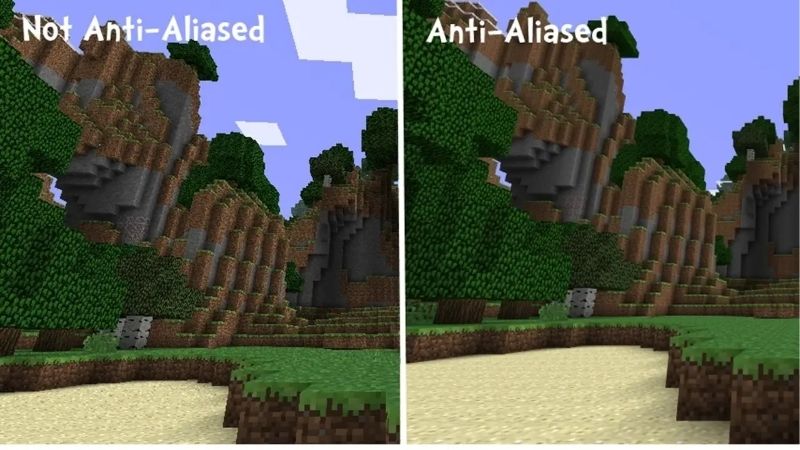
FSR vs DLSS is the upscaling showdown every gamer faces when chasing more frames without buying a new graphics card. Both technologies render a game at a lower resolution and reconstruct a sharper image to boost performance, but they take different paths: DLSS is Nvidia’s AI-powered, RTX-exclusive approach, while FSR is AMD’s open solution that runs on almost any card. The right choice depends heavily on which graphics card you own. This 2026 comparison breaks down the real differences in image quality, performance, and compatibility so you can pick the upscaler that gets the most from your hardware.
FSR vs DLSS: The Quick Verdict
If you only read one section, here it is. DLSS generally leads on image quality thanks to its AI approach but works only on Nvidia RTX cards, while FSR is more widely compatible and runs on nearly any graphics card, including older and non-Nvidia models. If you own an RTX card, DLSS is usually the better pick; if you do not, FSR is the clear choice. The fastest way to decide is to check what your card supports, and this is the natural spot to grab a card that unlocks the upscaler you want. The table below sums up the key differences before we dig into each one in detail.
| Factor | DLSS | FSR |
|---|---|---|
| Maker | Nvidia | AMD |
| Approach | AI-based reconstruction | Open, broadly compatible |
| Compatibility | Nvidia RTX cards only | Nearly any GPU, any brand |
| Image quality | Often the sharpest | Very good, closing the gap |
| Best for | RTX owners wanting top quality | Everyone else, broad support |
When DLSS Is the Better Choice
DLSS makes the most sense when you own an Nvidia RTX graphics card, since it is exclusive to that hardware. On those cards, its AI-based reconstruction typically delivers the sharpest, most detailed upscaled image available.
Because it runs on dedicated AI hardware within RTX cards, DLSS can rebuild fine detail with impressive accuracy, often producing an image very close to native resolution even at aggressive performance settings. This quality edge is its main draw.
For RTX owners who want the best possible balance of image quality and performance, DLSS is usually the natural first choice, taking full advantage of the hardware they have already paid for.
When FSR Makes More Sense
FSR is the smarter choice for the much larger group of gamers who do not own an RTX card. Because it is open and broadly compatible, it runs on AMD cards, Intel cards, and even many older Nvidia GPUs.
This universal compatibility means FSR is often the only upscaler available on a given card, and it still delivers a large, valuable performance boost. Its latest versions have also closed much of the image-quality gap with DLSS.
For anyone outside the RTX ecosystem, or anyone who wants an upscaler that works across a wide range of hardware, FSR is the practical and effective choice that brings the benefits of upscaling to almost everyone.
The Short Answer on Compatibility
The core distinction is straightforward. DLSS offers top-tier quality but only on Nvidia RTX cards, while FSR offers very good quality with near-universal compatibility across brands and generations of hardware.
So the right answer depends mostly on your graphics card rather than one being universally superior. Check what your card supports, and the choice usually makes itself based on the hardware sitting in your system.
It also helps to remember that this gap has narrowed considerably over time. What was once a clear quality win for DLSS is now a closer contest, especially with the latest machine-learning version of FSR, so for many players the practical difference comes down to which upscaler their card can actually run rather than a dramatic gulf in how the two look on screen.
FSR vs DLSS Deep Dive: Face-Off
Now we compare the two by the criteria that actually shape your experience rather than judging them in isolation. Across image quality, performance, and game support, both have strengths, though the gap between them has narrowed considerably in recent years.
Image Quality and Performance
In image quality, DLSS has traditionally held an edge thanks to its AI reconstruction, often producing cleaner detail and more stable images in motion. On RTX hardware, it frequently looks closest to native resolution.
FSR has improved dramatically, however, and its newest machine-learning version narrows the gap substantially on supported hardware. In many games, the difference between the two is now subtle rather than obvious.
On performance, both deliver large frame-rate boosts, with the exact gain depending on the quality mode and resolution. The performance uplift is broadly comparable, so image quality and compatibility tend to be the deciding factors rather than raw speed. In other words, neither upscaler will leave you wanting for frames, which is exactly why the conversation usually centers on how clean each one looks and which card can run it rather than on which is faster.
Compatibility and Game Support
Compatibility is where the two differ most sharply. DLSS is locked to Nvidia RTX cards, so a large share of gamers simply cannot use it, while FSR runs on almost any graphics card regardless of brand or age.
Game support is strong for both, as most major releases now include one or both technologies. FSR’s openness means it often appears in more titles and on more platforms, since developers can add it for nearly every player.
This broad reach is a major practical advantage for FSR, while DLSS’s narrower compatibility is the price of its tight integration with Nvidia’s hardware and the quality that integration enables.
Pros and Cons of Each
Here is the balanced view of both, based on how each performs in real games, so you can match them to your priorities.
DLSS pros: often the sharpest image quality, excellent motion stability, strong RTX integration. DLSS cons: works only on Nvidia RTX cards, leaving out many gamers.
FSR pros: runs on nearly any graphics card, very wide game support, rapidly improving quality. FSR cons: top image quality still slightly trails DLSS in some titles.
FSR vs DLSS: Making the Choice
Choosing between them comes down to your graphics card and what it supports, with a third option worth knowing about. A little thought about your hardware makes the decision clear and helps you get the most frames at the best quality.
The Alternative: XeSS and Trying Both
It is worth knowing that Intel’s XeSS is a third upscaler now offered in many games. It uses an AI approach like DLSS but works across brands like FSR, sitting between the two in both quality and compatibility.
Because many modern games include all three upscalers, you are often not limited to a single choice. Trying each one in a given game lets you see which looks and performs best on your particular hardware.
This flexibility means the FSR versus DLSS question is not always either-or, since you can test the available options and simply use whichever delivers the cleanest image and smoothest performance in each title you play. Rather than committing to one camp, the smart move is to treat each game on its own merits, switching between upscalers in the settings menu until you find the one that looks and runs best for that particular title on your card.
Matching to Your GPU and Needs
Start with your graphics card. If you own an Nvidia RTX card, DLSS is available and usually the best-quality option, while AMD, Intel, and older Nvidia cards rely on FSR or XeSS, where FSR is the most broadly supported.
Then consider your resolution and goals. At higher resolutions, the quality differences shrink, so compatibility matters most, while at aggressive performance settings the sharper upscaler can be more noticeable. Let your hardware lead the decision before fine-tuning to taste.
It is also worth thinking about the games you actually play, since support varies from title to title. If your favorite games happen to implement one upscaler particularly well, that can tip the balance, which is another reason to try the options available in your specific library rather than deciding purely on reputation before you have seen each one running on your own system.
Final Verdict and Recommendation
The recommendation is simple and hardware-driven. Choose DLSS if you own an Nvidia RTX card and want the best image quality, since it takes full advantage of your hardware to deliver top-tier upscaled visuals.
Choose FSR if you own any other card or want the most broadly compatible option, since it delivers a large performance boost with very good, steadily improving quality. To pick the right card for the upscaler you want, compare current options and their verified prices through the links on this page and match your hardware to your goals today.
Whichever you end up using, the bigger point is that upscaling has become one of the easiest ways to get more from a graphics card without spending a penny more. Turning on the right upscaler for your hardware can deliver a substantial frame-rate boost with little visible downside, which is why it has become a standard tool that the vast majority of gamers now rely on in their most demanding titles.
See More:
Final Thoughts on FSR vs DLSS
To close, the FSR vs DLSS verdict is that DLSS generally leads on image quality but only on Nvidia RTX cards, while FSR offers very good, rapidly improving quality with near-universal compatibility across brands and generations. Both deliver large performance boosts, so the deciding factor is usually your graphics card rather than one being outright better. Check what your hardware supports, try the options your games offer, and pick the upscaler that gives you the smoothest, best-looking result on the card you own.
Top-Rated Picks


Editor's Pick
GIGABYTE GeForce RTX 3060 Gaming OC 12G (REV2.0) Graphics Card, 3X WINDFORCE Fans, 12GB 192-bit GDDR6, GV-N3060 Video Card


| Product | Brand | Rating | Reviews | Price |
|---|---|---|---|---|
| MSI GeForce RTX 3060 Ventus 2X 12G OC, Gaming Graphic… | — | ★ 4.7 | 4.5k | $635.00 |
| GIGABYTE GeForce RTX 3060 Gaming OC 12G (REV2.0) Grap… | — | ★ 4.7 | 3.2k | $479.00 |
| EVGA GeForce GTX 1060 3GB GAMING, ACX 2.0 (Single Fan… | EVGA | ★ 4.6 | 3.4k | $247.79 |
| MSI Gaming GeForce GTX 1660 Super 192-bit HDMI/DP 6GB… | — | ★ 4.7 | 2.2k | $232.60 |
| MSI GeForce RTX 4060 Ti Ventus 3X 8G OC (8GB GDDR6/PC… | — | ★ 4.7 | 1.3k | $998.00 |
Frequently Asked Questions
Does FSR work on Nvidia cards and DLSS on AMD cards?
FSR is vendor agnostic in its older versions and runs on Nvidia, AMD and Intel GPUs, which is its biggest advantage. DLSS is locked to Nvidia RTX cards because it requires Tensor cores. FSR 4, the machine learning version, is restricted to RDNA 4 cards such as the Radeon RX 9070 series.
Which one gives better image quality?
DLSS 4 with the transformer model currently holds the edge, particularly for fine detail like foliage, wires, chain-link fences and ghosting behind moving objects. FSR 4 closed most of that gap and looks far cleaner than FSR 3.1, but older FSR 2 implementations still shimmer noticeably in motion at 1080p and lower internal resolutions.
Is one faster than the other at the same setting?
Performance uplift is broadly similar because both render at the same internal resolution for a given quality preset. Quality mode renders at about 67 percent, Balanced at 59 percent and Performance at 50 percent of the output width. Differences in final frame rate come from the GPU itself rather than the upscaler overhead, which is small.
Does game support differ between the two?
DLSS appears in more titles overall, but FSR support has grown fast and is also built into consoles and handhelds. Many games ship both. If a game only offers one, tools like the Nvidia App override and community DLL swaps can sometimes force a newer version of whichever upscaler is present.
Which card should I buy if upscaling matters most?
If you plan to run ray tracing or path tracing at 1440p or 4K, an Nvidia RTX card with DLSS 4 gives the best combination of image quality and frame generation. If you want raw raster performance per dollar and mostly play at 1440p without heavy ray tracing, current Radeon cards are strong value.






Write Your Review
No reviews yet. Be the first to share your experience!