
- Top Pick: ASUS ROG Strix GeForce RTX 4090 OC Edition Gaming Graphics Card (PCIe 4.0, 24GB GDDR6X, HDMI 2.1a, DisplayPort 1.4a), 3 Year Warranty
- Best Value: ASUS ROG Strix GeForce RTX™ 4090 BTF OC Edition Gaming Graphics Card (PCIe 4.0, 24GB GDDR6X, Exclusive to BTF ATX Motherboards (Renewed)
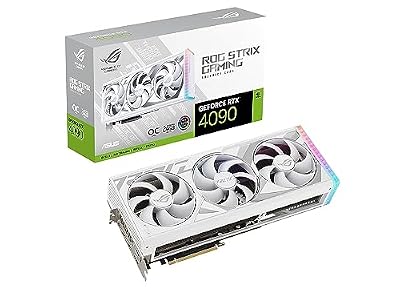
- Premium Choice: ASUS ROG Strix GeForce RTX 4090 White OC Edition Gaming Graphics Card (PCIe 4.0, 24GB GDDR6X, HDMI 2.1a, DisplayPort 1.4a), 3 Year Warranty
Asus ROG Strix RTX 4090 sits near the top of the 4090 stack, and if you have already decided on a 4090 you only need to know one thing fast: is the Strix premium worth it over cheaper partner cards? You want an objective verdict, the exact specs, and a clear answer on whether it fits your case and power supply, not a sponsored-feeling unboxing. This review pulls together the numbers, real buyer reports, and the practical fit details so you can buy with confidence.
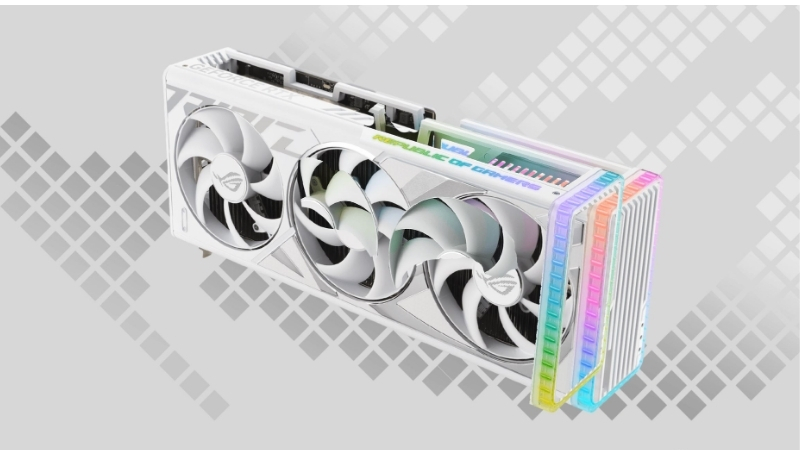
Is the Asus ROG Strix RTX 4090 Worth the Premium?
Short answer: yes, if you want the best cooling and quietest operation on a 4090 and have the case clearance for it; no, if you only care about raw frames, since cheaper 4090s deliver near-identical performance. The Strix is a premium-tier card, so the question is never about whether it performs, it is about whether its cooler, build, and acoustics justify the extra cost over a baseline 4090. For buyers who value a quiet, cool flagship and have the space, the answer is usually yes. The thing to keep front of mind is that you are evaluating a trim level, not a performance class, since every 4090 shares the same core silicon. That reframes the whole decision around cooling, acoustics, build, and fit rather than frames per second.
As an Amazon Associate we earn from qualifying purchases at no extra cost to you.


Who This Card Is For
The Strix RTX 4090 targets buyers who have already committed to a 4090 and want the most refined version rather than the cheapest. These are people building a no-compromise 4K system who care about temperatures and noise as much as frame rates.
It is not the card for budget-focused shoppers. If your only goal is maximum frames per dollar, a baseline or mid-tier 4090 reaches the same performance ceiling for less money.
So the Strix makes sense when the premium buys you something you will actually notice every day: a cooler, quieter card with a heavier, more durable build that suits a high-end, often visible build. If you keep your tower under a desk and never hear it, much of that premium is wasted on you. If your machine sits in view and you run long, demanding sessions, those refinements earn their cost.
Specs and Size at a Glance
Because case and power-supply fit decide whether this card is even an option, here are the key specs and physical figures in one place. Treat the dimensions as approximate and confirm the exact numbers for your specific revision before buying.
| Spec | Asus ROG Strix RTX 4090 |
|---|---|
| VRAM | 24 GB GDDR6X |
| Board power | Around 450W (higher in OC mode) |
| Recommended PSU | 850W or higher |
| Power connector | 16-pin (12VHPWR) |
| Length | Approximately 358 mm |
| Thickness | Around 3.5 slots |
The headline takeaway is size. This is one of the largest 4090 designs, so length and slot thickness, not performance, are the factors most likely to rule it out for a given build. Measure your case before anything else. The 16-pin power connector is also worth noting, since you will need a compatible PSU cable or the included adapter, and a clean cable run with no tight bends. Sorting these physical details first saves you from a card that performs perfectly but will not actually go in your system.
Real Performance Expectations
In raw terms, the Strix performs like any other well-cooled 4090, delivering top-tier 4K gaming and strong creator workload throughput thanks to its 24 GB of memory.
The factory overclock and superior cooler can yield marginally higher sustained clocks under load, but the real-world frame-rate gap over a baseline 4090 is small and rarely noticeable in actual gameplay.
Where the card genuinely shines is consistency. Its cooling headroom helps it hold boost clocks steadily during long sessions, which is a subtler benefit than a big benchmark number but one that matters for sustained workloads. For creators rendering for hours or gamers in marathon sessions, a card that never thermal-throttles delivers more usable performance than a card with a flashier peak that sags under heat. That steadiness is the quiet, practical case for premium cooling.
Living With the Asus ROG Strix RTX 4090
Day-to-day ownership of a flagship card is shaped less by peak benchmarks and more by heat, noise, and whether it physically fits your system. The Strix is built to excel on the first two, but its size makes the third a real consideration that deserves careful attention before you buy.
Cooling and Noise
Cooling is the Strix’s headline strength. Its oversized heatsink and fan array keep the GPU running noticeably cooler than smaller 4090 designs under sustained load.
That thermal headroom translates directly into quieter operation, since the fans spin slower to hit the same temperatures. For a card in a visible or quiet-focused build, this is a tangible daily benefit.
The trade is bulk. The same cooler that delivers low temperatures and low noise is what makes the card so large, which loops directly back to the fit question every buyer must answer. There is no way around this physics: the cooling you are paying for is the reason the card is hard to fit. Accepting that trade knowingly is far better than discovering it when the side panel will not close.
Will It Fit Your Case and PSU?
This is the single most important practical check, and the one videos rarely make easy to verify. At roughly 358 mm long and about 3.5 slots thick, the Strix demands a large case with generous clearance.
On power, plan for an 850W or higher supply with a proper 16-pin connector or the included adapter, and route the cable carefully without tight bends to avoid stress on the connector.
Before purchase, measure your case’s maximum GPU length and confirm slot clearance, and check your PSU wattage and connector. Getting these right in advance is what separates a smooth install from an expensive return. Spend five minutes with a tape measure and your PSU specs before you buy, and the install becomes a formality. Skip that step on a card this large and you risk a frustrating, costly reversal that could have been avoided entirely.
Pros and Cons of the Asus ROG Strix RTX 4090
Weigh the premium honestly with this breakdown tied directly to whether the Strix is worth choosing over a cheaper 4090.
- Pros: class-leading cooling, very quiet under load, a premium durable build, stable sustained clocks, and a strong factory overclock.
- Cons: a significant price premium over baseline 4090s, very large size that excludes many cases, and only a marginal real-world performance gain for the extra money.
The verdict is consistent: the Strix is worth it for cooling, quiet, and build quality, not for raw speed, so buy it for what it actually delivers over a cheaper 4090.
Should You Buy the Asus ROG Strix RTX 4090?
With performance and fit understood, the buying decision comes down to what real owners report, whether now is a sensible time to spend on a flagship, and the lingering questions buyers tend to have. This section closes those out so you can commit without second-guessing.
What Buyers Report
Owner feedback skews highly positive on the things that justify the premium. The strongest praise consistently centers on low temperatures, quiet fans, and a reassuringly solid build.
The recurring complaints in lower ratings are revealing and practical rather than about performance: the card’s sheer size causing case-fit problems, its weight requiring a support bracket, and the price being hard to justify for frame rates alone.
The pattern is clear. Buyers who wanted a cool, quiet, premium 4090 and had the space are happy, while the few regrets come from underestimating the size or overestimating the performance gain. In other words, almost every negative review is really a mismatch of expectations rather than a fault in the card. Set your expectations correctly and the Strix consistently delivers on what it actually promises.
Is Now the Right Time to Buy?
Timing matters on a purchase this expensive. The encouraging news is that prices have steadied in 2026 rather than climbing, with some makers reporting a relatively stable stretch, so you are not buying into a sharp upward spike.
At the same time, broader component prices have kept trending upward and supply remains tight, with meaningful memory relief not expected until new capacity arrives around 2027 to 2028, so waiting for a large 4090 price drop is unlikely to pay off soon.
The practical conclusion is to buy when you find the Strix at a fair price rather than holding out for a crash, since a current-gen flagship also keeps gaining value from ongoing Nvidia driver and DLSS improvements.
FAQ on the Asus ROG Strix RTX 4090
Fast answers to the questions that come up before committing to a premium 4090.
Is the Strix much faster than a cheaper 4090? No, the real-world frame-rate difference is small; you are paying for cooling, quiet, and build quality, not a meaningful speed jump.
Do I need a support bracket? It is strongly recommended given the card’s weight, and many owners use one to prevent sag over time, so factor that into your build.
See More:
- Are GPU prices dropping
- Refurbished GPU worth it
- Open box GPU risk
- GPU warranty transfer
- Microcenter GPU deals
Conclusion
The Asus ROG Strix RTX 4090 is a flagship done right, but only for the right buyer: it delivers the best cooling, the quietest operation, and a premium build, while offering only a marginal performance edge over cheaper 4090s. If you have the case clearance and the budget, and you value a cool, quiet, well-built card, the premium is justified. Measure your case and confirm your power supply first, then when you find it at a fair price, use the links in this guide to check the latest Amazon listing and buy with confidence.
Top-Rated Picks



| Product | Brand | Rating | Reviews | Price |
|---|---|---|---|---|
| ARCTIC MX-4 (4 g) – Premium Performance Thermal Paste… | ARCTIC | ★ 4.8 | 104k | $4.99 |
| ARCTIC MX-4 (incl. Spatula, 4 g) – Premium Performanc… | ARCTIC | ★ 4.8 | 71.9k | $5.49 |
| Crucial 8GB DDR4 RAM 3200MHz (PC4-25600), Downclockab… | Crucial | ★ 4.8 | 62.8k | $74.99 |
| AMD Ryzen 5 5600X 6-core, 12-thread unlocked desktop … | — | ★ 4.8 | 30.2k | $177.60 |
| NVIDIA Shield Remote; Voice Search, Motion-Activated,… | — | ★ 4.7 | 10.6k | $25.99 |
Frequently Asked Questions
Is the ROG Strix premium worth paying over a cheaper RTX 4090?
In gaming terms the difference is a few percent, since every 4090 hits its 450W power limit long before it runs out of cooling. The Strix premium buys a very large heatsink that stays quiet under sustained 4K load, a dual BIOS, stronger build quality and better sustained boost behaviour.
What power supply does the Strix RTX 4090 need?
An 850W supply is the minimum for a 450W card and 1000W is comfortable with a high-end CPU. Prefer an ATX 3.0 or 3.1 unit with a native 12VHPWR or 12V-2×6 cable over the bundled four-way 8-pin adapter, which adds bulk and strain inside a cramped chassis.
Will the Strix fit in my case?
It is one of the largest RTX 4090 designs at roughly 357mm long and about three and a half slots thick. That exceeds the clearance of many mid towers, particularly with a front radiator installed. Verify the number in your case specification, and use the support bracket to prevent slot sag.
Is a used RTX 4090 like this safe to buy?
It can be if you inspect the 12VHPWR connector for browning or melted plastic, ask about mining or continuous AI workload use, confirm the original invoice for warranty purposes, and run a sustained gaming plus memory stress test. Buy in person or through a platform with buyer protection rather than by direct transfer.
Does 24GB of VRAM still matter in 2026?
Not for games, where 16GB remains sufficient at 4K. It matters greatly for local AI models, high-resolution generative imaging and large 3D or video projects, and that non-gaming demand is a major reason RTX 4090 pricing has stayed firm well past its replacement by newer cards.











Write Your Review
No reviews yet. Be the first to share your experience!