
- Top Pick: GIGABYTE B550 Eagle WIFI6 AMD AM4 ATX Motherboard, Supports Ryzen 5000/4000/3000 Processors, DDR4, 10+3 Power Phase, 2X M.2, PCIe 4.0, USB-C, WIFI6, GbE LAN, PCIe EZ-Latch, EZ-Latch, RGB Fusion
- Best Value: Asus ROG Strix B550-F Gaming WiFi II AMD AM4 (3rd Gen Ryzen) ATX Gaming Motherboard (PCIe 4.0,WiFi 6E, 2.5Gb LAN, BIOS Flashback, HDMI 2.1, Addressable Gen 2 RGB Header and Aura Sync)
- Premium Choice: ASUS Prime B550M-A WiFi II AMD Micro ATX Motherboard with PCIe 4.0, WiFi 6, ECC Memory, HDMI 2.1, RGB Header
Who makes the best motherboard has no single answer, because ASUS, MSI, GIGABYTE and ASRock each own a different price band. This guide ranks the four major board partners on the things that actually matter after the build is finished: power delivery, BIOS behaviour, warranty terms and street availability.
As an Amazon Associate we earn from qualifying purchases at no extra cost to you. Product prices and availability are accurate as of the date shown and are subject to change.




As an Amazon Associate we earn from qualifying purchases at no extra cost to you. Product prices and availability are accurate as of the date shown and are subject to change.
By Ryan Cole
How to Judge Who Makes the Best Motherboard
Brand loyalty is the least useful way to settle who makes the best motherboard for your build. The four big partners draw on a small pool of contract manufacturers, so differences appear in firmware, component choice and support policy rather than in the PCB itself.
VRM Configuration, Not VRM Marketing
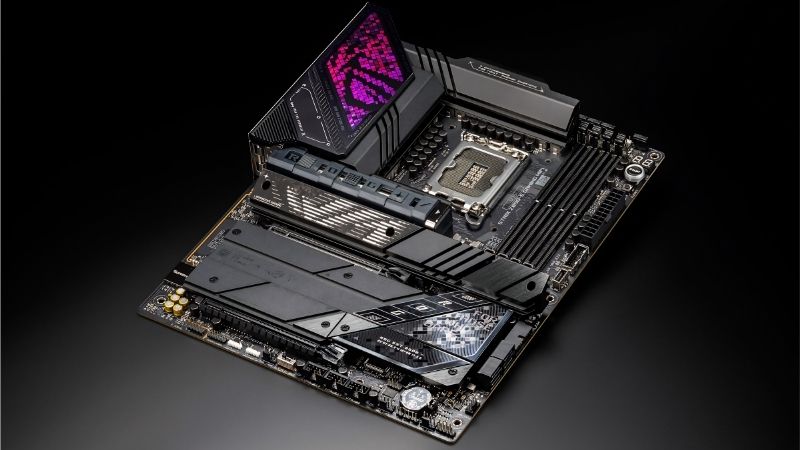
Board boxes advertise phase counts, but what matters is the current rating of each stage. A 14+2+2 arrangement using 80A smart power stages has more real headroom than an 18-phase design built from 50A parts, and holds boost longer under sustained load.
For a Ryzen 7 9800X3D or Core Ultra 7 265K, a 12+2+2 layout with 60A stages is adequate. Stepping up to 80A stages only pays off with a 16-core part, or a manual all-core overclock and a cooler that can absorb the heat.
BIOS Quality and Update Cadence
Firmware is where the question of who makes the best motherboard gets its clearest answer. MSI’s Click BIOS is the easiest to navigate for first-time builders, ASUS exposes the deepest memory tuning menus, and GIGABYTE ships the fastest AGESA updates after an AMD microcode release.
Check how long a vendor supported its previous-generation boards. A partner that abandoned B550 firmware two years after launch is telling you what happens to your B850 board in 2029, which matters more than a marginal VRM temperature difference.
Warranty Length and RMA Reality
GIGABYTE ships a five-year warranty on most AORUS models, while ASUS, MSI and ASRock sit at three years in the US. That gap is real money on a board you keep through two CPU upgrades on the same socket.
Length is only half the picture. Ask about advance replacement, who pays return shipping and how long turnaround runs. A three-year warranty with a two-week RMA beats a five-year one that leaves the machine dead for a month.
Rear I/O You Will Still Use in 2029
Networking ages worst. 2.5GbE is now the floor, 5GbE has moved into mid-range boards, and Wi-Fi 7 is standard above roughly $200. Paying for 10GbE only makes sense if you already run a NAS that can saturate it.
Count rear USB ports rather than trusting the header total. Two USB4 or Thunderbolt 4 ports at 40Gbps cover external NVMe enclosures and docks for years, and are more useful day to day than a fifth M.2 slot you will never fill.
What the 2026 Market Means for Motherboard Buyers
Board pricing has moved in ways that change who makes the best motherboard for the money this year. Three developments matter right now, and they push in one direction: buy the platform with the longer runway, and do not wait for a discount that is not coming.
AM5 Has a Guaranteed Runway to 2029
AMD confirmed at Computex 2026 that socket AM5 will keep receiving new CPUs through the end of 2029. Intel’s Nova Lake requires a new LGA 1954 socket, which means a Z890 board bought today is the end of its own upgrade path rather than the start of one.
That does not make Intel a bad buy for a machine you will not touch for five years. It does mean the drop-in upgrade argument belongs entirely to AMD, which is the strongest reason to pick an AM5 board from any of the four brands.
The Budget Tier Is Quietly Disappearing
Motherboard unit sales have fallen more than 25 percent, and every partner has shifted SKUs toward the mid and upper tiers. Promotional pricing ended in February 2026, so the sub-$120 board with decent VRM cooling is now rare rather than merely cheap.
Practically, that means the value pick in each brand’s lineup has crept up roughly one tier. What used to be a $130 recommendation is now a $160 one, and boards below that increasingly cut networking, M.2 heatsinks or rear USB to hit the price.
Memory Costs Are Bleeding Into Build Budgets
TrendForce raised its DRAM forecast again for the second half of 2026, and new fab capacity is not due before late 2027. Waiting for Black Friday will not help, because November stock uses memory bought at this year’s elevated contract rates.
The practical response is to spend less on the board and more on the memory kit. A $170 board with an 80A VRM will not bottleneck a mainstream CPU, and the saving covers most of the DDR5 increase you are absorbing anyway.
Top Picks: The Best Board From Each Major Brand
Each pick below shows who makes the best motherboard within a given bracket, chosen for what that brand does better than its rivals rather than for price. Treat the tier labels as the guide and verify current pricing and stock before ordering.
| Board | Brand | Socket | Power Stages | Networking | Tier |
|---|---|---|---|---|---|
| MAG B850 Tomahawk MAX WiFi | MSI | AM5 | 14+2+1, 80A | 5GbE + Wi-Fi 7 | Mid-range |
| B850 AORUS Elite WIFI7 | GIGABYTE | AM5 | 14+2+2 | 2.5GbE + Wi-Fi 7 | Mid-range |
| ROG Strix Z890-E Gaming WiFi | ASUS | LGA 1851 | 18+2+1+2 | Wi-Fi 7 + USB4 | High-end |
| X870E Taichi | ASRock | AM5 | 20+2+2 | Dual USB4 | High-end |
| TUF Gaming B850-Plus WiFi | ASUS | AM5 | 14+2+1 | 2.5GbE + Wi-Fi 7 | Mainstream |
| B650M Gaming Plus WiFi | GIGABYTE | AM5 | 8+2+1 | 2.5GbE + Wi-Fi 6E | Budget |
MSI – MAG B850 Tomahawk MAX WiFi
MSI’s strongest argument is that the Tomahawk line consistently lands the most complete feature set at its price. The B850 version pairs a 14+2+1 VRM using 80A stages with 5GbE networking, Wi-Fi 7 and two PCIe 5.0 M.2 slots, and it ships X3D-ready without a BIOS flash.
The trade-off is a three-year warranty against GIGABYTE’s five, and MSI’s rear I/O skips USB4 entirely at this tier. If you own a Thunderbolt dock, that omission will bother you. For everyone pairing a 9700X or 9800X3D with a single GPU, it is the most sensible AM5 board on sale.
GIGABYTE – B850 AORUS Elite WIFI7
GIGABYTE wins on warranty and firmware turnaround. The AORUS Elite runs a 14+2+2 arrangement, three M.2 slots and Wi-Fi 7, and the five-year coverage is genuinely useful on a socket that will still be receiving new CPUs in 2029.
Its weak point is software. Gigabyte Control Center remains clumsy, and several AORUS boards use Marvell network controllers that have needed driver attention. Install the chipset package, skip the rest, and the board is hard to fault at the price.
ASUS – ROG Strix Z890-E Gaming WiFi
On the Intel side ASUS builds the most complete board short of a flagship. The Strix Z890-E carries an 18+2+1+2 power stage design, up to seven M.2 slots, Wi-Fi 7 and dual USB4 ports, which makes it the obvious pick for a dense storage or hybrid creator build.
Two caveats apply. Much of the AI branding depends on Armoury Crate, which many builders refuse to install, and LGA 1851 has no future CPU path once Nova Lake moves to LGA 1954. Buy it as a five-year machine, not an upgrade platform.
ASRock – X870E Taichi
ASRock has spent several generations quietly over-engineering the Taichi, and the X870E version continues that. A 20+2+2 power stage layout, dual 40Gbps USB4 ports and full PCIe 5.0 provision give it more headroom than a Ryzen 9 can realistically consume.
The honest downside is that most builders never use what they pay for. Unless you run multiple Gen5 drives or a genuine dual-NIC workflow, an X870 Tomahawk delivers the same gaming result for less. ASRock’s RMA process is the least polished of the four.
ASUS – TUF Gaming B850-Plus WiFi
The TUF line is where ASUS stops charging an ROG premium. A 14+2+1 VRM, 2.5GbE, Wi-Fi 7 and a straightforward BIOS make it a dependable base for a mid-range AM5 build, and ASUS memory tuning menus are inherited intact from the more expensive boards.
Storage is where it economises, with fewer M.2 slots and thinner heatsinks than the Tomahawk. It also lacks a Q-code display, so a failed POST means reading LEDs rather than an error number. That annoys anyone who tinkers often.
GIGABYTE – B650M Gaming Plus WiFi
At roughly $109 this microATX board is the cheapest sensible entry to AM5. It provides PCIe 5.0 to the GPU slot, 2.5GbE, Wi-Fi 6E and enough VRM for a Ryzen 5 or Ryzen 7 part, which covers the great majority of 1080p and 1440p builds.
The compromises are visible: an 8+2+1 VRM that thermally limits a 16-core CPU, Wi-Fi 6E instead of 7, and two M.2 slots. Treat it as a platform ticket rather than a long-term host for a Ryzen 9 and it is the best value here.
Frequently Asked Questions
These are the questions that follow once builders start asking who makes the best motherboard rather than comparing individual models, and the answers are less complicated than forum threads suggest.
Do ASUS, MSI, GIGABYTE and ASRock make their own boards?
Partly. ASUS, GIGABYTE and MSI operate their own manufacturing capacity for higher-tier models, while entry-level SKUs across all four brands are frequently produced by contract manufacturers. The design, firmware and component selection remain the vendor’s own, which is where the meaningful differences live.
Does the motherboard brand affect gaming frame rates?
Not measurably at stock settings. Two boards with adequate power delivery and the same CPU will land within run-to-run variance of each other. Brand affects memory compatibility, boost stability under sustained load, and how long you keep receiving firmware, not raw frames per second.
Which brand has the best BIOS for a first build?
MSI, by a reasonable margin. Click BIOS presents EXPO or XMP, boot order and fan curves without burying them, and its EZ mode is genuinely usable. ASUS offers more depth once you are comfortable, and ASRock’s interface remains the least approachable of the four.
Is a five-year warranty worth paying extra for?
On AM5, yes. The socket is supported through 2029, so a board bought now can realistically host two more CPUs, and boards fail most often in years four and five as capacitors and VRM fans age. On a dead-end socket the longer warranty matters considerably less.
See More:
- Best budget AM5 CPU for gaming
- What is the best thermal paste pattern
- Best mini ITX computer case
- Best desktop RAM for gaming
Final Thoughts
The answer to who makes the best motherboard depends on where you are spending. MSI takes the mid-range on features per dollar, GIGABYTE takes value and warranty, ASUS takes the high-end on both platforms, and ASRock the over-built enthusiast slot. Pick the platform, then the tier, then the brand that leads it. Pricing reflects August 2026 and should be verified before purchase.







Write Your Review
No reviews yet. Be the first to share your experience!