
- Top Pick: GIGABYTE A620I AX (AM5/ LGA 1718/ AMD/ A620/ Mini-ITX/ 5-Year Warranty/ DDR5/ Single M.2/ PCIe 4.0/ USB 3.2 Gen1 Type-C/Realtek Wi-Fi 6E/ Realtek 2.5GbE/ Q-Flash Plus/PCIe EZ-Latch/Motherboard)
- Best Value: GIGABYTE X870I AORUS PRO ICE AMD AM5 LGA 1718 Motherboard, Mini-ITX, DDR5, 2X M.2, PCIe 5.0, USB-C, WIFI7, 2.5GbE LAN, EZ-Latch, 5-Year Warranty
- Premium Choice: ASUS TUF Gaming B850I WiFi NEO AM5 Mini ITX Motherboard, DDR5, DIMM Fit, WiFi 6E, 2.5Gb LAN, PCIe 5.0, 2X M.2, 2X USB-C, AI Cooling II, Pre-Mounted I/O Shield, SFF PC
Best AM5 ITX Motherboard decisions come down to what a manufacturer chose to leave out. Every mini-ITX board has two memory slots and one graphics slot, so the differences appear in power delivery, storage placement and how well the whole thing survives a hot, cramped case.
As an Amazon Associate we earn from qualifying purchases at no extra cost to you.


As an Amazon Associate we earn from qualifying purchases at no extra cost to you.
By Ryan Cole, hardware writer at NVIDIAReview.
How to Choose the Best AM5 ITX Motherboard
Mini-ITX compresses a full platform into 170 mm square, so every design involves trade-offs. The best am5 itx motherboard for your build is the one whose compromises land where you will not notice them. Four checks find it.
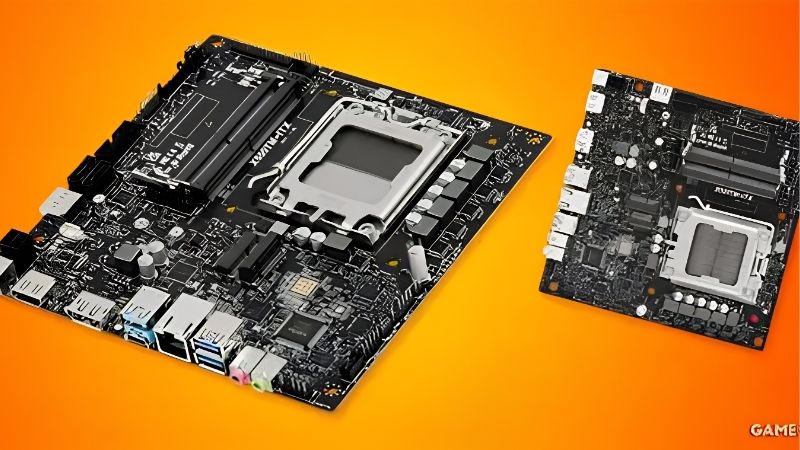
Two Memory Slots Change How You Buy Memory
With only two DIMM slots there is no adding modules later, so buy the capacity you want in one kit. Thirty-two gigabytes is the sensible target for a gaming build, with sixty-four for content work.
The upside is signal integrity. Two-slot boards typically support higher memory speeds more reliably than four-slot designs, which is useful on AM5 where memory speed affects performance more than on previous platforms.
Module height is worth checking too. Low-profile kits clear low-profile coolers and radiator brackets in tight cases, while tall heat spreaders can block a cooler the board specification says will fit.
Memory pricing has climbed steadily through 2026, so buying the right capacity once is both the technical and the financial answer. Planning to expand later is not an option this format offers.
M.2 Placement Matters More Than Slot Count
Most of these boards carry two M.2 slots, often with one mounted on the underside of the board. That rear position sits against the case tray with little airflow, so a Gen5 drive there will run hot.
Check which slot is Gen5 and whether it has a proper heatsink. In a small case, thermal throttling on a fast drive is far more likely than in a tower, and heatsink coverage varies enormously between models.
Drive choice can solve the problem instead. A high-performing Gen4 drive runs considerably cooler than a Gen5 one and, in a compact machine, will hold its speed for longer under sustained writes.
Power Delivery and VRM Cooling in a Small Case
Compressed layouts leave little room for VRM heatsinks, and small cases provide less air to cool them. A board that handles a Ryzen 9 comfortably on an open bench can behave differently inside eleven litres.
Match the board tier to the chip. For a six or eight-core processor almost any current ITX board is sufficient; for a twelve or sixteen-core part, choose one with visibly larger heatsinks and check reviews measuring VRM temperatures.
Undervolting helps here more than anywhere else. Reducing voltage lowers heat at the same clocks, which eases both processor and VRM temperatures in a case that has no spare air to give either of them.
Rear I/O, Front Headers and Case Compatibility
Rear connectivity is where ITX boards differ most, since there is no room for expansion cards. Count the USB ports you need, check for USB-C, and confirm the networking standard rather than assuming.
Front panel headers are equally important. Many small cases include a front USB-C port, and a board without the matching internal header leaves it permanently unused.
Antenna placement is a smaller detail that becomes annoying later. Some boards use fixed connectors that sit awkwardly against a case panel, while others ship a magnetic base you can position away from metal.
Top Picks for the Best AM5 ITX Motherboard in 2026
Contenders for the best am5 itx motherboard span budget to premium across the current chipsets. Specifications are manufacturer-listed and vary by revision, and retail pricing at the time of writing in August 2026 changes weekly.
| Board | Chipset | M.2 slots | Networking | Notes |
|---|---|---|---|---|
| ASUS ROG Strix B650E-I Gaming WiFi | B650E | Two, one on a daughterboard | 2.5G, Wi-Fi 6E | Gen5 graphics and storage |
| ASUS ROG Strix X870-I Gaming WiFi | X870 | Two | 2.5G, Wi-Fi 7 | USB4 support |
| Gigabyte B650I AORUS Ultra | B650 | Two | 2.5G, Wi-Fi 6E | Generous VRM heatsinks |
| MSI MPG B650I Edge WiFi | B650 | Two | 2.5G, Wi-Fi 6E | Clean layout, easy build |
| ASRock B650E PG-ITX WiFi | B650E | Two | 2.5G, Wi-Fi 6E | Compact component placement |
| ASRock B850I Lightning WiFi | B850 | Two | 2.5G, Wi-Fi 7 | Newer chipset, value pricing |
ASUS ROG Strix B650E-I Gaming WiFi
This has been the default premium ITX recommendation since the platform launched, offering a Gen5 graphics slot, Gen5 storage and a second M.2 on a small daughterboard that keeps the drive away from the graphics card.
It is expensive, and the daughterboard adds a step to the build that can complicate cable routing in the tightest cases. Rear USB count is good rather than generous.
ASUS ROG Strix X870-I Gaming WiFi
The X870 version adds USB4 and current wireless, which matters if you connect external storage or a docking setup to a compact machine that has no expansion slots to spare.
It carries the highest price here by some margin, and much of what it adds is irrelevant to a pure gaming build. Buy it for the connectivity, not for performance.
Gigabyte B650I AORUS Ultra
Gigabyte puts more heatsink mass on this board than most rivals manage in the format, which is exactly what a small case needs. Power delivery handles high core counts without the temperatures climbing sharply.
The firmware interface takes longer to learn than its competitors, and the rear panel layout groups ports tightly. Neither affects how the board runs once the machine is built.
MSI MPG B650I Edge WiFi
The Edge is the easiest board here to build with, thanks to sensible connector placement and clear labelling that matters when you are working in a case with almost no clearance.
Power delivery is adequate rather than exceptional, so it suits an eight-core chip better than a sixteen-core one. Storage heatsink coverage is modest compared with the ASUS and Gigabyte options.
ASRock B650E PG-ITX WiFi
ASRock packs a Gen5 graphics slot and dense component placement into a board that costs less than the premium options, making it the value route into a capable small form factor build.
The tight layout makes some connectors awkward to reach once a cooler is installed, and firmware polish varies. Check the current revision and its update history before ordering.
ASRock B850I Lightning WiFi
The newer chipset brings current wireless and a refreshed feature set at pricing below the ROG boards, which makes it the sensible middle choice for a build that does not need USB4.
Availability has been uneven in some regions, and the rear M.2 position runs warm in a compact chassis. Power delivery is sufficient for mainstream chips rather than built for a sixteen-core part.
What 2026 Conditions Mean for ITX Builders
Small form factor buyers feel platform and memory pricing more sharply than tower builders, which changes when to buy the best am5 itx motherboard for a project. Three points matter.
AM5 Runs Through 2029
AMD confirmed at Computex 2026 that AM5 will keep receiving new processors through the end of 2029, while Intel’s next generation requires a socket change. In a format where the board is the hardest part to replace, that matters.
It also means a modest processor now can be upgraded later without rebuilding the whole machine, which is a genuine advantage when disassembling a small case is a job in itself.
Memory Capacity Should Be Decided Now
DRAM pricing has continued climbing through 2026, with new production capacity not expected before late 2027. With only two slots, an ITX build has no route to add modules cheaply later.
Buy the capacity you expect to need for the life of the machine in a single kit. Thirty-two gigabytes is the practical minimum for a build you intend to keep for several years.
The Cheap End of the Board Market Is Thinning
Motherboard sales have fallen more than twenty five percent, manufacturers have concentrated on mid and upper tiers, and promotional pricing ended in early 2026. ITX boards were never cheap and have been affected too.
Since the range is small to begin with, popular models sell out and the alternatives at the same price are limited. Buying when stock is available matters more in this format than in any other.
Frequently Asked Questions
These come up most often once someone has shortlisted the best am5 itx motherboard options and starts planning the case around it.
Do ITX boards handle a Ryzen 9 properly?
The better ones do, but VRM temperatures rise faster in a small case. For a twelve or sixteen-core chip, choose a board with substantial heatsinks and make sure the case moves air past them.
Is two memory slots a real limitation?
Only for capacity. Two slots often support higher speeds more reliably, so the trade is that you must buy the full capacity you need in one kit rather than expanding later.
Will a three-slot graphics card fit?
That depends on the case, not the board. Every mini-ITX board has a single graphics slot, so check the chassis specification for card thickness and length before choosing either.
Is a higher chipset worth it on ITX?
Only if you need USB4, faster wireless or a Gen5 graphics slot. For a gaming build with one graphics card and two drives, the mid-tier chipsets provide everything you will use.
See More:
- What Is the Best Thermal Paste
- Best PC Case Fans 120mm
- Thermal Paste Best Brand
- Best Thermal Paste Brands
- Best CPU Cooler Reddit
Final Thoughts
The best am5 itx motherboard for most small builds is a mid-tier board with strong VRM heatsinks, a properly cooled front-side M.2 slot and the front panel headers your case actually has. Buy your full memory capacity in one kit, match the board tier to your processor rather than to the chipset name, and check case clearance before ordering anything.











Write Your Review
No reviews yet. Be the first to share your experience!